Course Overview and Introduction to Java
Understand the structure of this course and what will be expected of you every week (15 minutes)
-
Introduce self, TAs (2-3 minutes)
-
A brief overview of software engineering (5 minutes)
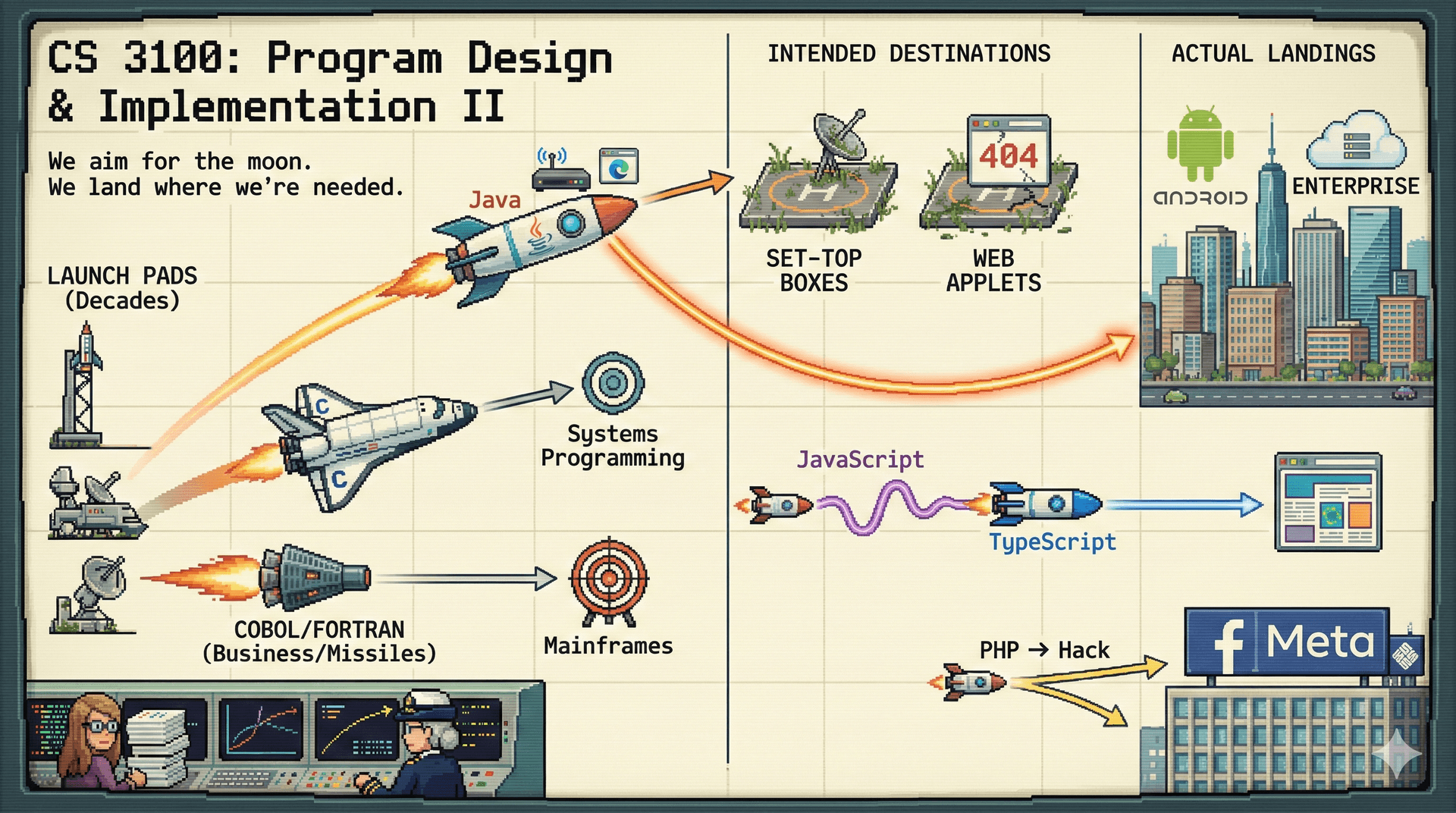
- SE goes back to the 1950s and 1960s: missiles, rockets, business machines
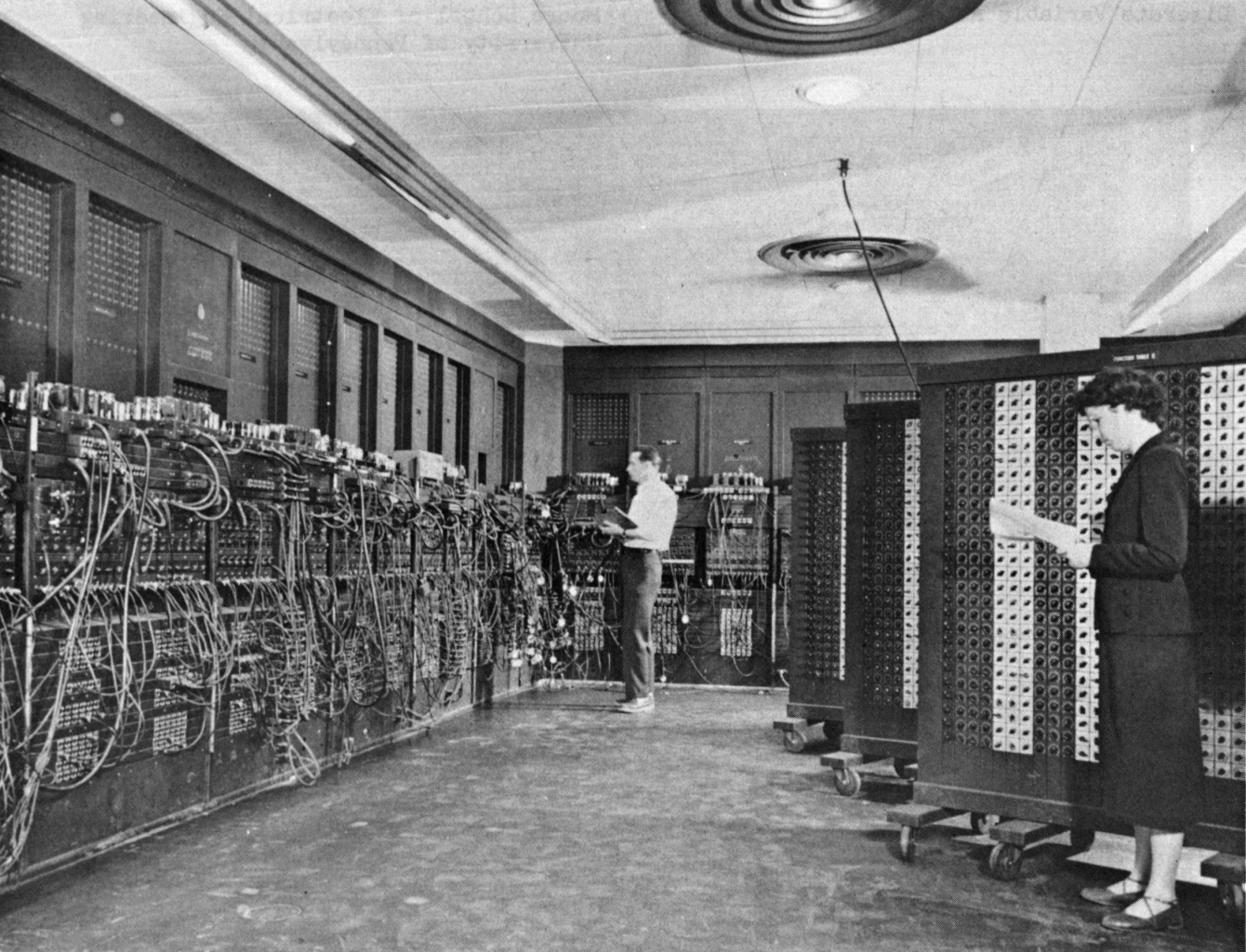 Source: Glen Beck and Betty Snyder program the ENIAC (Public Domain)
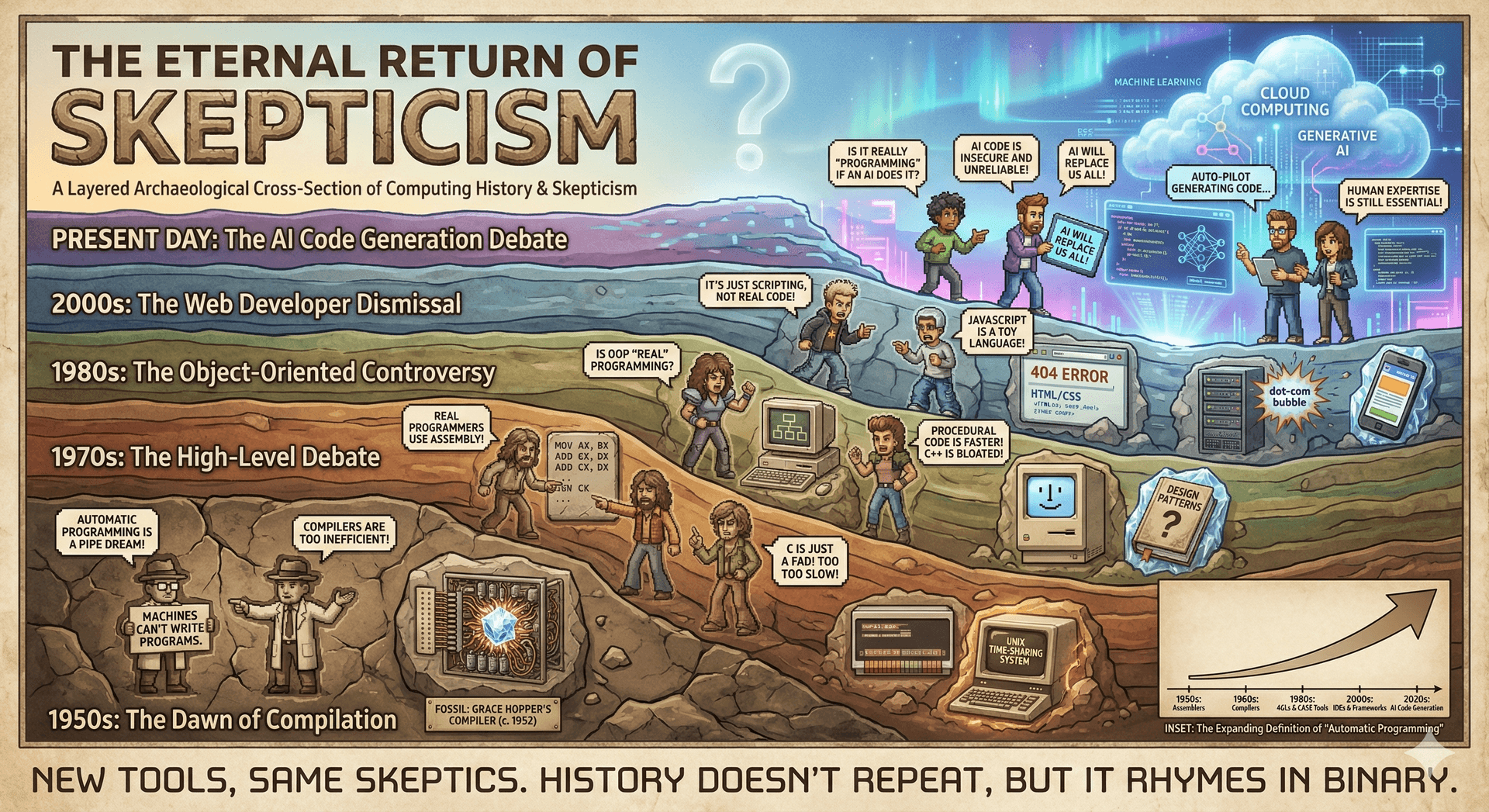
- In 1952, Grace Hopper developed the first compiler (A-0), introducing "automatic programming"—the radical idea that machines could translate human-readable code into machine code.
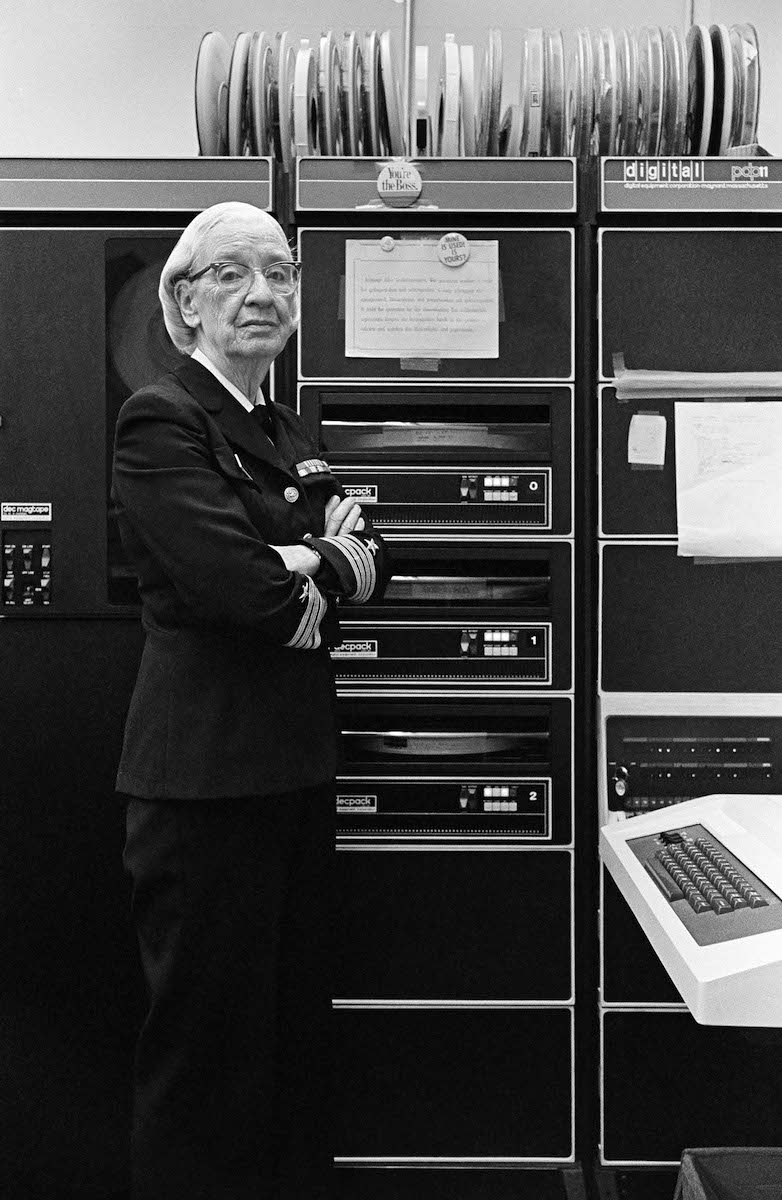 Photo: Lynn Gilbert, CC BY-SA 4.0
- Every generation redefines what "automatic programming" means, and faces skepticism each time:
- Margaret Hamilton led the Apollo flight control software team and is popularly attributed with popularizing the term "software engineering."
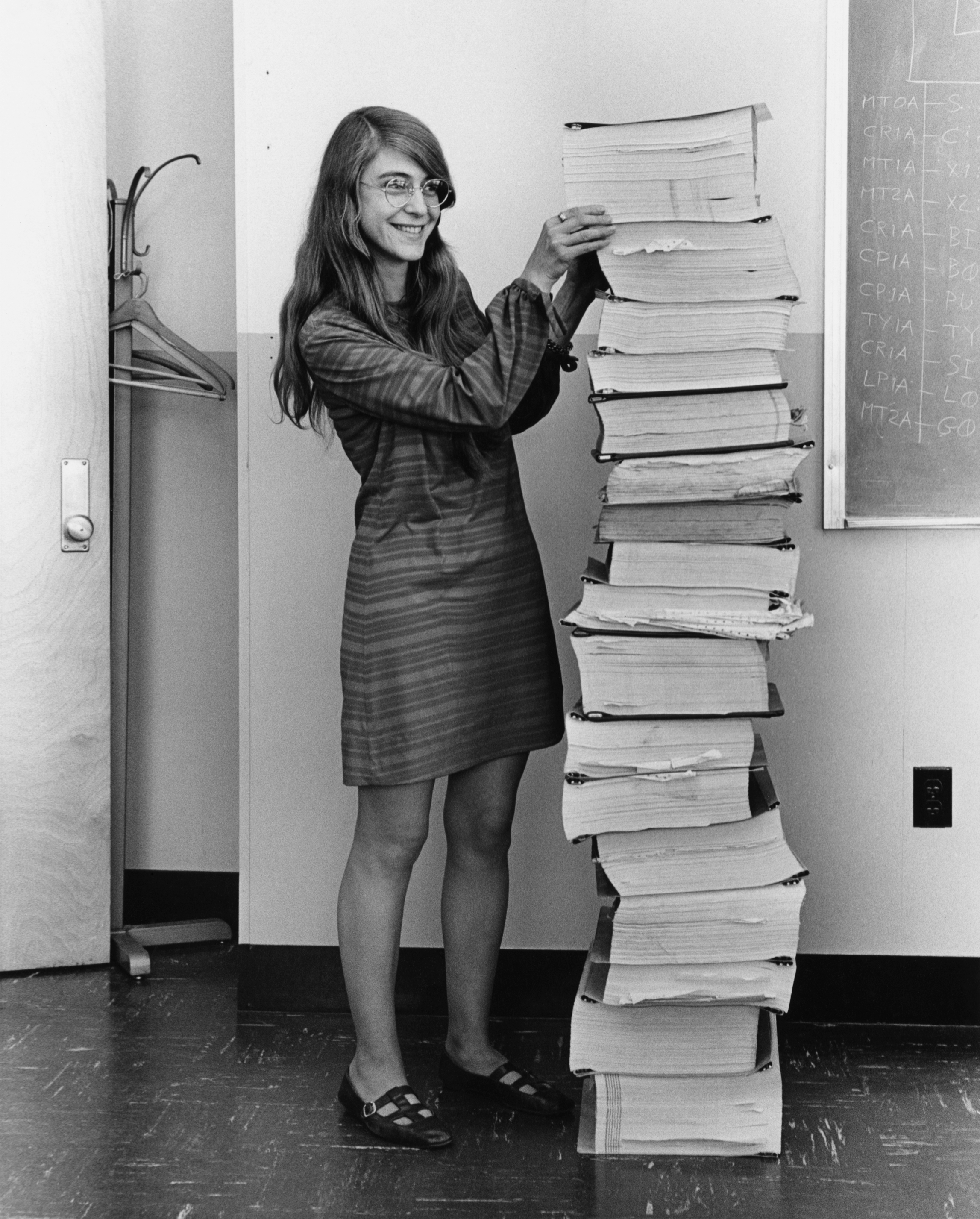 Margaret Hamilton with Apollo guidance software printouts (Public Domain)
- Key pioneers: Margaret Hamilton, Grace Hopper, Betty Holberton, and others
- SE is the integral of programming over time (Titus Winters essay)
- This principle will recur throughout the course. It explains why we care about changeability, readability, and testing. It also explains why we'll consider questions that might seem "non-technical": Who uses our software? Who maintains it? What assumptions do we bake in? These become engineering concerns because their costs compound over time.
- Most of the cost of software is in maintenance, not initial development. This is why sustainability—the ability of software to continue providing value over time—will be a recurring theme. We'll consider four dimensions: technical (can we maintain it?), economic (can we afford it?), social (does it serve people well?), and environmental (what resources does it consume?). These aren't separate from "real" engineering—they are engineering concerns when you think over time.
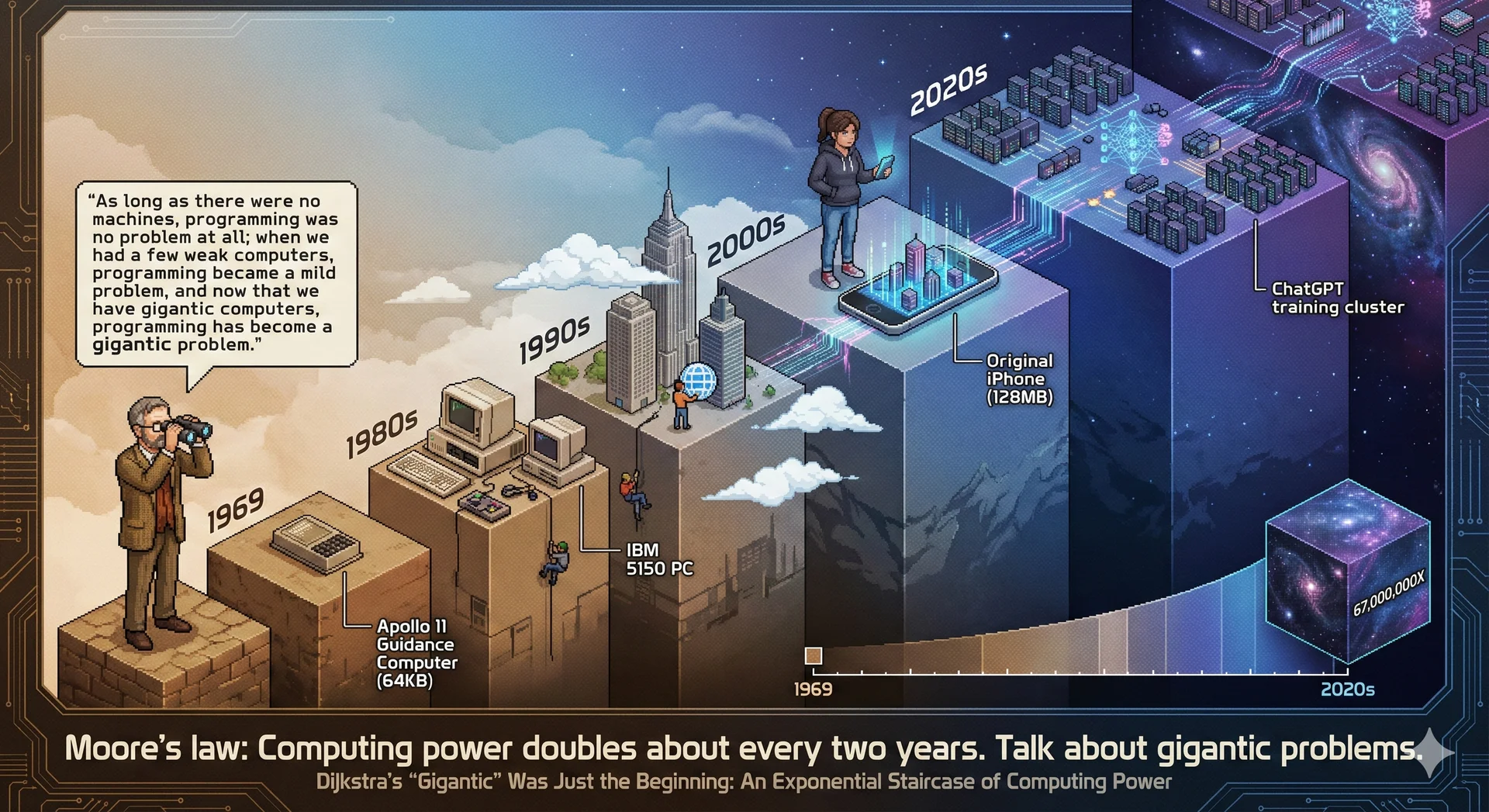
- Dijkstra observed that the "software crisis" didn't end—our ambitions simply grew with our capabilities:
 Photo: Hamilton Richards, CC BY-SA 3.0
"The major cause of the software crisis is that the machines have become several orders of magnitude more powerful! To put it quite bluntly: as long as there were no machines, programming was no problem at all; when we had a few weak computers, programming became a mild problem, and now we have gigantic computers, programming has become an equally gigantic problem." — Dijkstra's 1972 Turing Award lecture
- Computing power has grown ~67 million times since 1972, and software complexity has scaled correspondingly:
-
This course expands on principles of program design and implementation, looking at larger scale systems
-
This course is a principles-based course, not a syntax-based course: we will look at the big picture and why things are the way they are, rather than just the syntax of the language
- We will provide you with flashcards and other resources to help you learn the syntax. We expect you to use them, and will move quickly past the syntax in lecture.
-
Our perspective on AI: AI is a noisy amplifier—it can accelerate your work if you have expertise, but produces plausible-looking nonsense you can't evaluate if you lack expertise.
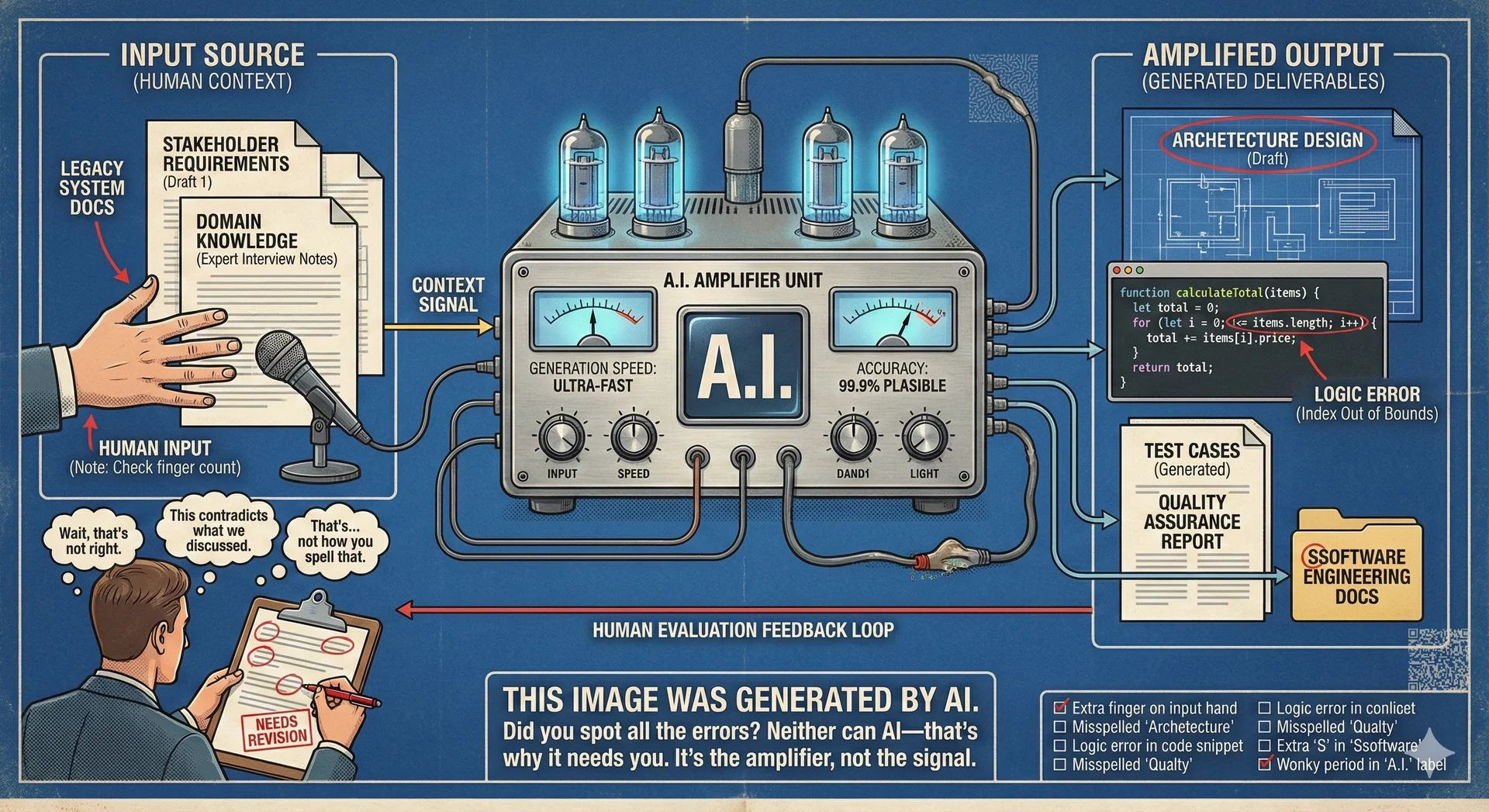
- The hardest parts of software engineering aren't typing code—they're understanding requirements, making tradeoffs, reviewing work, and coordinating with humans.
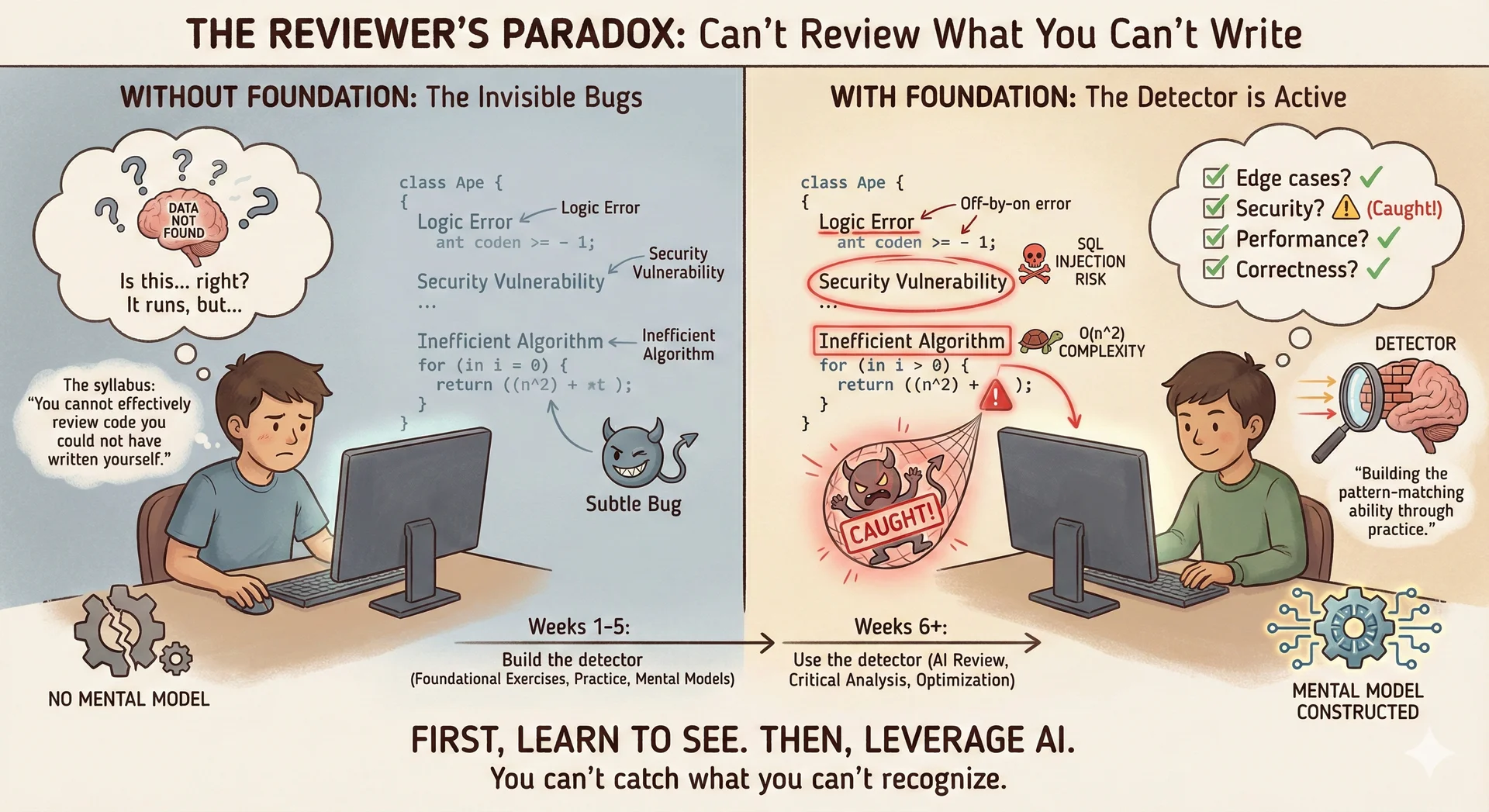
- AI coding assistance is not permitted in weeks 1-5 because you can't effectively review code you couldn't have written yourself:
-
Beyond technical skills
- This course is required for all CS majors—not just those heading into software engineering. Whether you pursue industry, research, ML, data science, or graduate school, you will collaborate with others on technical work.
- The CS field changes constantly. The specific languages and tools we teach will evolve, but your ability to learn new things quickly is a career-long asset. We'll practice this throughout the semester.
- This course is also an opportunity to learn how you work best. What's your working style? How do you collaborate effectively? What are your strengths? These insights matter regardless of where CS takes you.
- Growth mindset: This course will challenge you. Struggling doesn't mean you're failing—it means you're learning. The goal isn't to be perfect from day one; it's to be better at the end than at the beginning. When something is hard, that's the learning happening. We are here to support you in your learning - you should not be struggling alone! We will provide you with a lot of resources for self-study, plus labs, study sessions, office hours, a discussion board, and workshops.
-
Grade components (see Syllabus for full details):
- Individual assignments (30%): Five assignments (A1-A5) that build progressively into the CookYourBooks project. You'll implement features using the previous week's solution as a starting point.
- Group assignments (20%): Three team assignments (GA1-GA3) where you collaborate on larger features. Graded as a team, but individual contribution is tracked—you must demonstrate meaningful weekly participation.
- Exams (40%): Two midterms (20% total) and a cumulative final (20%). If your final exam score is higher than your midterm average, it replaces that average.
- Labs (5%): Weekly labs graded on good-faith effort. Attend, engage, submit something that shows you tried.
- Participation (5%): Each instructor has their own procedure, but all require some degree of in-class engagement.
- Grading philosophy: Your letter grade requires meeting minimum thresholds across categories—you can't compensate for weak exam performance with perfect homework, or vice versa. This ensures you develop competence across all aspects of the course. The exam threshold for a B is intentionally lower (55%) to accommodate students who struggle with timed assessments but demonstrate mastery through project work.
-
Expectations:
- Time commitment: 4 credit course: 200 minutes per-week of instruction plus 8-12 hours per-week of homework and self-study. Plus lab time (1 additional credit, no extra time required outside of lab time). Bi-weekly assignments expected to take 20 hours—do not wait until the last minute.
- Preparation: Read the lecture notes in advance of each lecture. Complete flash cards when assigned. Consider which optional readings are most relevant to your interests.
- Engagement: Come to class ready to participate. Ask questions when you're confused—your question probably helps others too. Contribute to discussions on the board; help classmates when you can.
- Ask for help early: If you're stuck for more than 30 minutes, reach out. Office hours, the discussion board, and your classmates are all resources. Don't bang your head against your desk trying to figure something out alone—learning how to get unstuck is one of the objectives of this course. If you spend hours struggling in isolation, you're missing the opportunity to learn the problem-solving process with guidance. Come to us with your confusion; working through it together is the learning.
- Professional conduct: Treat classmates, TAs, and instructors with respect. In group work, be someone your teammates can rely on. Give and receive feedback constructively.
-
What you can expect from us:
- We will respond to questions on the discussion board within 24 hours on weekdays (often faster).
- Office hours are for your benefit—come with questions, come to work through problems together, or just come to meet the staff. We want to help.
- We will provide clear rubrics and expectations for assignments. If something is unclear, ask—and we'll clarify for everyone. TAs are instructed to identify recurring questions and raise them to the instructional team to ensure that consistent clarifications are provided.
- We will give you feedback that helps you improve, not just grades. When we point out issues, we'll explain why and how to do better.
- We will be honest about what we don't know. The field is vast; no one knows everything. We'll model the learning process ourselves. We will adapt assessments and instruction based on feedback from students and TAs, discussed collaboratively among the instructional team.
- We will treat you as colleagues-in-training. We expect professional behavior, and we'll extend the same respect to you.
Review the Systematic Program Design and Implementation Process (10 minutes)
The goal of this class is to help you better understand how to design and implement programs. We provide an explicit, systematic process for doing so, inspired by classical software engineering practices. You should be familiar with this process from CS 2100, which focused on the requirements, design, and implementation steps for medium-scale programs. In this class, we will quickly expand the scale of our practice to large-scale programs. We will also begin to explore the validation and operations steps, which are covered in greater detail in CS 4530.
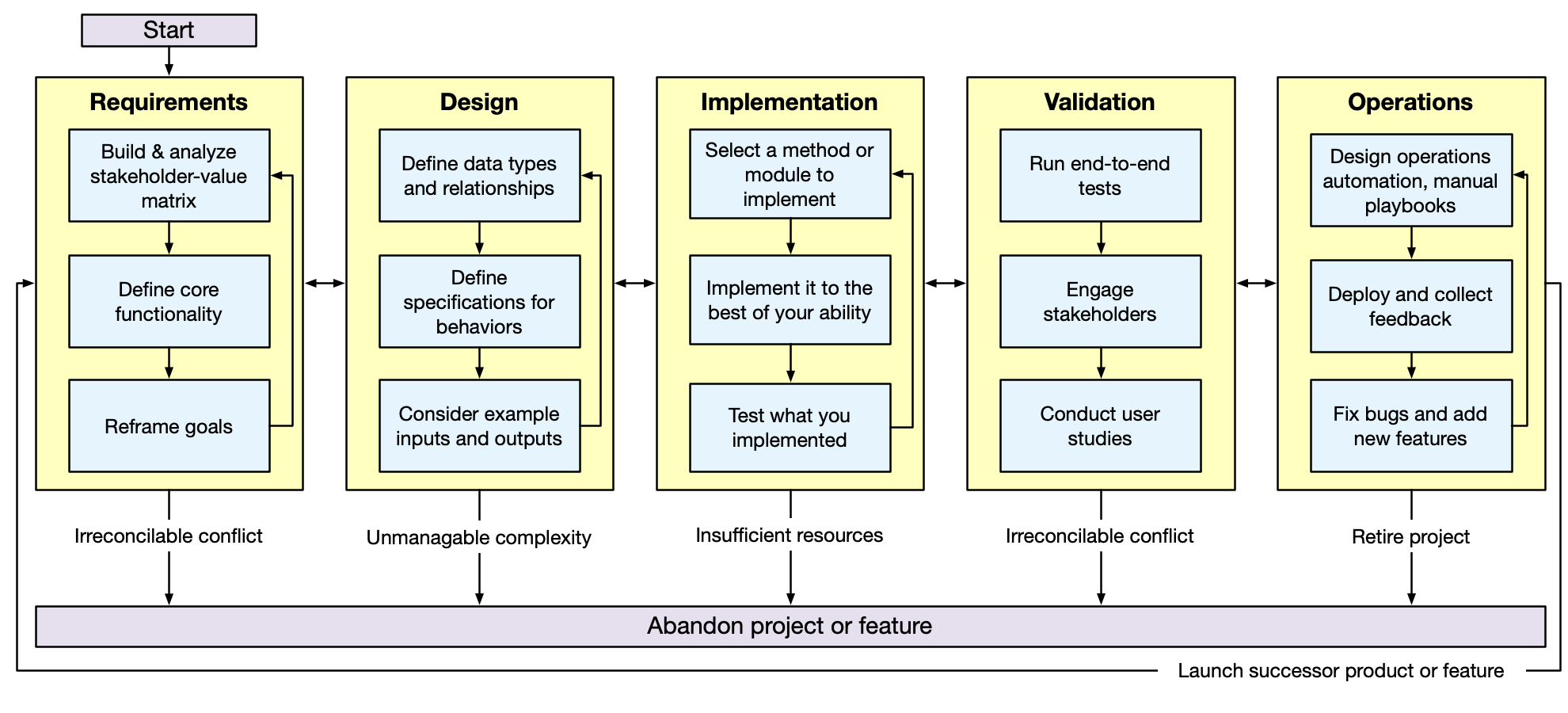
Note that the course structure does not follow this process order: we begin first with code-level design and implementation (considering requirements that are provided), and then step back to consider requirements more closely.
Describe the context of Java in the historical development of OO languages and "run anywhere" technology/JIT runtimes (10 minutes)
Background material:
-
Java was developed in the early 1990's by a team led by James Gosling. It is one of several languages being developed at the time that were based around "object-oriented" programming.
-
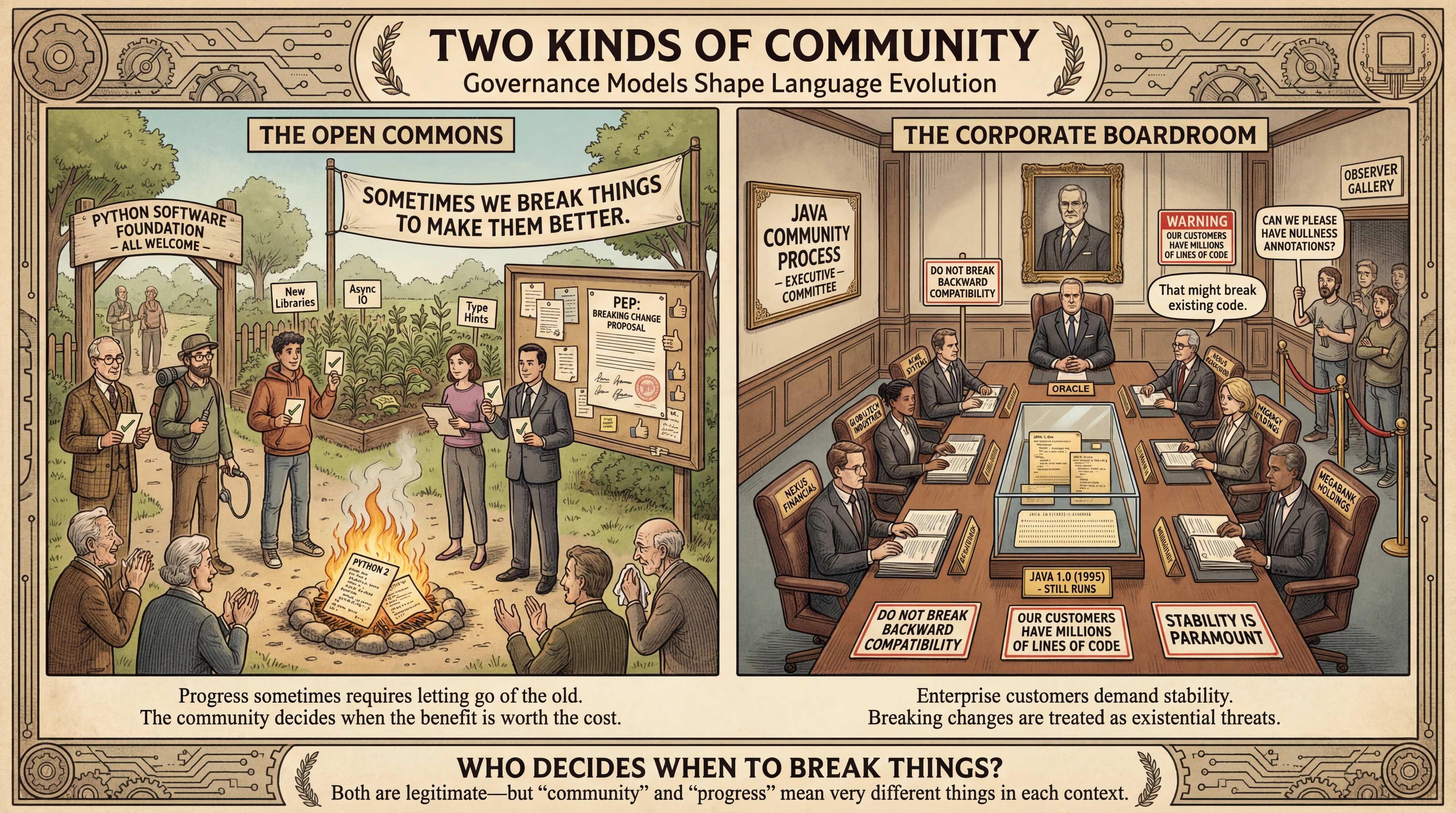
One important historical note of Java vs a language like Python is that Java was developed by a company that wanted to monetize the technology - Sun Microsystems. Python is a community-driven language.
- Sidebar: How did it go for Sun Microsystems? (There's A Hidden Message On The Sign Outside Facebook's Campus — It Reminds Employees To Stay Motivated) How did it go for Oracle? (Google v. Oracle)
- These different governance models shape how the languages evolve—Python accepted breaking changes (Python 2→3), while Java maintains extreme backward compatibility:
-
No matter what the product pitch was (cable tv set top boxes, web browsers, etc) the core marketing point was "write once, run anywhere" with performance
-
CPUs have different instruction sets, OS's have different APIs, how do you run a program on any machine?
-
Both Python and Java are compiled into a "bytecode" (an intermediate representation of the source code) that is then executed by an interpreter. In this sense, they are both "write once, run anywhere" insofar as the interpreter can run on any machine.
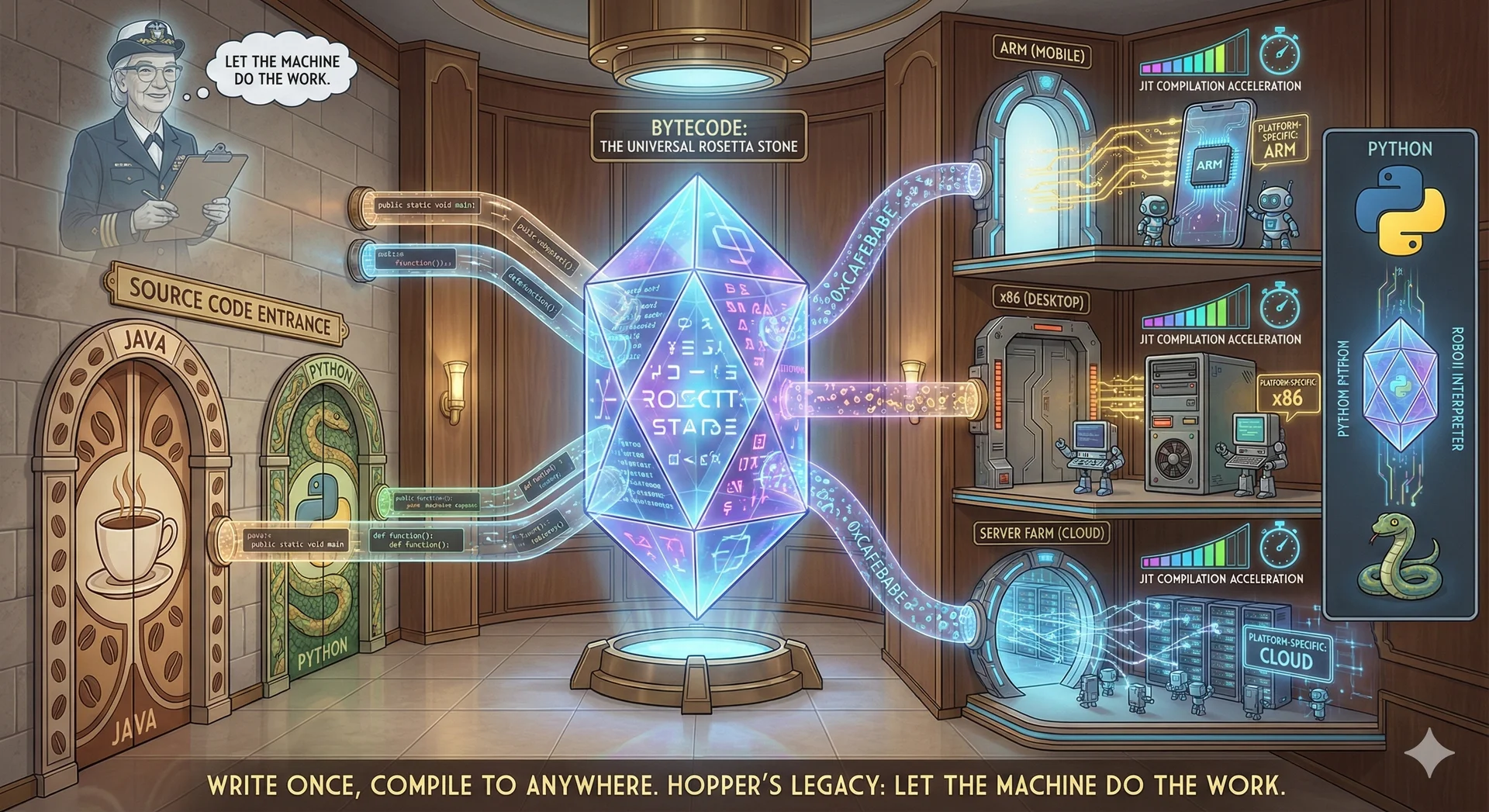
- Sidebar: Is it really that easy? Who has had the fun of having to compile native Python extensions?
-
Interpreting this bytecode is slower than running "native" code (e.g. C, or Rust, compiled into machine code).
- Example: Interpeted vs compiled code for a simple "Hello, World" program. Interpeted code is slower because it has to read the source code and execute it line by line. Compiled code is faster because it is already in machine code. Instead of spending 100's of instructions to read the source code and execute it, the machine code is already in memory and can be executed directly.
- Example: Basic optimizations. A compiler can identify branches that are never taken and remove them. An interpreter has to execute every line of code.
-
Java popularized the concept of a "JIT runtime," which dynamically compiles this bytecode as it is executed. The program that runs the Java code is called the "JVM" (Java Virtual Machine).
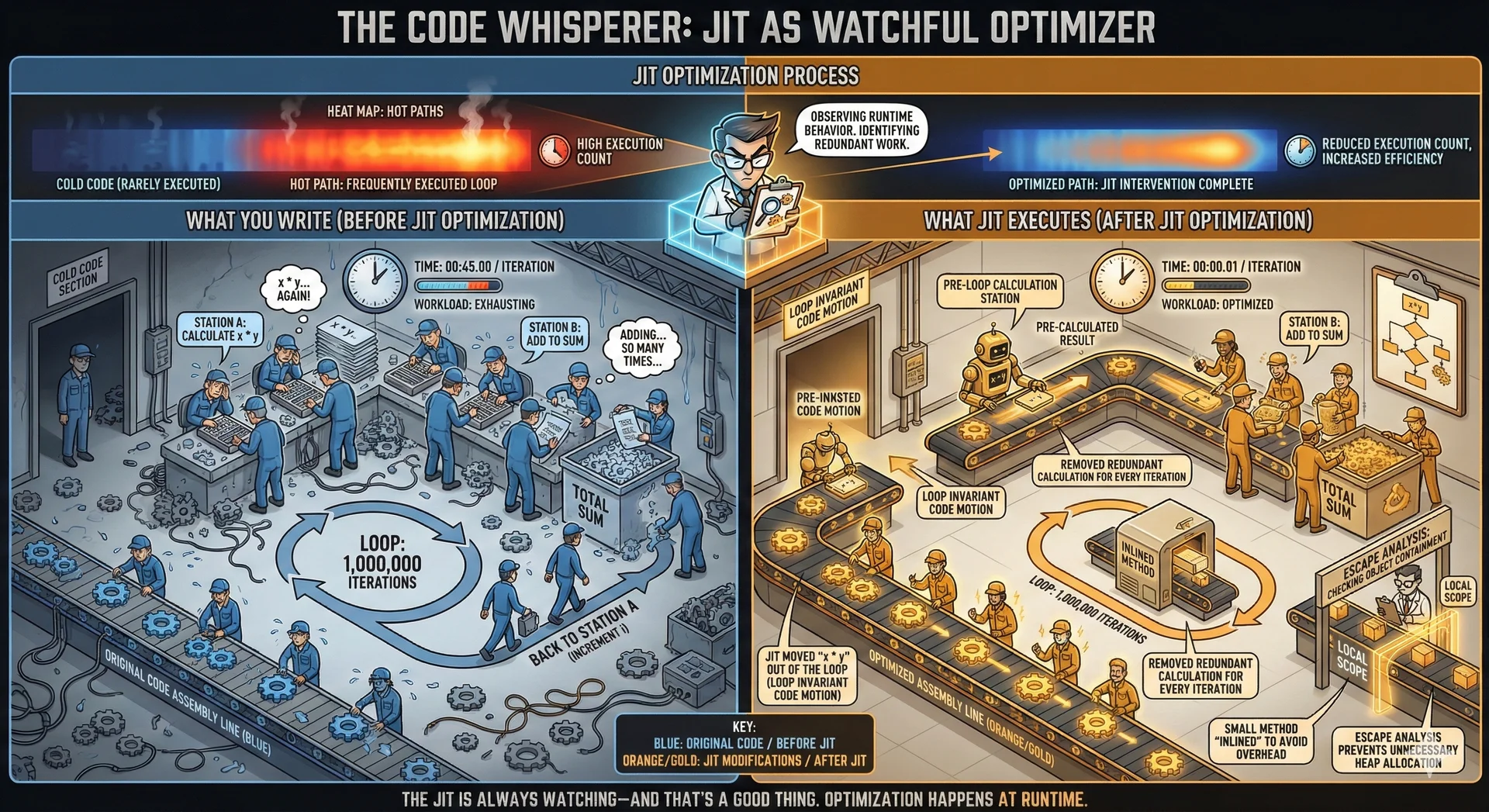
- Sidebar: There are other languages that run on the JVM, like Clojure, Kotlin, Scala, and Groovy. These languages, like Java, are compiled into the language that the JVM speaks, which is called "Java bytecode."
-
While much effort has gone into making a JIT for Python (like PyPy), there are fundamental language design differences that make it difficult to match the performance of a language like Java.
-
Sidebar: We started with cable boxes and web applets... how did that go? Where is Java used today?
- Android (See Google v Oracle)
- Enterprise applications
-
Discussion question: If Java is faster than Python, why use Python?
-
Compare the Java runtime environment to Python (10 minutes)
- One similarity between Java and Python is that they both have what (at the time) was somewhat novel: a large set of common libraries. They also both have a very large ecosystem of open-source third-party libraries.
- Open source libraries incorporate utilities, frameworks, and other tools that make it easier to build complex systems.
- You need to install a runtime to run Python code, and same goes for Java:
- Java code is run by the "Java Virtual Machine" (JVM). The "Java Development Kit" (JDK) includes the JVM and other tools that are used to develop Java programs.
- Java code is compiled into bytecode, which is the language that the JVM speaks. The JVM, in turn, compiles and optimizes that bytecode into what your CPU speaks.
- This is a change compared to Python, where the source code is executed directly by the Python interpreter.
- A simple mapping of tools that you may be familiar with from Python to Java:
pip->gradlepytest->junitVSCode->IntelliJ IDEA|VSCode
- In 2100, you learned about how Python was not designed to be statically typed. In contrast, Java was designed from the outset to be a "statically typed" language.
- In the 1990's, there was a lot of debate about the relative merits of static vs dynamic typing. The static type people argued that static typing would lead to more robust programs and better performance. The dynamic type people argued that dynamic typing would lead to more flexible programs and better programmer productivity.
- The general culture of the industry is moving towards static typing, here are a few examples:
- Facebook was originally written in PHP, which is a dynamically typed language. It is so hard to optimize dynamically typed code that it was determined cheaper to build a static type system on top of PHP and gradually migrate the codebase into it than it was to optimize PHP without the type system. https://www.fastcompany.com/3028778/why-facebook-invented-a-new-php-derived-language-called-hack
- JavaScript is a dynamically typed language that is pervasive in web browsers (sidebar: "JavaScript" is only connected to "Java" in that the authors of JavaScript said 'What would be a catchy-sounding name?' and Java had just came out and was also targeting web browsers, so... JavaScript - https://medium.com/@salimian/the-story-behind-the-name-javascript-15e879c42760). TypeScript extends JavaScript with a static type system, and has surpassed JavaScript in popularity.
- Truly understanding the performance implications of static vs dynamic typing probably requires taking a course in programming languages (we have some great ones!). But, as we learn about types in Java, we might start to get some intuition for this.
- Sidebar: Measuring the productivity impact of a type system is a very hard problem. While some have tried to design research studies, they tend to have significant methodological issues - because it is so hard to study. The most poignant reason why this is hard is that you can't really compare abstractly "a static type system" vs "a dynamic type system" - you need to compare specific type systems. There are some unique case studies for this (e.g. JavaScript -> Dart, Elm, Typescript, PHP -> Hack), but each is really a unique case study. Did anyone in the class have prior Python experience before CS 2100 (without mypi)?
Recognize Java syntax (10 minutes)
Again, we will not explicitly teach you Java syntax in the lectures for this course. We will provide you with flashcards to help you learn the syntax, tutorials for self-practice, and guided labs to help you practice. However, for this very first lecture, we will provide a very brief introduction to Java syntax.
Here is a complete example of a Java program:
package io.github.neu-pdi.cs3100.lecture2;

import io.github.neu-pdi.cs3100.utils.OtherClass;

/**
 * This is a simple program that prints "Hello, World" 10 times.
 */
public class HelloWorld {
    /**
     * This is the main method that is executed when the program is run.
     * @param args The command line arguments.
     */
    public static void main(String[] args) {
        OtherClass other = new OtherClass(10);
        for (int i = 0; i < 10; i++) {
            // Print a message to the console
            System.out.println("Hello, World #" + i);
        }
        other.doSomething();
    }
}
package io.github.neu-pdp.cs3100.utils;

public class OtherClass {
    private int x;
    public OtherClass(int x) {
        this.x = x;
    }
    public void doSomething() {
        System.out.println("Doing something with x = " + x);
    }
    public int getX() {
        return x;
    }
}
Let's break down the syntax of this program, starting with HelloWorld.java.
Package Declaration
- Code in Java is organized into packages. This is similar to how code in Python is organized into modules.
- It's best practice to use a package that is named after the organization that wrote the code.
- The convention for the package name is to use the reverse domain name of the organization.
- For example, GitHub user
octocatwould use the package nameio.github.octocat.
- For example, GitHub user
- You can, of course, choose whatever you want that satisfies the JVM's naming conventions.
Import Declaration
- The
importkeyword is used to import classes from other packages. - In this case, we are importing the
OtherClassclass from theio.github.neu-pdp.cs3100.utilspackage. - Note that we are not importing the
Stringclass or theSystemclass. These are both classes in thejava.langpackage, that are imported by default.
Comments
- Single line comments are denoted by
// - Multi-line comments are denoted by
/*and*/ - Documentation comments are denoted by
/**and*/, and are used to generate documentation for the code (more on this in an upcoming lecture)
Class Declaration
- All code in Java must be contained within a class.
- This class is
publicwhich means it can be used by other classes.- If you don't specify the access modifier, it will default to
package-privatewhich means it can only be used by classes in the same package.
- If you don't specify the access modifier, it will default to
- This class extends
OtherClasswhich means it will inherit all of the methods and fields ofOtherClass. - The contents of the class are contained within the
{and}braces. This is not Python, where indentation matters.
Method Declaration
- All code in Java must be contained within a method, which must be declared within a class.
- This method is
publicwhich means it can be used by other classes. It also could beprivatewhich means it can only be used by the class itself. - This method is
staticwhich means it can be called on the class itself without creating an instance of the class (a Python "class method"). - This method is
voidwhich means it does not return a value. - This method is named
mainand takes as an argument an array of strings. This is the entry point of the program, as defined by the Java Virtual Machine (JVM). This means that when we run the commandjava io.github.neu-pdp.cs3100.lecture2.HelloWorld, the JVM will look for apublic static void main(String[] args)method in theHelloWorldclass and execute it.
Method Body
- The contents of the method are contained within the
{and}braces. This is not Python, where indentation matters. - The method creates an instance of
OtherClassand calls itsdoSomethingmethod. - The method contains a loop that will print "Hello, World" 10 times.
- Note how we declare a variable
iand initialize it to 0, and also how we format a for-loop in Java - Again: This is not Python, where indentation matters.
{}are required to delimit the scope of the loop.
- Note how we declare a variable
- Let's disect the line
System.out.println("Hello, World #" + i);:Systemrefers to a class:java.lang.System(note that we didn't need to import this class since it is part ofjava.langwhich is imported by default)outis a static field of theSystemclass. Because it'sstatic, we can access it directly on the class without creating an instance of the class.System.outis an instance of a class that Java provides calledPrintStream, used for writing output to streams (more on streams in a few minutes).- The string
"Hello, World #"is concatenated with the value ofiand theprintlnmethod is called with that string as an argument. - Lastly, the line ends with a semicolon, which is required in Java to denote the end of a statement. This is different than Python, where the end of a statement is denoted by a newline.
OtherClass.java
- This class defines a private field
xand a constructor that initializes it. Because it'sprivate, it cannot be accessed directly from outside the class (it can be accessed from within the class, and because the class exposes the methodpublic int getX(), we can access it from outside the class indirectly). Note that unlike in Python, we can have multiple constructors in a class. - It also defines a
publicmethoddoSomethingthat prints a message to the console.
Understand the difference between core datatypes in Java: primitives, objects and array (15 minutes)
-
Here are the basic types of data in Java, which are called "primitive types":
byte-> 1 byte integershort-> 2 byte integerchar-> 2 byte integerint-> 4 byte integerlong-> 8 byte integerfloat-> 4 byte floating point numberdouble-> 8 byte floating point numberboolean-> 1 byte boolean- By a "1 byte" integer, we mean that the integer can only take on 2^8 (1 byte) = 256 different values.
- By a "4 byte" integer, we mean that the integer can only take on 2^32 (4 bytes) = 4,294,967,296 different values.
- ⚠️ This is a big change from python, where all integers can take on an arbitrary number of digits.
- A "Floating point" number is one that can take on a continuous range of values (e.g. 3.14, -1.0, 0.001, etc.).
- A "boolean" is one that can only take on two values:
trueorfalse.
-
There are also "reference types" which are references to objects in memory.
java.lang.Objectis the superclass of all objects in Java.- All reference types can also be the special value,
null, which means that the reference is not pointing to any object in memory. - Arrays are also reference types.
int[]is an array of integers, etc.- An array is a contiguous block of memory that stores a fixed number of elements of a given type, differing from Python's list which is a dynamic array that can grow and shrink as needed.
- Variables of a "reference type" are a pointer to an object in memory.
- When comparing two reference values (e.g.
a == b), the JVM compares the reference equality (doaandbpoint to the same object in memory?), not value equality (as in Python)
-
byte,short,char,int, etc. are called "primitive types" because they are not objects. They are not references to an object in memory. They are values that are stored directly in memory. Here is what we mean by that:void increment(int x) {
x = x + 1;
System.out.println("x in increment: " + x); // Prints out 6
}
int x = 5;
increment(x);
System.out.println("x after increment: " + x); // Prints out 5xis a primitive type, so theincrementfunction is passed a copy of the value ofxwhen we call it - it doesn't get a "reference" tox.- We said that arrays are reference types, so here is what happens when we pass an array to a function:
void increment(int[] arr) {
  arr[0] = arr[0] + 1;
  System.out.println("arr[0] in increment: " + arr[0]); // Prints out 6
}
int[] arr = {5};
System.out.println("arr[0] before increment: " + arr[0]); // Prints out 5
increment(arr);
System.out.println("arr[0] after increment: " + arr[0]); // Prints out 6 - You should understand the relevance of the size of your data:
- A
longis 8 bytes and abyteis 1 byte. The long can store many more values than the byte, but it also takes up more space. - Imagine we are building an application that needs to store the age (in years) of every person in the world. We could use a
byteto store the age, but then we would only be able to store 256 different ages. We could use alongto store the age, but then we would be wasting 7 bytes for every person.- But, at 8bn people (2023), this is the difference between 8GB and 64 GB.
- This mattered a lot in the 1990's when memory was much more expensive than it is today.
- Note also that once you need more than 256 unique values, you need to use more bytes anyway.
- Here is a trick to help you remember the size of each type: 1 byte is 8 bits, so the maximum number of values it can hold is , or . 4 bytes is 32 bits, and , so (1 with 9 zero's). 8 bytes is 64 bits, so (1 with 18 zeros) - that's a lot!
- Today you can often ignore this fact (look at Python!), but it becomes important when dealing with very large data sets (look at all of the C extensions to Python that you rely on like... numpy).
- A
- There is a lot more to say about types in Java, but we will save that for later.