Assignment 4: RecipeService and Testing
Overview
Changelog:
- 2/19/2026: Note error in handout: the documentation on the
RecipeServiceinterface is incomplete compared to the handout, in particular, this page explains exactly the effects ofimportFromJsonandimportFromText, please rely on this over the documentation on the handout. - 2/19/2026: Clarified that findByIngredient searches only RecipeRepository, not recipes embedded in collections via RecipeCollectionRepository. See findByIngredient clarification in the Shopping List Requirements.
In this assignment, you'll build RecipeService — the application layer that sits between user interfaces (CLI, GUI) and your domain model. This facade coordinates everything: parsing recipe text, transforming quantities, persisting to repositories, and aggregating shopping lists. It's the "brain" that the CLI (A5) might call to get things done.
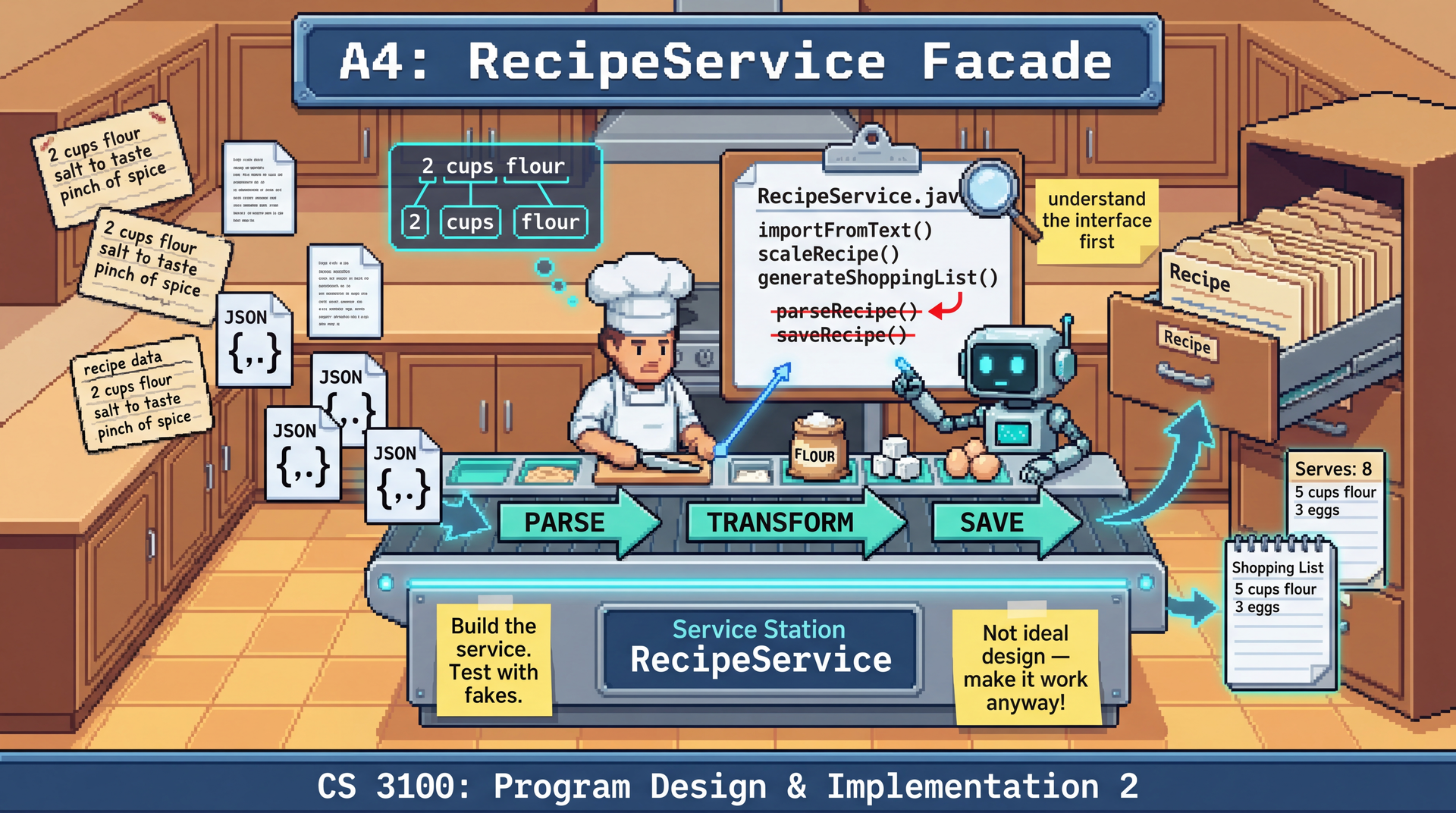
The core challenge is parsing and coordination. Your service must parse messy text like "2 1/2 cups flour, sifted" into structured domain objects, then orchestrate saving recipes, updating collections, and combining ingredients into shopping lists. One method call does a lot — that's what makes it convenient for callers but challenging to implement well.
The RecipeService interface is intentionally not an example of good API design. It's an arbitrary specification you've been given — the kind of "convenient but problematic" facade you might inherit on a real project. Your job is to implement it correctly while keeping your internal design clean.
Don't use this as a model for your own API designs. Instead, recognize the patterns that make it hard to test and maintain — and practice building clean implementations behind messy interfaces.
How do you verify a service like this works? You'll learn to use mocks — test doubles that stand in for real dependencies during testing. Using Mockito, you'll mock the repository interfaces to test your service in isolation, verifying both the outcomes and the interactions with dependencies.
Due: Thursday, February 26, 2026 at 11:59 PM Boston Time
Prerequisites: This assignment builds on the A3 sample implementation (provided). You should be familiar with the hexagonal architecture established in A3: RecipeRepository, RecipeCollectionRepository, and their JSON adapters. You'll also use ConversionRegistry from A2.
At a Glance
What you'll build: A RecipeService facade (6 methods) that coordinates parsing, transformation, persistence, and aggregation.
The main challenge: Parsing recipe text and ingredient strings into structured domain objects, then orchestrating multi-step operations (parse → save → update collection).
What you'll test: Unit tests for RecipeService using Mockito to mock repository dependencies.
How you'll be graded: 76 pts automated (facade correctness + logging + test quality via mutation testing), 24 pts reflection, minus up to 36 pts for design/quality issues. See Grading Rubric.
Development strategy: Start with simpler methods, build up to parsing. Test as you go with mocks. Submit early — the autograder tests your facade.
This assignment is about building a service layer — the glue between user interfaces and your domain. Here's a strategy:
-
Read the
RecipeServiceinterface carefully. Understand what each method must accomplish before you start coding. The interface is your specification. -
Start simple, build up. Implement
findByIngredientandimportFromJsonfirst — they're straightforward. Then tackle parsing (importFromText) and aggregation (generateShoppingList). -
Parsing is the core challenge. Invest time in understanding the ingredient parsing requirements. Break down
"2 1/2 cups flour, sifted"→ quantity type, amount, unit, name, preparation. -
Test with mocks. Use Mockito to mock repository dependencies. Verify your service calls the right methods with the right arguments, and returns the expected results.
-
Submit early and often. The autograder tests your facade. Early feedback helps you catch issues before the deadline.
Starting early isn't about needing more hours to code — it's about giving yourself time to think, get stuck productively, and get help when you need it.
This assignment involves design decisions and tricky parsing logic. You'll hit moments where something doesn't work and you're not sure why. That's normal and valuable — if you have time to step back, sleep on it, and come to office hours. Students who start early can ask questions, get unstuck, and learn from the struggle.
Students who start late miss this. They hit the same walls but have no time to get help. The struggle stops being productive and becomes frustrating.
Early Bird Bonus (+10 points): Complete through Phase 3 (simple service methods working with tests) by Friday, February 20 at 11:59 PM and earn +10 bonus points. The bonus is added to the numerator of your final score after all other adjustments (i.e., your final score can be up to 110/100). This gets you to office hours before the hard parts.
Submission limits: You can submit up to 15 times per rolling 24-hour period. Use these submissions throughout the assignment — each one gives you feedback on what's working and what needs fixing.
Learning Outcomes
By completing this assignment, you will demonstrate proficiency in:
- Building an application service layer — implementing a facade that coordinates domain operations, parsing, and persistence (L17: From Code Patterns to Architecture Patterns)
- Implementing behind an arbitrary interface — building clean internals despite an externally-imposed API (L16: Designing for Testability)
- Parsing unstructured text — transforming recipe and ingredient strings into structured domain objects
- Using dependency injection to wire services with their dependencies (L17)
- Unit testing with mocks — using Mockito to test service logic in isolation (L15: Test Doubles and Isolation)
AI Policy for This Assignment
AI coding assistants continue to be encouraged. Building on A3's introduction, this assignment provides more opportunities for effective AI collaboration:
| Task Type | AI Value | Strategy |
|---|---|---|
| Service implementation | High | AI can help translate interface contracts into working code |
| Mock setup boilerplate | High | AI excels at Mockito when/thenReturn patterns |
| Parsing logic | Moderate | Think through cases first, then use AI for implementation |
| Test generation | Moderate | AI for structure/ideas, you verify tests are meaningful and catch bugs |
| Debugging | High | Use scientific debugging, supported by AI |
For boilerplate (mock setup, test structure), AI saves time — but always verify expected values are correct. For parsing and aggregation logic, think through the cases yourself first, then use AI to help with implementation details.
You must document your AI usage in the Reflection section.
Do not manually select expensive AI models (like Claude Opus, GPT-4, or other premium models) for coursework in this class. The course provides access to AI tools through Cursor, but resources are shared and limited.
Always use "Auto" mode in Cursor, which selects an appropriate model for your task. Auto mode balances capability with cost and is sufficient for all coursework in this class. Manually selecting premium models:
- Consumes shared resources faster, potentially affecting availability for everyone
- Provides no meaningful benefit for the tasks in this course
- May result in you being asked to pay out of pocket if you exhaust shared quotas
The default models are capable of helping with parsing, test generation, debugging, and all other tasks in this assignment. If you find yourself thinking "maybe a smarter model would help" — that's usually a sign to step back and think through the problem yourself, not to reach for a more expensive model.
Technical Specifications
Architecture Overview
This assignment adds a RecipeService facade that sits between driving adapters (like the CLI you'll build in A5) and your domain/ports. How you structure the implementation behind it is your design decision.
Legend: Yellow = facade interface (prescribed). Green = your implementation (design freedom). Blue = mocked dependencies (for your unit tests).
Key principle: RecipeService depends only on port interfaces, never on concrete adapters. In tests, you mock these interfaces using Mockito.
The Facade Problem
The RecipeService interface is designed for CLI convenience. Each method does everything the CLI needs in one call. But this convenience has implications for testing.
Remember: This interface represents an arbitrary specification you've been given — not a design you should emulate. In practice, you'll often inherit interfaces like this from legacy code, external contracts, or team decisions made before testability was a priority. The skill is implementing them cleanly internally, even when the external API is suboptimal.
Consider importFromText(recipeText, collectionId). This single method:
- Parses the recipe text (title, servings, ingredients, instructions)
- Parses each individual ingredient string
- Creates domain objects
- Looks up the collection from
RecipeCollectionRepository - Saves the recipe to
RecipeRepository - Adds the recipe to the collection and saves the updated collection
To test this in isolation, you'll mock the repository interfaces. This lets you:
- Control inputs: Use
when(repo.findById(...)).thenReturn(...)to set up the test scenario - Verify interactions: Use
verify(repo).save(...)to confirm the service called the right methods - Test edge cases: Mock exceptions to test error handling without real I/O
The key is testing that your service correctly coordinates the parsing, lookup, and save operations.
The RecipeService Interface
This is the facade the CLI will call. We test your implementation through this interface — it's what the autograder uses. How you structure the implementation behind it is your design decision.
The documentation on the RecipeService interface is incomplete compared to the handout, in particular, this page explains exactly the effects of importFromJson and importFromText, please rely on this page over the documentation on the handout.
public interface RecipeService {

    // ==================== IMPORT / PARSING ====================

    /**
     * Imports a recipe from a JSON file and adds it to the specified collection.
     *
     * Reads the file, deserializes it into a Recipe, saves it to the recipe
     * repository, and adds it to the specified collection.
     *
     * @param jsonFile path to a JSON file containing a serialized Recipe
     * @param collectionId the ID of the collection to add the recipe to
     * @return the imported Recipe
     * @throws CollectionNotFoundException if no collection exists with the given ID (checked first)
     * @throws ImportException if the file cannot be read or parsed
     */
    @NonNull Recipe importFromJson(@NonNull Path jsonFile, @NonNull String collectionId);

    /**
     * Parses plain text into a Recipe and adds it to the specified collection.
     *
     * Parses the text into a Recipe (title, servings, ingredients, instructions),
     * saves it to the recipe repository, and adds it to the specified collection.
     *
     * @param recipeText the plain text recipe to parse
     * @param collectionId the ID of the collection to add the recipe to
     * @return the parsed and saved Recipe
     * @throws CollectionNotFoundException if no collection exists with the given ID (checked first)
     * @throws ParseException if the text cannot be parsed into a valid recipe
     */
    @NonNull Recipe importFromText(@NonNull String recipeText, @NonNull String collectionId) throws ParseException;

    // ==================== TRANSFORMATION ====================

    /**
     * Scales a recipe to the target number of servings, saving the result.
     *
     * Looks up the recipe by ID, scales all measured ingredients proportionally,
     * creates a NEW recipe (with a new auto-generated ID), saves it to the
     * repository, and returns it. The original recipe is not modified or overwritten.
     *
     * @param recipeId the ID of the recipe to scale
     * @param targetServings the desired number of servings (must be positive)
     * @return the new, scaled Recipe with a new ID (saved to the repository)
     * @throws IllegalArgumentException if targetServings is not positive (checked first)
     * @throws RecipeNotFoundException if no recipe exists with the given ID
     * @throws IllegalArgumentException if the recipe has no servings information
     */
    @NonNull Recipe scaleRecipe(@NonNull String recipeId, int targetServings);

    /**
     * Converts all measured ingredients in a recipe to the specified unit, saving the result.
     *
     * Looks up the recipe by ID, then delegates to
     * Recipe.convert(targetUnit, conversionRegistry), which converts each
     * measured ingredient to the target unit (enhancing the registry with
     * recipe-specific conversion rules). VagueIngredients are left unchanged.
     * Creates a NEW recipe (with a new auto-generated ID), saves it to the
     * repository, and returns it. The original recipe is not modified or
     * overwritten.
     *
     * @param recipeId the ID of the recipe to convert
     * @param targetUnit the unit to convert all ingredients to
     * @return the new, converted Recipe with a new ID (saved to the repository)
     * @throws RecipeNotFoundException if no recipe exists with the given ID
     * @throws UnsupportedConversionException if any measured ingredient cannot be converted
     */
    @NonNull Recipe convertRecipe(@NonNull String recipeId, @NonNull Unit targetUnit)
        throws UnsupportedConversionException;

    // ==================== AGGREGATION ====================

    /**
     * Generates a shopping list from multiple recipes, looking them up by ID.
     *
     * Looks up each recipe from the repository, then combines like ingredients
     * where possible. For example, if one recipe needs "2 cups flour" and another
     * needs "1 cup flour", the shopping list should show "3 cups flour".
     * VagueIngredients (e.g., "salt to taste") are collected into the
     * uncountable items list, deduplicated by name (case-insensitive).
     *
     * @param recipeIds the IDs of the recipes to aggregate
     * @return a ShoppingList containing all needed ingredients
     * @throws RecipeNotFoundException if any recipe ID is not found
     */
    @NonNull ShoppingList generateShoppingList(@NonNull List<String> recipeIds);

    // ==================== SEARCH ====================

    /**
     * Finds all recipes that contain the specified ingredient.
     *
     * Searches all recipes in the repository by ingredient name using
     * case-insensitive substring matching. For example, searching for "chicken"
     * would match recipes containing "chicken breast", "ground chicken", or
     * "Chicken Thighs".
     *
     * @param ingredientName the ingredient to search for
     * @return list of recipes containing that ingredient (may be empty)
     */
    @NonNull List<Recipe> findByIngredient(@NonNull String ingredientName);
}
Notice the pattern: most methods combine lookup + computation + persistence. This is convenient for the CLI but means you're testing coordination — does the service correctly orchestrate parsing, transformation, and persistence?
Internal Design Freedom
How you structure RecipeServiceImpl internally is your design decision. You might:
- Put all logic directly in
RecipeServiceImpl(not recommended — hard to maintain) - Extract helper methods within the class
- Create separate classes for parsing, scaling, aggregation (recommended — easier to test and maintain)
We only test through the RecipeService interface. Your internal decomposition affects maintainability and testability, but not your grade directly — except through the quality of your implementation and how well your tests catch bugs.
Injected Dependencies
Your RecipeService implementation must accept these dependencies through its constructor:
public RecipeServiceImpl(
    RecipeRepository recipeRepository,
    RecipeCollectionRepository collectionRepository,
    ConversionRegistry conversionRegistry
) { ... }
| Dependency | Purpose |
|---|---|
RecipeRepository | Save/retrieve individual recipes |
RecipeCollectionRepository | Save/retrieve collections |
ConversionRegistry | Find unit conversion rules |
Testing with Mockito
You'll test your RecipeService implementation using Mockito to mock the repository interfaces. This lets you test your service logic in isolation without needing real file I/O.
Basic Mock Setup
@ExtendWith(MockitoExtension.class)
class RecipeServiceTest {

    @Mock private RecipeRepository recipeRepository;
    @Mock private RecipeCollectionRepository collectionRepository;
    @Mock private ConversionRegistry conversionRegistry;

    private RecipeService service;

    @BeforeEach
    void setUp() {
        service = new RecipeServiceImpl(recipeRepository, collectionRepository, conversionRegistry);
    }
}
Stubbing Return Values
Use when(...).thenReturn(...) to control what mocked methods return:
@Test
void scaleRecipe_looksUpRecipeAndSavesScaledVersion() {
    // Arrange: stub the repository to return a recipe
    Recipe original = createRecipeWithServings(4);
    when(recipeRepository.findById("rec-1")).thenReturn(Optional.of(original));

    // Act
    Recipe scaled = service.scaleRecipe("rec-1", 8);

    // Assert: verify the result and interactions
    assertThat(scaled.getServings().getAmount()).isEqualTo(8);
    verify(recipeRepository).save(any(Recipe.class));
}
Verifying Interactions
Use verify(...) to confirm your service called the right methods:
@Test
void importFromText_savesRecipeAndUpdatesCollection() {
    // Arrange
    RecipeCollection collection = createCollection("col-1");
    when(collectionRepository.findById("col-1")).thenReturn(Optional.of(collection));

    // Act
    Recipe result = service.importFromText(recipeText, "col-1");

    // Assert: verify both repositories were called
    verify(recipeRepository).save(any(Recipe.class));
    verify(collectionRepository).save(any(RecipeCollection.class));
}
Using Argument Captors
When you need to inspect what was passed to a mocked method:
@Test
void scaleRecipe_savesRecipeWithCorrectScaledQuantities() {
    Recipe original = createRecipeWith(ingredient("flour", 2, CUP));
    when(recipeRepository.findById("rec-1")).thenReturn(Optional.of(original));

    service.scaleRecipe("rec-1", 8); // Scale from 4 to 8 servings (2x)

    // Capture the recipe that was saved
    ArgumentCaptor<Recipe> captor = ArgumentCaptor.forClass(Recipe.class);
    verify(recipeRepository).save(captor.capture());

    Recipe saved = captor.getValue();
    MeasuredIngredient flour = (MeasuredIngredient) saved.getIngredients().get(0);
    assertThat(flour.getQuantity().toDecimal()).isEqualTo(4.0); // 2 cups * 2 = 4 cups
}
Domain Types
Servings (Provided)
The Servings class represents serving information for a recipe. Unlike ingredient quantities, servings are a simple integer count with an optional descriptive label:
public class Servings {
    public Servings(int amount, @Nullable String description)
    public Servings(int amount) // description = null

    public int getAmount()                    // e.g., 24
    public @Nullable String getDescription()  // e.g., "cookies", or null

    public Servings scale(double factor)      // returns new Servings with rounded amount
}
Examples:
"Makes 24 cookies"→new Servings(24, "cookies")"Serves 4"→new Servings(4)(ornew Servings(4, null))"Serves: 8"→new Servings(8)
Recipe.getServings() returns @Nullable Servings — null if the recipe has no servings information.
ShoppingList and ShoppingItem (Provided)
The ShoppingList and ShoppingItem interfaces are provided, along with stub implementations (ShoppingListImpl and ShoppingItemImpl) that throw UnsupportedOperationException. You must complete these implementations:
public interface ShoppingList {
    /**
     * Returns all measurable items in the shopping list.
     */
    @NonNull List<ShoppingItem> getItems();

    /**
     * Returns the names of uncountable ingredients (from VagueIngredients).
     */
    @NonNull List<String> getUncountableItems();
}

public interface ShoppingItem {
    /**
     * The ingredient name (e.g., "flour", "chicken breast").
     */
    @NonNull String getName();

    /**
     * The total quantity needed.
     */
    @NonNull Quantity getQuantity();
}
Your implementations should be straightforward — these are immutable data containers returned by generateShoppingList(). ShoppingItem represents MeasuredIngredients with concrete quantities. VagueIngredients (e.g., "salt to taste", "fresh herbs") appear in the uncountableItems list instead — they have no quantity to aggregate, but you still need to buy them! See Shopping List Requirements.
Exception Classes
The following exception classes are already provided in app.cookyourbooks.services — you do not need to create them:
/** Thrown when an import operation fails. */
public class ImportException extends RuntimeException {
    public ImportException(String message) { super(message); }
    public ImportException(String message, Throwable cause) { super(message, cause); }
}

/** Thrown when a requested collection is not found. */
public class CollectionNotFoundException extends RuntimeException {
    public CollectionNotFoundException(String collectionId) {
        super("Collection not found: " + collectionId);
    }
}

/** Thrown when a requested recipe is not found. */
public class RecipeNotFoundException extends RuntimeException {
    public RecipeNotFoundException(String recipeId) {
        super("Recipe not found: " + recipeId);
    }
}

/** Thrown when parsing fails. */
public class ParseException extends Exception {
    public ParseException(String message) { super(message); }
    public ParseException(String message, Throwable cause) { super(message, cause); }
}
Note: ParseException is a checked exception because parsing failures are expected and callers should handle them explicitly. The other exceptions are unchecked because they represent programming errors or environmental failures.
Ingredient Parsing Requirements
Your ingredient parsing logic (however you structure it internally) must handle these formats:
| Input | Expected Result |
|---|---|
"2 cups flour" | MeasuredIngredient: ExactQuantity(2, CUP), name="flour" |
"1 cup milk" | MeasuredIngredient: ExactQuantity(1, CUP), name="milk" |
"1/2 cup sugar" | MeasuredIngredient: FractionalQuantity(0, 1, 2, CUP), name="sugar" |
"2 1/2 tbsp butter" | MeasuredIngredient: FractionalQuantity(2, 1, 2, TABLESPOON), name="butter" |
"1.5 cups water" | MeasuredIngredient: ExactQuantity(1.5, CUP), name="water" |
"100 g chocolate" | MeasuredIngredient: ExactQuantity(100, GRAM), name="chocolate" |
"1 lb ground beef" | MeasuredIngredient: ExactQuantity(1, POUND), name="ground beef" |
"2 cups brown sugar" | MeasuredIngredient: ExactQuantity(2, CUP), name="brown sugar" |
"1 cup semi-sweet chocolate chips" | MeasuredIngredient: ExactQuantity(1, CUP), name="semi-sweet chocolate chips" |
"salt to taste" | VagueIngredient: name="salt", description="to taste" |
"fresh herbs" | VagueIngredient: name="fresh herbs" |
"a pinch of nutmeg" | MeasuredIngredient: ExactQuantity(1, PINCH), name="nutmeg" |
"2 cups flour, sifted" | MeasuredIngredient: name="flour", preparation="sifted" |
"1/4 cup onion, finely diced" | MeasuredIngredient: FractionalQuantity(0, 1, 4, CUP), name="onion", preparation="finely diced" |
"3 eggs" | MeasuredIngredient: ExactQuantity(3, WHOLE), name="eggs" |
"1 large egg" | MeasuredIngredient: ExactQuantity(1, WHOLE), name="large egg" |
"1 tsp vanilla extract" | MeasuredIngredient: ExactQuantity(1, TEASPOON), name="vanilla extract" |
"2 Tbsp olive oil" | MeasuredIngredient: ExactQuantity(2, TABLESPOON), name="olive oil" |
"500 mL chicken broth" | MeasuredIngredient: ExactQuantity(500, MILLILITER), name="chicken broth" |
"2 fl oz vanilla extract" | MeasuredIngredient: ExactQuantity(2, FLUID_OUNCE), name="vanilla extract" |
"2-3 cloves garlic" | MeasuredIngredient: RangeQuantity(2, 3, WHOLE), name="cloves garlic" |
"1-2 cups water" | MeasuredIngredient: RangeQuantity(1, 2, CUP), name="water" |
"1/2 cup butter or margarine" | MeasuredIngredient: FractionalQuantity(0, 1, 2, CUP), name="butter or margarine" |
"2 cups all-purpose or bread flour" | MeasuredIngredient: ExactQuantity(2, CUP), name="all-purpose or bread flour" |
"a large egg" | MeasuredIngredient: ExactQuantity(1, WHOLE), name="large egg" |
"an onion" | MeasuredIngredient: ExactQuantity(1, WHOLE), name="onion" |
Parsing clarifications:
"a"/"an"as a quantity: The words"a"and"an"are treated as quantity 1. When followed by a recognized unit, that unit is used (e.g.,"a pinch of nutmeg"→ quantity 1, unitPINCH, name"nutmeg"). When followed by a word that is not a recognized unit, useWHOLEas the unit (e.g.,"a large egg"→ quantity 1, unitWHOLE, name"large egg";"an onion"→ quantity 1, unitWHOLE, name"onion")."of"is a connecting word: The word"of"appearing between a unit and the ingredient name should be stripped. This applies broadly:"a pinch of nutmeg"→ name"nutmeg","1 cup of flour"→ name"flour","2 tbsp of olive oil"→ name"olive oil". Without"of", parsing is the same:"1 cup flour"→ name"flour".- Implicit
WHOLEunit: When a number is followed by text that is not a recognized unit, useWHOLEas the unit and treat all remaining text as the ingredient name. For example,"3 eggs"→ quantity 3, unitWHOLE, name"eggs";"1 large egg"→ quantity 1, unitWHOLE, name"large egg". - Multi-word unit aliases: Some units have multi-word aliases (e.g.,
"fl oz"forFLUID_OUNCE). Your parser should check for these by trying two-word combinations before falling back to single-word unit lookup. UseUnit.fromString()for all unit matching. - Unrecognized words become part of the name: Only words matching
Unit.fromString()are treated as units."cloves"is not a recognized unit, so"2-3 cloves garlic"parses as range 2–3, unitWHOLE, name"cloves garlic". TO_TASTEunit is not produced by text parsing. The pattern"X to taste"(e.g.,"salt to taste") is parsed as aVagueIngredient, not as aMeasuredIngredientwith unitTO_TASTE. TheTO_TASTEunit exists for programmatic use and JSON-imported recipes, but the text parser does not produce it.VagueIngredientparsing: The onlyVagueIngredientpatterns you need to handle are those shown in the table above:"salt to taste"(name + "to taste" description) and"fresh herbs"(name only, no leading number or recognized unit). Any line that starts with a number or"a"/"an"should produce aMeasuredIngredient, not aVagueIngredient.- Recipe-specific conversion rules: Recipes parsed from text have no recipe-specific conversion rules — use an empty list for the
conversionRulesconstructor parameter. The injectedConversionRegistryhandles all unit conversions at the service level.
Your implementation may support additional input formats beyond those listed above — that's fine and often unavoidable. However, your tests must only verify the behaviors explicitly specified in this document.
Why this matters:
- The autograder runs YOUR tests against OUR reference implementation
- If your tests expect behaviors we don't guarantee (e.g., parsing
"½ cup"with Unicode fractions, or specific whitespace handling), your tests may fail against our implementation — even if your code is correct - Tests that go beyond the specification are testing your implementation's quirks, not the required contract
Rule of thumb: If a format isn't in the table above, don't write a test that depends on it parsing a specific way.
Unit recognition: Your parser should recognize the units defined in the Unit enum (from A1/A2/A3), including their abbreviations and common variations. Matching should be case-insensitive. For example:
tbsp,Tbsp,tablespoon,tablespoons→TABLESPOONcup,cups,c→CUPg,gram,grams→GRAMlb,lbs,pound,pounds→POUND
Use Unit.fromString(text) to look up units by name or abbreviation — it recognizes all standard names, abbreviations, and common variations (case-insensitive). Note that some units have multi-word aliases (e.g., "fl oz" → FLUID_OUNCE, "fluid ounce" → FLUID_OUNCE). See the Unit enum for the complete list.
Formats NOT required (do not test for these):
- Unicode fraction characters (
½,¼,⅓, etc.) — use ASCII fractions like1/2instead - Spelled-out ranges (
1 to 2 cups) — use hyphenated format like1-2 cupsinstead - Spelled-out numbers (
two cups flour,one dozen eggs) - Parenthetical notes embedded in the line (
2 cups flour (sifted)) — use comma format like2 cups flour, sifted - Temperature or time specifications embedded in ingredients
Recipe Text Parsing Requirements
The importFromText facade method must parse plain text recipes (likely delegating to an internal parser). A typical format:
Chocolate Chip Cookies

Makes 24 cookies

Ingredients:
2 cups flour
1 cup sugar
1/2 cup butter, softened
2 eggs
1 tsp vanilla extract
chocolate chips to taste

Instructions:
1. Preheat oven to 350F
2. Mix dry ingredients
3. Cream butter and sugar
4. Combine and fold in chocolate chips
5. Bake for 12 minutes
Required behaviors:
- Title: First non-blank line becomes the recipe title
- Servings: Lines matching "Makes N", "Makes: N", "Serves N", or "Serves: N" set the servings (optional). The number
NbecomesServings.amount. Any text after the number becomesServings.description(e.g.,"Makes 24 cookies"→Servings(24, "cookies");"Serves 4"→Servings(4, null)). - Ingredients section: Lines after an
"Ingredients:"header until the instructions header. The header is recognized by the word "Ingredients" (case-insensitive) optionally followed by a colon. - Instructions section: Lines after an
"Instructions:","Directions:", or"Steps:"header. The header is recognized by any of these words (case-insensitive) optionally followed by a colon. Each instruction line becomes anInstructionobject. Strip any leading number prefix (e.g.,"1. ","2) ") — only the text after the prefix becomes the instruction text. Number theInstructionobjects sequentially starting from 1 (using thestepNumberparameter). It is fine foringredientRefsto be an empty list. - Minimum valid recipe: A recipe must have at least a non-blank title. Missing servings, empty ingredient lists, and empty instruction lists are all valid — they simply produce a
Recipewith null servings, empty ingredients, or empty instructions respectively. AParseExceptionshould be thrown when the input is empty, entirely blank, or otherwise cannot produce even a title. - Autograder behavior: The autograder tests only the rules documented in this section and the Ingredient Parsing Requirements table. Your parser does not need to handle formats or variations beyond what is explicitly specified.
What you don't need to handle:
- Multiple recipes in one text block
- Nested sections or complex formatting
- Non-English recipes
Exception precedence for importFromText: Validate the collection exists before parsing. If the collection is not found, throw CollectionNotFoundException immediately — don't attempt to parse. If the collection exists but parsing fails, throw ParseException.
Exception precedence for importFromJson: Validate the collection exists before reading the file. If the collection is not found, throw CollectionNotFoundException immediately. If the collection exists but the file cannot be read or parsed, throw ImportException.
importFromJson format and behavior: The JSON file contains a recipe serialized in Jackson's polymorphic JSON format — the same format used by the repository adapters. You can use Jackson's ObjectMapper to deserialize it directly, since the Recipe class (and its nested types) already have @JsonCreator and @JsonTypeInfo annotations. The imported recipe retains its original ID from the JSON file (unlike scaleRecipe/convertRecipe, which generate new IDs).
Text parsing is likely unfamiliar territory — most CS students haven't written parsers before this course. This is a great opportunity for AI-assisted implementation using GitHub Copilot in your IDE.
Why this is a good AI use case:
- Parsing logic is tedious but well-defined — perfect for AI code generation
- The specification above tells you what to parse, but not how
- Debugging regex is notoriously painful without AI assistance
- You have clear success criteria (the input/output tables above) to evaluate AI output
A quick primer on regular expressions:
Regular expressions (regex) are patterns for matching text. They're the standard tool for parsing structured strings:
| Pattern | Matches | Example |
|---|---|---|
\d+ | One or more digits | "123" in "123 cups" |
\d+/\d+ | A fraction | "1/2" in "1/2 cup" |
[a-zA-Z]+ | One or more letters | "cups" in "2 cups" |
\s+ | One or more whitespace | Spaces, tabs |
(\d+)\s+(\w+) | Groups to capture | Captures "2" and "cups" separately |
In Java, use Pattern and Matcher:
Pattern pattern = Pattern.compile("(\\d+)\\s+(\\w+)");
Matcher matcher = pattern.matcher("2 cups flour");
if (matcher.find()) {
    String quantity = matcher.group(1);  // "2"
    String unit = matcher.group(2);      // "cups"
}
Recommended AI workflow (from L13: Introduction to AI Programming Agents):
Apply the 6-step human-AI collaboration workflow:
-
Identify — Recognize what information Copilot needs to help you. For parsing, this means: the input formats you need to handle, the output types you need to produce (
MeasuredIngredient,VagueIngredient, etc.), and the edge cases that matter. -
Engage — Craft an effective prompt. Copy/paste the specification tables directly from this assignment into your Copilot chat. For example:
I need to implement RecipeService's importFromText method in Java. Here are the required input/output formats: ... First, outline an approach for parsing these formats.
-
Evaluate — Critically assess Copilot's output against the specification. Examine it. Ask it to implement it and test it. Does the generated code handle all the formats in the table? Test a few inputs manually. Does
"2 1/2 cups flour"parse correctly? What about"salt to taste"? -
Calibrate — Steer Copilot toward correct behavior through feedback. If parsing fails on
"1/4 cup onion, finely diced", tell Copilot: "This fails to extract the preparation 'finely diced' — the comma-separated preparation isn't being captured." -
Tweak — Refine the generated code to match the assignment's quality and design standards (e.g. separation of concerns, immutability, etc.)
-
Finalize — Document your parsing approach. Add Javadoc explaining the supported formats and any limitations.
Key insight: The specification tables in this assignment are exactly what Copilot needs. Don't paraphrase — copy/paste them directly. AI excels when given concrete input/output examples.
Remember: AI can draft the parsing logic quickly, but you are responsible for verifying it handles all specified formats correctly. Use the requirements tables above as your test cases. If you find yourself unable to evaluate whether Copilot's output is correct, that's a sign you need to slow down and understand the parsing logic yourself first.
Scaling Requirements
The scaleRecipe facade method looks up a recipe by ID, scales it, saves the result as a new recipe (with a new auto-generated ID), and returns it. The original recipe is not modified or overwritten in the repository. The scaling logic adjusts ingredient quantities proportionally:
// Original recipe "rec-1" serves 4, with 2 cups flour, 1 cup sugar

// Scale to serve 8
Recipe scaled = service.scaleRecipe("rec-1", 8);

// scaled has a NEW ID (not "rec-1"), 4 cups flour, 2 cups sugar, and is saved to the repository
// The original recipe "rec-1" still exists unchanged
Edge cases and exception precedence:
Validate in this order — throw the first applicable exception:
| Priority | Scenario | Required Behavior |
|---|---|---|
| 1 | Target servings ≤ 0 | Throw IllegalArgumentException |
| 2 | Recipe ID not found | Throw RecipeNotFoundException |
| 3 | Recipe has no servings | Throw IllegalArgumentException |
| — | VagueIngredient | Leave unchanged (can't scale "salt to taste") |
Conversion Requirements
The convertRecipe facade method looks up a recipe by ID, converts all measured ingredients to the target unit, saves the result as a new recipe (with a new auto-generated ID), and returns it. The original recipe is not modified or overwritten.
Conversion behavior: Delegate to Recipe.convert(targetUnit, conversionRegistry), which converts each MeasuredIngredient to the target unit. The Recipe.convert method automatically enhances the conversion registry with recipe-specific conversion rules (if any). VagueIngredients are left unchanged. If any MeasuredIngredient cannot be converted (e.g., converting WHOLE to GRAM), Recipe.convert throws an UnsupportedConversionException — let this propagate to the caller.
Exception precedence:
| Priority | Scenario | Required Behavior |
|---|---|---|
| 1 | Recipe ID not found | Throw RecipeNotFoundException |
| 2 | Conversion not supported | Throw UnsupportedConversionException (from Recipe.convert()) |
VagueIngredients are left unchanged (they have no quantity to convert).
Shopping List Requirements
The generateShoppingList facade method looks up recipes by ID and aggregates their ingredients:
// "rec-cookies" has 2 cups flour, 1 cup sugar, and VagueIngredient "salt" (to taste)
// "rec-cake" has 3 cups flour, 2 cups sugar, and VagueIngredient "salt" (to taste)

ShoppingList list = service.generateShoppingList(List.of("rec-cookies", "rec-cake"));

// list.getItems():           5 cups flour, 3 cups sugar
// list.getUncountableItems(): ["salt"]  (deduplicated — appears in both recipes but listed once)
Required behaviors:
- Combine
MeasuredIngredients with the same name (case-insensitive exact match) and the same unit by summing their quantities (usingtoDecimal()— the result should be anExactQuantitywith the summed total) - If two ingredients share a name but have different units, list them as separate shopping items (do not attempt unit conversion within the shopping list)
VagueIngredients are collected into theuncountableItemslist — they have no quantity to aggregate, but they still belong on the shopping list. Deduplicate by name (case-insensitive); use the name from the first occurrence. For example, if two recipes both containVagueIngredient("salt", "to taste"), the uncountable list contains"salt"once.- Item ordering (
getItems): Items appear in the order their unique name+unit combination is first encountered, iterating through recipes inrecipeIdsorder and each recipe's ingredients in list order - Uncountable ordering (
getUncountableItems): Names appear in the order their unique name (case-insensitive) is first encountered, same iteration order as above - If
recipeIdsis empty, return an emptyShoppingList(no items, no uncountable items) - Throw
RecipeNotFoundExceptionif any recipe ID is not found findByIngredientsearches the recipe repository only. This method searches recipes stored inRecipeRepository(viafindAll()). It does not search recipes embedded within collections in RecipeCollectionRepository. In the CookYourBooks architecture, recipes are added to RecipeRepository when they are imported (via importFromJson or importFromText), so any recipe that has been imported through the service will be findable. However, recipes that exist only inside a collection (and were never individually saved to the recipe repository) will not appear in search results. Your tests should mock only recipeRepository.findAll() for this method — stubbing collectionRepository is not necessary. (Added 2/19/26)
Ingredient matching: Two MeasuredIngredients are considered "the same" if they have the same name (case-insensitive exact match) and the same unit. For example, "Flour" and "flour" with unit CUP are the same, but "flour" in CUP and "flour" in GRAM are different items. When combining ingredients, use the name from the first occurrence (i.e., whichever ingredient was encountered first while iterating through the recipes in order).
Quantity combining: When summing quantities, always produce an ExactQuantity using the toDecimal() value from each ingredient's quantity. Don't worry about preserving FractionalQuantity or RangeQuantity representations — summing 1/2 cup + 1 cup should produce ExactQuantity(1.5, CUP).
Design Requirements
- Dependency Injection:
RecipeServiceImplmust receive dependencies through its constructor - Port Abstraction: Depend on interfaces (
RecipeRepository,ConversionRegistry), not concrete classes - Immutability: Transformations (scaling, conversion, etc.) return new objects; don't mutate originals
- Null Safety: Use
@NonNulland@Nullableannotations from JSpecify - Documentation: Javadoc for all public classes and methods
Logging Requirements
Your service must implement logging using SLF4J (Simple Logging Facade for Java). This section introduces logging concepts you'll use throughout your career.
Why Logging Matters
When your application runs in production (or even during development), you need visibility into what it's doing. System.out.println() works for quick debugging, but it has serious limitations:
- No severity levels — you can't distinguish "everything is fine" from "something is wrong"
- No control — you can't turn off debug messages without removing code
- No context — no timestamps, class names, or thread information
Professional applications use logging frameworks that solve these problems.
SLF4J: The Logging Facade
SLF4J is a facade (interface) for logging — it defines what you can do, but not how it's done. The actual logging is handled by a backend like Logback, Log4j, or java.util.logging. This separation means:
- Your code uses SLF4J's API
- The deployment environment chooses the backend
- You can switch backends without changing your code
The starter code includes Logback as the SLF4J backend. You don't need to configure it — just use the SLF4J API.
Basic Usage
import org.slf4j.Logger;
import org.slf4j.LoggerFactory;

public class RecipeServiceImpl implements RecipeService {
    // Create a logger for this class (one per class, static and final)
    private static final Logger logger = LoggerFactory.getLogger(RecipeServiceImpl.class);

    public Recipe importFromText(String recipeText, String collectionId) {
        logger.info("Importing recipe to collection {}", collectionId);

        // ... parsing logic ...

        logger.debug("Parsed {} ingredients", ingredients.size());

        // ... save logic ...

        logger.info("Successfully imported recipe '{}' with ID {}", recipe.getTitle(), recipe.getId());
        return recipe;
    }
}
Log Levels
SLF4J defines five severity levels (from most to least severe):
| Level | When to Use | Example |
|---|---|---|
| ERROR | Something failed and needs attention | logger.error("Failed to parse recipe", exception) |
| WARN | Something unexpected but recoverable | logger.warn("Skipping vague ingredient: {}", name) |
| INFO | Major operations completing successfully | logger.info("Imported recipe '{}' to collection", title) |
| DEBUG | Detailed information for troubleshooting | logger.debug("Parsing {} ingredient lines", count) |
| TRACE | Very detailed, usually too verbose | logger.trace("Checking unit alias: {}", alias) |
In production, you typically enable INFO and above. During debugging, you enable DEBUG. The configuration controls what gets output — your code logs at all levels, and the config decides what's visible.
Parameterized Messages (Important!)
Always use placeholders ({}) instead of string concatenation:
// GOOD: Efficient — string formatting only happens if DEBUG is enabled
logger.debug("Scaling recipe from {} to {} servings", original, target);

// BAD: Inefficient — string concatenation happens even if DEBUG is disabled
logger.debug("Scaling recipe from " + original + " to " + target + " servings");
The placeholder approach is more efficient because the string isn't built unless the log level is enabled.
Logging Exceptions
When catching exceptions, pass the exception as the last argument:
try {
    // ... risky operation ...
} catch (IOException e) {
    // Exception is passed as last argument — SLF4J logs the full stack trace
    logger.error("Failed to read file: {}", filename, e);
    throw new ImportException("Could not import from " + filename, e);
}
Required Logging (Auto-Graded)
Your logging will be automatically graded. You must use the exact logger names and message formats specified below.
Required Loggers
Create a logger in RecipeServiceImpl using the standard pattern:
// In RecipeServiceImpl.java
private static final Logger logger = LoggerFactory.getLogger(RecipeServiceImpl.class);
The autograder checks for loggers named app.cookyourbooks.services.RecipeServiceImpl.
Required Log Messages
The autograder verifies these exact message patterns. Use the placeholders ({}) exactly as shown — the autograder uses regex to match these patterns.
RecipeServiceImpl — INFO level (method completion):
| Method | Message Pattern | Example |
|---|---|---|
importFromJson | Imported recipe '{}' from JSON to collection '{}' | Imported recipe 'Chocolate Cake' from JSON to collection 'desserts' |
importFromText | Imported recipe '{}' from text to collection '{}' | Imported recipe 'Pancakes' from text to collection 'breakfast' |
scaleRecipe | Scaled recipe '{}' from {} to {} servings | Scaled recipe 'Cookies' from 12 to 24 servings |
convertRecipe | Converted recipe '{}' to {} | Converted recipe 'Bread' to GRAM (where {} is the Unit enum value) |
generateShoppingList | Generated shopping list from {} recipes | Generated shopping list from 3 recipes |
findByIngredient | Found {} recipes containing '{}' | Found 5 recipes containing 'flour' |
// Examples of correct INFO logging:
logger.info("Imported recipe '{}' from JSON to collection '{}'", recipe.getTitle(), collectionId);
logger.info("Scaled recipe '{}' from {} to {} servings", recipe.getTitle(), originalServings, targetServings);
logger.info("Found {} recipes containing '{}'", results.size(), ingredientName);
RecipeServiceImpl — DEBUG level (implementation details):
| Situation | Message Pattern | Example |
|---|---|---|
| Starting parse | Parsing recipe text ({} characters) | Parsing recipe text (523 characters) |
| Parsed ingredients | Parsed {} ingredients | Parsed 8 ingredients |
| Parsed instructions | Parsed {} instructions | Parsed 5 instructions |
| Scaling calculation | Scaling factor: {} | Scaling factor: 2.0 (any numeric representation is acceptable — the autograder only checks the message prefix, not the precision of the number) |
| Shopping list aggregation | Aggregating ingredients from recipe '{}' | Aggregating ingredients from recipe 'Cookies' |
// Examples of correct DEBUG logging:
logger.debug("Parsing recipe text ({} characters)", recipeText.length());
logger.debug("Parsed {} ingredients", ingredients.size());
logger.debug("Scaling factor: {}", scaleFactor);
RecipeServiceImpl — ERROR level (failures):
| Situation | Message Pattern | Example |
|---|---|---|
| File read failure | Failed to read file: {} | Failed to read file: /path/to/recipe.json |
| Parse failure | Failed to parse recipe text | Failed to parse recipe text |
// Examples of correct ERROR logging (always include the exception):
logger.error("Failed to read file: {}", jsonFile, e);
logger.error("Failed to parse recipe text", e);
Grading Criteria
The autograder runs your code and captures log output. It checks:
- Logger names — Must be the fully-qualified class names shown above
- Log levels — Must use the exact level specified (INFO, DEBUG, WARN, ERROR)
- Message patterns — Must match the patterns above (placeholder values can vary, but the text structure must match)
- Exception logging — ERROR logs must include the exception object
By default, logs are written to logs/cookyourbooks.log rather than the console. This keeps your test output clean while still capturing all log messages for review.
To see logs in the console while debugging, adjust src/main/resources/logback.xml:
<!-- Add STDOUT appender to see logs in console -->
<root level="DEBUG">
    <appender-ref ref="FILE" />
    <appender-ref ref="STDOUT" />
</root>
The autograder uses its own logging configuration, so your logback.xml settings won't affect grading.
Additional Logging (Not Graded)
You may add additional log statements beyond those required above. Additional logging won't affect your grade — only the required messages are checked. Good practice: add DEBUG logging wherever it helps you understand what your code is doing.
Testing Requirements
You'll write unit tests for your RecipeService implementation using Mockito to mock dependencies.
| What You Test | Test Doubles | Grading |
|---|---|---|
RecipeService methods | Mocked repositories | Mutation testing (automated) + manual review |
Unit Tests with Mockito
Use Mockito to mock RecipeRepository, RecipeCollectionRepository, and ConversionRegistry. This lets you test your service logic in isolation:
@ExtendWith(MockitoExtension.class)
class RecipeServiceTest {

    @Mock private RecipeRepository recipeRepository;
    @Mock private RecipeCollectionRepository collectionRepository;
    @Mock private ConversionRegistry conversionRegistry;

    private RecipeService service;

    @BeforeEach
    void setUp() {
        service = new RecipeServiceImpl(recipeRepository, collectionRepository, conversionRegistry);
    }

    @Test
    void importFromText_savesRecipeAndUpdatesCollection() {
        // Arrange: stub the collection lookup
        RecipeCollection collection = createCollection("col-1");
        when(collectionRepository.findById("col-1")).thenReturn(Optional.of(collection));

        String recipeText = """
            Chocolate Cake

            Ingredients:
            2 cups flour
            1 cup sugar

            Instructions:
            1. Mix ingredients
            2. Bake
            """;

        // Act
        Recipe result = service.importFromText(recipeText, "col-1");

        // Assert: verify the result
        assertThat(result.getTitle()).isEqualTo("Chocolate Cake");
        assertThat(result.getIngredients()).hasSize(2);

        // Assert: verify interactions with repositories
        verify(recipeRepository).save(any(Recipe.class));
        verify(collectionRepository).save(any(RecipeCollection.class));
    }

    @Test
    void scaleRecipe_savesScaledVersion() {
        // Arrange
        Recipe original = createRecipeWithServings(4);
        when(recipeRepository.findById("rec-1")).thenReturn(Optional.of(original));

        // Act
        Recipe scaled = service.scaleRecipe("rec-1", 8);

        // Assert: getServings() returns a Servings object
        assertThat(scaled.getServings().getAmount()).isEqualTo(8);
        verify(recipeRepository).save(argThat(r -> r.getServings().getAmount() == 8));
    }

    @Test
    void scaleRecipe_throwsWhenRecipeNotFound() {
        when(recipeRepository.findById("missing")).thenReturn(Optional.empty());

        assertThatThrownBy(() -> service.scaleRecipe("missing", 8))
            .isInstanceOf(RecipeNotFoundException.class);
    }
}
Testing importFromJson with Temporary Files
The importFromJson method reads from the file system — a real Path to a JSON file. Since file I/O is not a mocked dependency (it's built into the method's contract), you'll need to create actual temporary files in your tests:
@Test
void importFromJson_savesRecipeAndUpdatesCollection() throws Exception {
    // Arrange: create a temp JSON file with a serialized recipe
    Path tempFile = Files.createTempFile("recipe-", ".json");
    Files.writeString(tempFile, """
        {
            "id": "rec-1",
            "title": "Test Recipe",
            "ingredients": [],
            "instructions": [],
            "conversionRules": []
        }
        """);

    RecipeCollection collection = createCollection("col-1");
    when(collectionRepository.findById("col-1")).thenReturn(Optional.of(collection));

    // Act
    Recipe result = service.importFromJson(tempFile, "col-1");

    // Assert
    assertThat(result.getTitle()).isEqualTo("Test Recipe");
    verify(recipeRepository).save(any(Recipe.class));
    verify(collectionRepository).save(any(RecipeCollection.class));

    // Cleanup
    Files.deleteIfExists(tempFile);
}
Use JUnit's @TempDir annotation for cleaner temporary file management:
@TempDir Path tempDir;

@Test
void importFromJson_throwsImportExceptionOnBadFile() {
    Path nonexistent = tempDir.resolve("does-not-exist.json");
    RecipeCollection collection = createCollection("col-1");
    when(collectionRepository.findById("col-1")).thenReturn(Optional.of(collection));

    assertThatThrownBy(() -> service.importFromJson(nonexistent, "col-1"))
        .isInstanceOf(ImportException.class);
}
Notice that importFromJson takes a Path — it directly performs file I/O rather than going through an injected dependency. This makes it harder to test in isolation. A more testable design might accept an InputStream or a RecipeLoader interface that could be mocked. You'll reflect on this design tradeoff in the Reflection section.
Don't guess at the Jackson polymorphic JSON format — generate it programmatically. Create a Recipe object in your test, serialize it with Jackson, and write that JSON to a temp file:
ObjectMapper mapper = new ObjectMapper();
Recipe testRecipe = new Recipe("rec-test", "Test Recipe",
    new Servings(4),
    List.of(new MeasuredIngredient("flour", new ExactQuantity(2, Unit.CUP), null, null)),
    List.of(), List.of());
String json = mapper.writerWithDefaultPrettyPrinter().writeValueAsString(testRecipe);
Files.writeString(tempFile, json);
This guarantees the JSON includes the correct type discriminator fields (e.g., "type": "measured" for ingredients, "type": "exact" for quantities) that Jackson requires for polymorphic deserialization. You can also use this approach to inspect the expected JSON format — print the serialized string and study the structure.
Test Quality via Mutation Testing
Your RecipeService tests are graded via mutation testing. We run YOUR tests against OUR implementation with bugs introduced. If your tests catch the bugs, you score well.
- We have a reference implementation of
RecipeService - We introduce mutations (bugs) into our implementation
- We run YOUR tests against our buggy versions
- If your tests fail (catch the bug), the mutant is "killed" — good!
- If your tests pass (miss the bug), the mutant "survives" — bad!
Example: If our implementation has a bug where scaleRecipe doesn't actually save the result, your test should fail because verify(recipeRepository).save(...) won't match.
This approach tests whether your tests verify the right behaviors — not just that they exercise code, but that they would catch real bugs.
What Your Tests Should Verify
| Method | Test Cases |
|---|---|
importFromJson | Saves recipe, updates collection; throws ImportException on bad file; throws CollectionNotFoundException |
importFromText | Parses correctly, saves, updates collection; throws on missing collection |
scaleRecipe | Saves new recipe (new ID) with scaled quantities; throws RecipeNotFoundException; throws IllegalArgumentException on invalid servings |
convertRecipe | Saves new recipe (new ID) with converted units; throws UnsupportedConversionException if any measured ingredient cannot be converted; throws RecipeNotFoundException |
generateShoppingList | Combines like ingredients; collects vague ingredients into uncountable items; throws RecipeNotFoundException if any not found |
findByIngredient | Case-insensitive substring match; returns empty list when none found |
Required Test Files
src/test/java/app/cookyourbooks/
└── services/
    └── RecipeServiceTest.java     (REQUIRED - mock-based unit tests, mutation tested)
All tests for the RecipeService specification must go in src/test/java/app/cookyourbooks/services/. You can organize these tests however you prefer:
- All in one file (
RecipeServiceTest.java) - Split across multiple files (e.g.,
RecipeServiceParsingTest.java,RecipeServiceScalingTest.java)
The autograder runs tests from app.cookyourbooks.services against our reference implementation, not yours. This is how mutation testing works — we check if your tests catch bugs in our code.
If you want to write additional tests for your own helper classes (e.g., IngredientParser, RecipeTextParser), put them in a different package (e.g., app.cookyourbooks.services.internal or app.cookyourbooks.parsing). Tests outside the services package won't run against our reference implementation, so they won't fail unexpectedly.
Summary:
app.cookyourbooks.services.*→ Tests the spec (runs against our implementation)- Any other package → Tests your implementation (entirely optional, won't affect grading)
Suggested Implementation Order
Phase 1: Understand the Interface
Before writing code, read through the RecipeService interface carefully:
- What does each method need to do?
- What exceptions should be thrown when?
- What are the edge cases?
Understand how to use Mockito to mock repository interfaces for testing.
Phase 2: Plan Your Internal Design
The RecipeService facade is prescribed, but how you structure the implementation is your decision. Before coding, sketch out your approach:
Questions to answer:
- Will you put all logic in
RecipeServiceImpl, or extract helper classes? - How will you structure parsing? A separate
RecipeParserclass?IngredientParser? - What about scaling and shopping list aggregation — separate classes or inline?
Recommended approach: Extract at least a parser class. Parsing is complex enough that mixing it with service coordination makes both harder to understand and test.
RecipeServiceImpl
├── RecipeParser (or RecipeTextParser)
│   └── IngredientParser
├── ShoppingListAggregator (optional)
└── ... other helpers as needed
You don't need to submit a design document, but spending 15-30 minutes planning will save hours of refactoring later. This is a good use case for AI: describe your plan and ask for feedback before implementing.
Phase 3: Implement Simple Service Methods First
Start with the easier facade methods to build confidence:
findByIngredient— just filtering, no persistence changesimportFromJson— file reading + save
Write mock-based tests as you go.
Checkpoint: Tests pass for these methods. Submit by Friday 2/20 11:59 PM for +10 early bird bonus!
Phase 4: Implement Parsing and Transformation Methods
Now tackle the more complex methods:
importFromText— requires parsing logicscaleRecipe— scaling + saveconvertRecipe— conversion + save
Checkpoint: Tests pass. Try edge cases (missing recipe, invalid servings).
Phase 5: Implement Aggregation
Finally, implement:
generateShoppingList— combining ingredients from multiple recipes
Checkpoint: All tests pass. ./gradlew build succeeds. Submit to the autograder and review feedback — if mutants are surviving, add more targeted tests.
Reflection
Update REFLECTION.md to address:
-
Parsing Design: How did you structure your parsing logic? Did you create separate classes (e.g.,
IngredientParser,RecipeTextParser) or keep it inline? What tradeoffs did you consider? If you were explaining your design choice to a skeptical teammate who preferred a different approach, what arguments would you use to advocate for your decision? -
What Are Your Tests Actually Testing? Look at your
RecipeServiceTestsuite. Are your tests primarily verifying coordination (the service calls the right methods in the right order) or computation (the service produces correct results)? Which type of bug would your tests catch? Which might they miss? Is that the right balance for a service layer? -
Implementing a Non-Ideal Interface: The
RecipeServicefacade bundles multiple responsibilities into single methods. How did you keep your internal implementation clean despite this external constraint? What would you change about the interface if you could redesign it? -
Mocks, Fakes, and Untestable Designs: This assignment required mock-based testing for repositories, but
importFromJsonforced you to use real temp files because file I/O isn't behind a mockable interface. Compare these two testing approaches you used: (a) mockingRecipeRepositoryfor methods likescaleRecipe, and (b) creating temp files forimportFromJson. What bugs does each approach catch? What bugs might each miss? If you could redesign theimportFromJsonmethod signature to make it more testable, what would you change? What interface or abstraction would you introduce so that file reading could be mocked? -
What the Struggle Taught You: Describe a moment where you were stuck on this assignment. What was confusing? How did you get unstuck (office hours, debugging, stepping away, etc.)? What did this experience reveal about how you work best — do you prefer to push through, step away, seek help early, or something else? How might you approach a similar situation differently next time?
-
AI Collaboration: Which tasks benefited most from AI assistance (e.g., boilerplate, parsing logic, test generation, debugging)? Where did you need to think independently? Did the AI teach you anything new — a technique, pattern, or concept you hadn't seen before? What's one thing you learned about working effectively with AI on this assignment?
Quality Requirements
Your submission should demonstrate:
- Correctness: Code compiles, follows specifications, passes tests
- Architecture: Service depends only on ports; dependency injection used correctly
- Logging: Comprehensive logging at appropriate levels
- Test Quality: Meaningful mock-based unit tests that catch bugs
- Documentation: Clear Javadoc with contracts documented
Grading Rubric
Automated Grading (76 points)
Implementation Correctness (40 points)
Your code is tested through the RecipeService facade against a comprehensive instructor test suite:
| Component | Points |
|---|---|
importFromJson | 6 |
importFromText (recipe parsing) | 16 |
scaleRecipe | 2 |
convertRecipe | 2 |
generateShoppingList | 4 |
findByIngredient | 4 |
| Exception handling (not found, parse errors) | 2 |
| Logging (required messages at correct levels) | 4 |
Test Suite Quality (36 points)
Your tests are evaluated using mutation testing. We introduce bugs into each component and check if your tests catch them:
| Component | Points | What We Mutate |
|---|---|---|
importFromJson | 4 | File reading, deserialization, save/update logic |
importFromText | 10 | Parsing logic, ingredient extraction, section detection |
scaleRecipe | 6 | Scaling calculations, vague ingredient handling |
convertRecipe | 6 | Conversion delegation, exception propagation, vague ingredient handling |
generateShoppingList | 6 | Aggregation logic, quantity combining, uncountable item collection |
findByIngredient | 4 | Search logic, case-insensitivity |
Note: The autograder mutates OUR reference implementation and runs YOUR tests — your tests must catch the bugs to earn points.
Manual Grading (Subtractive, max -36 points)
This assignment involves significant design decisions. Poor design choices compound into maintenance nightmares — the rubric reflects this reality.
Service Architecture (-20 max)
| Issue | Max Deduction | Description |
|---|---|---|
| Monolithic service | -8 | All logic in RecipeServiceImpl with no delegation to helper classes. |
| No or weak parser extraction | -6 | Ingredient parsing (12+ format variations) and recipe text parsing mixed into service methods instead of dedicated parser classes. |
| Tight coupling | -6 | Service depends on concrete classes instead of interfaces; hard-coded dependencies instead of constructor injection. |
| Missing immutability | -4 | Transformations mutate existing objects instead of returning new ones. |
Review the lectures on good design before implementing:
- L16: Designing for Testability — why facades with many responsibilities are hard to test, and how to structure code for testability
- L17: From Code Patterns to Architecture Patterns — service layers, dependency injection, and separating coordination from computation
The principle: each class should have one job. Services coordinate; parsers parse; aggregators aggregate.
Test Architecture (-28 max)
| Issue | Deduction | Description |
|---|---|---|
| Over-mocking | -4 | Mocking domain objects or simple value objects that don't need mocking. |
| Copy/paste tests | -8 | Same setup code duplicated across tests instead of @BeforeEach and helper methods. |
| Does not use mocks | -16 | The service methods are not tested using mocks. |
Well-structured tests use helpers and setup methods:
// GOOD: Reusable setup and helpers with mocks
@Mock private RecipeRepository recipeRepository;
@Mock private RecipeCollectionRepository collectionRepository;

@BeforeEach
void setUp() {
    service = new RecipeServiceImpl(recipeRepository, collectionRepository, registry);
}

private Recipe createRecipeWithIngredients(String title, Ingredient... ingredients) { ... }
private void givenCollectionExists(String id) {
    when(collectionRepository.findById(id)).thenReturn(Optional.of(createCollection(id)));
}
// BAD: Copy/paste setup in every test
@Test void test1() {
    RecipeRepository repo = mock(RecipeRepository.class);
    RecipeCollectionRepository collRepo = mock(RecipeCollectionRepository.class);
    RecipeService service = new RecipeServiceImpl(repo, collRepo, registry);
    when(collRepo.findById("col-1")).thenReturn(Optional.of(collection));
    // ... all repeated in test2, test3, test4 ...
}
Code Quality (-8 max)
| Issue | Deduction | Description |
|---|---|---|
| Missing Javadoc | -4 | Public classes and methods lack documentation; contracts not specified. |
| Poor naming/style | -4 | Unclear variable names; methods doing multiple things; inconsistent formatting; overly complex conditionals. |
Reflection (24 points)
See Reflection for the 6 questions. Each question is worth 4 points (6 × 4 = 24 points total).