Lecture overview:
Total time: ~55 minutesPrerequisites: L29 (GUIs in Java, event loop), L30 (MVVM, property binding), L12 (Domain Modeling)Connects to: L32 (Async/CompletableFuture), L33 (Event-Driven Architecture), GA1 (BackgroundTaskRunner) Structure (~22 slides):
Arc 1: Why Concurrency? + Week Roadmap (~10 min) — motivating scenario, three-lecture overview, concurrency vs parallelism
Arc 2: Threads (~12 min) — creating threads, thread pools, interrupts
Arc 3: The Problem — Shared Mutable State (~12 min) — race conditions, atomicity, Java Memory Model
Arc 4: Solving It — Synchronization (~12 min) — synchronized, fine-grained locking, concurrent collections
Arc 5: Deadlock (~8 min) — deadlock scenario, Coffman conditions, prevention
Arc 6: Wrap-Up (~5 min) — comprehension check, takeaways, looking ahead
Running example: SceneItAll — the IoT/smarthome platform students know from L2, L13, L29, L30, Labs 11-12. IoT is a natural fit for concurrency: many devices, many users, many network calls, real-time state that must stay consistent.
Transition: Let's start with the learning objectives...
CS 3100: Program Design and Implementation II Lecture 31: Concurrency I — Threads and Synchronization
©2026 Jonathan Bell, CC-BY-SA
Context from previous lectures:
L29: Built a SceneItAll area dashboard — introduced the event loop. "Long handlers freeze the UI."
L30: MVVM, property binding, ObservableList, ViewModel testing. Students are deep in the SceneItAll domain.
L12: Domain modeling — competing actions on the same domain objects. Today we see the technical version of that problem.
Today: why concurrency matters, how threads work, what goes wrong with shared state, and how to fix it.
Transition: Here's what you'll be able to do after today...
Learning Objectives
After this lecture, you will be able to:
Describe threads as a concurrency mechanism Recognize the need for synchronization and atomicity Utilize locks and concurrent collections to implement basic thread-safe code Understand deadlocks and race conditions Time allocation:
Objective 1: Threads and thread pools (~12 min)
Objective 2: Shared mutable state, race conditions, atomicity (~12 min)
Objective 3: synchronized, concurrent collections (~12 min)
Objective 4: Deadlock scenarios and prevention (~8 min)
Wrap-up: comprehension check, takeaways (~5 min)
Connection to GA1: The GA1 handout provides BackgroundTaskRunner — students need to understand what it does internally. Today's concepts are the foundation.
Transition: Let me set the scene...
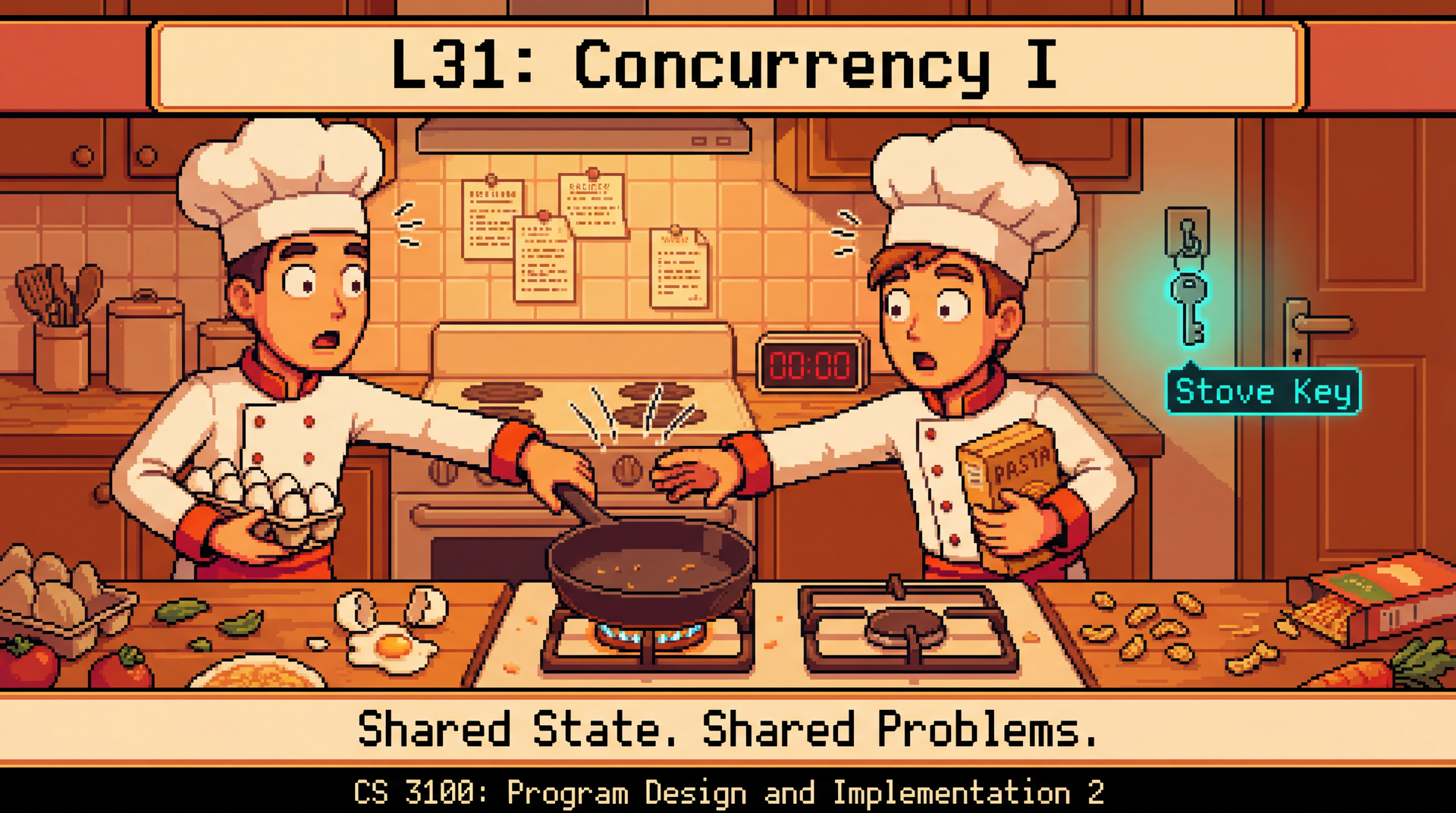
50 Devices, 3 Users, 1 Hub SceneItAll's hub manages 50 smart devices — lights, fans, shades, thermostats — across a whole house.
Three family members walk in and activate scenes simultaneously from different rooms:
User Scene Devices Sequential time Alice "Evening" 15 devices (dim lights, close shades) ~5 sec Bob "Movie Night" 8 devices (lights off, shades closed) ~3 sec Carol "Study" 6 devices (desk lamp on, overhead dim) ~2 sec
Sequential: 10 seconds of delay — Alice waits, Bob waits longer, Carol waits longest.Concurrent: All three scenes activate within ~5 seconds.
Remember L29: "long handlers freeze the UI." Same problem — now the hub is the UI.
The hook: Students know SceneItAll well from L29/L30 and Labs 11-12. The motivating scenario is concrete: three people arrive home, tap their phones, and expect instant responses. Sequential processing means Carol waits 10 seconds for her desk lamp.
L29 callback: In L29 we said if an event handler takes too long, the whole UI freezes. The hub has the same problem — if it processes commands one at a time, every user waits for every other user.
Transition: This week we solve this problem in three steps...
The Concurrency Roadmap: This Week and GA1 Lecture Topic The question it answers L31 (today) Threads, shared state, synchronization, deadlock "Why does my GUI freeze when I load data?" L32 (Wed) Async programming, CompletableFuture, Platform.runLater() "How do I load data in the background and update my GUI when it's ready?" L33 (Thu) Event-driven architecture, consistency, resilience "What happens when the service I depend on is slow or down?"
GA1 connection: These concepts are the foundation for GA1's BackgroundTaskRunner — more in the Looking Ahead slide.
The three-lecture arc: L31 builds the mental model (threads, shared state, locks). L32 gives the practical tool (CompletableFuture, Platform.runLater). L33 zooms out to system-level coordination (events, consistency).
BackgroundTaskRunner: This is provided in the GA1 handout code. It wraps javafx.concurrent.Task with daemon threads and FX-thread callbacks. Students call BackgroundTaskRunner.run(() -> loadData(), data -> updateUI(data), ex -> showError(ex)). They don't write the threading code, but TAs will ask what happens under the hood during code walks.
GA1 connection: The concepts from this week directly address the "Handling asynchronous operations in a GUI context" learning outcome in GA1.
Transition: Before we dive in, let's clarify two terms people often confuse...
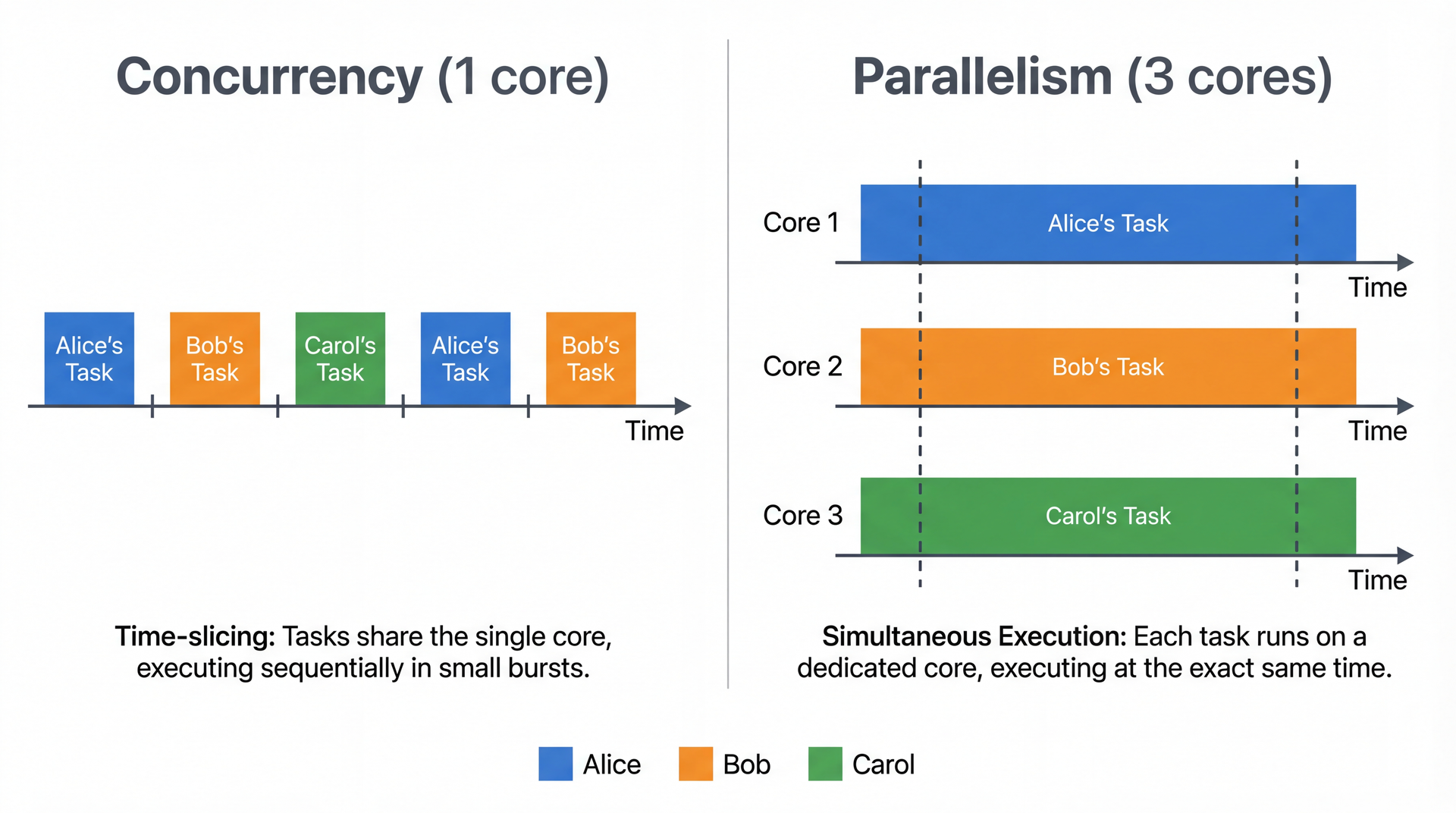
Concurrency Is Not Parallelism Concurrency = managing overlapping tasks (structure )
Parallelism = executing simultaneously (execution )
Your laptop has ~8 cores but hundreds of threads running right now. You get both : parallelism across cores, concurrency within each core. The bugs we'll see today apply to all of it.
Key distinction: Concurrency is about structure — designing your program to handle multiple things. Parallelism is about execution — actually running things at the same time on multiple cores.
The real world is row 3. A modern laptop has 8-16 cores, but the OS is running hundreds of threads. Each core time-slices between many threads. You get parallelism (multiple cores) AND concurrency (many threads per core). This is why concurrency bugs are so hard to reproduce — the exact interleaving depends on how the OS schedules threads across cores, which varies every time.
Analogy: A single chef (1 core) can manage 3 dishes concurrently by switching between them. Three chefs (3 cores) can work on all three dishes in parallel. A real restaurant kitchen (8 cores, 50 orders) has both — chefs switch between dishes AND work in parallel. If two chefs grab the same pan, you have a problem regardless.
Transition: Let's look at the mechanism Java gives us for concurrency...
A Thread Is an Independent Path of Execution
Every Java program has a main thread . You can create additional threads that run simultaneously. Threads share the heap (device state, scene definitions) but have their own stack (local variables).
Shared heap, separate stacks: This is the key mental model. The heap is where objects live — Device objects, Scene objects, the ConcurrentHashMap of registered devices. Every thread can see and modify these. The stack is local — each thread's method call frames, local variables, parameters. This is private to each thread.
The shared heap is what makes concurrency dangerous. If threads only used their own stacks, there would be no concurrency bugs. The problems start when two threads read and write the same heap objects.
Full imports for the code in this section (if students ask):
import java . util . concurrent . ExecutorService ; import java . util . concurrent . Executors ; import java . util . concurrent . Future ; import java . util . concurrent . TimeUnit ; import java . util . concurrent . TimeoutException ; import java . time . Duration ;
Transition: Let's see the three ways to create threads in Java...
Creating Threads in Java public class DeviceCommandSender extends Thread { private final DeviceCommand command ; public DeviceCommandSender ( DeviceCommand command ) { this . command = command ; } @Override public void run ( ) { DeviceResponse response = sendViaZigbee ( command ) ; log . info ( "Command sent: " + response . getStatus ( ) ) ; } } new DeviceCommandSender ( command ) . start ( ) ; Thread thread = new Thread ( new DeviceCommandTask ( command ) ) ; thread . start ( ) ; new Thread ( ( ) -> { DeviceResponse response = sendViaZigbee ( command ) ; log . info ( "Light dimmed: " + response . getStatus ( ) ) ; } ) . start ( ) ;
Prefer Runnable / lambda. Java has single inheritance — extending Thread means you can't extend anything else.
Option 3 (lambda) is what students will actually use. But they need to know Options 1-2 to read legacy code and understand what's happening under the hood.
Common misconception: Calling run() directly does NOT start a new thread — it executes on the current thread. You must call start(). This is a classic exam question.
But don't do any of these in production. Next slide: thread pools. Creating raw threads is like opening raw sockets — you can, but you almost never should.
Transition: But creating a thread per device command has problems...
Thread Pools: Don't Create a Thread Per Device public class HubCommandService { private final ExecutorService executor = Executors . newFixedThreadPool ( 10 ) ; public void activateScene ( Scene scene , Area room ) { for ( Device device : room . getDevices ( ) ) { executor . submit ( ( ) -> { DeviceState target = scene . getTargetState ( device ) ; DeviceResponse response = sendViaZigbee ( new DeviceCommand ( device , target ) ) ; device . updateStatus ( parseResponse ( response ) ) ; } ) ; } } public void shutdown ( ) { executor . shutdown ( ) ; } }
"Evening" scene sends 15 device commands. Pool processes 10 at once, 5 queue up. Like a kitchen with fixed staff — orders go on a queue, cooks grab the next one when they're free.
Why not one thread per command? Each thread costs 512KB-1MB of stack memory. For 15 commands, that's fine. But a hub with 200 devices, 10 users, and concurrent scene activations could spawn hundreds of threads — eating memory and causing excessive context switching.
Thread pool benefits:
Reuses threads (no creation/destruction overhead per task)
Bounds resource usage (at most 10 threads active)
Queues excess work automatically
Clean shutdown via executor.shutdown()
The kitchen analogy: A restaurant doesn't hire a new cook for every order. It has a fixed staff (the pool) and orders queue up on the pass. Same idea.
Full imports:
import java . util . concurrent . ExecutorService ; import java . util . concurrent . Executors ;
Transition: What if a device stops responding?
Interrupts: What If a Device Stops Responding? public class TimedCommandSender { private final ExecutorService executor = Executors . newSingleThreadExecutor ( ) ; public DeviceResponse sendWithTimeout ( DeviceCommand command , Duration timeout ) { Future < DeviceResponse > future = executor . submit ( ( ) -> sendViaZigbee ( command ) ) ; try { return future . get ( timeout . toMillis ( ) , TimeUnit . MILLISECONDS ) ; } catch ( TimeoutException e ) { future . cancel ( true ) ; return DeviceResponse . timeout ( "Device exceeded " + timeout . toSeconds ( ) + "s" ) ; } catch ( InterruptedException | ExecutionException e ) { future . cancel ( true ) ; return DeviceResponse . error ( "Command failed: " + e . getMessage ( ) ) ; } } } public void applyFirmwareChunks ( Device device , List < byte [ ] > chunks ) { for ( byte [ ] chunk : chunks ) { if ( Thread . currentThread ( ) . isInterrupted ( ) ) { return ; } device . writeChunk ( chunk ) ; } }
Interrupts are cooperative — cancel(true) sets the interrupt flag and interrupts blocking calls (like Thread.sleep() or I/O), but the worker must check it or handle the exception. Thread.stop() was deprecated in 1997 — forcibly killing threads corrupts shared state.
The scenario: A smart bulb hangs during a firmware update. The command thread blocks on sendViaZigbee() forever. Without intervention, that thread is gone from the pool permanently.
What future.get(timeout, unit) can throw (three different situations):
TimeoutExceptionsendWithTimeout is fine; the worker may still be stuck in sendViaZigbee. future.cancel(true) asks that worker to stop; you return DeviceResponse.timeout(...) to the caller.InterruptedExceptioncalling thread was interrupted while blocked inside get (e.g. shutdown, higher-level cancellation). You must end the wait cooperatively: future.cancel(true), then Thread.currentThread().interrupt() so callers up the stack still see the interrupt, and return DeviceResponse.error(...) (or similar) instead of swallowing it silently.ExecutionExceptionsendViaZigbee is wrapped in ExecutionException; use getCause() for the real Throwable and fold its message into DeviceResponse.error(...). Cancel is unnecessary—the task already completed unsuccessfully. Disambiguation for students: InterruptedException on get means this thread (whoever called sendWithTimeout) was interrupted while waiting. That is different from the worker thread blocking in sendViaZigbee: after a timeout , cancel(true) tries to interrupt that worker so it can unwind cooperatively—the paragraph below is about that side.
cancel(true)Thread.interrupt() on the worker thread, which both sets the interrupt flag AND wakes threads blocked in interruptible operations (like Thread.sleep(), BlockingQueue.take(), I/O) by throwing InterruptedException. The thread can then clean up and exit.
Why not Thread.stop()? Imagine stopping a thread halfway through updating a device's firmware. The device is now in an unknown state — partially updated firmware. The method was deprecated in Java 1.1 (1997) because forcible termination corrupts shared state.
Full imports:
import java . util . concurrent . ExecutionException ; import java . util . concurrent . ExecutorService ; import java . util . concurrent . Executors ; import java . util . concurrent . Future ; import java . util . concurrent . TimeUnit ; import java . util . concurrent . TimeoutException ; import java . time . Duration ;
Transition: Now we know how to create and manage threads. But there's a problem lurking...
Two Users Activate Different Scenes at the Same Time
Alice activates "Evening" (lights to 30%, shades closed). Bob activates "Movie Night" (lights off, shades to 80%). Same room, same instant. This code handles it:
public class SceneService { public boolean activateScene ( Scene scene , Area room ) { for ( Device device : room . getDevices ( ) ) { DeviceState targetState = scene . getTargetState ( device ) ; if ( targetState != null ) { device . setState ( targetState ) ; } } return true ; } }
Looks correct. What could go wrong?
Pause here and ask students. The code is simple — iterate through devices, set each one's state. What could possibly go wrong? Let them think about it before showing the next slide.
Transition: Let's trace what happens when two threads run this simultaneously...
The Interleaving (1/3): Alice Goes First
Alice reads the light at 100%, sets it to 30%. So far so good...
Pause here. "Nothing wrong yet. Alice reads 100%, sets 30%. Normal. What happens if Bob arrives right now?"
The Interleaving (2/3): Bob Reads Stale Data
Bob reads 100% — not Alice's 30%. His write overwrites hers. The light is now 0%.
This is the key moment. Bob read the light's brightness before Alice's write was visible to him (or between Alice's reads of different devices). His setBrightness(0) overwrites Alice's setBrightness(30). Alice's change to the light is silently lost.
"And the same thing is about to happen with the shades..."
The Interleaving (3/3): Nobody Got What They Wanted
Light = 0% (Bob wins). Shades = 80% (Bob wins). Both got true. Neither scene actually applied.
The scary part: Both methods return true. No exception. No crash. The room is silently in a mixed state. Alice thinks "Evening" is active. Bob thinks "Movie Night" is active. Neither is correct.
Key question to ask: "How would you even know this happened? No error was thrown. The only way to discover it is to look at the room and notice the lights and shades don't match any scene."
Connect to L12: In L12 (Domain Modeling) we discussed competing actions on shared domain objects. That was a modeling challenge. Here's the technical manifestation — even with a correct domain model, concurrent access corrupts state.
Transition: This has a name...
Race Conditions: When Correctness Depends on Luck A race condition occurs when the program's behavior depends on the relative timing of operations, which is unpredictable. The core issue: operations that need to be atomic (indivisible — no other thread can see them mid-execution) are actually multiple steps that can be interleaved.
Common patterns:
Pattern Example Why it's dangerous Check-then-act if (!scenes.containsKey(name)) scenes.put(name, scene)Another thread puts first Read-modify-write deviceCount++Two threads read same value Compound action Read state + write new state across multiple devices Interleaving between reads and writes
"These bugs are timing-dependent — your tests pass 99 times, fail once, and you can't reproduce it."
Why race conditions are terrifying:
They don't throw exceptions
They don't crash the program
They produce silently wrong results
They depend on timing, so they might never appear in testing
They appear in production under load, when timing changes
The check-then-act pattern is extremely common. Students will write if (!map.containsKey(key)) map.put(key, value) and think it's safe. It's not — another thread can insert between the check and the put.
Note: Check-then-act and compound action are named here as a taxonomy. Students haven't seen code for these yet — read-modify-write is the one we'll drill next with deviceCount++. Check-then-act gets its fix on the concurrent collections slide (putIfAbsent).
Transition: Let's look at the simplest possible race condition...
You Can't Even Trust deviceCount++ (1/2)
deviceCount++ is three operations : read, add, write. Two threads registering devices simultaneously:
Both threads read 0. Both compute 1. What happens when they write?
Pause here. "Both threads read the same value — 0. Both independently add 1. What value does each one write?" Students will say "1." "And what should the final value be?" "2." "But both are about to write 1..."
You Can't Even Trust deviceCount++ (2/2)
Lost update: Thread A writes 1. Thread B writes 1 — overwrites A's result with the same stale computation. One increment is silently lost. If you can't trust deviceCount++, how do you trust anything?
This is the "aha" moment. Students think deviceCount++ is a single operation because it's a single line of code. It's not — the JVM compiles it into read, add, write. Two threads can interleave between any of those steps.
Expected result: 2 (two devices registered). Actual result: 1 (one registration lost). No error, no exception — just silently wrong.
Transition: And it gets worse...
The Java Memory Model: It Gets Worse
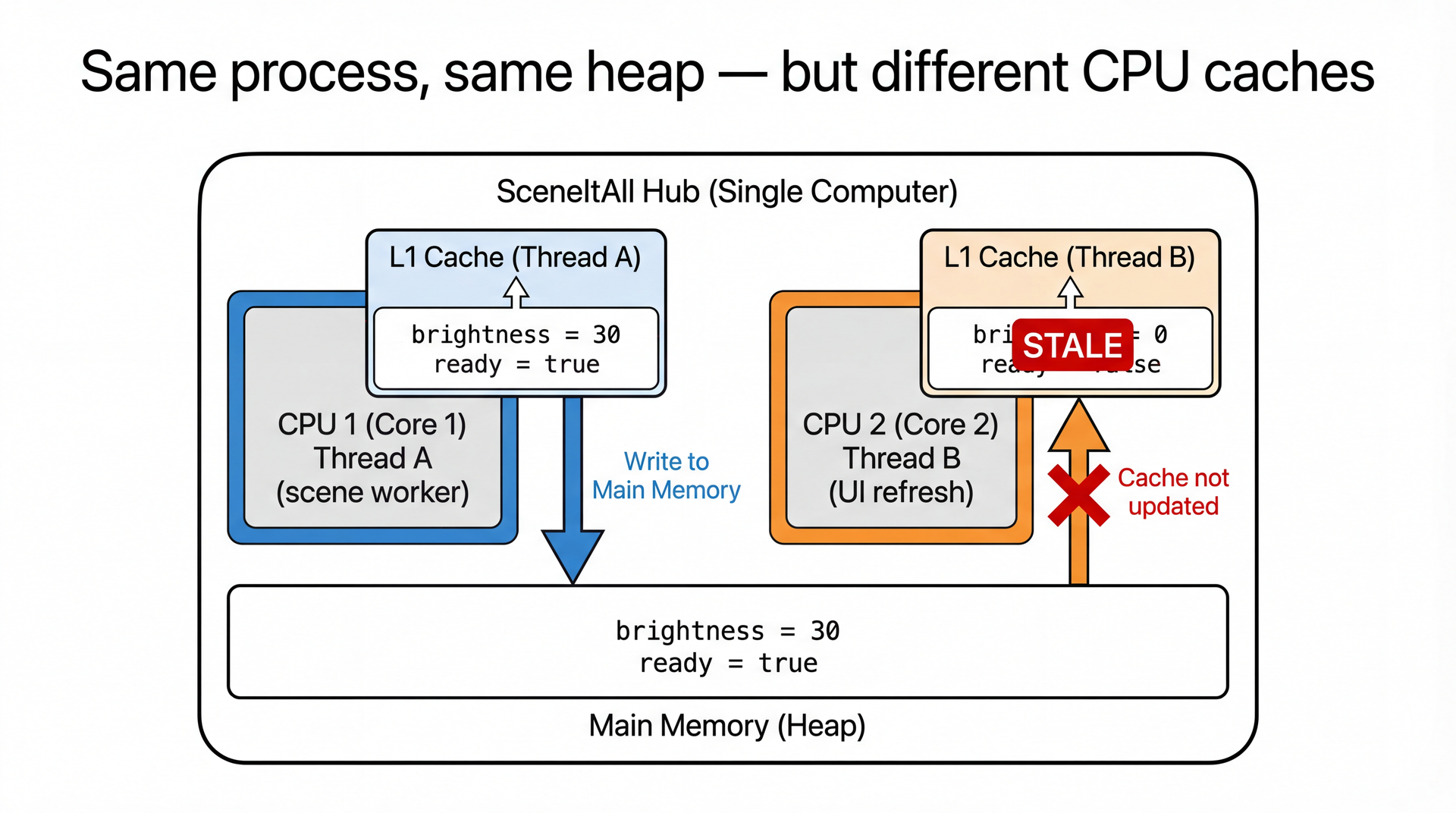
Beyond interleaving, there's a visibility problem. Modern CPUs have caches — writes by one thread may not be visible to another thread, even in the same process.
Thread A writes brightness = 30. Thread B reads brightness — and gets 0. Same object, same heap. Different CPU caches.
This is counterintuitive. Students expect that if Thread A writes brightness = 30, Thread B will eventually see 30. But the JVM and CPU are allowed to cache writes, reorder instructions, and delay flushing to main memory — all for performance.
Spend time on the diagram. Core 1 has the updated values in its cache. Core 2's cache is stale. Main memory might or might not be updated yet — the JVM doesn't guarantee when writes flush. This is a real hardware effect, not a JVM quirk.
Transition: Let's see what this looks like in code...
Visibility in Code public class DeviceStateHolder { private boolean ready = false ; private int brightness = 0 ; public void updateBrightness ( ) { brightness = 30 ; ready = true ; } public void checkBrightness ( ) { while ( ! ready ) { } System . out . println ( brightness ) ; } } Three things that can go wrong without synchronization:
Thread B never sees ready = true — spins forever (write cached, never flushed)
Thread B sees ready = true but brightness = 0 — CPU may execute the write to ready before the write to brightness reaches memory
Thread B sees both correctly — works today, breaks tomorrow on different hardware
The fix: synchronized, volatile, or atomic classes — all establish a "happens-before" relationship that guarantees visibility.
Caution: volatile fixes visibility but does NOT fix compound operations — volatile int count; count++ is still a race condition.
All three outcomes are legal under the Java Memory Model without synchronization. The JVM is free to reorder writes and delay cache flushes for performance. This is why "it works on my machine" is so dangerous with concurrency — different hardware has different cache behavior.
Option 3 is the scariest — the code appears to work during development and testing, then breaks in production on a machine with a different CPU architecture or more cores.
Transition: So how do we fix all of this?
synchronized: One Scene at a Time public class SceneService { public synchronized boolean activateScene ( Scene scene , Area room ) { for ( Device d : room . getDevices ( ) ) { DeviceState target = scene . getTargetState ( d ) ; if ( target != null ) { d . setState ( target ) ; } } return true ; } }
Now the scene activation is atomic . The room goes "Evening" then "Movie Night", never a mix.
This is the fix for slide 9's bug. Adding synchronized to the method means the JVM acquires a lock (monitor) on the SceneService instance before entering the method. If another thread already holds the lock, the caller blocks until it's released.
Bob's thread waits. It doesn't crash, doesn't get an exception — it simply waits until Alice's scene finishes applying. Then Bob's scene applies cleanly. The room transitions from "Evening" to "Movie Night" in sequence, never a mix.
Transition: What exactly does synchronized guarantee?
What synchronized Actually Does synchronized provides two guarantees:
1. Mutual Exclusion
Only one thread can execute the synchronized block at a time. Bob's scene activation waits until Alice's finishes.
Fixes the race condition from slide 9.
2. Visibility
When a thread releases a lock, all its writes are flushed to main memory. When another thread acquires the same lock, it sees all those writes.
Fixes the memory visibility problem from slide 12.
synchronized fixes both the interleaving problem and the caching problem. That's why it's the fundamental building block.
Two bugs, one fix. Students often think synchronized is only about mutual exclusion. The visibility guarantee is equally important — it's what ensures Thread B sees Thread A's brightness changes after acquiring the lock.
The "happens-before" relationship: Releasing a lock "happens-before" acquiring the same lock. This means all writes before the release are visible after the acquire. This is formalized in the Java Language Specification.
Transition: But locking the whole service is too coarse...
Fine-Grained Locking: Don't Lock the Whole House public class SceneService { private final Map < String , Object > roomLocks = new ConcurrentHashMap < > ( ) ; public boolean activateScene ( Scene scene , Area room ) { Object roomLock = roomLocks . computeIfAbsent ( room . getId ( ) , k -> new Object ( ) ) ; synchronized ( roomLock ) { for ( Device device : room . getDevices ( ) ) { DeviceState targetState = scene . getTargetState ( device ) ; if ( targetState != null ) { device . setState ( targetState ) ; } } return true ; } } }
Alice activates "Evening" in the living room , Bob activates "Movie Night" in the bedroom — both proceed in parallel because they lock different rooms .
Use dedicated lock objects: synchronized(roomLock) not synchronized(this).
Why fine-grained? With synchronized on the whole method, Alice's living room scene blocks Bob's bedroom scene — even though they don't share any devices. Fine-grained locking (one lock per room) lets independent operations proceed in parallel.
Dedicated lock objects: Using synchronized(this) exposes the lock to external code — anyone with a reference to the object can synchronize on it, potentially causing unexpected blocking. A private lock object keeps locking internal.
Tradeoff: More locks = more parallelism but more complexity. Fewer locks = simpler but less parallelism. For SceneItAll, per-room locking is a good balance.
Transition: Java also provides ready-made thread-safe collections...
Concurrent Collections and AtomicInteger public class DeviceRegistry { private final ConcurrentHashMap < String , Device > devices = new ConcurrentHashMap < > ( ) ; private final AtomicInteger deviceCount = new AtomicInteger ( 0 ) ; public void registerDevice ( Device device ) { Device existing = devices . putIfAbsent ( device . getId ( ) , device ) ; if ( existing == null ) { deviceCount . incrementAndGet ( ) ; } } public int getDeviceCount ( ) { return deviceCount . get ( ) ; } } Collection Use case ConcurrentHashMapDevice registry — many readers, occasional writers AtomicIntegerCounters — deviceCount, commandsSent BlockingQueueCommand queue — producers (users) and consumers (workers) CopyOnWriteArrayListListener lists — read-heavy, rarely modified
Use these — the experts already debugged them.
This fixes the slide 11 bug. AtomicInteger.incrementAndGet() uses hardware-level compare-and-swap (CAS) to atomically read, add, and write. No lock needed, no lost updates.
putIfAbsentif (!map.containsKey(key)) map.put(key, value). One atomic operation instead of two separate ones.
Full imports:
import java . util . concurrent . ConcurrentHashMap ; import java . util . concurrent . atomic . AtomicInteger ; import java . util . concurrent . BlockingQueue ; import java . util . concurrent . CopyOnWriteArrayList ; Design principle: Don't roll your own thread-safe data structures. Use java.util.concurrent. Doug Lea and team spent years getting these right.
Transition: Synchronization solves race conditions, but it introduces a new problem...
Deadlock: When Everyone Waits Forever (1/2)
Two methods, opposite lock ordering. What happens when they run simultaneously?
public class SmartHomeService { public void activateScene ( Scene scene , Area room ) { synchronized ( room ) { for ( Device device : room . getDevices ( ) ) { synchronized ( device ) { device . setState ( scene . getTargetState ( device ) ) ; } } } } public void firmwareUpdate ( Device device , Area room , FirmwarePackage firmware ) { synchronized ( device ) { synchronized ( room ) { device . applyFirmware ( firmware ) ; room . updateDeviceManifest ( device ) ; } } } }
Two threads. Opposite lock orders. What happens next?
Point out the lock ordering. activateScene goes room → device. firmwareUpdate goes device → room. Ask students: "What happens if both run at the same time?"
Let them think. Some will see it. Then advance to the next slide.
Deadlock: When Everyone Waits Forever (2/2)
Both threads are stuck. The living room lights are frozen at 100%. Forever. Unlike a race condition (wrong results), deadlock produces no results . No error. No exception. The system just hangs.
Walk through the diagram step by step:
Thread A gets the room lock. Fine.
Thread B gets the device lock. Also fine.
Thread A tries to get the device lock — blocked, B has it.
Thread B tries to get the room lock — blocked, A has it.
Neither can release what they hold because they're both stuck waiting.
"Forever" is literal. The user taps "activate scene" and nothing happens. No error message. No log entry. Just silence. That's worse than a crash — at least a crash tells you something went wrong.
Transition: How do we prevent this?
Preventing Deadlock: Break the Cycle
Deadlock happens because of a circular wait : Thread A holds lock X and waits for lock Y, while Thread B holds lock Y and waits for lock X. Neither can proceed.
The simplest fix: always acquire locks in the same order.
Before (deadlock possible)
synchronized ( room ) { synchronized ( device ) { . . . } } synchronized ( device ) { synchronized ( room ) { . . . } } Different order → circular wait → deadlock
After (deadlock impossible)
synchronized ( room ) { synchronized ( device ) { . . . } } synchronized ( room ) { synchronized ( device ) { . . . } } Same order → no cycle → no deadlock
Consistent lock ordering is a convention, not a mechanism. The language doesn't enforce it — you enforce it through code review and documentation. "In this codebase, we always lock rooms before devices." Simple rule, prevents an entire class of bugs.
If students ask about other approaches: You can also use tryLock() with a timeout (back off if you can't get the lock), or reduce lock scope (release one lock before acquiring another). But consistent ordering is the go-to strategy — it's the simplest and most reliable.
Transition: Before we wrap up, let's talk about why these bugs are so hard to catch...
Concurrency Bugs Are the Hardest Bugs Why they're hard:
Timing-dependent — the bug only appears under specific interleavingsNon-reproducible — run the same test twice, get different resultsLoad-dependent — works fine with 5 devices, glitches with 50
The family's lights work fine with 5 devices. Add a 6th and scenes start glitching. Add a firmware update and the hub deadlocks. These bugs grow with scale.
Detection strategies:
Code review — look for shared mutable state accessed without synchronizationStatic analysis — tools like SpotBugs detect common patternsStress testing — activate 10 scenes simultaneously, verify device statesDesign — prefer immutable objects, concurrent collections, minimal shared state
"The best concurrency bug is the one you avoid by not sharing mutable state."
This is a mindset slide. The takeaway isn't "memorize these four strategies" — it's "concurrency bugs are qualitatively different from the bugs you've encountered so far."
Normal bugs are deterministic — same input, same output, every time. You can set a breakpoint and step through.
Concurrency bugs are nondeterministic — they depend on scheduling, CPU speed, cache behavior, load, and phase of the moon. Your test might pass 999 times and fail once. Adding a print statement changes the timing enough to make the bug disappear (a "Heisenbug").
The best defense is design: don't share mutable state in the first place. Use immutable records, concurrent collections, and message passing. When you must share state, use synchronization.
Transition: Let's check your understanding...
Comprehension Check
Open Poll Everywhere and answer the three questions.
Quick verbal check before the poll (LO1): "What's the difference between calling thread.run() and thread.start()?" (run() executes on the current thread; start() creates a new thread). This is the most common misconception from Arc 2.
Poll Q1: Two threads call registerDevice() simultaneously. The method does if (!devices.containsKey(id)) devices.put(id, device); deviceCount++. Neither method is synchronized. What can happen?
A. One device is registered, the other is rejected cleanly
B. Both devices are registered but deviceCount only increments once [CORRECT — lost update]
C. ConcurrentModificationException
D. Both devices and both increments succeed correctly
Discussion: B is the scary answer — the check-then-act on containsKey/put and the read-modify-write on deviceCount++ are both race conditions. Students must transfer what they learned from the scene activation and deviceCount++ examples to a new scenario.
Poll Q2: Thread A is executing synchronized(livingRoomLock) { ... }. Thread B tries to execute synchronized(livingRoomLock) { ... } on the same lock. Thread C tries to execute synchronized(bedroomLock) { ... }. What happens?
A. B and C both block until A finishes
B. B blocks; C executes immediately (different lock) [CORRECT]
C. All three execute — synchronized doesn't actually block
D. B throws an exception
Discussion: This is the fine-grained locking payoff. Different rooms use different locks, so they can be controlled in parallel.
Poll Q3: activateScene() locks room then device. firmwareUpdate() locks device then room. Which prevents deadlock?
A. Both always lock room first, then device [CORRECT]
B. Remove synchronized from both methods
C. Use one global lock for the entire hub [Works but kills parallelism]
D. Both A and C prevent deadlock, but A is better [CORRECT]
Discussion: D is the most complete answer. A single global lock prevents deadlock but serializes everything — no parallelism between rooms. Consistent ordering (A) preserves fine-grained parallelism while preventing deadlock.
Key Takeaways Threads enable concurrency — multiple paths of execution sharing the same heap. Use thread pools, not raw threads.Shared mutable state is dangerous. Race conditions produce silently wrong results. deviceCount++ is not atomic.synchronized provides atomicity + visibility.Use concurrent collections — ConcurrentHashMap, AtomicInteger, BlockingQueue. The experts already debugged them.Fine-grained locking increases parallelism — lock per room, not per hub. But more locks = more deadlock risk.Prevent deadlock with consistent lock ordering. Always acquire locks in the same order across all code paths.Recap the arc: We started with the motivating problem (50 devices, 3 users, 1 hub). We learned how threads work (creating, pooling, interrupting). We saw what goes wrong (race conditions, lost updates, stale data). We fixed it (synchronized, concurrent collections). And we saw the new problem synchronization creates (deadlock).
Connection to GA1: Students won't write raw thread code in GA1 — they'll use BackgroundTaskRunner. But they need to understand what it does internally, and they need to recognize when shared state is being accessed concurrently.
Transition: What's coming next...
Looking Ahead L32 (Wednesday): Asynchronous Programming
Activating "Evening" means sending commands to 15 devices — each one a 200ms network call
Threads are expensive for all that waiting
CompletableFuture and allOf for fan-out patternsPlatform.runLater() for updating your GA1 GUI from a background thread Lab 12 runs Monday — GUI pair programming with Scene Builder
Your group project:
GA1 (due Apr 9): BackgroundTaskRunner wraps the threading concepts from today
Your TA will ask what happens under the hood — be ready to explain threads, shared state, and synchronization
Today: why shared state is dangerous and how locks protect it. Wednesday: how to avoid blocking threads entirely.
L32 preview: Today we learned that threads can run work concurrently. But sending 15 device commands means 15 threads sitting around waiting for Zigbee responses. Each thread costs memory. L32 introduces async programming — instead of blocking a thread waiting for a response, you register a callback and move on. CompletableFuture makes this composable.
Lab 12: Students build SceneItAll GUI components using Scene Builder and MVVM patterns from L29-30. This is pair programming — they'll practice binding, property listeners, and FXML layout.
GA1 connection: Next slide dives into the specifics.
Transition: Let's connect this to your group project...
GA1: Where This Shows Up in CookYourBooks Every core feature has one async operation that uses BackgroundTaskRunner:
Feature Async Operation What today's lecture explains Library View refresh() loads collectionsBackground thread does I/O; FX thread updates ObservableList Recipe Editor save() persists editsSave button disabled while saving — what if two saves race? Import OCR extraction from image State machine (idle → processing → review) — each transition is a thread handoff Search & Filter Debounced search query What if a slow search returns after a newer one? (race condition!)
BackgroundTaskRunner . run ( ( ) -> librarianService . listCollections ( ) , collections -> { } , error -> { } ) ;
Your TA will ask: what thread does the callable run on? What thread do the callbacks run on? What breaks if you skip Platform.runLater()?
This is the GA1 payoff slide. Students don't write raw thread code in GA1 — they use BackgroundTaskRunner. But they must understand what it does internally.
Under the hood: BackgroundTaskRunner.run() creates a javafx.concurrent.Task, runs it on a daemon thread, and uses Platform.runLater() to call onSuccess/onFailure on the FX thread. The callable (first arg) runs on the background thread. The callbacks (second and third args) run on the FX thread.
Why this matters for each feature:
Library View: refresh() fetches collections on a background thread. The loading property is true while fetching. If you update ObservableList from the background thread, JavaFX throws IllegalStateException.Recipe Editor: save() runs persistence on a background thread. While saving, edit controls are disabled. If the save fails, you stay in edit mode with dirty state preserved — the user doesn't lose their work.Import: The OCR call can take seconds. The state machine (idle → processing → review/error) maps directly to thread handoffs — start OCR on background thread, transition to review/error on FX thread when it completes.Search & Filter: Debounced search has a subtle race condition: if the user types "cake", a search fires, then they type "cookies" and a second search fires — the first search might return after the second. Blindly accepting results shows "cake" results for "cookies". This is exactly the kind of concurrency bug we discussed today. TA code walk questions:
What thread does the callable run on? (Background/daemon thread)
What thread do the callbacks run on? (FX Application Thread, via Platform.runLater())
What would break if the callbacks ran on the background thread? (IllegalStateException — can't modify JavaFX nodes from non-FX thread)
How does BackgroundTaskRunner relate to synchronized? (Different mechanism, same goal — ensuring shared state is accessed safely. BackgroundTaskRunner separates work by thread rather than locking shared state.)
That's it for today. Questions?