Lecture overview:
Total time: ~55 minutesPrerequisites: L31 (Threads, Synchronization, Deadlock), L29/L30 (JavaFX, MVVM, event loop)Connects to: L33 (Event-Driven Architecture), GA1 (BackgroundTaskRunner, Platform.runLater) Structure (~27 slides):
Arc 0: L31 Bridge (~3 min)
Arc 1: The Problem with Threads for I/O (~8 min)
Arc 2: The Async Model + Restaurant Analogy (~10 min)
Arc 3: Futures and CompletableFuture (~18 min) — progressive reveal pipeline
Arc 4: Async Safety (~12 min) — ordering bugs, thread confinement, Platform.runLater
Arc 5: Wrap-up (~5 min)
Running example: SceneItAll — activating "Evening" scene sends commands to 15 devices.
Transition: Let's start with the learning objectives...
CS 3100: Program Design and Implementation II Lecture 32: Concurrency II — Asynchronous Programming
©2026 Jonathan Bell, CC-BY-SA
Context from L31: Students learned threads, shared mutable state, race conditions, synchronized, concurrent collections, and deadlock. Bell ended L31 with: "Wednesday we'll look at a different programming model — how we minimize mutable state and minimize having to worry about locks."
Today picks up that promise directly.
Learning Objectives
After this lecture, you will be able to:
Compare threads and asynchronous programming for I/O-bound work Understand blocking vs non-blocking operations Use CompletableFuture to compose asynchronous workflows Evaluate the safety of asynchronous code (ordering, errors, shared state) Use Platform.runLater() to safely update GUIs from async callbacks LO5 is new — elevated from a sub-topic to a first-class objective because every GA1 feature needs it. Students will use BackgroundTaskRunner (which wraps Platform.runLater()) and TAs will ask them to explain what it does internally.
Time allocation:
LO1-2: Arcs 0-2 (~18 min)
LO3: Arc 3 (~18 min)
LO4-5: Arc 4 (~12 min)
Wrap-up: ~5 min
Transition: Let's start by remembering what hurt about threads on Monday...
Threads Gave Us Concurrency — at a Price On Monday we learned to orchestrate threads. It was painful:
Shared state → race conditions (two scenes interleave, room ends up in a mix of both)Locks → deadlocks (two threads each hold what the other needs — frozen forever)Every thread → costs memory, OS resources, and context-switch overheadTesting → timing-dependent bugs that pass 99 times, fail once, can't reproduce
But here's the thing: most of what our software needs concurrency for isn't computing — it's waiting. Waiting for a device to respond. Waiting for a file to load. Waiting for a network call to return. We're paying the full cost of threads just to sit idle.
What if we could have concurrency without threads fighting over shared state? What if one thread could manage many concurrent operations by dispatching work and getting notified when results arrive?
This slide does two things: (1) reminds students of the pain from L31, and (2) reframes the problem. The pain wasn't that threads exist — it's that we used threads for the wrong kind of work. Computing needs threads. Waiting doesn't.
The key reframe: "Most concurrency needs are about I/O, not CPU. For I/O, there's a simpler model that avoids shared state entirely."
Bell's closing from L31: "Wednesday we'll look at a different programming model — how we minimize mutable state and minimize having to worry about locks." This slide delivers on that promise.
Transition: Let's see a concrete example of what "mostly waiting" looks like...
Activating "Evening" Means Talking to 15 Devices — and Waiting 14 Times "Evening" scene: dim 5 lights, close 4 shades, turn off 3 fans, set 3 color temperatures. Each command is a network call to a device over Zigbee — ~200ms round trip .
Approach Threads Time Problem Sequential 1 15 × 200ms = 3 seconds UI frozen the entire time Thread per device 15 ~200ms 14 threads doing nothing but waiting
Sequential is too slow. Thread-per-device works, but 14 of those threads are just... sitting there. Doing nothing. Waiting for a response.
Connect to L29: "Remember the event loop from L29? If your button handler takes 3 seconds, the entire UI freezes. Same problem here — 15 sequential Zigbee commands = 3 seconds of frozen UI."
The key insight: The threads aren't computing. They're waiting . That's an expensive way to wait.
Transition: How expensive? Let's put it in perspective...
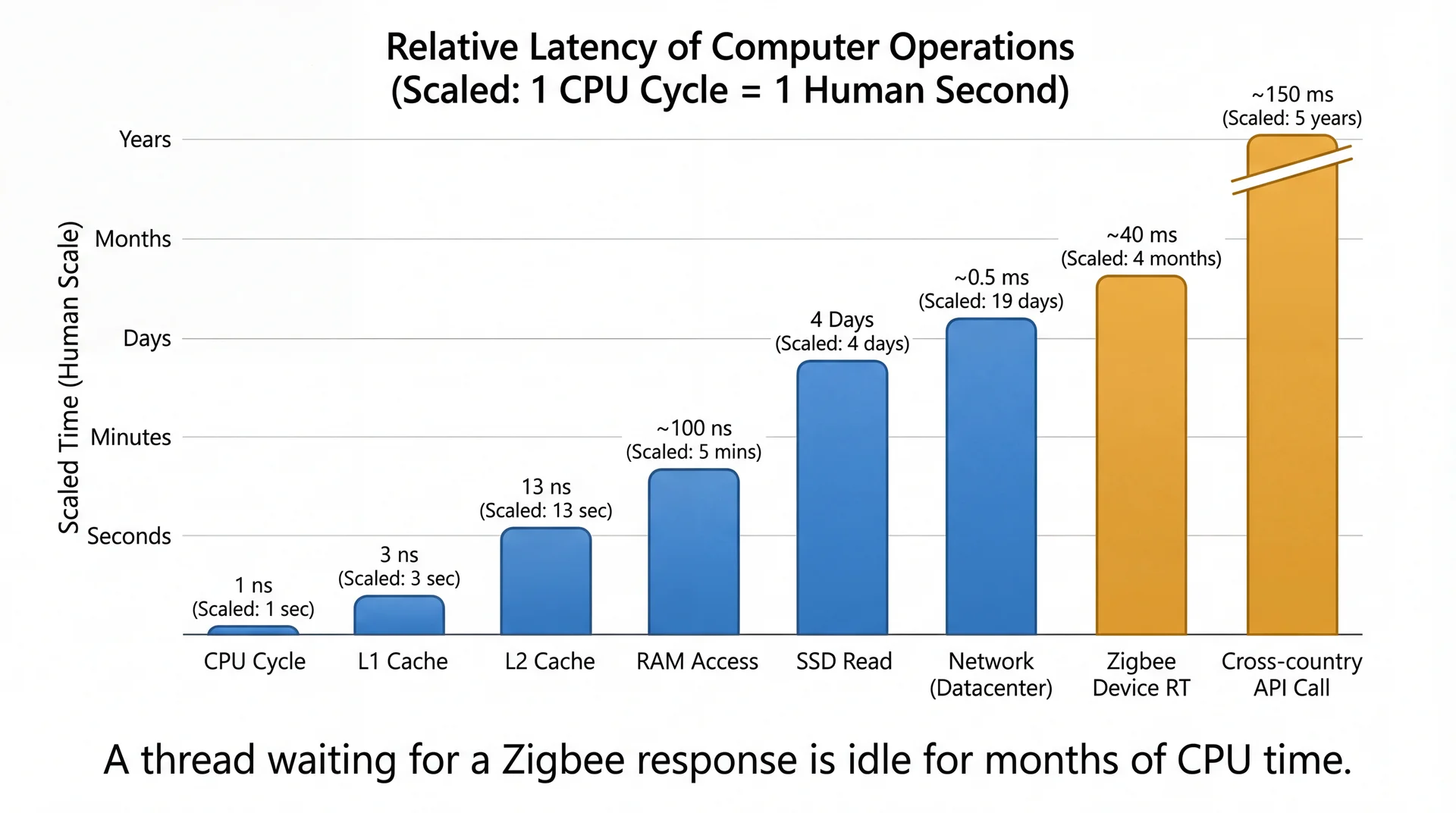
I/O Takes an Eternity (from the CPU's Perspective) This should be a visceral "wow" moment. Let students absorb the scale. A blocking thread sending a brightness command sits idle for months in CPU time. And we're dedicating an entire thread — with its stack memory, OS resources, context-switch overhead — to do nothing.
The employee analogy: "Imagine hiring an employee, giving them a desk and a computer, and their entire job is to sit there and wait for a phone call. When the call comes, they write down one number and go back to waiting. Would you hire 15 of those employees?"
Transition: There must be a better way to wait. And you already understand the mental model...
Blocking Wastes Threads; Non-Blocking Frees Them
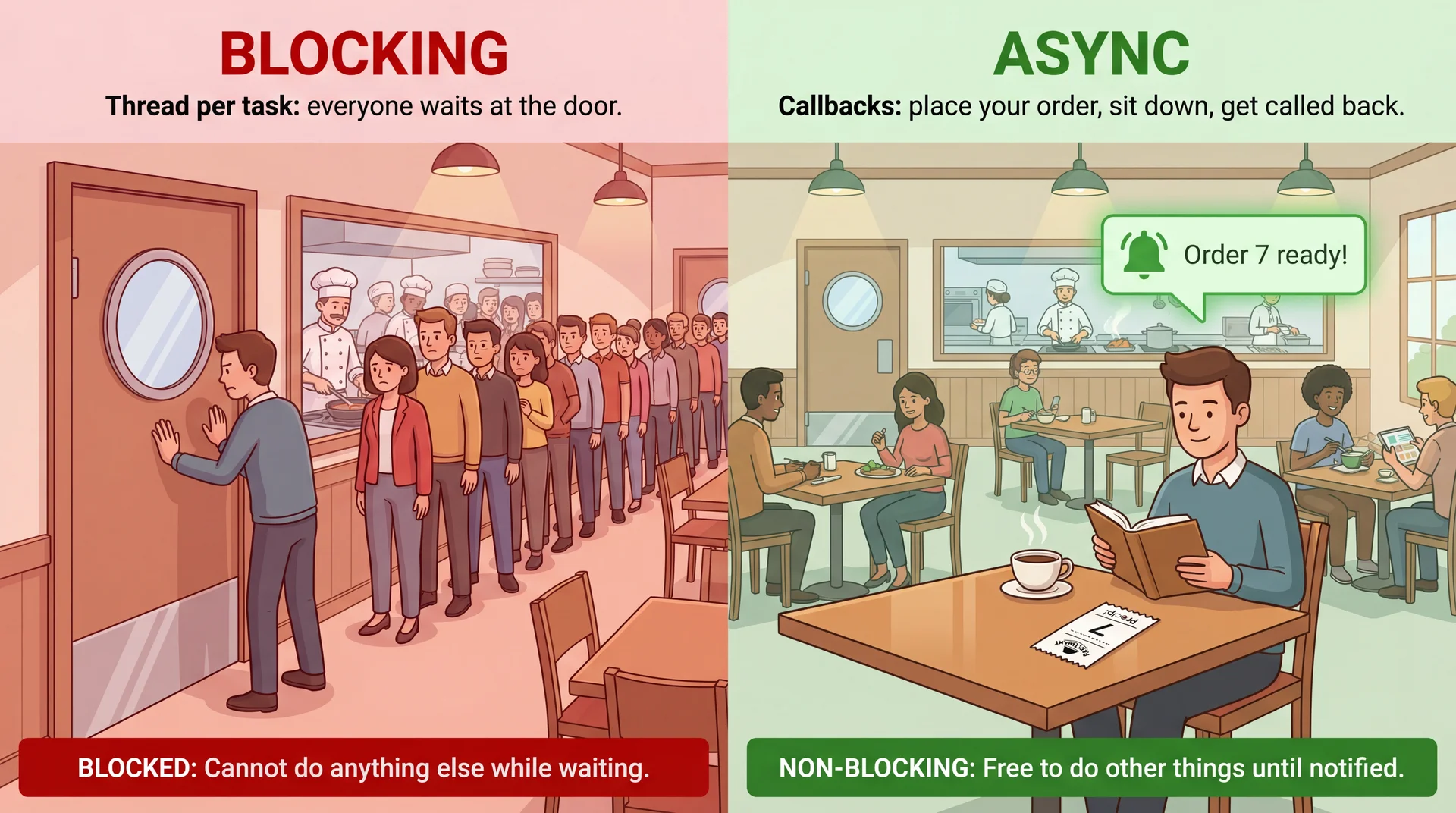
A blocking operation halts the thread until it completes. A non-blocking operation returns immediately.
Walk through both halves. Top: two threads, each blocking for 200ms. Bottom: one thread dispatches both commands immediately, handles callbacks when they arrive.
The key visual: In the top half, Thread 1 and Thread 2 are both doing nothing — just waiting. In the bottom half, one thread dispatches both and is free immediately. The savings multiply as you add more devices.
Transition: Here's an analogy that makes this concrete...
The Restaurant Analogy: Don't Wait at the Kitchen Door This analogy maps precisely to the API:
Restaurant Java Place an order executor.submit(() -> sendCommand(...))Get a receipt with a number Future<DeviceAck>Stand at the kitchen door future.get() — blocks!Sit down and read your book Do other work while waiting Kitchen calls your number Callback — thenAccept()
The insight of CompletableFuture: what if the kitchen texts you when the food is ready, instead of making you check?
Transition: Let's see this in code...
One Line of Code, Two Completely Different Behaviors Blocking
DeviceAck ack = zigbee . sendCommand ( light , new BrightnessCommand ( 30 ) ) ; updateStatus ( light , ack ) ; Standing at the kitchen door.
Non-blocking (async)
zigbee . sendCommandAsync ( light , new BrightnessCommand ( 30 ) ) . thenAccept ( ack -> { updateStatus ( light , ack ) ; } ) ; Sitting down with your receipt.
Walk through the LEFT side first. The thread calls sendCommand, blocks for 200ms, can't do anything. Then show the RIGHT side: sendCommandAsync returns immediately. The thenAccept callback runs later when the ACK arrives. The thread is free to dispatch more commands.
Key question: "What does sendCommandAsync return?" It returns a Future — a receipt. Let's look at what that means...
Transition: One command was easy. But "Evening" has 15 devices...
Async Scales: Dispatch Many, Wait for All
With blocking, 15 devices = 15 idle threads. With async, one thread dispatches all 15:
List < Future < DeviceAck > > receipts = new ArrayList < > ( ) ; for ( DeviceCommand cmd : scene . getCommands ( ) ) { receipts . add ( zigbee . sendCommandAsync ( cmd ) ) ; }
15 commands dispatched in microseconds. All 15 devices processing in parallel. One thread. Zero idle waiting. We'll see how to collect all the results with CompletableFuture.allOf() later.
This is the "multiply by 15" moment. The code slide showed one async call. This slide shows the pattern at scale — loop through all commands, dispatch each one async, and the thread is free immediately.
Preview: "We dispatched them all. But how do we know when they're all done? How do we collect the results? That's where CompletableFuture comes in — later this lecture."
Transition: So when should you reach for each model?
Use Threads When the CPU Is Busy; Async When It's Idle Threads Async Best for CPU-bound work (computing) I/O-bound work (waiting) Resource usage Higher (thread per task) Lower (callbacks) Programming model Familiar (sequential code) Less familiar (callbacks/futures) SceneItAll Computing optimal scene settings Sending Zigbee device commands In GA1 Running business logic Loading data, BackgroundTaskRunner
Use threads when the CPU is busy. Use async when the CPU is idle and waiting. And the async model isn't even new to you...
The GA1 row is important. Students' CookYourBooks features need async for loading recipes, running OCR imports, searching. BackgroundTaskRunner wraps this — we'll see it at the end of the lecture.
Transition: You've actually seen this model before — since L29...
You Already Know This Model — From L29's Event Loop
Remember the event loop from L29 ?
while ( applicationIsRunning ) { Event event = waitForNextEvent ( ) ; EventHandler handler = findHandler ( event ) ; handler . handle ( event ) ; }
Async I/O uses the same model — but the events are I/O completions instead of button clicks:
while ( running ) { IOEvent event = waitForIOCompletion ( ) ; Callback callback = findCallback ( event ) ; callback . run ( ) ; }
You already understand this model. Now we're applying it to I/O instead of UI.
This connection is powerful. Students have been using the event loop since L29. Button clicks and device ACKs are structurally identical — both are "something happened, call the registered handler."
Java's approach: Java's CompletableFuture uses thread pools internally rather than a pure single-threaded event loop. But the programming model is the same: don't block, register a callback, get notified.
Transition: Now let's look at the Java API for this...
Future: The Basic Receipt
A Future<T> is a placeholder for a result that will be available later — the receipt from our restaurant:
ExecutorService executor = Executors . newFixedThreadPool ( 10 ) ; Future < SceneSettings > receipt = executor . submit ( ( ) -> settingsEngine . computeOptimal ( scene , sensors ) ) ; SceneSettings settings = receipt . get ( ) ;
But get() blocks. You're back to standing at the kitchen door. What if the kitchen could call your number instead?
The analogy annotations are the key teaching tool:
executor.submit(...) = place the orderFuture<SceneSettings> = your receiptreceipt.get() = go to the counter and wait The problem: get() blocks the calling thread. If you call get() on the JavaFX Application Thread, you freeze the UI — exactly the L29 problem.
Bridge to CompletableFuture: "What if the kitchen could text you when the food is ready?"
Transition: That's exactly what CompletableFuture does...
Future Blocks; CompletableFuture Calls You Back Future<T> (2004, Java 5)
The basic receipt.
T get() — wait for result (blocks!)boolean isDone() — is it ready yet?boolean cancel(boolean) — cancel the order You have to check or wait.
CompletableFuture<T> (2014, Java 8)
The receipt that calls your number.
CF<U> thenApply(fn) — transform resultCF<Void> thenAccept(fn) — use result, return nothingCF<U> thenCompose(fn) — chain another async opCF<V> thenCombine(other, fn) — join two resultsCF<Void> allOf(...) — wait for allCF<T> exceptionally(fn) — handle errors The kitchen calls you.
Future is the receipt. CompletableFuture is the receipt plus a way to say "when it's ready, do this next thing automatically."
Don't make students memorize this table. It's a reference. The important distinction is conceptual: Future makes you poll or block. CompletableFuture lets you register what should happen next.
Note: Students won't write CompletableFuture chains directly in GA1 — they use BackgroundTaskRunner which wraps javafx.concurrent.Task and Platform.runLater(). But they need to understand the concepts (async dispatch, callbacks, thread confinement) because TAs will ask them to explain what BackgroundTaskRunner does under the hood. The CompletableFuture API is the industry-standard version they'll encounter after this course.
If students ask about other languages — the same idea exists everywhere:
Year Language Concept 2004 Java 5 Future<T> — blocking get() only2011 C# 5.0 Task<T> + async/await keywords — compiler rewrites sequential-looking code into callbacks. First mainstream language with async/await.2012 JavaScript Promises (via libraries like Q, Bluebird) — .then() chains, same idea as thenApply 2014 Java 8 CompletableFuture<T> — Java catches up to C# and JS with composable futures2015 ECMAScript 2015 (ES6) Promise standardized in the language — .then(), .catch(), Promise.all()2017 ECMAScript 2017 (ES8) async/await — syntactic sugar over Promises, inspired by C#2021 Java 19 (preview) Virtual threads (Project Loom) — lightweight threads that make blocking cheap again, potentially reducing the need for CompletableFuture
The arc: Blocking futures (2004) → composable futures/promises (2011-2015) → async/await syntactic sugar (2011-2017) → virtual threads trying to make blocking OK again (2021+). Java arrived late to composable futures (2014, a decade after C#) and still doesn't have async/await syntax. If students have used JavaScript or Python, Promises and async/await will feel familiar — CompletableFuture is Java's version, just more verbose.
Transition: Let's see the simplest possible example...
CompletableFuture: The Kitchen Calls Your Number
The simplest CompletableFuture chain — one async operation, one callback:
CompletableFuture . supplyAsync ( ( ) -> settingsEngine . computeOptimal ( scene , sensors ) ) . thenAccept ( settings -> applyToDevices ( settings ) ) ; Restaurant Java Place the order supplyAsync(() -> ...)Kitchen calls your number thenAccept(result -> ...)You never stand at the door Thread is free immediately
This is the minimal mental model. One async operation, one callback. Students need to absorb this before seeing pipelines.
Key point: supplyAsync returns a CompletableFuture immediately. The lambda inside runs on a background thread. When it finishes, thenAccept runs with the result. The calling thread never blocks.
If students ask "which thread does thenAccept run on?" — by default, whichever thread completes the async operation. We'll see how to control this with Platform.runLater() later.
Transition: What if you need to do two async things in sequence?
thenCompose: Sequential Dependencies Without Blocking
thenCompose chains async operations that depend on each other:
sendCommandAsync ( light , new BrightnessCommand ( 30 ) ) . thenCompose ( ack -> updateHubStateAsync ( light , ack ) ) . thenAccept ( state -> log ( "Hub updated: " + state ) ) ;
Each step depends on the previous result, but no thread ever blocks. thenCompose = "when the first thing finishes, start the second thing."
Walk through the mermaid step by step. The thread dispatches the command, becomes free immediately. When the ACK arrives, it dispatches the hub update, becomes free again. When the hub confirms, it logs. Three async operations, zero blocking.
Compare to blocking: Without async, this would be three sequential blocking calls — 600ms of idle thread time. With async, the thread does useful work between callbacks.
thenCompose vs thenApply:thenCompose is for when the callback itself returns a CompletableFuture (another async op). thenApply is for synchronous transformations. If students ask, point them to the API reference slide.
Transition: Before we build the full pipeline, let's see what the old way looked like...
CompletableFuture Flattens the Pyramid of Doom
Before CompletableFuture existed, async code looked like this:
Nested callbacks (the old way)
sendCommand ( light , brightness , lightAck -> { if ( lightAck . isError ( ) ) { handleError ( lightAck ) ; } else { sendCommand ( shade , close , shadeAck -> { if ( shadeAck . isError ( ) ) { handleError ( shadeAck ) ; } else { updateHub ( state , hubResult -> { if ( hubResult . isError ( ) ) { handleError ( hubResult ) ; } else { log ( "All done" ) ; } } ) ; } } ) ; } } ) ; CompletableFuture (flat chain)
sendCommandAsync ( light , brightness ) . thenCompose ( ack -> sendCommandAsync ( shade , close ) ) . thenCompose ( ack -> updateHubAsync ( state ) ) . thenAccept ( result -> log ( "All done" ) ) . exceptionally ( error -> { handleError ( error ) ; return null ; } ) ; Same logic. Flat. Readable. One error handler for the whole chain.
Walk through the LEFT side first. Let students feel the pyramid of doom. Three levels of nesting, error handling at each level, deeply indented. "This is what async code looked like before CompletableFuture."
Then reveal the RIGHT side. Same logic, flat chain, one error handler at the end. This is why CompletableFuture was added in Java 8.
Transition: Now let's build a real pipeline...
Three Ways to Activate a Scene Raw Threads (L31)
for ( DeviceCommand cmd : commands ) { new Thread ( ( ) -> sendCommand ( cmd ) ) . start ( ) ; } 15 threads. 14 idle. 15MB stacks.
Thread Pool (L31)
for ( DeviceCommand cmd : commands ) { Future < Ack > f = executor . submit ( ( ) -> sendCommand ( cmd ) ) ; futures . add ( f ) ; } 10 threads (reused). Still blocks to collect.
Async (today)
List < CF < Ack > > futures = commands . stream ( ) . map ( cmd -> sendCommandAsync ( cmd ) ) . toList ( ) ; CompletableFuture . allOf ( futures . toArray ( new CF [ 0 ] ) ) ; 1 thread. 0 idle. Scales to 1000.
The punchline: async lets you fire all 15 requests without paying for a thread to sit and wait for each response. This is also a coupling reduction (L7): your code no longer depends on thread lifecycles, shared locks, or execution timing — it just dispatches work and reacts to results.
Walk left to right: "Monday's raw threads: one thread per device, all sitting idle waiting for I/O. Thread pool: better (reuses threads), but Future.get() still blocks the caller. Today's async: one thread dispatches everything, allOf collects results without blocking anyone."
The L7 coupling connection: With raw threads, your activateScene code is coupled to thread creation, starting, joining, exception handling — it manages the mechanism of concurrency, not just the intent . With thread pools, you're still coupled to Future.get() — you have to know when and where to block. With async CompletableFuture, your code says what should happen (send command, then update hub, then push to apps) and is completely decoupled from how and when it executes. The calling code doesn't create threads, doesn't manage lifecycles, doesn't block. That's information hiding applied to execution — same principle as L7.
Scaling comparison:
Raw threads: 1000 devices = 1000 threads = 1GB of stacks. Not viable.
Thread pool: 1000 devices, 10 threads — the pool queue grows enormous, get() calls pile up.
Async: 1000 devices, 1 thread, 1000 lightweight callbacks. Fine.
Error handling comparison:
Raw threads: try/catch inside each thread, easy to miss, errors silently swallowed
Thread pool: Future.get() throws, but only when you call it — delayed discovery
Async: .exceptionally() at the end of the chain — explicit and composable
Transition: Now let's build the full async pipeline...
The Full Pipeline: Four Phases, Zero Blocking
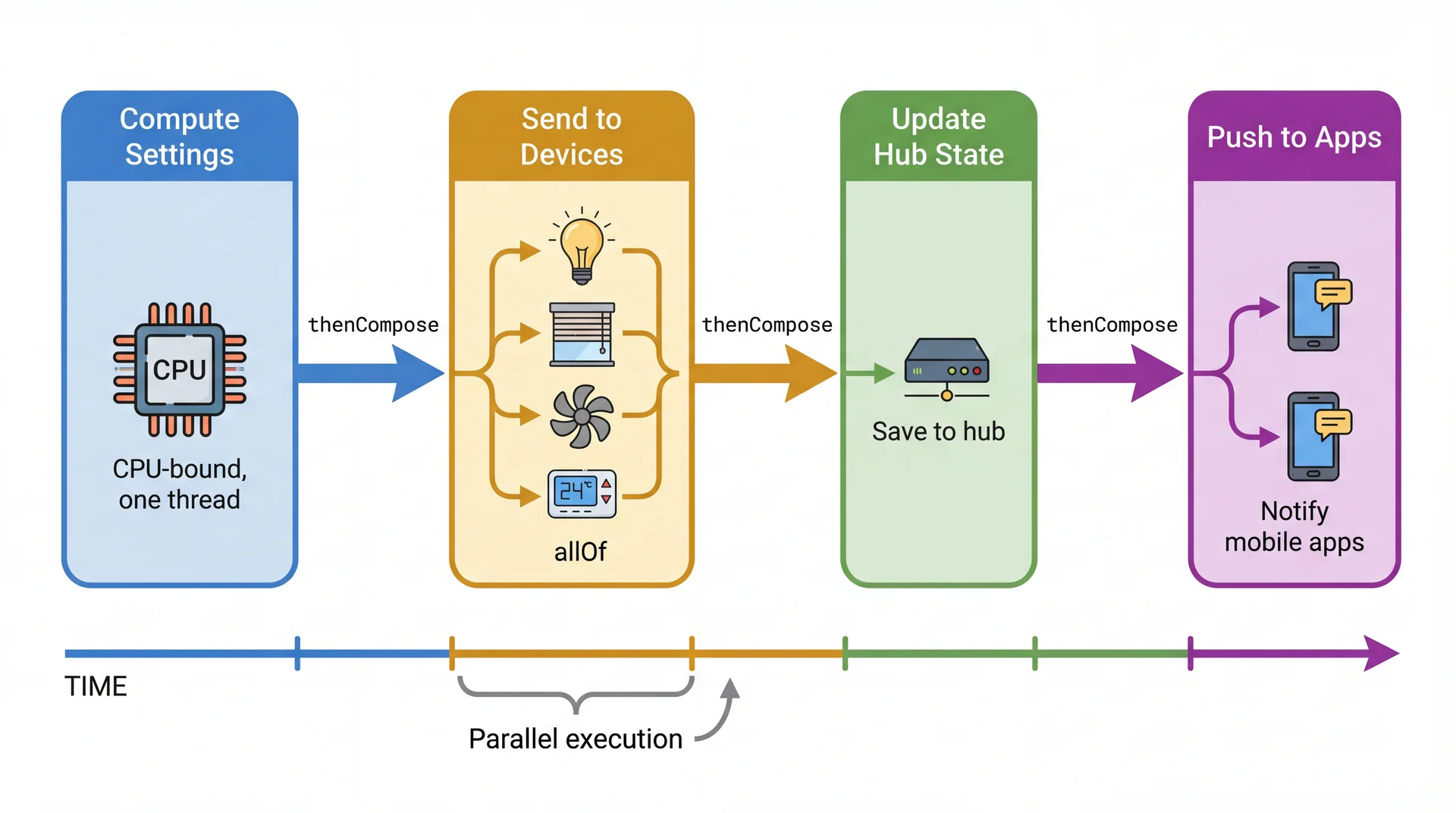
Four phases. Phases run sequentially (each depends on the previous). Within Phase 2, device commands run in parallel .
This diagram is the reference for the next three slides. Each slide implements one phase. Point at the diagram as you walk through the code.
Transition: Let's implement this phase by phase...
Phase 1: supplyAsync Starts the Computation CompletableFuture < SceneSettings > settingsFuture = CompletableFuture . supplyAsync ( ( ) -> settingsEngine . computeOptimal ( scene , sensors ) ) ;
supplyAsync runs the computation on a background thread from the common pool. Returns a CompletableFuture immediately. The calling thread is free.
This is the simplest phase. One async operation, one result. supplyAsync is the "place the order" step.
Highlight each phase while pointing at the pipeline diagram.
Transition: Phase 2 is where it gets interesting — fan-out to 15 devices...
Phase 2: allOf Dispatches 15 Commands in Parallel
Phase 2: fan out to all devices, wait for all to complete.
CompletableFuture < List < DeviceAck > > devicesFuture = settingsFuture . thenCompose ( settings -> { List < CompletableFuture < DeviceAck > > commands = settings . getCommands ( ) . stream ( ) . map ( cmd -> sendCommandAsync ( cmd ) ) . toList ( ) ; return CompletableFuture . allOf ( commands . toArray ( new CompletableFuture [ 0 ] ) ) . thenApply ( v -> commands . stream ( ) . map ( CompletableFuture :: join ) . toList ( ) ) ; } ) ; This is the key pattern. Fan-out: dispatch N async operations in parallel. Fan-in: allOf waits for all N to complete. One thread dispatches all commands, no thread blocks.
The mermaid shows 4 devices for readability (not all 15). The ACKs arrive in arbitrary order — allOf handles waiting for all of them.
Highlight each phase while pointing at the pipeline diagram.
Transition: Phases 3-4 are simpler...
Phases 3-4: Fan In, Then Push to All Apps CompletableFuture < HubState > hubFuture = devicesFuture . thenCompose ( acks -> hub . updateStateAsync ( scene , acks ) ) ; CompletableFuture < Void > pushFuture = hubFuture . thenCompose ( state -> { CompletableFuture < Void > pushToApps = pushService . notifyAllAsync ( state ) ; CompletableFuture < Void > logActivation = logger . logAsync ( scene , state ) ; return CompletableFuture . allOf ( pushToApps , logActivation ) ; } ) ;
The entire pipeline — compute, fan-out to 15 devices, update hub, push to apps — runs without a single blocking call. One thread dispatches everything.
Phase 3 is a single thenCompose — sequential dependency (need all ACKs before updating hub).
Phase 4 fans out again — push to apps and log activation can happen in parallel, so we use allOf again.
Recap the pipeline: "We dispatched 15+ async operations, composed them into a pipeline with sequential and parallel phases, and never blocked a single thread."
Transition: But what if the kitchen never calls your number? What if a device doesn't respond?
Async Errors Are Silent by Default Bad: silent failure
sendCommandAsync ( light , brightness ) . thenAccept ( ack -> updateUI ( ack ) ) ; Good: explicit error handling
sendCommandAsync ( light , brightness ) . thenAccept ( ack -> updateUI ( ack ) ) . exceptionally ( error -> { showError ( "Light unreachable" ) ; return null ; } ) . orTimeout ( 5 , TimeUnit . SECONDS ) ;
Async errors are silent by default . If you don't add .exceptionally(), errors vanish. The user sees nothing — the device just doesn't change.
Restaurant analogy: "You placed an order and the kitchen never calls your number. You wait forever. That's what happens without .exceptionally() — no error, no callback, just silence."
orTimeoutTimeoutException, which .exceptionally() catches.
Transition: Let's bookmark all the methods we've learned...
Your CompletableFuture Reference Card Method What it does When to use allOf(f1, f2, f3...)Wait for all to complete Fan-out / fan-in supplyAsync(() -> ...)Start async work, return Future "Place the order" thenApply(result -> ...)Transform result (sync) Change the type: String → int orTimeout(n, SECONDS)Fail if not done in time Device not responding thenAccept(result -> ...)Use result, return nothing Final step: log, update UI thenCompose(result -> ...)Chain another async op Sequential dependency thenCombine(other, (a,b) -> ...)Join two Futures Combine independent results thenAcceptAsync(fn, executor)Run callback on specific thread Platform.runLater() for GUIexceptionally(error -> ...)Handle errors in the chain Error recovery / fallback
Now that students have seen all these methods in context (pipeline + error handling), this table serves as a summary/reference rather than an introduction. Don't read through it — tell students to bookmark it.
The thenCombine example: combining a sensor reading with a time-of-day calculation:
CompletableFuture < Integer > sensorBrightness = readSensorAsync ( ) ; CompletableFuture < Integer > timeBrightness = computeTimeBasedAsync ( ) ; sensorBrightness . thenCombine ( timeBrightness , Math :: min ) ;
Transition: Error handling catches failures. But even when every operation succeeds , async can produce wrong results in more subtle ways...
Async Doesn't Eliminate Concurrency Bugs — It Changes Their Shape
Even when every operation succeeds, async can produce wrong results:
Ordering bug
You ordered steak first, then salad. Salad arrives first — because it's simpler.
setBrightnessAsync ( light , 30 ) ; setBrightnessAsync ( light , 10 ) ; Fix: thenCompose for sequential dependency
Shared state race
Same deviceCount++ bug from L31 — now in callbacks:
sendCommandAsync ( light , brightness ) . thenAccept ( ack -> { totalCommands ++ ; } ) ; sendCommandAsync ( shade , close ) . thenAccept ( ack -> { totalCommands ++ ; } ) ; Fix: AtomicInteger.incrementAndGet()
Async doesn't eliminate concurrency bugs — it changes their shape. Instead of threads interleaving, callbacks execute in unpredictable order.
Two bugs, one slide. The ordering bug is the async version of L31's race condition — operations arrive in the wrong order. The shared state bug is literally deviceCount++ from L31 happening inside callbacks.
Restaurant analogy for ordering: "You ordered steak first, then salad. But the kitchen delivers the salad first because it's simpler. If order matters, you have to say so — that's thenCompose."
Keep this slide moving — these are setup for the main event (thread confinement). Spend ~2 min total, not 4.
Transition: There's one more critical async safety issue — and it's the one you'll hit in GA1...
Callbacks Run on the Wrong Thread — And Your GUI Crashes
Async callbacks run on background threads. But GUI updates must happen on the JavaFX Application Thread .
This is the single most GA1-relevant slide. Every student will hit this bug — an async operation completes on a background thread and tries to update a JavaFX widget. It either crashes with IllegalStateException or corrupts the UI silently.
Walk through both paths in the mermaid.
WRONG: Background thread directly touches the slider → crash
CORRECT: Background thread hands the update to the FX thread via Platform.runLater() → works
Connection to L29: "Remember from L29: all UI updates must happen on the JavaFX Application Thread. Async callbacks don't run on that thread."
Transition: Here's the fix in code...
sendCommandAsync ( light , brightness ) . thenAccept ( ack -> slider . setValue ( ack . getBrightness ( ) ) ) ; sendCommandAsync ( light , brightness ) . thenAcceptAsync ( ack -> slider . setValue ( ack . getBrightness ( ) ) , Platform :: runLater ) ; In GA1, use BackgroundTaskRunner — it wraps this pattern:
BackgroundTaskRunner . run ( ( ) -> librarianService . listCollections ( ) , collections -> { this . collections . setAll ( ) ; } , error -> showError ( error . getMessage ( ) ) ) ;
Every GA1 feature needs this. Your TAs will ask you to explain what BackgroundTaskRunner does internally.
This is the slide students will come back to most. The BackgroundTaskRunner.run() pattern is what they'll actually write in GA1.
Under the hood: BackgroundTaskRunner creates a javafx.concurrent.Task, runs it on a daemon thread, and uses Platform.runLater() to call onSuccess/onFailure on the FX thread. During code walks, TAs will ask students to explain this.
GA1 example: "When CookYourBooks loads the recipe list, listCollections() runs on a background thread. When it finishes, setAll() runs on the FX thread to update the ObservableList. The ListView updates automatically via binding."
Transition: That pattern will save you hours of debugging. Here are four more rules to keep you safe...
Comprehension Check
Open Poll Everywhere and answer the next 4 questions.
Run 4 multiple-choice questions. Give ~60 seconds per question, then briefly discuss.
Q1: Threads vs async
SceneItAll needs to (1) compute optimal brightness from sensor data [CPU-heavy, 2 sec] and (2) send the brightness command to a light [Zigbee I/O, 200ms]. Best approach?
A. One thread does both sequentially
B. Two threads — one computes, one sends
C. Thread for computation (CPU-bound), async for device command (I/O-bound) ✅
D. Both async with CompletableFuture
Discussion: C is most precise. Computation genuinely uses the CPU; the device command is pure waiting. D is arguable since supplyAsync uses a thread pool for CPU work too, but the conceptual distinction matters.
Q2: Platform.runLater
What's wrong with this code?
sendCommandAsync ( light , 30 ) . thenAccept ( ack -> brightnessSlider . setValue ( 30 ) ) ;
A. Nothing — it's correct
B. brightnessSlider.setValue() might run on a background thread, crashing the GUI ✅
C. thenAccept doesn't return a value, so the ACK is lost
D. sendCommandAsync should be synchronous for UI operations
Discussion: The callback runs on whatever thread completed the async operation — likely a pool thread, not the FX thread. Fix: thenAcceptAsync(ack -> slider.setValue(30), Platform::runLater).
Q3: allOf
"Evening" scene sends commands to 15 devices. We want all 15 to complete before updating the hub. Which CompletableFuture method?
A. thenCompose() — chain them sequentially
B. thenCombine() — combine two at a time
C. allOf() — wait for all to complete ✅
D. anyOf() — wait for the first to complete
Q4: Platform.runLater
What's wrong with this code?
sendCommandAsync ( light , 30 ) . thenAccept ( ack -> brightnessSlider . setValue ( 30 ) ) ;
A. Nothing — it's correct
B. brightnessSlider.setValue() might run on a background thread, crashing the GUI ✅
C. thenAccept doesn't return a value, so the ACK is lost
D. sendCommandAsync should be synchronous for UI operations
Discussion: The callback runs on whatever thread completed the async operation — likely a pool thread, not the FX thread. Fix: thenAcceptAsync(ack -> slider.setValue(30), Platform::runLater).
Q4: Forward-looking
The Zigbee hub goes offline. SceneItAll keeps sending device commands, but they all fail. What should happen?
A. Keep retrying immediately until the hub comes back
B. Retry a few times with increasing delays, then stop trying for a while ✅
C. Crash the app and show an error screen
D. Silently drop the commands
Discussion: B is the real-world answer. L33 will formalize this as retry with exponential backoff and the circuit breaker pattern.
Five Best Practices for Async Safety Prefer immutability. Pass records between async stages — don't share mutable objects between callbacks.Chain properly. Use thenCompose for sequential dependencies. Don't fire-and-forget operations that depend on each other.Handle errors at the end. Every chain needs .exceptionally() or .handle() — async errors are silent by default.Use timeouts. .orTimeout(5, SECONDS) — devices go offline, networks fail. Don't wait forever.Confine UI updates. Use Platform.runLater() or BackgroundTaskRunner — never touch JavaFX widgets from a background thread.Rules 2, 3, and 5 are the most important for GA1:
Rule 2: Students will chain loadRecipes().thenCompose(recipes -> updateUI(recipes)) — if they fire both independently, the UI might update before recipes are loaded.
Rule 3: Without .exceptionally(), a failed OCR import silently does nothing.
Rule 5: Every BackgroundTaskRunner.run() call handles this automatically.
Transition: Key takeaways...
Key Takeaways Threads wait expensively. A blocking thread uses memory and OS resources to do nothing. Async lets one thread manage many concurrent I/O operations.Future = receipt. CompletableFuture = receipt that calls your number. supplyAsync, thenCompose, allOf compose workflows without blocking.Async doesn't eliminate concurrency bugs — it changes their shape. Ordering bugs, silent errors, and shared mutable state are still dangerous.GUI updates must run on the FX thread. Use Platform.runLater() or BackgroundTaskRunner — never touch widgets from a callback.Always handle errors. .exceptionally() at the end of every chain. Async errors are silent by default.Takeaway #4 is the one students will use this week. Every GA1 feature needs BackgroundTaskRunner. TAs will ask what it does internally during code walks.
Transition: Looking ahead...
Looking Ahead Tomorrow: Event-Driven Architecture (L33)
Today's async model works inside one process. But SceneItAll has a hub, a mobile app, a cloud service, and device firmware — on different machines, different networks. How do they coordinate?
The answer: events . Instead of services calling each other directly (fragile), they publish facts to a broker and react independently. Same decoupling as Observer/MVVM, but across the network.
Async beyond Java:
Modern languages make async even cleaner with async/await syntax — C# (2011), JavaScript (2017), Python, Kotlin, Rust. Same concepts as today's CompletableFuture, but the compiler rewrites sequential-looking code into callbacks for you.
Your group project:
GA1 (due Apr 9): BackgroundTaskRunner wraps today's concepts — every feature needs it
TAs will ask you to explain what it does internally during code walks
Today you learned to stop waiting and start getting called back. Tomorrow, we scale that idea across an entire system.
L33 foreshadow: "Today everything was inside one JVM. Tomorrow we zoom out. SceneItAll isn't one program — it's a hub, a mobile app, a cloud service, and device firmware. They can't share memory. They can't use synchronized. They need a coordination model that works across networks. That model is events — and it's the Observer pattern you've known since L29, scaled to distributed systems."
Why EDA matters at scale: "Think about how many services Netflix, Uber, or Slack coordinate. Hundreds of microservices, each doing one thing. They don't call each other directly — they publish events to brokers. It's the only way to keep the system loosely coupled at that scale."
Async/await: "Java's CompletableFuture is verbose compared to other languages. In JavaScript, C#, Python, and Kotlin, you can write await sendCommandAsync(light, 30) — it looks like blocking code but the compiler transforms it into callbacks. Same concepts, nicer syntax. Java has been exploring this with virtual threads (Project Loom) — making blocking cheap again instead of requiring explicit async APIs."
That's it for today. Questions?