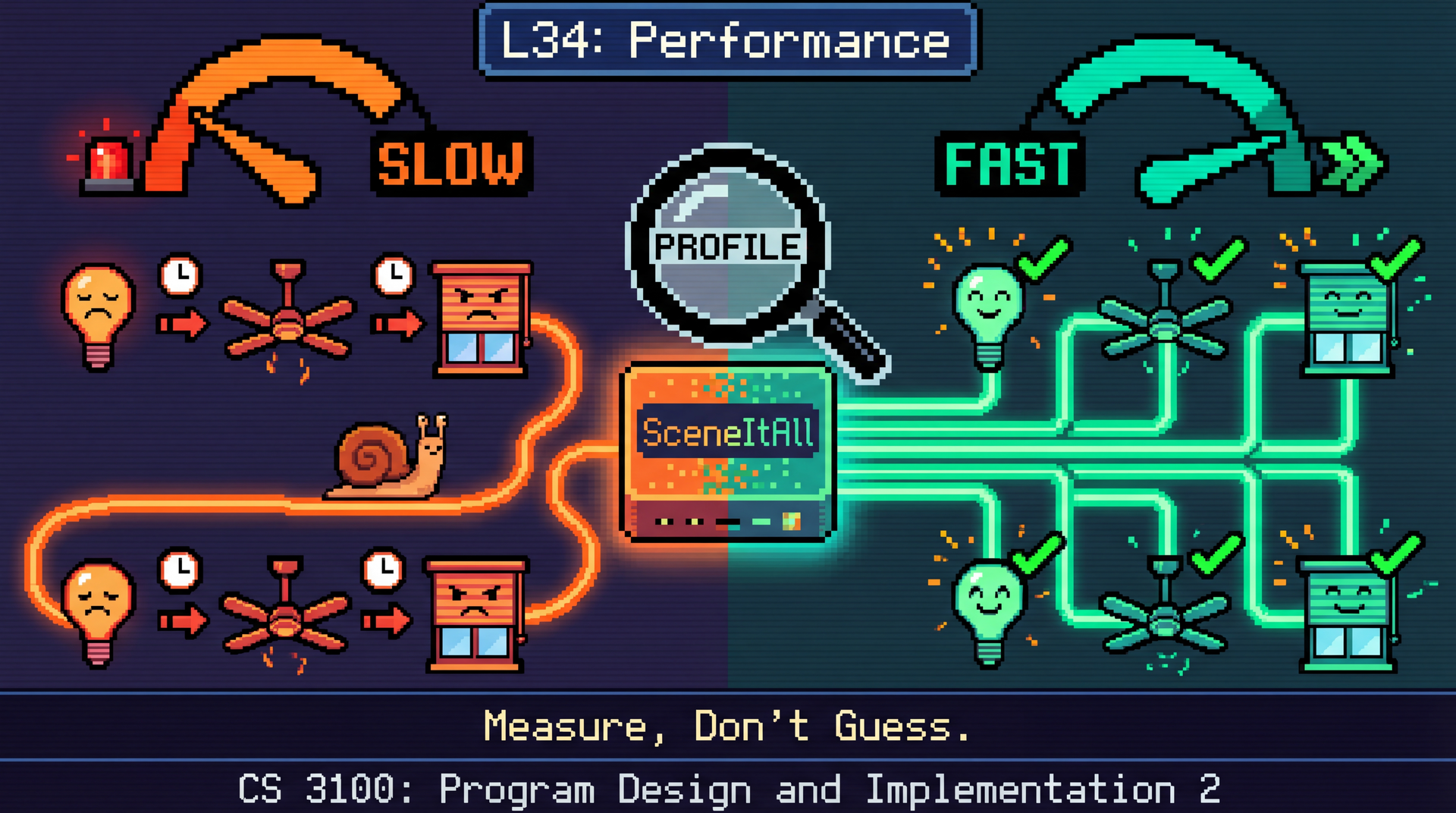
Lecture overview:
Total time: ~55 minutesPrerequisites: L3 (ArrayList vs LinkedList), L14 (Debugging/Scientific Method), L20 (Networks), L31 (Threads), L32 (Async), L33 (Event Architecture)Connects to: L35 (Safety and Reliability), L36 (Sustainability), GA1 (CookYourBooks performance) Structure (~23 slides):
Arc 1: Big-O Notation (~10 min) — growth rates, recognizing complexity, constants
Arc 2: Measure, Don't Guess (~7 min) — profiling, flame graphs, performance dimensions
Arc 3: Architectural Decisions (~15 min) — memory hierarchy, latency budgets, architecture constraints
Arc 4: Performance Patterns (~10 min) — caching, batching, pooling, premature optimization
Arc 5: Garbage Collection (~8 min) — safety-performance trade-off, GC everywhere
Arc 6: Wrap-Up (~5 min) — comprehension check, sustainability, looking ahead
Running examples: SceneItAll (IoT hub performance) and Pawtograder (grading pipeline latency). These are systems students know and have experienced directly.
GA1 due Apr 9 — students are finishing CookYourBooks features. Performance is directly relevant: why their GUI freezes, why network calls are slow, why batching matters.
Transition: Let's start with the learning objectives...
CS 3100: Program Design and Implementation II
©2026 Jonathan Bell, CC-BY-SA
Context from previous lectures:
L3: ArrayList vs LinkedList — "use ArrayList by default" (we finally explain why today)
L14: Debugging and the scientific method — observe, hypothesize, measure, iterate
L20: Network latency, caching, Fallacy 2 ("latency is zero")
L31: Thread overhead, thread pools
L32: Async I/O, the scaled-time table for I/O latency
L33: Rate limiting, eventual consistency
Today we bring all of those threads together into a coherent approach to performance engineering.
Transition: Here's what you'll be able to do after today...
Learning Objectives
After this lecture, you will be able to:
Reason about algorithmic growth using Big-O notation Identify performance bottlenecks: measure, don't guess Analyze the performance impact of architectural decisions Apply common patterns to improve performance Lecture Performance concept L3 (Java Collections)ArrayList vs LinkedList L20 (Networks)Network latency, caching L31 (Concurrency I)Thread overhead L32 (Concurrency II)I/O scaled-time table L33 (Event Architecture)Rate limiting
Today we bring those threads together. Core principle: measure, don't guess.
L14's scientific method applies here too — hypothesize, measure, iterate.
Bridge slide. Students have encountered performance in passing throughout the semester. Today we formalize it.
Core principle: measure, don't guess. Developers have notoriously bad intuitions about where their code spends time. The scientific method from L14 (Debugging) applies directly — observe a performance problem, hypothesize the bottleneck, measure to test your hypothesis, fix the actual bottleneck.
Framing question for the week: "Pawtograder grading optimization assumes everyone has high-speed internet. SceneItAll hub optimization assumes modern hardware. Performance for whom ?" This primes the distributional question that L36 will formalize.
Transition: Before we can profile code, we need a language for describing how fast things grow...
Big-O Describes How Code Scales, Not How Fast It Is
Notation Name SceneItAll example O(1) Constant HashMap lookup by IDO(log n) Logarithmic Binary search sorted devices O(n) Linear Iterate all devices by name O(n log n) Linearithmic Sort 1,000 devices O(n²) Quadratic Compare every device pair
What Big-O measures: How the runtime (or memory usage) of an algorithm scales as the input size n grows. When n gets large enough, the shape dominates everything else — constants become irrelevant.
SceneItAll examples make this concrete:
O(1): deviceMap.get(deviceId) — HashMap lookup, same speed for 10 or 10,000 devices
O(log n): Binary search through a sorted device list
O(n): Scanning every device to find one by name
O(n log n): Collections.sort() — Java's TimSort
O(n^2): Nested loop comparing every pair of devices
Transition: Let's see how to recognize these patterns in actual code...
Recognize Complexity in Code Without Proofs Device device = deviceMap . get ( deviceId ) ; for ( Device d : devices ) { if ( d . getName ( ) . equals ( name ) ) return d ; } for ( Device a : devices ) { for ( Device b : devices ) { if ( a != b && a . getRoom ( ) . equals ( b . getRoom ( ) ) ) { } } } Collections . sort ( devices , Comparator . comparing ( Device :: getBrightness ) ) ;
The practical test: "If I double the input, how much slower?" O(n) = 2x. O(n²) = 4x.
You don't need formal proofs. Learn to recognize common patterns:
One loop = O(n)
Nested loops over the same collection = O(n^2)
HashMap get/put = O(1)
Sorting = O(n log n)
The doubling test is the key intuition. If you double the input size:
O(n): 2x slower
O(n^2): 4x slower
O(n log n): slightly more than 2x slower
This is how you predict whether your code will survive scaling from 10 devices to 10,000.
Transition: But Big-O hides something important...
Constants Don't Matter — Until They Do for ( int i = 0 ; i < arrayList . size ( ) ; i ++ ) { process ( arrayList . get ( i ) ) ; } for ( int i = 0 ; i < linkedList . size ( ) ; i ++ ) { process ( linkedList . get ( i ) ) ; }
Walking the whole list with an iterator is O(n) for both . But ArrayList is 10-100x faster due to cache locality.
"Big-O says they're the same. Your users disagree."
L3 callback: We said "use ArrayList by default" back in L3 but deferred the explanation. The indexed loop on LinkedList is actually O(n^2) total because each get(i) traverses from the head. But even when asymptotic complexity matches (iterator-based traversal, O(n) for both), ArrayList is 10-100x faster because of CPU cache behavior.
We'll explain why when we reach the memory hierarchy in a few slides — contiguous memory, cache lines, and why the CPU loves ArrayList.
Key teaching point: Big-O is necessary but not sufficient. It tells you the shape of growth, but the constant factor matters to real users. This is why we still need profiling.
Transition: So when does Big-O actually matter?
Big-O Matters When n Is Large — or When Each Operation Is Expensive
Big-O doesn't tell you about constant factors or GC pressure. "This is why we still need profiling."
Two cases where Big-O matters:
Large n: 10,000 devices — O(n²) means 100 million operations. Algorithmic choice dominates.Small n, expensive per-operation cost: Even 15 devices — if each operation is a 200ms network call, O(n) vs O(1) is the difference between 3 seconds and 200ms. This is exactly the batching pattern we'll see later (Arc 4). Big-O tells you how many times you pay the fixed cost. Students often think Big-O only matters for huge datasets. The network call example reframes it: Big-O matters whenever the per-operation cost is non-trivial, even for small n. This directly connects to the latency budget analysis in Arc 3.
Transition: Which brings us to the single most important lesson in performance engineering...
You Cannot Trust Your Intuition About Where Time Is Spent Code that looks slow may be irrelevant to overall runtime.
Code that looks fast may be called millions of times and dominate the profile.
"Is this method inherently expensive, or is it being called too many times?"
Inherently expensive → optimize the algorithm
Called too many times → cache or batch
This is the core message of the entire lecture. Everything else — Big-O, profiling tools, patterns — serves this principle.
The key question matters because it determines the fix:
If a method is inherently expensive: optimize the algorithm
If a method is called too many times: cache results or batch calls to reduce call frequency
Students will be tempted to optimize the code that "looks slow" — a complex algorithm, a nested loop. But the profiler might show that 90% of time is spent in network I/O. Optimizing the algorithm saves microseconds; fixing the I/O pattern saves seconds.
Transition: Let's see what a profiling tool actually shows you...
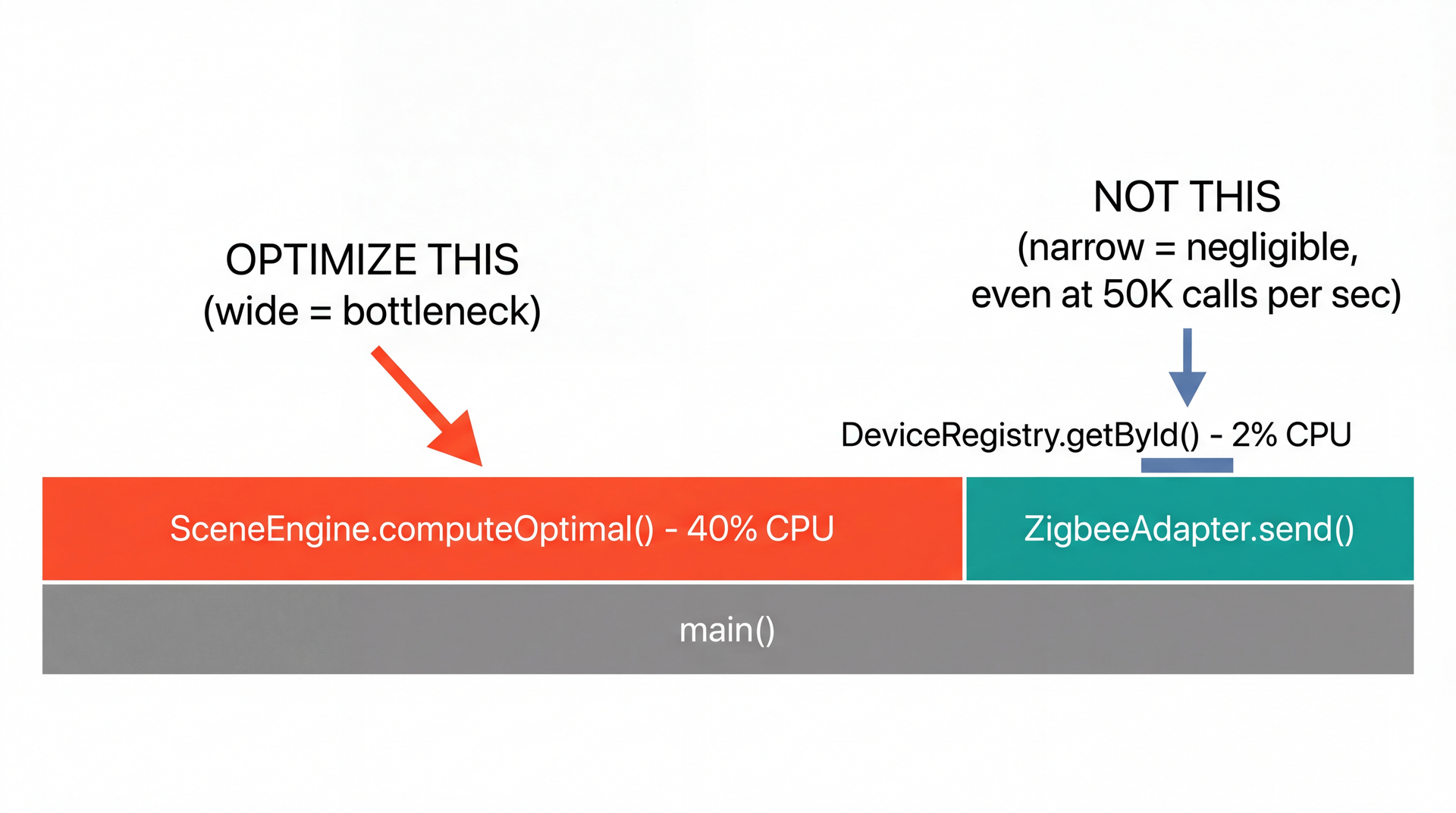
Flame Graphs Show Where Time Goes Tools (know they exist, not details): JFR (Java Flight Recorder, built into JDK), flame graphs, heap dumps
Flame graphs are the most useful profiling visualization. The width of each box represents the proportion of CPU time spent in that method. Wider = more time = higher priority to optimize.
The SceneItAll example concretizes the measurement principle:
computeOptimal() is called infrequently but is computationally expensive — it dominates the profile
getById() is called 50,000 times per second but each call is O(1) HashMap lookup — negligible total
This primes Poll Question Q2 where students must apply this reasoning.
Tools for reference:
JFR (Java Flight Recorder): Built into the JDK, low overhead, production-safe
Flame graphs: Visual representation of where CPU time goes
Heap dumps: Snapshot of all live objects — use when you suspect a memory leak
Transition: Performance isn't just about CPU time...
Metric What it measures Example Latency Time for a single operation "How long until the user sees their grade?" Throughput Operations per unit time "How many submissions per minute?" Memory Heap/stack consumption "How much RAM for 1,000 devices?" CPU Processor time consumed "CPU-bound or I/O-bound?" (recall L32)
Optimizing one can worsen another: caching reduces latency but increases memory.
The trade-off is the key insight. Students tend to think of performance as one-dimensional ("make it faster"). But every optimization has a cost:
Caching reduces latency (no recomputation) but increases memory (stored results)
Batching improves throughput (amortized cost) but increases latency (individual items wait)
Thread pools bound memory but limit throughput
Async I/O improves throughput but adds code complexity
Connection to testing (L15): Just as unit tests catch correctness regressions, performance benchmark tests catch performance regressions. Teams add these to CI pipelines so that a change making a critical path 2x slower fails the build before reaching production.
Transition: Now let's see how architectural decisions determine where your performance ceiling is...
Architecture determines where data lives. Monolith = RAM (5 min). Microservices = network (5 years ).
Students have seen this table before in L32 where it motivated async programming. The lesson there was: I/O is slow, don't block threads waiting for it.
Today's lesson is different: Your architectural decisions determine where data lives in this hierarchy, and that determines your performance ceiling. A monolith keeps data in RAM (nanoseconds). A microservice puts data across the network (milliseconds). That's a 1,000,000x difference.
The scaled-time column makes this visceral. If a CPU cycle is one second, reading from RAM is 5 minutes. Reading from an SSD is 4 days. A cross-country network call is 5 years. Students can feel why network calls dominate latency budgets.
Transition: This table explains something we've been saying since L3...
ArrayList Wins Because of Cache Lines, Not Algorithms Recall L3: "Use ArrayList by default." Now we explain why .
Both are O(n) to iterate. ArrayList is 10-100x faster because of cache locality .
This is the L3 payoff. Back in L3 we said "use ArrayList by default" as a rule. Now students understand why : it's not about algorithmic complexity (both are O(n) for iteration), it's about hardware.
Cache lines: When the CPU reads one element of an ArrayList, it loads a 64-byte cache line — that's 16 ints or 8 references. The next several elements are already in L1 cache (3 seconds in scaled time). LinkedList scatters nodes across the heap, so every .next pointer is a cache miss that goes back to RAM (5 minutes in scaled time).
The diagram mental model: ArrayList is a row of houses on the same street — walk to the next one. LinkedList is houses scattered across the city — drive to each one.
Transition: Cache locality explains individual operations. But what about the whole system?
Latency Budgets: Where Does the Time Actually Go?
Optimizing the 5ms computation to 1ms saves 4ms — irrelevant. Batching Zigbee saves 100ms+ — significant.
Hub runs great on Pi 5 — but 80% of deployed hubs are Pi 3s. Optimizing for modern hardware excludes existing users.
A latency budget allocates time across every step in the path. If your target is 500ms, the budget shows you that Zigbee commands and network round trips dominate. Optimizing computation is a rounding error.
The Pi 3 vs Pi 5 point foreshadows L36: Performance constraints aren't just about speed — they're about which users your software includes or excludes. The hub runs great on a 80 P i 5 , b u t m o s t d e p l o y e d h u b s a r e 80 Pi 5, but most deployed hubs are 80 P i 5 , b u t m os t d e pl oye d h u b s a re
Transition: You've lived inside a latency budget too...
You've Lived Inside This Latency Budget
Infrastructure dominates everything. It typically takes 2-3 minutes just to go from push to running tests. Optimizing test execution from 10s to 8s saves 2s — irrelevant compared to the infrastructure overhead.
Amazon found every 100ms of added latency cost them 1% of sales. L20 Fallacy 2: latency is not zero.
Students have experienced this latency every time they submit. The infrastructure overhead — queuing the workflow, finding an available runner, provisioning the environment — takes 2-3 minutes. That's where the time goes. The grader tarball caching by SHA connects to L20's caching discussion.
Brief reference: architectural decisions that set the performance ceiling:
Monolith vs microservices: method calls (ns) vs network calls (ms) — L19
Synchronous vs async: blocking threads vs event-driven I/O — L32
Thread-per-request vs pool: memory scales with connections vs bounded — L31
Serverless vs always-on: cold start latency vs idle resource cost — L21
GitHub monolith note: GitHub is a Ruby on Rails monolith serving 100M+ developers. As AI-generated traffic doubled request volume, they optimized within the monolith — aggressive caching, database read replicas, request-level performance budgets — rather than rewriting as microservices. Sometimes the right move is to optimize within your architecture rather than change it.
L18 callback: Architecture determines the ceiling. You can optimize code within an architecture, but you can't exceed its fundamental limits.
Transition: Now that we know where time goes, how do we fix it?
Caching: The Fastest Operation Is the One That Doesn't Happen Before: compute every time
public SceneSettings getSettings ( Scene scene , SensorData sensors ) { return settingsEngine . computeOptimal ( scene , sensors ) ; } After: cache by inputs — O(f(n)) → O(1)
private final Map < CacheKey , SceneSettings > cache = new ConcurrentHashMap < > ( ) ; public SceneSettings getSettings ( Scene scene , SensorData sensors ) { return cache . computeIfAbsent ( new CacheKey ( scene . getId ( ) , sensors . hash ( ) ) , k -> settingsEngine . computeOptimal ( scene , sensors ) ) ; }
Cache when: same inputs, staleness acceptable. Don't cache: inputs always change, or staleness is unsafe (L33).
L20 + L33 callback: In L20 we discussed caching as a network optimization — Pawtograder caches grader tarballs by SHA hash. In L33 we formalized this: a cache is an eventually consistent copy of the source of truth. The cache invalidation problem ("when does the cache expire?") is the consistency question in disguise.
Teaching point: Caching is the single most effective optimization pattern. It turns an O(f(n)) computation into O(1) for cache hits — you skip the computation entirely. With a 95% hit rate, you've effectively turned an expensive operation into a near-constant-time one.
ConcurrentHashMap.computeIfAbsent is the idiomatic Java way to implement a cache — it's thread-safe and only computes the value if the key isn't present.
Transition: Caching avoids redundant work. What about unavoidable work that has a high fixed cost?
Batching: Amortize the Fixed Cost Across Many Items Before: 15 calls × 200ms = 3 seconds
for ( Device device : devices ) { zigbee . sendCommand ( device , command ) ; } After: 1 batch call = 200ms
zigbee . sendBatch ( devices , command ) ; Where The problem The fix Database N queries for N records (N+1 problem) One query with JOIN Network N API calls Batch endpoint File I/O Write one byte at a time Buffered writer
Batching amortizes the fixed per-invocation cost. The fixed cost C (network round-trip, TCP handshake, database connection setup) is paid once instead of N times.
The N+1 query problem is the classic example: loading 100 users and their profiles with one query per profile = 101 database queries. Batching into a single query with a JOIN = 1 query. The algorithmic work is the same, but the fixed cost drops from 101 x C to 1 x C.
Connection to the latency budget: In the SceneItAll example, batching Zigbee commands could save 100ms+. That's more than any algorithmic optimization could achieve.
Transition: Another pattern for expensive resources...
Pooling: Reuse Expensive Resources ExecutorService pool = Executors . newFixedThreadPool ( 10 ) ; You've already used this pattern — ExecutorService in L31 is a thread pool .
Resource Pool type Why it matters Threads Thread pool (L31) Each thread costs 512KB-1MB of stack DB connections Connection pool Opening a connection: ~10ms TCP + auth HTTP connections HTTP keep-alive Reuse TCP connections across requests
Creating the resource once and reusing it is always faster than creating and destroying per use.
L31 callback: Students already know this pattern from ExecutorService. The thread pool creates 10 threads once and reuses them for every task, rather than creating and destroying a thread per device command.
The same principle applies everywhere:
Database connection pools: opening a PostgreSQL connection involves TCP handshake, SSL negotiation, and authentication — 10ms+ each time. A pool of 20 connections, reused across requests, eliminates that overhead.
HTTP keep-alive: reuse the same TCP connection for multiple HTTP requests instead of opening a new connection each time.
Pooling trades memory for latency. The pool holds resources in memory even when they're idle. But the creation cost saved per use is enormous.
Transition: These patterns are powerful, but there's a danger...
Premature Optimization Is the Root of All Evil
"Premature optimization is the root of all evil." — Donald Knuth
Every optimization increases coupling (L7): cached values must be invalidated, batched operations add complexity, pooled resources must be managed.
Caching, batching, and pooling all create objects on the heap. Who cleans them up?
Connect to L7's coupling analysis: An optimization that makes code 10% faster but introduces stamp coupling between two modules may not be worth it. The maintenance cost over the lifetime of the software may exceed the performance benefit.
The rule in practice: If your profiler shows that 90% of time is spent in network I/O, optimizing a sorting algorithm that takes 0.1% of the time is wasted effort — and it makes the sorting code harder to maintain.
The transition question sets up the next arc: caching, batching, and pooling all allocate objects. Those objects must eventually be freed. In C, you free them manually (and risk use-after-free). In Java, the garbage collector frees them automatically (but at a cost).
Transition: Let's talk about what happens to all those objects...
C/C++ (manual)
Full control over when memory is freed.
But: use-after-free, double-free, memory leaks. Among the most dangerous bugs in software engineering.
Java/Python/JS (automatic)
Garbage collector decides when to free.
You cannot use-after-free in Java. Trade-off: GC may pause your application at inconvenient times.
Automatic memory management is overwhelmingly the right default — the bugs it prevents are far more costly than the performance it sacrifices.
This is a design decision at the language level. It reflects the same safety-vs-performance trade-off we've seen throughout the course. Java's garbage collector eliminates entire categories of bugs — use-after-free, double-free, dangling pointers — at the cost of occasional GC pauses.
High allocation rate = more GC pauses: Caching, batching, and pooling all create objects. Those objects eventually become garbage. A high allocation rate means the GC runs more frequently, causing more pauses.
Pawtograder example: During deadline submission spikes, thousands of grading jobs allocate large data structures simultaneously. This creates heap pressure, triggers GC pauses, and can delay grade display — the same spike that stresses the system also stresses the garbage collector.
Transition: "But how dangerous are these manual memory bugs, really? Let me show you..."
Use-After-Free: How a PNG Can Root Your Phone
This is not hypothetical — Apple's FORCEDENTRY (2021) used exactly this pattern. NSO Group exploited a bug in Apple's image parser to install Pegasus spyware. No user interaction required.
This is the "why should I care?" slide for GC. Students might think use-after-free is an academic concern. FORCEDENTRY proves it's not.
The attack chain, simplified:
iMessage automatically renders image previews — no user tap needed
Apple's image parsing code (CoreGraphics) is written in C for performance
A bug in the JBIG2 decoder freed a buffer but kept a pointer to it (use-after-free)
The attacker crafted a PNG/PDF that caused a new allocation at the same address
The attacker controlled the contents of that new allocation
When the parser read through the stale pointer, it executed attacker-controlled data
The attacker used this to bootstrap a full exploit chain → root access → Pegasus spyware installed
Why C? Image parsers are written in C for performance — they process millions of pixels and need to be fast. The trade-off: C gives you speed but no safety net. Java's GC makes this attack impossible — you cannot use-after-free because the GC won't free an object you still have a reference to.
The L35 connection: This is the safety-performance trade-off made concrete. Apple chose C for image parsing performance. That choice created an attack surface that compromised journalists, activists, and heads of state. Same pattern as Therac-25: remove a safety mechanism for performance, pay the price later.
Teaching point: "In Java, this entire class of attack is impossible. The garbage collector is not just a convenience — it's a security boundary."
Transition: GC isn't just a JVM concept...
GC Is Everywhere, Not Just the JVM System What it manages How it reclaims Performance cost JVM GC Heap objects Mark-and-sweep: trace from roots, free unreachable GC pauses (ms to seconds) PostgreSQL Table rows VACUUM: find dead rows from old transactions, reclaim space VACUUM pauses, table bloat File system Disk blocks Reference counting + periodic GC of orphaned blocks Background I/O Kafka Log segments Retention policy: delete segments older than N days Disk cleanup spikes
Same pattern at every level: automatic reclamation of unused resources, background cost.
"A database is a big list with well-maintained indexes — and its own garbage collector."
The pattern is universal. When you DELETE a row in PostgreSQL, the row isn't immediately removed — it's marked as dead. A background process called VACUUM periodically scans for dead rows and reclaims the space, just like a JVM garbage collector scans for unreachable objects.
This is largely desirable from a safety perspective. You don't want application code manually managing database storage, just as you don't want application code manually freeing heap memory.
Java memory leaks still possible — not in the C sense (forgotten free()), but in the sense of unintended references keeping objects alive:
Static collections that grow forever
Listener registration without removal
Unbounded caches without eviction
The database equivalent: a query that opens a transaction and never commits — dead rows accumulate forever
Practical takeaway: In performance-critical code, reduce unnecessary object allocation. Reuse objects where possible (pooling). But don't sacrifice readability — only optimize allocation in code the profiler identifies as a hot spot.
Transition: Let's check your understanding...
Comprehension Check
Open Poll Everywhere and answer the three questions.
Q1: SceneItAll's findDeviceByName() iterates all devices in a List<Device>. The hub has 10,000 devices. A user activates a scene referencing 15 devices. What's the Big-O of finding all 15?
A. O(15)
B. O(10,000)
C. O(15 x 10,000) = O(n x m) [CORRECT]
D. O(10,000^2)
Teaching point: nested iteration — "for each device in scene, scan all devices" is O(n x m), not O(n). The outer loop is 15, the inner loop is 10,000. Students need to see that two different collections produce O(n x m), not O(n^2).
Q2: A flame graph shows SceneEngine.computeOptimal() is the widest box (40% of CPU time). It's called once per scene activation. DeviceRegistry.getById() is narrow (2% of CPU) but called 50,000 times per second. Which do you optimize first?
A. computeOptimal — it's 40% of CPU [CORRECT]
B. getById — it's called more often
C. Both equally
D. Neither — need more data
Teaching point: flame graphs show WHERE time goes, not just call count. 40% of CPU in one method is the bottleneck. Students who pick B are falling into the "called more often = more important" trap — exactly the intuition we said not to trust.
Q3: You add a HashMap cache to computeOptimal(). Cache hit rate is 95%. What's the effective complexity?
A. O(1) always
B. O(1) 95% of the time, O(f(n)) 5% — amortized near O(1) [CORRECT]
C. O(f(n)) always — cache doesn't change complexity
D. O(n) — cache lookup is O(n)
Teaching point: caching doesn't change worst-case complexity but dramatically changes amortized/expected complexity. Students who pick A forget about cache misses. Students who pick C are being too theoretical — the practical effect is near-O(1).
Performance trade-offs distribute benefits and costs across users:
Accessibility + Inclusivity: Poor performance on constrained devices = exclusion Environmental Sustainability: 10% efficiency in code running billions of times mattersSceneItAll: Hub runs great on Pi 5, but most deployed hubs are Pi 3s Same safety-vs-performance trade-off at every level:
Strong consistency is slower but safer
Error handling adds complexity but prevents silent failure
Staged rollouts are slower but limit blast radius
Forward to L36: Jevons' paradox — efficiency enables more usage, not less total consumption.
Performance optimization is not value-neutral. When you optimize for high-end devices, you're making a choice about who your software includes and excludes. This connects to L28's accessibility framework — when software performs poorly on constrained devices or slow networks, it excludes users just as surely as missing alt text excludes screen reader users.
Green software engineering is emerging as a discipline. Organizations like the Green Software Foundation are developing standards for measuring and reducing the carbon footprint of software. A 10% efficiency improvement in code that runs billions of times per day adds up.
L36 preview: Jevons' paradox — making something more efficient often leads to more total consumption, not less. More efficient cloud computing led to more total cloud usage. More efficient grading led to more submissions. This is the sustainability question.
Transition: Let's look ahead to Wednesday...
Looking Ahead: L35 Wednesday: Safety and Reliability
We've been treating performance as "making things faster." But what happens when the safety mechanism you removed for performance is the one that would have prevented harm?
Therac-25: Replaced hardware interlocks with software for speed — killed six patientsBoeing 737 MAX: Single sensor, no pilot training — 346 killedCrowdStrike Falcon: Skipped staged rollout — 8.5 million machines bricked
Today: where does time go, and how do we spend it wisely?
The L34-L35-L36 arc:
L34 (today): Where does time go? Performance engineering.
L35 (Wednesday): What happens when it fails? Safety and reliability.
L36 (Thursday): Who benefits, who bears cost? Sustainability.
The Therac-25 connection was planted in the GC section: removing safety mechanisms for performance gains can have catastrophic consequences. L35 will develop this fully with three case studies.
GA1 connection: GA1 is due April 9. Performance is directly relevant — why their GUI freezes when loading data, why network calls are slow, why batching API calls matters for responsiveness.
That's it for today. Questions?