CS 3100: Program Design and Implementation II
Lecture 32: Concurrency II — Asynchronous Programming
©2026 Ellen Spertus & Jonathan Bell, CC-BY-SA
Learning Objectives
After this lecture, you will be able to:
- Distinguish whether an operation should run on the GUI thread or a background thread
- Explain what problems asynchronous programming solves
- Use
BackgroundTaskRunnerto divide work between GUI and background threads - Identify and avoid common asynchronous programming pitfalls
Big Picture
GUI apps need to stay responsive while doing slow work. The naive fix — spawning a thread — works but has costs.
Today you'll learn a cleaner approach you'll use directly in Lab 13 and GA1.
Cook My Books Example A
public class CookMyBooks {
  private static final long START_TIME = System.currentTimeMillis();

  private static void log(String message) {
    long elapsed = System.currentTimeMillis() - START_TIME;
    String thread = Thread.currentThread().getName();
    System.out.printf("%4dms %s %s%n", elapsed, thread, message);
  }

  private static String fetchRecipe() {
    log("Fetching recipe...");
    try {
      Thread.sleep(2000); // simulates slow network call
    } catch (InterruptedException e) {
      // this can't happen in our program
    }
    log("Got recipe!");
    return "Cookie Recipe";
  }

  private static void updateUI(String recipe) {
    log("Updating UI: " + recipe);
  }

  // This runs in the UI thread.
  private static void handleFetchRecipeRequest() {
    log("UI thread received fetch recipe request");
    log("UI is non-responsive");
    String recipe = fetchRecipe();
    updateUI(recipe);
    log("UI is now responsive again");
  }

  public static void main(String[] args) {
    handleFetchRecipeRequest();
  }
}
    0ms main UI thread received fetch recipe request
   20ms main UI is non-responsive
   21ms main Fetching recipe...
 2036ms main Got recipe!
 2038ms main Updating UI: Cookie Recipe
 2038ms main UI is now responsive again
Cook My Books Example B
public class CookMyBooks {
  private static final long START_TIME = System.currentTimeMillis();

  private static void log(String message) { .. }

  private static String fetchRecipe() {
    log("Fetching recipe...");
    try {
      Thread.sleep(2000); // simulates slow network call
    } catch (InterruptedException e) { .. }
    log("Got recipe!");
    return "Cookie Recipe";
  }

  private static void updateUI(String recipe) {
    log("Updating UI: " + recipe);
  }

  // This runs in the UI thread
  private static void handleFetchRecipeRequest() {
    log("UI thread received fetch recipe request");
    log("UI is non-responsive");

    // Create a worker thread to fetch the recipe
    new Thread(CookMyBooks::fetchRecipe).start();
    log("UI is now responsive again");
    // How do we update the UI with the recipe?
  }

  public static void main(String[] args) {
    handleFetchRecipeRequest();
  }
}
    0ms main UI thread received fetch recipe request
   23ms main UI is non-responsive
   24ms main UI is now responsive again
   24ms Thread-0 Fetching recipe...
 2035ms Thread-0 Got recipe!
✅ UI remains responsive
❌ How does UI get updated with recipe?
Cook My Books Example C
public class CookMyBooks {
  // ... log() unchanged

  private static void fetchRecipe() {
    log("Fetching recipe...");
    try {
      Thread.sleep(2000); // simulates slow network call
    } catch (InterruptedException e) {
      // this can't happen in our program
    }
    log("Got recipe!");
    updateUI("Cookie Recipe");
  }

  private static void updateUI(String recipe) {
    if (!Thread.currentThread().getName().equals("main")) {
      throw new IllegalStateException(
        "updateUI must be called on the main thread");
    }
    log("Updating UI: " + recipe);
  }

  // This runs in the UI thread.
  private static void handleFetchRecipeRequest() {
    log("UI thread received fetch recipe request");
    log("UI is non-responsive");
    new Thread(CookMyBooks::fetchRecipe).start();
    log("UI is now responsive again");
  }

  public static void main(String[] args) {
    handleFetchRecipeRequest();
  }
}
    0ms main UI thread received fetch recipe request
   16ms main UI is non-responsive
   19ms main UI is now responsive again
   19ms Thread-0 Fetching recipe...
2029ms Thread-0 Got recipe!
Exception in thread "Thread-0" java.lang.IllegalStateException:
updateUI must be called on the main thread
Asynchronous Programming
Asynchronous: start an operation and move on; get notified when it completes.
Original single-threaded synchronous version
Asynchronous Programming: The Pattern
To run a task asynchronously, you need to specify:
- What task to run in the background
- What to do on success
- What to do on failure
| Java (GA1) | Java (general) | JavaScript | Python | |
|---|---|---|---|---|
| Mechanism | BackgroundTaskRunner | CompletableFuture | Promise / async/await | asyncio / concurrent.futures |
| Background task | callable | supplyAsync() | async function | async def / submit() |
| On success | onSuccess | thenAccept() | .then() | await / add_done_callback() |
| On failure | onFailure | exceptionally() | .catch() | try/except / add_done_callback() |
BackgroundTaskRunner Signature
public static <T> Task<T> run(
    Callable<T> callable,          // () -> fetchRecipe()
    Consumer<T> onSuccess,         // (String recipe) -> updateUI(recipe)
    Consumer<Throwable> onFailure  // (Throwable error) -> showError(error)
)
In our example, the type argument T is String.
| Type | Meaning | Example |
|---|---|---|
Callable<T> | A lambda that takes no arguments and returns a value of type T | () -> fetchRecipe() returns String |
Consumer<T> | A lambda that takes a value of type T and returns nothing | (String recipe) -> updateUI(recipe) |
Consumer<Throwable> | A lambda that takes an exception and returns nothing | (Throwable error) -> showError(error) |
Cook My Books Example D
public class CookMyBooks {
  // ... log(), fetchRecipe(), updateUI(), showError() unchanged

  // This runs in the UI thread.
  private static void handleFetchRecipeRequest() {
    log("UI thread received fetch recipe request");
    BackgroundTaskRunner.run(
        () -> fetchRecipe(),
        recipe -> updateUI(recipe),
        error -> showError(error));
    log("UI is now responsive again");
  }

  public static void main(String[] args) {
    Platform.startup(() -> {}); // initialize JavaFX without a GUI
    Platform.runLater(() -> handleFetchRecipeRequest());
  }
}
 419ms JavaFX Application Thread UI thread received fetch recipe request
 445ms JavaFX Application Thread UI is now responsive again
 446ms Thread-2 Fetching recipe...
2447ms Thread-2 Got recipe!
2448ms JavaFX Application Thread Updating UI: Cookie Recipe
✅ UI remains responsive
✅ UI gets updated with recipe on FX thread
The Task Object
BackgroundTaskRunner.run() returns a Task<T> object that can be used to monitor or cancel the background operation:
Task<String> task = BackgroundTaskRunner.<String>run(
    () -> fetchRecipe(),
    recipe -> updateUI(recipe),
    error -> showError(error));
| Method | Purpose |
|---|---|
task.cancel() | Request cancellation of the task |
task.isCancelled() | Check if the task has been cancelled — useful inside the callable to stop early |
task.isDone() | Checks if the task has completed (succeeded or failed) |
Cook My Books Example E
public class CookMyBooks {
  // ... log(), updateUI(), showError() unchanged
  private static Task<String> fetchRecipeTask = null;

  private static String fetchRecipe() {
    log("Fetching recipe...");
    try {
      Thread.sleep(2000); // simulates slow network call
    } catch (InterruptedException e) {
      log("fetchRecipe() was interrupted");
      log("isCancelled is: " + fetchRecipeTask.isCancelled());
      return null;
    }
    log("Got recipe!");
    return "Cookie Recipe";
  }

  // This runs in the UI thread
  private static void handleFetchRecipeRequest() {
    log("UI thread received fetch recipe request");
    fetchRecipeTask = BackgroundTaskRunner.run(
        () -> fetchRecipe(),
        recipe -> updateUI(recipe),
        error -> showError(error));
    log("UI is now responsive again");
  }

  // This runs in the UI thread
  private static void handleCancelFetchRecipeRequest() {
    log("UI thread received cancel request");
    if (fetchRecipeTask != null) {
      fetchRecipeTask.cancel();
    }
  }

  public static void main(String[] args) throws InterruptedException {
    Platform.startup(() -> {}); // initialize JavaFX without a GUI
    Platform.runLater(() -> handleFetchRecipeRequest());
    Thread.sleep(1000); // simulate cancel after 1 second
    handleCancelFetchRecipeRequest();
  }
}
 434ms JavaFX Application Thread UI thread received fetch recipe request
 459ms JavaFX Application Thread UI is now responsive again
 459ms Thread-2 Fetching recipe...
1433ms main UI thread received cancel request
1434ms Thread-2 fetchRecipe() was interrupted
1437ms Thread-2 isCancelled is: true
✅ Task is cancelled after 1 second
✅ Worker thread is interrupted immediately
✅ isCancelled() returns true inside the callable
What Goes on Which Thread?
FX / UI thread:
- Updating labels, lists, buttons
- Responding to user input
- Anything touching
ObservableListorProperty - Short, fast operations
Background / worker thread:
- Reading or writing files
- Network calls
- Database queries
- Heavy computation
- Anything slow
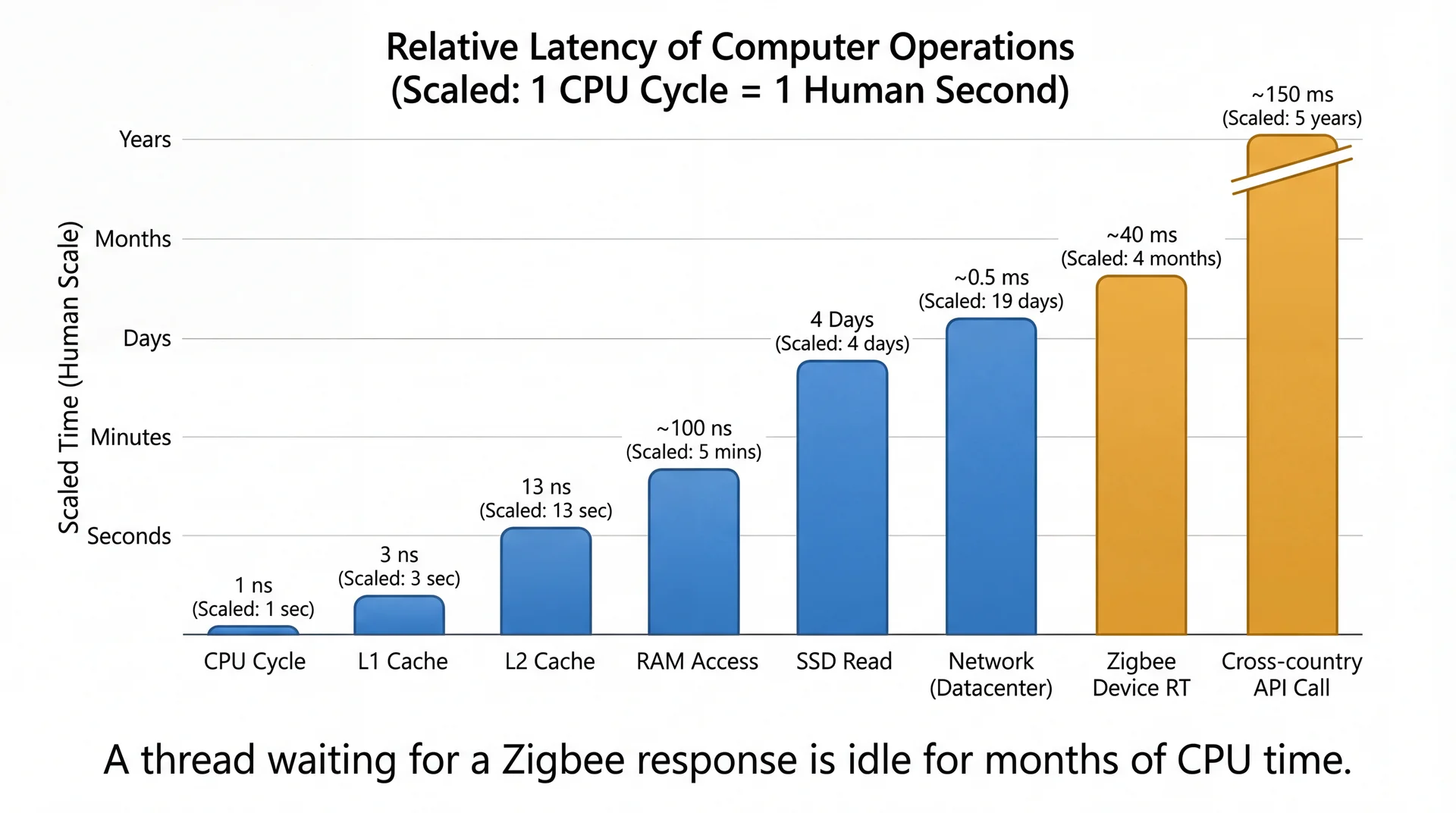
Why? I/O operations can take thousands of times longer than UI operations. Blocking the FX thread on I/O freezes the entire UI — no redraws, no input handling, nothing.
I/O Takes an Eternity (from the CPU's Perspective)
Poll: Which should run on a background thread?
A. Loading a list of collections from the database
B. Updating a ListView with search results
C. Computing optimal scene settings from sensor data
D. Handling a button click
E. Mining bitcoin

Text espertus to 22333 if the
URL isn't working for you.
Async Pitfalls
- Running scheduled code on the wrong thread
- Cancelling tasks running on worker threads
- Preventing race conditions
You are required to handle all of these correctly in GA1.
Let's find out how.
Introducing Pitfall 1: Timer Thread Mistakes
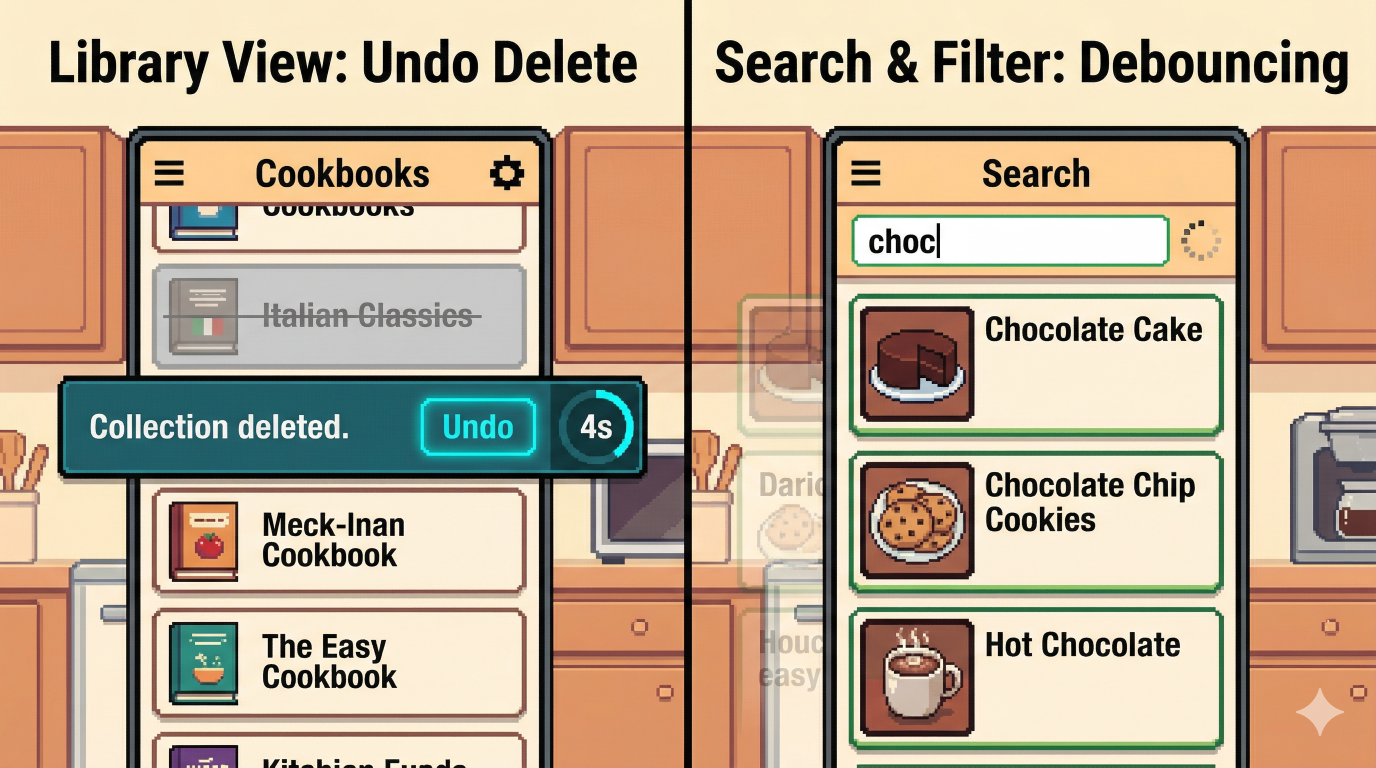
Pitfall 1: Running Scheduled Code on the Wrong Thread
In CookYourBooks, two features require running code after a delay:
Library View: After the user deletes a collection, show an "Undo" button for 5 seconds. If the timer expires without the user clicking Undo, permanently delete the collection.
Search & Filter: Don't fire a search on every keystroke. Wait 300ms after the user stops typing, then run the search.
PauseTransition
Waits for a specified duration, then fires a callback on the FX thread:
PauseTransition timer = new PauseTransition(Duration.seconds(5));
timer.setOnFinished(e -> doSomething());  // runs on FX thread
timer.play();   // start the timer
timer.stop();   // cancel the timer (e.g., on each keystroke)
| Method | Purpose |
|---|---|
new PauseTransition(Duration) | Create a timer with a specified duration |
setOnFinished(handler) | Set the callback to run when the timer expires |
play() | Start (or restart) the timer |
stop() | Cancel the timer |
Because PauseTransition is part of the JavaFX animation system, its onFinished handler fires on the FX Application Thread automatically.
Pitfall 2: Task Cancellation
Import Interface: The user selects an image and clicks Import. OCR runs on a background thread. While it's running, a Cancel button is displayed. If the user clicks Cancel, the import should stop and the UI should return to the idle state.
Task.cancel() does two things:
- Interrupts the background thread if it is blocked
- Sets
isCancelled()totrue
But it does not trigger onSuccess or onFailure. If you rely on onFailure to transition your UI back to idle, nothing will happen.
Fix: Handle the state transition directly in your cancel method — do not rely on the callbacks.
Cook My Books Example F
public class CookMyBooks {
  // ... log(), fetchRecipe(), updateUI(), showError() unchanged
  private static Task<String> fetchRecipeTask = null;

  // This runs in the UI thread
  private static void handleFetchRecipeRequest() {
    log("UI thread received fetch recipe request");
    fetchRecipeTask = BackgroundTaskRunner.run(
        () -> fetchRecipe(),
        recipe -> updateUI(recipe),
        error -> showError(error));
    log("UI is now responsive again");
  }

  // This runs in the UI thread
  private static void handleCancelFetchRecipeRequest() {
    log("UI thread received cancel request");
    if (fetchRecipeTask != null) {
      fetchRecipeTask.cancel();
      updateUI("fetch recipe request cancelled");
      fetchRecipeTask = null;
    }
  }

  public static void main(String[] args) throws InterruptedException {
    Platform.startup(() -> {}); // initialize JavaFX without a GUI
    Platform.runLater(() -> handleFetchRecipeRequest());
    Thread.sleep(1000); // simulate cancel after 1 second
    Platform.runLater(() -> handleCancelFetchRecipeRequest());
  }
}
 445ms JavaFX Application Thread UI thread received fetch recipe request
 469ms JavaFX Application Thread UI is now responsive again
 469ms Thread-2 Fetching recipe...
1444ms JavaFX Application Thread UI thread received cancel request
1448ms Thread-2 fetchRecipe() was interrupted
1448ms JavaFX Application Thread Updating UI: fetch recipe request cancelled
1449ms Thread-2 isCancelled is: true
✅ Both handlers run on the FX Application Thread
✅ Task is cancelled after 1 second
✅ UI is updated directly in the cancel handler — not via callback
Cook My Books Example G
public class CookMyBooks {
  // ... log(), updateUI(), showError() unchanged
  private static Task<String> calculatePiTask = null;

  private static String calculatePi() {
    double pi = 0;
    for (int i = 0; i < 100_000_000; i++) {
        pi += Math.pow(-1, i) / (2 * i + 1);
    }
    pi *= 4;
    log("Calculated Pi: " + pi);
    return Double.toString(pi);
  }

  // This runs in the UI thread
  private static void handleCalculatePiRequest() {
    log("UI thread received calculate Pi request");
    calculatePiTask = BackgroundTaskRunner.run(
        () -> calculatePi(),
        pi -> updateUI(pi),
        error -> showError(error));
    log("UI is now responsive again");
  }

  // This runs in the UI thread
  private static void handleCancelCalculatePiRequest() {
    log("UI thread received cancel request");
    if (calculatePiTask != null) {
      calculatePiTask.cancel();
      updateUI("calculate Pi request cancelled");
      calculatePiTask = null;
    }
  }

  public static void main(String[] args) throws InterruptedException {
    Platform.startup(() -> {}); // initialize JavaFX without a GUI
    Platform.runLater(() -> handleCalculatePiRequest());
    Thread.sleep(1000); // simulate cancel after 1 second
    Platform.runLater(() -> handleCancelCalculatePiRequest());
  }
}
 449ms JavaFX Application Thread UI thread received calculate Pi request
 474ms JavaFX Application Thread UI is now responsive again
1448ms JavaFX Application Thread UI thread received cancel request
1454ms JavaFX Application Thread Updating UI: calculate Pi request cancelled
3215ms Thread-2 Calculated Pi: 3.141592643589326
✅ UI is updated directly in the cancel handler
❌ cancel() does not interrupt a CPU-bound loop
❌ Result is computed but never shown — callback never fires
Cook My Books Example H
public class CookMyBooks {
  // ... log(), updateUI(), showError() unchanged
  private static volatile Task<String> calculatePiTask = null;

  private static String calculatePi() {
    double pi = 0;
    for (int i = 0; i < 100_000_000; i++) {
        pi += Math.pow(-1, i) / (2 * i + 1);
        if (calculatePiTask != null && calculatePiTask.isCancelled()) {
          log("calculatePi was cancelled after " + i + " iterations");
          return "Cancelled";
        }
    }
    pi *= 4;
    log("Calculated Pi: " + pi);
    return Double.toString(pi);
  }
}
 413ms JavaFX Application Thread UI thread received calculate Pi request
 435ms JavaFX Application Thread UI is now responsive again
1412ms JavaFX Application Thread UI thread received cancel request
1414ms JavaFX Application Thread Updating UI: calculate Pi request cancelled
1414ms Thread-2 calculatePi was cancelled after 36863664 iterations
  // This runs in the UI thread
  private static void handleCalculatePiRequest() {
    log("UI thread received calculate Pi request");
    calculatePiTask = BackgroundTaskRunner.run(
        () -> calculatePi(),
        pi -> updateUI(pi),
        error -> showError(error));
    log("UI is now responsive again");
  }

  // This runs in the UI thread
  private static void handleCancelCalculatePiRequest() {
    log("UI thread received cancel request");
    if (calculatePiTask != null) {
      calculatePiTask.cancel();
      updateUI("calculate Pi request cancelled");
      calculatePiTask = null;
    }
  }
✅ CPU-bound loop stops early by checking isCancelled()
✅ UI updated directly in cancel handler
✅ Neither callback fires
The volatile Keyword
Recall from L31: threads can cache variable values locally, leading to visibility problems.
// Without volatile: background thread may never see the update
private static Task<String> calculatePiTask = null;

// With volatile: all threads always see the most recent value
private static volatile Task<String> calculatePiTask = null;
Use volatile when:
- A variable is written by one thread and read by another
- You only need visibility, not atomicity
volatile is not enough when you need atomicity:
- Use
AtomicIntegerforcount++ - CookMyBooks Example H
Cook My Books Example H Revisited
public class CookMyBooks {
  // ... log(), updateUI(), showError() unchanged
  private static volatile Task<String> calculatePiTask = null;

  private static String calculatePi() {
    double pi = 0;
    for (int i = 0; i < 100_000_000; i++) {
        pi += Math.pow(-1, i) / (2 * i + 1);
        if (calculatePiTask != null &&
            // What if calculatePiTask becomes null?
            calculatePiTask.isCancelled()) {
          log("calculatePi was cancelled after " + i + " iterations");
          return "Cancelled";
        }
    }
    pi *= 4;
    log("Calculated Pi: " + pi);
    return Double.toString(pi);
  }
}
  // This runs in the UI thread
  private static void handleCalculatePiRequest() {
    log("UI thread received calculate Pi request");
    calculatePiTask = BackgroundTaskRunner.run(
        () -> calculatePi(),
        pi -> updateUI(pi),
        error -> showError(error));
    log("UI is now responsive again");
  }

  // This runs in the UI thread
  private static void handleCancelCalculatePiRequest() {
    log("UI thread received cancel request");
    if (calculatePiTask != null) {
      calculatePiTask.cancel();
      updateUI("calculate Pi request cancelled");
      calculatePiTask = null;
    }
  }
❌ Race condition could cause NullPointerException
Cook My Books Example I
public class CookMyBooks {
  // ... log(), updateUI(), showError() unchanged
  private static volatile Task<String> calculatePiTask = null;

private static String calculatePi() {
    double pi = 0;
    for (int i = 0; i < 100_000_000; i++) {
        pi += Math.pow(-1, i) / (2 * i + 1);
        // Prevent race condition by caching calculatePiTask.
        Task<String> task = calculatePiTask;
        if (task != null && task.isCancelled()) {
          log("calculatePi was cancelled after "
              + i + " iterations");
          return "Cancelled";
        }
    }
    pi *= 4;
    log("Calculated Pi: " + pi);
    return Double.toString(pi);
  }
}
 682ms JavaFX Application Thread UI thread received calculate Pi request
 713ms JavaFX Application Thread UI is now responsive again
1593ms JavaFX Application Thread UI thread received cancel request
1594ms JavaFX Application Thread Updating UI: calculate Pi request cancelled
1595ms Thread-2 calculatePi was cancelled after 23144009 iterations
✅ CPU-bound loop stops early by checking isCancelled()
✅ UI updated directly in cancel handler
✅ Neither callback fires
✅ No race condition
Introducing Pitfall 3: Debounce Race Conditions
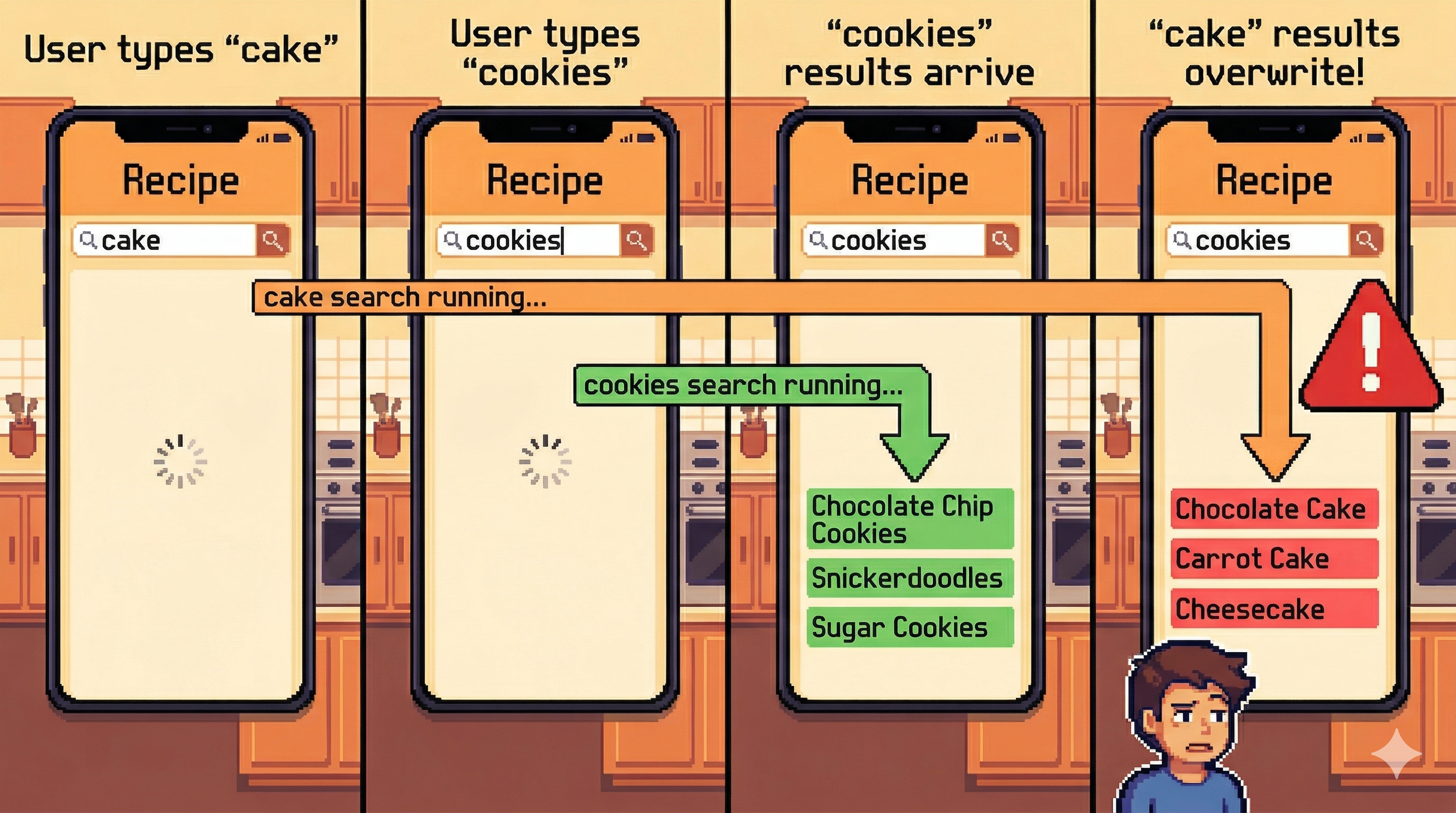
Why "Debounce"?

Pitfall 3: Debounce Race Conditions
Search & Filter: Results update automatically as the user types. Each keystroke waits 300ms then runs a search on a background thread via BackgroundTaskRunner.
Consider what happens when the user types quickly:
- User types "cake" → 300ms passes → search fires on background thread
- User types "cookies" → 300ms passes → second search fires on background thread
- The "cookies" search finishes first and results are shown
- The "cake" search finishes second and overwrites the correct results
The user typed "cookies" but sees results for "cake".
This is a race condition — the result depends on which search happens to finish first, which is nondeterministic.
Poll: How can you ensure the most recent search's results are shown?
Text espertus to 22333 if the
URL isn't working for you.
Fixing the Debounce Race Condition: Generation Counter
Each time a new search starts, increment a generation counter. When results arrive, discard them if the generation no longer matches.
Shared counter: 1 → 2
Search 1 starts query: "cake" generation: 1
Search 2 starts query: "cookies" generation: 2
"cookies" arrives
generation: 2
counter: 2
2 == 2 ✅ show
"cake" arrives
generation: 1
counter: 2
1 != 2 ❌ discard
Each search captures the counter value when it starts. When results arrive, it checks whether the counter has moved on — if so, these results are stale.
Key Takeaways
- Blocking the FX thread freezes the UI — any slow operation must run on a background thread
BackgroundTaskRunnerhandles the thread handoff — callable on background thread, callbacks on FX thread- Three pitfalls to watch for in GA1: — Use
PauseTransitionfor timers, notScheduledExecutorService— Handle state transitions directly on cancel —cancel()does not triggeronFailure— Use a generation counter to discard stale search results
Bonus Slide