Group Assignment 1: Core Features
Overview
In this assignment, your team implements the four core GUI features for CookYourBooks. Each team member owns one feature and is individually accountable for their ViewModel and View implementation, which will be manually evaluated by course staff. Teams collaborate on shared infrastructure, integration, and code review. Teams of three may omit the "Search & Filter" feature (as in GA0); the omitted feature is not reassigned—each of the remaining three core features must have one owner, and grading applies only to the features you implement.
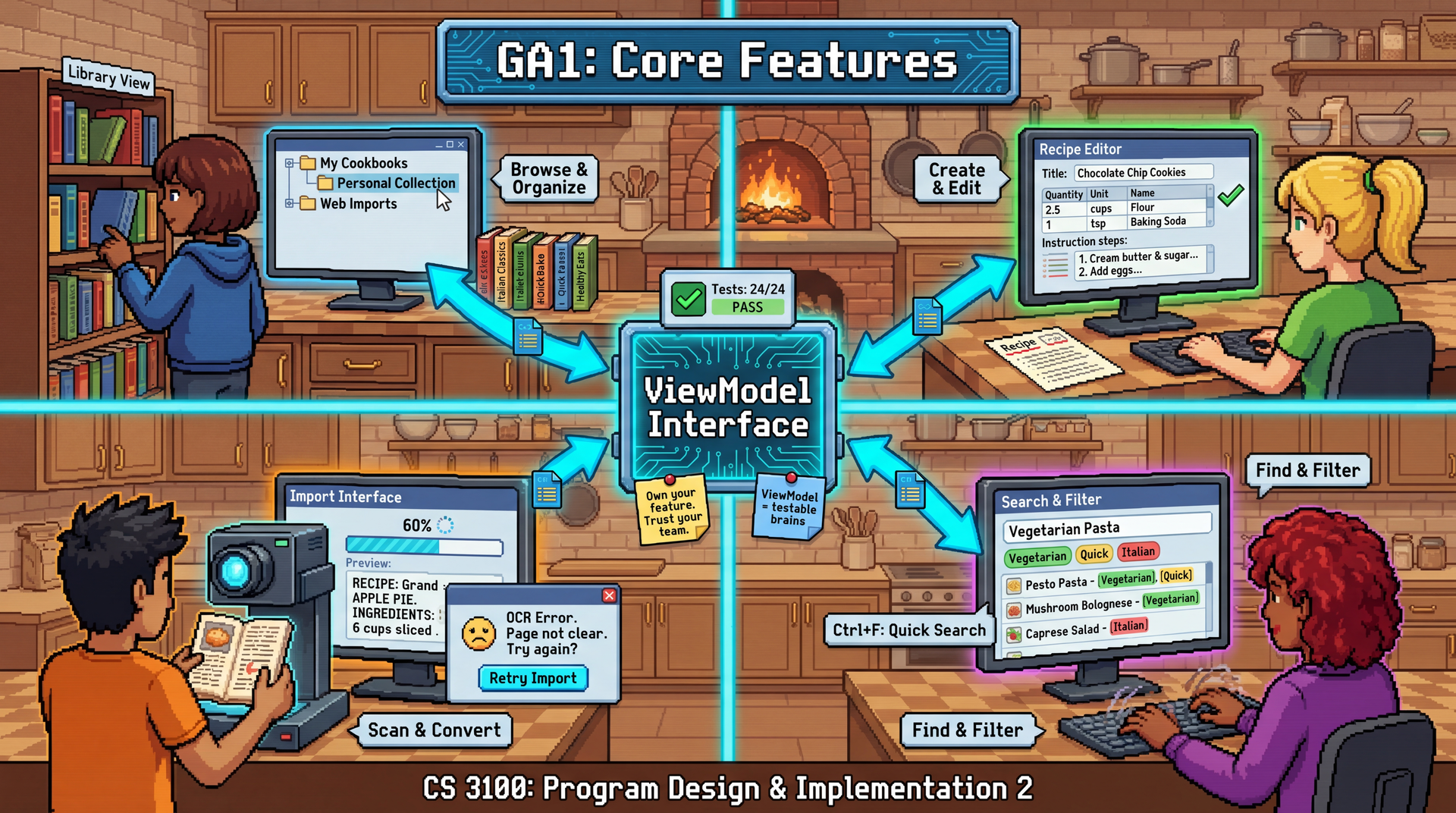
The key architectural insight of this assignment is that ViewModels are the testable "brains" of GUI features. By implementing against provided ViewModel interfaces, your individual work is independently evaluable while still requiring integration with your team's shared codebase.
Due: Thursday, April 9, 2026 at 11:59 PM Boston Time
Prerequisites: This assignment builds on GA0 (Design Sprint). You should have your team charter and design artifacts complete.
Learning Outcomes
By completing this assignment, you will demonstrate proficiency in:
- Implementing the MVVM pattern with ViewModels that expose observable state and commands (L30: GUI Patterns and Testing)
- Creating JavaFX interfaces that bind to ViewModel properties (L29: GUIs in Java)
- Handling asynchronous operations in a GUI context (L31-32: Concurrency)
- Practicing effective code review with HRT principles (L22: Teams and Collaboration)
- Integrating multiple features into a cohesive application
AI Policy for This Assignment
AI tools are encouraged for this assignment. Effective uses include:
- Generating JavaFX boilerplate and FXML layouts
- Implementing ViewModel property bindings
- Writing unit tests
- Debugging async/threading issues
Remember: the ViewModel interfaces are your contract. AI can help you implement them, but you must understand the code well enough to debug and extend it.
TA Mentor Meetings
Throughout GA1, your team will have weekly 30-minute meetings with your assigned TA mentor. These meetings are an accountability mechanism, not just a scheduling requirement. If you cannot attend, notify your TA before the meeting and provide a written update on your work status—this demonstrates accountability. Missing a meeting without prior notice signals a lack of accountability and will likely result in a grade of zero for that week's individual accountability component. These meetings serve multiple purposes:
- Code walks: Each team member explains what they worked on and their design choices
- Progress check-ins: Are you on track? Stuck anywhere?
- Collaboration verification: Is the team working well together?
- Debugging support: Your TA can help unblock technical issues
Meeting schedule for GA1:
| Meeting | Target Dates | Focus |
|---|---|---|
| 1 | Mar 23–24 | Design sprint check-in — team introductions, progress review, workflow setup (ungraded) |
| 2 | Mar 30–31 | Core features kickoff — early code, first graded code walk |
| 3 | Apr 6–7 | Core features deep dive — detailed code walks, PR review, integration check |
Starting with Meeting 2, your TA scores each student on a 10-point scale using the rubric below. These scores are the primary input into the Individual Accountability Adjustment (see Grading Rubric) — they directly determine whether your individual grade is adjusted up or down. A student who consistently demonstrates strong comprehension and collaboration in meetings is unlikely to receive a downward adjustment; a student who cannot explain their own code will.
| Category | Points | What your TA is looking for |
|---|---|---|
| Code Comprehension | 4 | Can you explain your own code at both a high level and in detail? Can you articulate design decisions and trade-offs? |
| Process & Workflow | 3 | Are you using feature branches, opening PRs with meaningful descriptions, and participating in code review? |
| Collaboration Evidence | 2 | Have you reviewed teammates' PRs? Can you describe what your teammates are working on? |
| Forward Planning | 1 | Do you have a concrete plan for what you're doing next? |
Your TA will use a top-down questioning approach: starting with general questions ("What does your feature do?") and drilling into specifics ("Show me this method — why did you structure it this way?"). The goal is to assess comprehension, not to quiz you on syntax. The specific questions are not shared in advance.
These meetings are where you demonstrate your understanding of your code. If you used AI tools to help with implementation, you must still be able to explain how the code works and why you made certain design decisions. Inability to do so is a red flag that will be reflected in your accountability adjustment.
Before your first meeting, make sure your team has read the Git Workflow for Team Projects guide and set up your branching strategy.
Provided Materials
You will receive:
- ViewModel Interfaces: Four Java interfaces defining the contract for each core feature
- Starter FXML Templates: Optional starting points for your Views
- A5 Solution: The complete service layer your ViewModels will use
- Navigation Infrastructure:
NavigationService,MainViewController,MainView.fxml, and shared CSS — the navigation plumbing is provided so you can focus on your individual feature BackgroundTaskRunnerUtility: A helper class that wrapsjavafx.concurrent.Taskcreation, daemon thread management, and FX-thread callback delivery into a singlerun(callable, onSuccess, onFailure)method. Every feature requires one async operation — use this utility instead of hand-writing the threading boilerplate. You are still expected to understand what it does internally (your TA will ask).FakeRecipeOcrServiceTest Fixture: A test double forRecipeOcrServicethat returns a canned recipe after a configurable delay. Use it for developing and testing the Import feature without a Gemini API key.
Core Features
Each team member implements one of these features:
1. Library View (LibraryViewModel)
Browse and manage the user's recipe collections.
Key Functionality:
- Display list of collections with titles and recipe counts
- Select a collection to view its recipes
- Create new collections
- Delete collections (with confirmation and undo support)
- Navigate to Recipe Details when a recipe is selected
- Collection filtering — A text field above the collection list lets the user filter collections by title as they type. This is a client-side filter over the already-loaded collections (no background thread needed). The filter interacts with undo-delete: if you undo a deletion while a filter is active, the restored collection only reappears if it matches the current filter. Clearing the filter always shows all collections (including recently restored ones).
- Async collection loading —
refresh()must run on a background thread viaBackgroundTaskRunnerand show a loading indicator while collections are being fetched - Undo for delete — After deleting a collection, show an "Undo" state for 5 seconds. If the user clicks Undo, restore the collection. If the timer expires, the delete is permanent. This requires transient state management: the deleted collection is held in memory but not yet removed from the repository until the timer expires.
Note: If
refresh()is called during the undo window, the pending-delete collection is still in the repository and would reappear in the UI. Your ViewModel should filter out any collection that is pending deletion, even after a refresh.
Observable State:
Your ViewModel must expose:
- The list of collections. Each entry should make the collection's ID, title, source type, and recipe count accessible to the View.
- The currently selected collection
- The list of recipes in the selected collection. Each entry should make the recipe's ID and title accessible.
- Whether collections are currently loading (for the async loading indicator)
- Whether an undo action is available, and a message describing what can be undone
- The current filter text for narrowing the collection list by title
2. Recipe Details/Editor (RecipeEditorViewModel)
View and edit recipe content.
Key Functionality:
- Display recipe title, description, ingredients, instructions
- Edit mode toggle
- Add/remove/reorder ingredients
- Validate changes before saving
- Track dirty state (unsaved changes)
- Async save —
save()must run the persistence operation on a background thread viaBackgroundTaskRunner. While saving: the Save button shows "Saving..." and is disabled, edit controls are disabled. On success: exit edit mode, show "Saved successfully." On failure: stay in edit mode, show error message, keep dirty state so the user doesn't lose their edits.Note:
RecipeRepository.save()is sufficient for updating existing recipes. The collection membership is maintained automatically by CybLibrary's persistence mechanism — you do not need to separately update collections after saving a recipe.
Observable State:
Your ViewModel must expose:
- The currently loaded recipe
- Whether the editor is in edit mode
- Whether there are unsaved changes (dirty state)
- Whether the current edits are valid (e.g., title is not blank)
- The list of ingredients being edited
- Whether a save operation is currently in progress
- A status/error message
3. Import Interface (ImportViewModel)
Import recipes from images using OCR. Use BackgroundTaskRunner to run the OCR operation on a background thread, and inject FakeRecipeOcrService (provided in the handout) for development and testing. If you have a Gemini API key, you can also use the real GeminiRecipeOcrService for production use.
Key Functionality:
- Select image file(s) for import
- Display import progress with cancellation support
- Show extracted recipe for review before saving
- Pre-save editing — Before accepting, the user can edit the imported recipe's title and ingredients (reuse the same editing patterns as Recipe Editor but in a simpler context)
Clarification: "Edit title and ingredients" means the user can change the recipe title (a string) and edit ingredient names. For
MeasuredIngredientobjects, editing the name preserves the existing quantity. New ingredients added during review are plainVagueIngrediententries (name only, no quantity). Simplification accepted: If tracking the originalMeasuredIngredientquantities through edits is too complex, it is acceptable to convert all ingredients toVagueIngredient(name only) during the review/edit phase. You will not lose points for this simplification. - Handle OCR errors gracefully (network issues, parsing failures)
- Select target collection for imported recipe
Note: Use
LibrarianService.saveRecipe(recipe, collectionId)to save the imported recipe — this method handles both persisting the recipe and adding it to the target collection in one call. This is different from the Recipe Editor, which usesRecipeRepository.save()for updating existing recipes that are already in a collection.
Your ViewModel must manage a state machine with these transitions: idle (ready for new import) → processing (OCR in progress) → review (extraction complete, awaiting user decision) or error (import failed) → back to idle.
JavaFX layout tip: The Import View typically has separate panes for each state (idle, processing, review, error) with visibility toggled based on the current state. Remember that setting
visible=falsehides a node but it still takes up layout space. To truly remove a node from layout, bind bothvisibleandmanagedto the same condition.
Observable State:
Your ViewModel must expose:
- The current import workflow state. The UI must distinguish between: idle, processing, review, and error.
- Import progress (for a progress bar)
- A status message describing the current step
- The imported recipe (available during review)
- The list of available collections to import into
- The currently selected target collection
- An error message (when in error state)
4. Search & Filter (SearchViewModel)
Find recipes across all collections.
Key Functionality:
- Search by title (via
LibrarianService.resolveRecipes())Note:
resolveRecipes("")returns an empty list — it is designed for non-empty queries. To retrieve all recipes (for S11: empty query with no filters), useLibrarianService.listAllRecipes(). - Filter by ingredient (via
LibrarianService.searchByIngredient()) — when multiple ingredient filters are active, results must match all of them (AND logic, not OR) - Display search results with collection context
- Navigate to selected result
- Async debounced search — Don't fire a search on every keystroke. Wait 300ms after the user stops typing, then run the search on a background thread via
BackgroundTaskRunner. Show a loading indicator while the search runs.Note: Debouncing applies to the text query field only. Ingredient filter additions/removals should trigger an immediate search (no debounce).
- Keyboard navigation — Up/Down arrow keys in the search field move the selection in the results list. Enter navigates to the selected recipe. This requires key event handling in the controller, focus management, and programmatic selection updates.
Observable State:
Your ViewModel must expose:
- The search query text
- The list of search results. Each entry should make the recipe's ID and title accessible.
- The list of active ingredient filter terms
- Whether a search is currently in progress
- A status message (e.g., "5 results" or "No results found")
- The currently selected search result (for keyboard navigation)
Individual Deliverables
ViewModel Implementation
- Implement your assigned ViewModel interface
- Use dependency injection to receive services (constructor injection)
- Follow your team's user-facing terminology for naming
View Implementation
- Create FXML layout for your feature
- Implement the FXML controller that binds to your ViewModel
- Follow accessibility guidelines from your GA0 plan
- Support keyboard navigation
Tests (Required — Tied to Implementation Grade)
Tests are not a separate deliverable — they are required evidence that your implementation works. You only receive implementation points for requirements that have a mapped, passing test (see Grading Rubric).
- Write tests that cover every requirement in your feature's requirement table
- Focus on observable state changes: call a command, assert the resulting property/list values
- Test async behavior — every feature has one async operation (use
CountDownLatchorThread.sleep+Platform.runLaterto synchronize with background tasks) - Test edge cases and error conditions (the requirement tables include these)
- Complete the Pawtograder test mapping task within 48 hours after the deadline: for each requirement, identify which test method(s) cover it
Team Deliverables
Integrated Application
- All implemented core features working together in one application (four features, or three if your team dropped Search & Filter per the 3-person-team exception)
- Consistent navigation between those features
- Shared application state where appropriate
Shared Infrastructure
The navigation component (NavigationService, MainViewController, MainView.fxml) and shared CSS are provided in the handout. Your team is still responsible for:
- Theming/styling (consistent look and feel — extend the provided CSS as needed)
- Error handling (how are errors displayed to users?)
- Application startup and shutdown (the provided
CookYourBooksGuiAppshows the wiring pattern)
3-person teams: Shared infrastructure applies to your three implemented features; you are not required to support navigation or UI for the omitted feature.
Recommended shared utilities: Your team should coordinate early on at least two shared utilities that multiple features will need:
EditableIngredient(production source) — DomainIngredientobjects are immutable and enforce non-blank names, which makes them unsuitable for form binding (a user typing a new ingredient starts with a blank name). You will need a mutable, UI-friendly wrapper that can be bound to text fields and later converted back to anIngredientfor persistence. Both Recipe Editor and Import Interface need this — build it once as a shared class rather than each owner inventing their own.RecipeFixtures(test source) — Every feature's tests need helper methods likemakeRecipe(id, title)ormakeCollection(name, recipes...)to set up test data. Rather than each student writing their own, create a shared test fixture class (e.g., in atestFixturessource set or a common test package). This reduces boilerplate and ensures consistent test data across the team.
Coordinate on these in your first team meeting — decide on the API together, have one person create the initial PR, and have the others review it. This is a natural opportunity to practice your code review workflow early.
Integration Tests
- At least 3 integration tests verifying interactions between your implemented core features
- Example: "User selects collection → selects recipe → recipe displays in editor" (or similar cross-feature flows for the features you built)
- 3-person teams: Tests cover the three features you implemented; you do not need tests involving Search & Filter.
Code Review Evidence
- Each PR must have at least one substantive review comment
- Reviews should demonstrate HRT principles
- Include at least one example of design discussion in PR comments
Technical Specifications
ViewModel Interface Contract
Each ViewModel interface defines what state must be accessible and what commands must be supported, without mandating specific DTO classes. You choose your own representation for list entries (records, domain objects, etc.). The grading contract is the provided interface — implement it correctly.
Your ViewModel interfaces should include:
- Observable properties (
ObservableList,ObjectProperty,BooleanProperty,StringProperty, etc.) for JavaFX binding in the View - Commands (void methods) for user actions
- Non-JavaFX accessors for grading tests — plain Java getters that return
String,List<String>,boolean, etc., so tests can verify state without depending on JavaFX types
Example pattern:
public interface LibraryViewModel {
    // Observable state for JavaFX binding — you choose the list entry type
    ObservableList<? /* your collection summary type */> getCollections();

    // Commands
    void selectCollection(String collectionId);
    void createCollection(String title);
    void deleteCollection(String collectionId);
    void refresh();
    void undoDelete();

    // For grading: non-JavaFX accessors
    List<String> getCollectionIds();
    String getSelectedCollectionId();
}
Tip: Your ViewModel interfaces work with collection IDs (e.g.,
selectCollection(String collectionId)), butLibrarianService.listRecipes()takes a collection name. UsefindCollectionById(collectionId)to look up the collection by ID, then callgetRecipes()on the returnedRecipeCollectionobject.
Suggested Constructor Signatures
Each ViewModel needs certain services injected via its constructor. Here are the recommended signatures (you may adjust as needed, but these cover the required dependencies):
// Library View — needs LibrarianService for collection/recipe operations,
// NavigationService for recipe navigation, and a configurable undo timeout for testing.
public LibraryViewModelImpl(LibrarianService librarianService,
                            NavigationService navigationService,
                            Duration undoTimeout)

// Recipe Editor — needs RecipeRepository to load/save recipes.
public RecipeEditorViewModelImpl(RecipeRepository recipeRepository)

// Import Interface — needs RecipeOcrService for OCR, LibrarianService to save
// imported recipes and load available collections.
public ImportViewModelImpl(RecipeOcrService ocrService,
                           LibrarianService librarianService)

// Search & Filter — needs LibrarianService for search/filter operations,
// NavigationService for result navigation, and a configurable debounce delay for testing.
public SearchViewModelImpl(LibrarianService librarianService,
                           NavigationService navigationService,
                           Duration debounceDelay)
Using BackgroundTaskRunner
Every feature requires one async operation. Use the provided BackgroundTaskRunner utility:
BackgroundTaskRunner.run(
    () -> librarianService.listCollections(),   // runs on background thread
    collections -> {                             // runs on FX thread (success)
        this.collections.setAll(/* map to summaries */);
        loading.set(false);
    },
    error -> {                                   // runs on FX thread (failure)
        statusMessage.set("Failed to load: " + error.getMessage());
        loading.set(false);
    }
);
You are expected to understand what this utility does internally — your TA will ask. Key questions to be able to answer: What thread does the callable run on? What thread do the callbacks run on? What would break if the callbacks ran on the background thread?
Testing Your ViewModel
@Test
void selectCollection_updatesRecipeList() {
    // Arrange — inject mock services via constructor
    LibraryViewModel vm = new LibraryViewModelImpl(mockLibrarianService, mockCollRepo);

    // Act
    vm.selectCollection("desserts-id");

    // Assert — use non-JavaFX accessors for clean assertions
    assertThat(vm.getSelectedCollectionId()).isEqualTo("desserts-id");
    assertThat(vm.getRecipeIdsInSelectedCollection()).hasSize(5);
}
Tip: Make time-based parameters (undo timeout, debounce delay) configurable via your ViewModel constructor so tests don't need to wait real-time durations:
public LibraryViewModelImpl(LibrarianService svc, NavigationService nav, Duration undoTimeout)In production, pass
Duration.ofSeconds(5). In tests, passDuration.ofMillis(50).
A ViewModelTestBase class is provided in the test fixtures. Extend it to get automatic FX toolkit initialization and a waitForFxEvents() helper for testing async behavior.
Testing Import with FakeRecipeOcrService
@Test
void importFlow_extractsRecipeFromImage() throws Exception {
    RecipeOcrService ocr = new FakeRecipeOcrService(500); // 500ms simulated delay
    ImportViewModel vm = new MyImportViewModel(ocr, librarianService);
    vm.startImport(Path.of("pancakes.jpg"));
    // ... wait for async completion, then assert REVIEW state
}
Grading Rubric
Total: 50 points — 35 points individual (ViewModel + View) + 15 points team (integration).
How Implementation and Testing Are Graded Together
Implementation points are only awarded for requirements that are both (a) working on TA inspection and (b) covered by a reasonable test that you have mapped to that requirement in Pawtograder. Writing code without tests, or writing tests without working code, earns zero for that requirement. This is not a separate "testing grade" — testing is part of demonstrating that your implementation works.
Pawtograder Test Mapping Task: After the submission deadline passes, each student has 48 hours to log in to Pawtograder and map your test methods to the specific requirements they cover. For each requirement in your feature's table below, you identify which test(s) exercise that behavior. If you cannot point to a test for a requirement, you will not receive implementation credit for it even if the code works. This mapping is how course staff efficiently verify your test coverage during manual evaluation.
The mapping window opens after the deadline so that your final submission is stable — if you could map before the deadline, a subsequent push that renames or moves methods would invalidate the mapping. Write your tests before the deadline; map them to requirements after.
Individual Components (35 points)
| Component | Points | Criteria |
|---|---|---|
| ViewModel + Tests | 25 | Each requirement in your feature table (below) is worth points. Points awarded only if implementation passes TA inspection and a mapped test covers the behavior. |
| View Implementation | 8 | FXML + controller binds correctly to ViewModel, follows design |
| Code Quality | 2 | Follows UI terminology, clean code, appropriate documentation |
| Total | 35 |
Feature Requirement Tables
Each table below lists the testable requirements for one feature. The Points column shows how much each requirement is worth. In the Pawtograder test mapping task, you will identify which of your test method(s) cover each requirement.
Library View (25 points ViewModel + Tests)
| # | Requirement | Points |
|---|---|---|
| L1 | refresh() loads collections from the service layer and populates the observable list | 2 |
| L2 | Each collection entry exposes ID, title, source type, and recipe count | 2 |
| L3 | selectCollection(id) updates the selected collection and populates the recipe list | 3 |
| L4 | createCollection(title) adds a new collection and it appears after refresh | 2 |
| L5 | deleteCollection(id) removes the collection (after undo timeout expires) | 2 |
| L6 | After delete, undo is available for 5 seconds; undoDelete() restores the collection | 3 |
| L7 | Undo state clears after the 5-second timeout | 2 |
| L8 | refresh() runs on a background thread; loading indicator is true while fetching | 2 |
| L9 | Selecting a collection then selecting a recipe provides the recipe ID for navigation | 2 |
| L10 | Edge case: selecting a nonexistent collection ID is handled gracefully | 1 |
| L11 | filterTextProperty() filters collections by title (case-insensitive substring match) | 2 |
| L12 | Filtered list updates immediately as the user types (no debounce — it's in-memory) | 1 |
| L13 | Undo-delete works correctly with an active filter (restored collection reappears only if it matches the current filter; clearing the filter always shows all collections) | 1 |
| Total | 25 |
Recipe Editor (25 points ViewModel + Tests)
| # | Requirement | Points |
|---|---|---|
| E1 | loadRecipe(id) populates the current recipe, title, and ingredient list | 3 |
| E2 | toggleEditMode() enables/disables editing | 2 |
| E3 | Changing the title or ingredients in edit mode sets isDirty to true | 3 |
| E4 | discardChanges() reverts to the original recipe state and clears dirty | 3 |
| E5 | isValid is false when the title is blank; true otherwise | 2 |
| E6 | addIngredient() / removeIngredient(index) modify the ingredient list | 2 |
| E7 | save() persists the edited recipe to the repository | 3 |
| E8 | save() runs on a background thread; isSaving is true while in progress | 2 |
| E9 | Save failure: stays in edit mode, preserves dirty state, shows error message | 3 |
| E10 | Edge case: save() while not dirty or not valid is a no-op | 2 |
| Total | 25 |
Import Interface (25 points ViewModel + Tests)
| # | Requirement | Points |
|---|---|---|
| I1 | Initial state is idle; no imported recipe, no error | 2 |
| I2 | startImport(path) transitions to processing; status message updates | 3 |
| I3 | Successful OCR transitions to review; imported recipe is populated | 3 |
| I4 | OCR failure transitions to error; error message is populated | 3 |
| I5 | cancelImport() during processing transitions back to idle | 2 |
| I6 | acceptImport() saves the recipe to the selected collection and transitions to idle | 3 |
| I7 | rejectImport() discards the imported recipe and transitions to idle | 2 |
| I8 | Available collections are loaded from the repository | 2 |
| I9 | Pre-save editing: imported recipe title/ingredients can be modified before accept | 3 |
| I10 | Edge case: acceptImport() with no selected collection or no recipe is a no-op | 2 |
| Total | 25 |
Search & Filter (25 points ViewModel + Tests)
| # | Requirement | Points |
|---|---|---|
| S1 | Setting the search query triggers a search and populates results | 3 |
| S2 | Search by title returns matching recipes via resolveRecipes() | 3 |
| S3 | Adding an ingredient filter narrows results via searchByIngredient() | 3 |
| S4 | Multiple ingredient filters use AND logic (intersection) | 3 |
| S5 | Clearing filters/query resets results | 2 |
| S6 | Search runs on a background thread; isSearching is true while running | 2 |
| S7 | Search is debounced (300ms delay after last keystroke before firing) | 2 |
| S8 | selectNextResult() / selectPreviousResult() cycle through results | 2 |
| S9 | navigateToSelectedResult() provides the selected recipe ID for navigation | 2 |
| S10 | Status message reflects result count ("5 results" / "No results found") | 1 |
| S11 | Edge case: empty query with no filters returns all recipes | 2 |
| Total | 25 |
Team Components (15 points)
| Component | Points | Criteria |
|---|---|---|
| Integration Works | 5 | All implemented core features work together, navigation functions |
| Shared Infrastructure | 4 | Consistent theming, navigation, error handling across implemented features |
| Integration Tests | 4 | 3+ tests verifying cross-feature behavior for implemented core features |
| Code Review Quality | 2 | PRs have substantive reviews, HRT evident |
| Total | 15 |
Individual Accountability Adjustment
TA meeting observations and weekly collaboration surveys can adjust an individual's final grade by up to -20 points or award an upward adjustment of up to +20 points. If a team member cannot explain their code in TA meetings while the rest of the team succeeds, their grade may be reduced. The upward adjustment exists for a specific scenario: if your team's project isn't fully complete, but you went above and beyond to support struggling teammates — helping them get unblocked, taking on extra integration work, providing thorough code reviews — you can still earn full marks. This is not an extra credit mechanism; it is unlikely to bring a student above the assignment's total points. Simply doing your own work well is the expected baseline, not grounds for an upward adjustment. The weekly collaboration surveys (due Mar 23, Mar 30, Apr 6, Apr 13) inform this adjustment.
Feature Balance and Selection
The four features are designed to be comparable in difficulty. Each feature involves one async operation, MVVM state management, and a unique GUI challenge. Self-select based on interest rather than perceived difficulty:
| Feature | Unique Challenge |
|---|---|
| Library View | Undo-delete transient state management + client-side collection filtering + async loading |
| Recipe Editor | Mutable-over-immutable dirty tracking + async save with error recovery |
| Import Interface | State machine (idle → processing → review/error → idle) + pre-save editing |
| Search & Filter | Debounced async search + ingredient filter intersection + keyboard navigation |
Teams of 3: Drop Search & Filter (the most self-contained feature). The remaining three features are closely matched in difficulty.
Gotchas
Common pitfalls to watch for:
- Dirty tracking and programmatic resets: If your Recipe Editor marks
isDirty=truewhenever a property changes, then loading a recipe or discarding changes will also set dirty to true (because you're changing the properties back to their original values). You need a mechanism to suppress dirty detection during programmatic resets. Think about this design problem before you start coding. One common approach is a boolean flag that temporarily suppresses dirty detection during programmatic resets. visiblevs.managedin JavaFX: Settingvisible=falsehides a node but it still takes up layout space. To truly remove a node from layout, set bothvisible=falseandmanaged=false. Bind both properties to the same condition.- Debounce race conditions (Search): If a user types "cake", your debounce fires a search. While that search is running on a background thread, the user types "cookies". Your debounce fires a second search. The second search might return before the first one. If you blindly accept whichever result arrives, you'll show results for "cake" after the user typed "cookies." Think about how to handle this. A common pattern is a "generation counter" — increment a counter each time you start a new search, and discard results from any search whose generation doesn't match the current one.
- Import state machine: Make sure UI elements are enabled/disabled appropriately for each state. The "Accept" button should not be clickable during PROCESSING. The "Start Import" button should not be clickable during REVIEW. Map out every state transition before implementing.
- Threading rule of thumb: Anything that touches
ObservableList,Property, or any JavaFX node must run on the FX Application Thread. Anything that does I/O, network calls, or heavy computation should run on a background thread.BackgroundTaskRunnerhandles this separation — understand why. - Use
PauseTransitionfor timers: For the 5-second undo window (Library View) and 300ms debounce (Search & Filter), use JavaFX'sPauseTransition. Alternatives likeScheduledExecutorServiceorjava.util.Timerrun callbacks on non-FX threads, requiring manualPlatform.runLaterwrapping.PauseTransitionfires its handler on the FX Application Thread automatically. Note: if your ViewModel usesPauseTransition, your tests must initialize the FX toolkit withPlatform.startup(() -> {})in a@BeforeAllmethod. - Task cancellation does not trigger
onFailed: When you callTask.cancel()on a task returned byBackgroundTaskRunner.run(), neitheronSuccessnoronFailurefires. If you need to cancel an in-progress operation (e.g.,cancelImport()), handle the state transition directly in your cancel method — do not rely on the failure callback. @SuppressWarnings("NullAway.Init")on FXML controllers: Every FXML controller class needs the annotation@SuppressWarnings("NullAway.Init")at the class level. FXML fields annotated with@FXMLare injected by theFXMLLoader, not initialized in the constructor, so NullAway will flag them as potentially null. The suppression tells NullAway that FXML handles the initialization. Example:@SuppressWarnings("NullAway.Init")
public class LibraryViewController {
@FXML private ListView<...> collectionList;
// ...
}- Error Prone flags
private void initialize()as unused: FXML controllers conventionally define aprivate void initialize()method that theFXMLLoadercalls reflectively after injecting@FXMLfields. Because it is private and never called directly in your code, Error Prone'sUnusedMethodcheck will warn that it appears unused. This is a false positive — the method is called, just via reflection. Suppress it with@SuppressWarnings("UnusedMethod")on the method:@SuppressWarnings("UnusedMethod")
@FXML
private void initialize() {
// bind ViewModel properties to UI controls
}
Submission
Your team repository should follow this structure (plan it from day one):
/design/                        ← GA0 artifacts (personas, wireframes, etc.)
/src/                           ← application source code
/menu-features/                 ← GA2 process portfolios (one subfolder per feature)
- Merge to
main: Yourmainbranch is automatically submitted to Pawtograder. Make sure all work is merged tomainby the deadline. - Pawtograder test mapping (48-hour window after deadline): After the submission deadline, each student has 48 hours to log in to Pawtograder and map their test methods to the requirements in their feature's table. Implementation points are only awarded for requirements with a mapped test. Do not skip this step.
- Weekly collaboration surveys: Make sure all team members are up to date on the weekly TCRS surveys via Pawtograder