Group Assignment 2: Feature Buffet
Overview
In this final implementation assignment, your team selects and implements 2-3 features from a provided menu. Unlike GA1, this assignment is graded primarily on process rather than product—demonstrating thoughtful design iteration, quality code review, and professional documentation matters more than feature completeness.
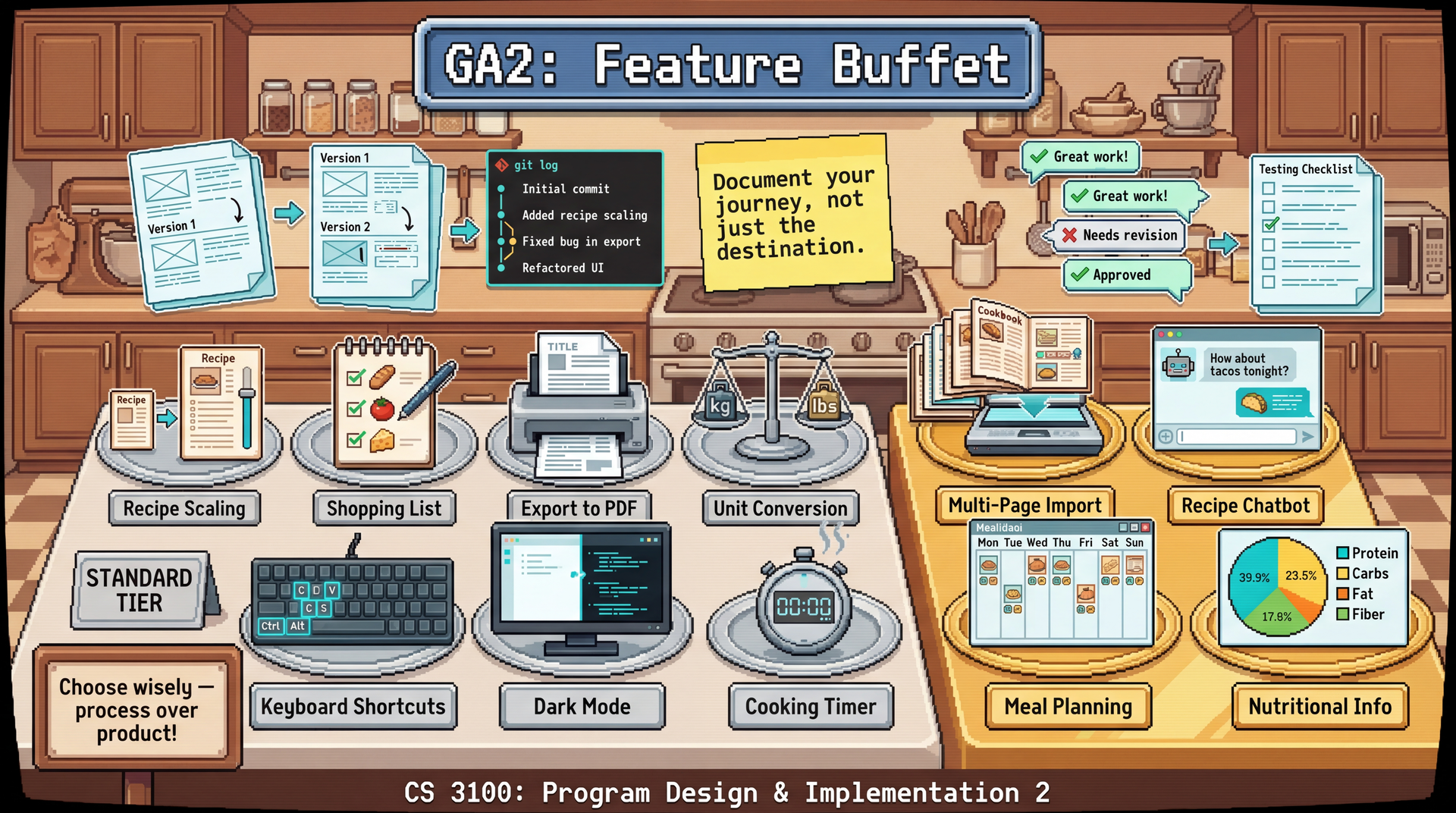
This approach reflects real-world software development: a well-documented, well-tested partial feature is more valuable than a hastily-implemented complete feature with no documentation or tests.
Due: Thursday, April 16, 2026 at 11:59 PM Boston Time
Prerequisites: GA1 (Core Features) must be complete. Your core features should be integrated and working. You will build on this foundation for your GA2 features.
Learning Outcomes
By completing this assignment, you will demonstrate proficiency in:
- Iterative design through documented design evolution (L27: User-Centered Design)
- Professional documentation of design decisions and implementation choices
- Quality code review that improves code and spreads knowledge (L22: Teams and Collaboration)
- Process reflection that identifies lessons learned and areas for improvement
AI Policy for This Assignment
AI tools are encouraged, but remember: we're grading process, not just product. AI can help you implement features quickly, but it cannot:
- Make design decisions for your specific users
- Document why you made the choices you made
- Provide meaningful code review (AI-generated review comments do not satisfy the code review rubric)
- Reflect on what you learned
Use AI as a tool, but ensure the thinking is yours. If you use AI assistance for implementation, you must be able to explain the code and design decisions in your own words during TA meetings.
TA Mentor Meetings
Throughout GA2, your team will have weekly 30-minute meetings with your assigned TA mentor. These meetings are an accountability mechanism, not just a scheduling requirement. If you cannot attend, notify your TA before the meeting and provide a written update on your work status—this demonstrates accountability. Missing a meeting without prior notice signals a lack of accountability and will likely result in a penalty for that week's individual accountability component. These meetings serve multiple purposes:
- Code walks: Each team member explains what they worked on and their design choices
- Progress check-ins: Are you on track? Stuck anywhere?
- Collaboration verification: Is the team working well together?
- Debugging support: Your TA can help unblock technical issues
Meeting schedule for GA2:
| Meeting | Target Dates | Focus |
|---|---|---|
| 4 | Apr 13–14 | Feature buffet and integration — buffet feature progress, architecture deep dive, integration maturity, final sprint planning |
Each student earns up to 10 points at the graded meeting using the same rubric as GA1:
| Category | Points | What your TA is looking for |
|---|---|---|
| Code Comprehension | 4 | Can you explain your own code at both a high level and in detail? Can you articulate design decisions and trade-offs? |
| Process & Workflow | 3 | Are you using feature branches, opening PRs with meaningful descriptions, and participating in code review? |
| Collaboration Evidence | 2 | Have you reviewed teammates' PRs? Can you describe what your teammates are working on? |
| Forward Planning | 1 | Do you have a concrete plan for what you're doing next? |
Your TA will use a top-down questioning approach: starting with general questions and drilling into specifics. The goal is to assess comprehension, not to quiz you on syntax. If you used AI tools to help with implementation, you must still be able to explain how the code works and why you made certain design decisions.
Weekly collaboration surveys are due each Monday (Mar 23, Mar 30, Apr 6, Apr 13) via Pawtograder. These brief check-ins ask you to reflect on team dynamics, your contributions, and any blockers. They are visible to your TA mentor and directly inform the individual accountability adjustment.
The Feature Buffet
Choose 2-3 features from the buffet below. 3-person teams follow the same Feature Buffet process and grading as 4-person teams — the number of features selected and all process expectations are unchanged.
Standard Features
| Feature | Description | Complexity |
|---|---|---|
| Recipe Scaling | Adjust serving sizes with automatic ingredient recalculation | Medium |
| Shopping List | Generate aggregated shopping list from selected recipes | Medium |
| Export to PDF | Create nicely formatted PDF exports of recipes | Medium |
| Unit Conversion | Toggle between metric and imperial throughout the app | Medium |
| Keyboard Shortcuts | Comprehensive keyboard navigation and shortcuts | Medium |
| Dark Mode | Theme switcher with system preference detection | Low-Medium |
| Cooking Timer | Timers linked to recipe instruction steps | Medium-High |
| Cooking Mode | Step-by-step cooking interface: one instruction per screen with referenced ingredients, large easy-to-tap navigation buttons, and previous/next step controls | Medium |
Advanced Features
| Feature | Description | Complexity |
|---|---|---|
| Multi-Page Import | Import multiple files at once, multi-page PDF support, detect recipe continuation across pages | Medium-High |
| Recipe Chatbot | "What should I make?" meal suggestion assistant using Gemini API | Medium-High |
| Meal Planning | Calendar-based meal planning with recipe scheduling | High |
| Nutritional Info | API integration for nutritional data | High |
Process Portfolio
For each feature from the buffet, your team must submit a Process Portfolio demonstrating thoughtful development. This is the primary grading artifact.
1. Design Rationale (10% of feature grade)
Document (1/2 page):
- Why did you choose this feature?
- What user need does it address? (Reference a persona from GA0)
- What alternatives did you consider?
2. Design Artifacts (25% of feature grade)
Show your design evolution:
- Version 1: Initial wireframe/mockup
- Version 2+: At least one iteration with documented changes
- Rationale: Why did you change the design? What feedback prompted it?
Photos of whiteboard sketches are fine. The goal is showing iteration, not polish.
3. Implementation Journal (20% of feature grade)
Document your implementation process:
- Git history: Show incremental progress (not one giant commit at the end)
- PR history: Link to PRs with meaningful review comments
- Decision log: At least one documented technical decision with alternatives considered
4. Testing & Quality (20% of feature grade)
- Unit tests for the feature
- Brief accessibility check: Does it support keyboard navigation?
- Known limitations documented
5. Demo & Reflection (25% of feature grade)
- Demo video: 1-2 minute screen recording showing the feature working (upload to YouTube/Vimeo as unlisted, or commit an MP4 to the repo; link from DEMO.md)
- What worked well? What aspects of your process were effective?
- What would you do differently? Specific, actionable lessons learned
- Integration notes: How does this feature connect to the rest of the app?
Grading Philosophy
A well-documented partial feature scores higher than a complete feature with no process evidence.
| Scenario | Score (out of 40) | Letter Grade Equivalent |
|---|---|---|
| Feature complete, excellent process documentation, meaningful iteration | 36–40 | A |
| Feature partially complete, excellent process documentation | 32–36 | B+ |
| Feature complete, minimal process documentation | 28–32 | B- |
| Feature generally broken, but excellent documentation of what was attempted | 28–32 | B- |
| Feature partially complete, minimal process documentation | 24–28 | C+ |
| Feature complete, no documentation | 20–24 | C- |
Grading Rubric
Total: 50 points — 40 points team (Process Portfolios) + 10 points individual (contribution evidence). This equates to 80% team / 20% individual grading.
Team: Process Portfolio (40 points)
Each feature is scored out of 40 points. If your team implements 2–3 features, scores are averaged to produce the 40-point team component. Components scored zero (entirely missing) will produce grades below the philosophy ranges above.
| Component | Points | Excellent | Satisfactory | Needs Improvement |
|---|---|---|---|---|
| Design Rationale | 4 | Clear user need, thoughtful alternatives considered | User need stated | Generic or missing rationale |
| Design Artifacts | 10 | 3+ versions with clearly documented evolution | 2 versions shown | Single design, no iteration |
| Implementation Journal | 8 | Regular commits, quality PRs, decisions documented | Some commits, basic PRs | Large commits, no discussion |
| Testing & Quality | 8 | Comprehensive tests; known limitations documented | Basic tests present | Minimal or no testing |
| Demo & Reflection | 10 | Insightful reflection with specific lessons; demo shows working feature or thoroughly documents what was attempted for incomplete/broken features | Generic reflection; demo present | Superficial reflection; no demo |
| Total | 40 |
Individual Contribution (10 points)
Scored per team member based on evidence of personal engagement:
| Component | Points | Excellent | Satisfactory | Needs Improvement |
|---|---|---|---|---|
| Commit history & PR activity | 5 | Regular, meaningful commits; substantive PR participation | Some commits and PRs | Minimal commits; one large dump at the end |
| Code review quality | 5 | Substantive, specific review comments | Reviews present but surface-level | "LGTM" only or no reviews |
| Total | 10 |
Individual Accountability Adjustment
TA meeting observations and weekly collaboration surveys can adjust an individual's final grade by up to -20 points or award an upward adjustment of up to +20 points. If a team member cannot explain their code in TA meetings while the rest of the team succeeds, their grade may be reduced. The upward adjustment exists for a specific scenario: if your team's project isn't fully complete, but you went above and beyond to support struggling teammates — helping them get unblocked, taking on extra integration work, providing thorough code reviews — you can still earn full marks. This is not an extra credit mechanism; it is unlikely to bring a student above the assignment's total points. Simply doing your own work well is the expected baseline, not grounds for an upward adjustment. The weekly collaboration surveys (due Mar 23, Mar 30, Apr 6, Apr 13) inform this adjustment.
Submission
All deliverables should be merged to main following the Git Workflow for Team Projects. Your main branch is automatically submitted to Pawtograder.
Repository Contents
/menu-features/
  /feature-name-1/
    RATIONALE.md
    design/
      v1-wireframe.png
      v2-wireframe.png
      design-evolution.md
    IMPLEMENTATION_JOURNAL.md
    DEMO.md (with link to video)
  /feature-name-2/
    ...
Checklist
- 2-3 features selected from the buffet
- Process portfolio complete for each feature
- Demo videos recorded and linked
- Weekly collaboration surveys up to date (due each Monday via Pawtograder)
Reflection Questions for Team Discussion
Before submitting, discuss as a team:
- Which feature had the smoothest development process? Why?
- Where did your GA0 design artifacts help most? Where did they fall short?
- What would you do differently if starting the group project over?
- What's one thing each team member learned from another team member?
These don't need to be submitted, but inform your individual reflections in the weekly team collaboration surveys and the final individual reflection.
As part of the Final Report, each team member must submit an individual reflection. This is a mandatory gate — your individual and team grades for the final report are not released until it is submitted. Keep notes throughout GA2 so you're prepared.