CS 3100: Program Design and Implementation II
Lecture 3: Inheritance and Polymorphism in Java II
©2025 Jonathan Bell & Ellen Spertus, CC-BY-SA
Poll: What pre-college CS courses did you take?
A. AP CS A
B. AP CS Principles
C. Other Java class or self-study
D. Other non-Java class or self-study
E. None

Text espertus to 22333 if the
URL isn't working for you.
How's Assignment 1 going?
A. Haven't looked at it
B. Looked at it but haven't started
C. Started it but got stuck
D. Started it and doing alright
E. Pretty far along
F. Completed it
Text espertus to 22333 if the
URL isn't working for you.
Learning Objectives
After this lecture, you will be able to:
- Describe the role of generics in the Collections API
- Recognize and apply Java's core data structures (List, Set, Map)
- Describe the purpose of primitive wrapper types
- Utilize Java methods for reading input and writing output to streams
The JVM Chooses Methods Based on Runtime Type
Dynamic dispatch: The JVM chooses methods at runtime based on actual object type
Java's Standard Libraries Model Good OOP Design
Inheritance and polymorphism aren't just theory...
They shape how Java's built-in libraries work:
- Collections API — Lists, Sets, Maps with type safety
- I/O Streams — Uniform abstraction for reading/writing
Understanding these APIs deepens your grasp of OOP design
Collections Need Flexibility AND Safety

Without Generics, Collections Are Type-Unsafe
public interface List {
    void add(Object o);
    Object get(int index);
}
List list = new ArrayList();
list.add(new TunableWhiteLight(2700));
list.add(new Fan());  // No compiler complaint!

// Runtime explosion! ClassCastException
TunableWhiteLight light = (TunableWhiteLight) list.get(1);
The compiler can't help you — errors hide until runtime
Java programmers demanded generic types

Generics Catch Type Errors at Compile Time
/**
 * A list
 * @param <E> the type of elements in the list
 */
public interface List<E> {
    void add(E element);
    E get(int index);
}
List<Light> lights = new ArrayList<Light>();
lights.add(new TunableWhiteLight(2700));  // ✓ Light subtype
lights.add(new Fan());  // Compile-time error! ✗
Errors detected when you write them, not when customers find them
Type Inference Eliminates Redundant Declarations
// Explicit type parameters (verbose but clear)
List<Light> lights = new ArrayList<Light>();

// Java 7+: Diamond operator infers the type
List<Light> lights = new ArrayList<>();

// Works with complex types too
Map<String, List<IoTDevice>> devicesByRoom = new HashMap<>();
The compiler infers the type parameter from the variable declaration
Three Rules Keep Your Generic Code Safe
| Rule | Why |
|---|---|
| Don't use raw types | Type safety is the whole point |
| Eliminate unchecked warnings | They're errors in disguise |
| Favor generic types & methods | Design for reuse |
See Effective Java, Items 26, 27, 29, 30.
Generic Type Information Disappears at Runtime
List<Light> lights = new ArrayList<>();
List<Fan> fans = new ArrayList<>();

// At runtime, both are just "List" — type info is gone!
System.out.println(lights.getClass() == fans.getClass());  // true!

// This won't even compile:
// if (lights instanceof List<Light>) { }  // Error!

// You can only check the raw type:
if (lights instanceof List) { }  // This works, but less useful
Generic type information is erased at runtime — a backwards compatibility compromise from 2004
Collections Form an Inheritance Hierarchy
Lists Maintain Order and Support Index Access
List<Light> lights = new ArrayList<>();
lights.add(new DimmableLight("office", 100));      // Index 0
lights.add(new TunableWhiteLight("den", 2700));    // Index 1

// Direct access by index
Light first = lights.get(0);

// Insert at specific position
lights.add(0, new SwitchedLight("porch"));  // Now at index 0

// Iterate in guaranteed order
for (Light light : lights) {
    light.turnOn();  // porch, then office, then den
}
Key property: Elements maintain insertion order and are accessible by index
Arrays Are Fast but Fixed in Size
// Arrays are built into the language — fixed size, declared with []
Light[] lights = new Light[3];  // Create array of exactly 3 slots
lights[0] = new DimmableLight("office", 100);
lights[1] = new TunableWhiteLight("den", 2700);
lights[2] = new SwitchedLight("porch");

// Direct access by index — O(1)
Light first = lights[0];

// Iteration
for (Light light : lights) {
    light.turnOn();
}

// But... what if we need a 4th light?
lights[3] = new Fan("oops");  // ArrayIndexOutOfBoundsException!
Problem: Size is fixed at creation — can't grow or shrink
ArrayList Trades Slight Overhead for Flexibility
Array (Light[]) | ArrayList (ArrayList<Light>) | |
|---|---|---|
| Size | Fixed at creation | Grows automatically |
| Syntax | lights[i] | lights.get(i) |
| Type safety | Built-in | Via generics |
| Primitives | Yes (int[]) | No (need Integer) |
| Length | .length (field) | .size() (method) |
| Methods | None (just indexing) | add, remove, contains... |
Rule: Use ArrayList unless you need primitives or know the exact size
What's your understanding of Big-O notation?
A. I've never heard of it
B. I've heard of it but don't remember it
C. I know the basics
D. I've mastered it
Text espertus to 22333 if the
URL isn't working for you.
Absolute Time Doesn't Measure Algorithm Quality

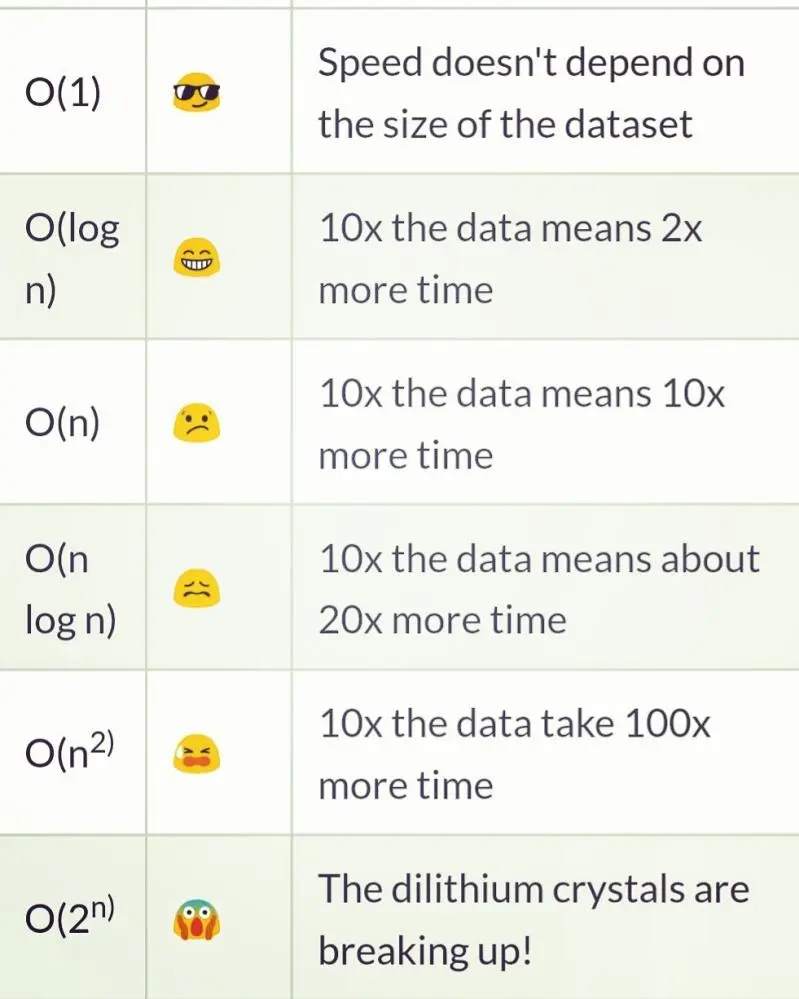
Big-O Describes How Work Scales with Input Size
Big-O describes how an algorithm's time (or space) scales with input size n
| Notation | Name | Example | 10 items | 1000 items |
|---|---|---|---|---|
| O(1) | Constant | Array access by index | 1 step | 1 step |
| O(n) | Linear | Search unsorted list | 10 steps | 1,000 steps |
| O(n²) | Quadratic | Compare all pairs | 100 steps | 1,000,000 steps |
The "O" stands for "order of" — we care about the growth pattern, not exact counts
Big-O Patterns Appear in Everyday Tasks
O(1) — Constant
- Looking up a word in a dictionary by page number
- Getting the first item from a shelf
- Checking if a light switch is on
O(n) — Linear
- Finding a specific book on an unsorted shelf
- Counting people in a room
- Reading every line of a file
O(n²) — Quadratic
- Comparing every student's answer to every other student's (plagiarism check)
- Bubble sort
Big-O Described in Emojis
The Wrong Algorithm Fails at Scale
// O(1) — accessing element at index: instant at any size
Light light = lights.get(500000);  // Same speed as get(0)

// O(n) — finding an element: slower as list grows
for (Light light : lights) {
    if (light.getId().equals("target")) { /* found! */ }
}
// 1 million lights = up to 1 million comparisons

// O(n²) — nested loops: gets very slow, very fast
for (Light a : lights) {
    for (Light b : lights) {
        // Compare a to b
    }
}
// 1000 lights = 1,000,000 comparisons
// 10000 lights = 100,000,000 comparisons!
ArrayList Is Just an Array with Bookkeeping
// Simplified view of ArrayList's internal structure
public class ArrayList<E> {
    private Object[] elementData;  // The backing array!
    private int size;              // How many elements we actually have

    public ArrayList() {
        this.elementData = new Object[10];  // Default capacity: 10
        this.size = 0;
    }

    public E get(int index) {
        return (E) elementData[index];  // O(1) — just array access
    }

    public boolean add(E element) {
        if (size == elementData.length) {
            grow();  // Array full — need to resize!
        }
        elementData[size] = element;
        size++;
        return true;
    }
}
ArrayList is an array — it just manages resizing for you!
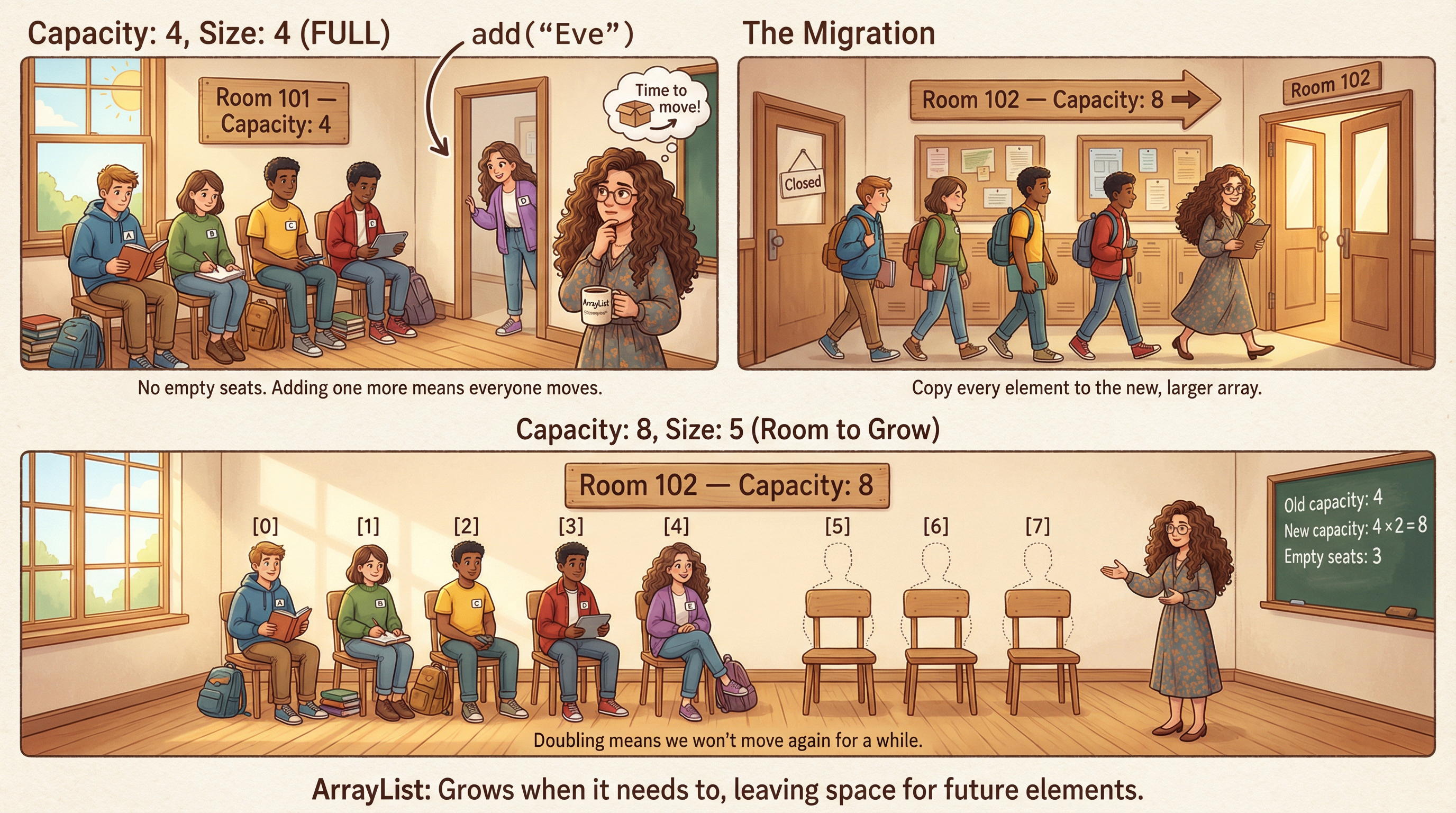
ArrayList Grows by Copying to a Larger Array
private void grow() {
    int oldCapacity = elementData.length;
    int newCapacity = oldCapacity + (oldCapacity >> 1);  // Grow by 50%
    // >> is the right shift operator, which is equivalent to dividing by 2
    // So oldCapacity + (oldCapacity >> 1) is equivalent to oldCapacity * 1.5
    // but faster to compute because it's a bitwise operation

    // Create a new, bigger array
    Object[] newArray = new Object[newCapacity];

    // Copy all elements to the new array
    for (int i = 0; i < size; i++) {
        newArray[i] = elementData[i];
    }

    // Switch to the new array
    elementData = newArray;
    // Old array becomes garbage — GC will clean it up
}
Before: [A][B][C][D] (capacity 4, full!)
After: [A][B][C][D][ ][ ] (capacity 6)
Classroom Analogy
Infrequent Resizes Average Out to O(1) Per Add
| Operation # | Array Size | Resize? | Elements Copied |
|---|---|---|---|
| 1-10 | 10 | No | 0 |
| 11 | 10→15 | Yes | 10 |
| 12-15 | 15 | No | 0 |
| 16 | 15→22 | Yes | 15 |
| 17-22 | 22 | No | 0 |
| 23 | 22→33 | Yes | 22 |
| ... | ... | ... | ... |
After N adds: ~2N total copies → O(1) per add on average
Doubling strategy means resizes become increasingly rare
LinkedList: Use It Only for Queues
How it works:
- Chain of nodes, each pointing to neighbors
- O(1) add/remove at both ends
- O(n) to access middle elements (must walk chain)
When to use it:
- As a
Queue(FIFO) - As a
Deque(double-ended) - Almost never as a general
List
// Good use of LinkedList: as a Queue
Queue<Task> taskQueue = new LinkedList<>();
taskQueue.offer(new Task("process"));  // Add to end — O(1)
Task next = taskQueue.poll();          // Remove from front — O(1)

// For everything else, use ArrayList
List<Light> lights = new ArrayList<>();  // Default choice
Rule: Use ArrayList unless you specifically need queue behavior
HashSets Guarantee Uniqueness with O(1) Lookup
Set<String> deviceIds = new HashSet<>();
deviceIds.add("light-001");
deviceIds.add("fan-002");
deviceIds.add("light-001");  // Silently ignored — already present!

System.out.println(deviceIds.size());  // 2, not 3
System.out.println(deviceIds.contains("fan-002"));  // true — O(1)!

// Iteration order is NOT guaranteed with HashSet
for (String id : deviceIds) {
    System.out.println(id);  // Could be either order
}
Key property: No duplicates; extremely fast contains() check
Maps Let You Find Values by Meaningful Keys
Map<String, IoTDevice> deviceRegistry = new HashMap<>();

// Store devices by a meaningful key
deviceRegistry.put("living-room-main", new DimmableLight("lr", 100));
deviceRegistry.put("bedroom-fan", new Fan("bf"));
deviceRegistry.put("living-room-main", new TunableWhiteLight("lr", 2700));
// ^ Replaces the previous value for this key!

// Retrieve by key — O(1)
IoTDevice device = deviceRegistry.get("living-room-main");
device.identify();

// Check before accessing
if (deviceRegistry.containsKey("kitchen-light")) {
    deviceRegistry.get("kitchen-light").identify();
}
Poll: What should be used for a playlist?
A. ArrayList
B. LinkedList
C. Set
D. Map
E. I have no idea
Assume that songs can be played in order or referenced by number and that duplicates are allowed.
Text espertus to 22333 if the
URL isn't working for you.
Answer: Data structure for playlist
Scenario: Store a playlist of songs in the order they should play
Use: List<Song> (ArrayList)
- Order matters — songs play in sequence
- May contain duplicates — same song can appear twice
- Need indexed access — "skip to track 5"
List<Song> playlist = new ArrayList<>();
playlist.add(new Song("Bohemian Rhapsody"));
playlist.add(new Song("Stairway to Heaven"));
playlist.add(new Song("Bohemian Rhapsody"));  // Play it again!
Song track5 = playlist.get(4);
Poll: What should be used for a voter list?
A. ArrayList
B. LinkedList/Queue
C. Set
D. Map
E. I have no idea
We need to track which users have voted to prevent double-voting.
Text espertus to 22333 if the
URL isn't working for you.
Answer: Data Structure for Voter List
Scenario: Track which users have already voted (prevent double-voting)
Use: Set<String> (HashSet)
- No duplicates — each user votes once
- Order doesn't matter — just need "has this user voted?"
- Fast contains() check — O(1)
Set<String> voterIds = new HashSet<>();

public boolean recordVote(String voterId, String choice) {
    if (voterIds.contains(voterId)) {
        return false;  // Already voted!
    }
    voterIds.add(voterId);
    // ... record the vote
    return true;
}
Poll: What should be used for a student grade?
A. ArrayList
B. LinkedList/Queue
C. Set
D. Map
E. I have no idea
Given a student ID, we want to find their course average.
Text espertus to 22333 if the
URL isn't working for you.
Answer: Data Structure for Student Grade
Scenario: Look up a student's average by student ID
Use: Map<String, Double> (HashMap)
- Need to find values by a key (student ID)
- Each student has exactly one grade
- Fast lookup — O(1)
Map<String, Double> grades = new HashMap<>();
grades.put("12345", 92.5);
grades.put("67890", 87.0);

double grade = grades.get("12345");  // 92.5
grades.put("12345", 94.0);  // Update after extra credit
Poll: What should be used for office hours requests?
A. ArrayList
B. LinkedList/Queue
C. Set
D. Map
E. I have no idea
We want to process office hour requests in the order they arrive.
Text espertus to 22333 if the
URL isn't working for you.
Answer: Data Structure for Office Hours Requests
Scenario: Process office hour requests in the order they arrived
Use: Queue<Ticket> (LinkedList)
- First-in, first-out (FIFO) order
- Add at the end, remove from the front
- Don't need random access
Queue<Ticket> supportQueue = new LinkedList<>();
supportQueue.offer(new Ticket("build problem"));
supportQueue.offer(new Ticket("debug help"));

Ticket next = supportQueue.poll();  // Gets "build problem"
Poll: What should be used to store devices by room?
A. ArrayList
B. LinkedList/Queue
C. Set
D. Map
E. I have no idea
Given a room, we want to retrieve all of the devices in it.
Text espertus to 22333 if the
URL isn't working for you.
Answer: Data Structures for Devices by Room
Scenario: Store all devices in each room of a smart home
Use: Map<String, List<IoTDevice>> or
Use: Map<String, Set<IoTDevice>> Or
- Look up by room name (key)
- Each room has multiple devices (value is a List)
- Nested generics — Map of String to List of IoTDevice
Map<String, List<IoTDevice>> devicesByRoom = new HashMap<>();
devicesByRoom.put("living-room", new ArrayList<>());
devicesByRoom.get("living-room").add(new DimmableLight("lr1", 100));
devicesByRoom.get("living-room").add(new Fan("lr-fan"));

// Turn off all devices in living room
for (IoTDevice device : devicesByRoom.get("living-room")) {
    // ...
}
Match Your Data Structure to Your Access Pattern
| Need | Use | Why |
|---|---|---|
| Ordered sequence, indexed access | ArrayList | O(1) random access |
| FIFO queue | LinkedList | O(1) add/remove at ends |
| Unique elements, fast lookup | HashSet | O(1) contains |
| Key-value lookup | HashMap | O(1) by key |
Primitives Need Wrapper Classes for Collections
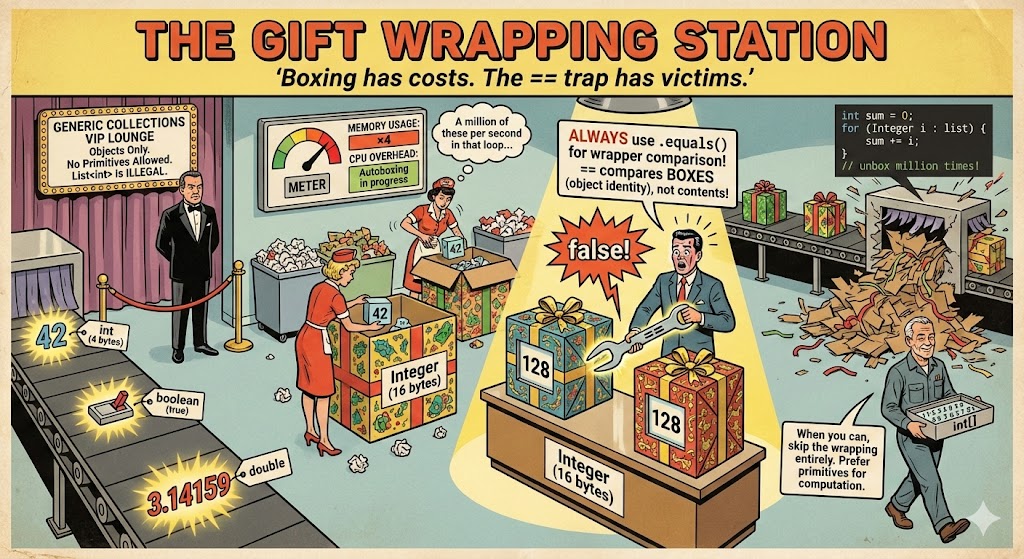
Java Automatically Boxes and Unboxes Primitives
| Primitive | Wrapper |
|---|---|
int | Integer |
double | Double |
boolean | Boolean |
char | Character |
long | Long |
// Must use wrapper for generics
List<Integer> numbers = new ArrayList<>();

// Autoboxing: int → Integer
numbers.add(42);

// Autounboxing: Integer → int
int x = numbers.get(0);

// Can do arithmetic directly
numbers.set(0, numbers.get(0) + 1);
Never Use == to Compare Wrapper Objects
// Primitives: == compares values
int x = 1, y = 1;
System.out.println(x == y);  // true ✓

// Wrappers: == compares object identity!
Integer a = 128, b = 128;
System.out.println(a == b);  // false! 😱
Always use .equals() for object comparison, or prefer primitives
Wrapper Objects Add Overhead—Prefer Primitives
// Prefer this:
int count = 0;
for (int i = 0; i < 1000000; i++) {
    count += i;
}

// Over this (much slower!):
Integer count = 0;
for (Integer i = 0; i < 1000000; i++) {
    count += i;  // Unbox, add, rebox... million times
}
- Use primitives for local variables, loop counters, arithmetic
- Use wrappers only when required (generics, nullability)
- Be careful with == on wrappers
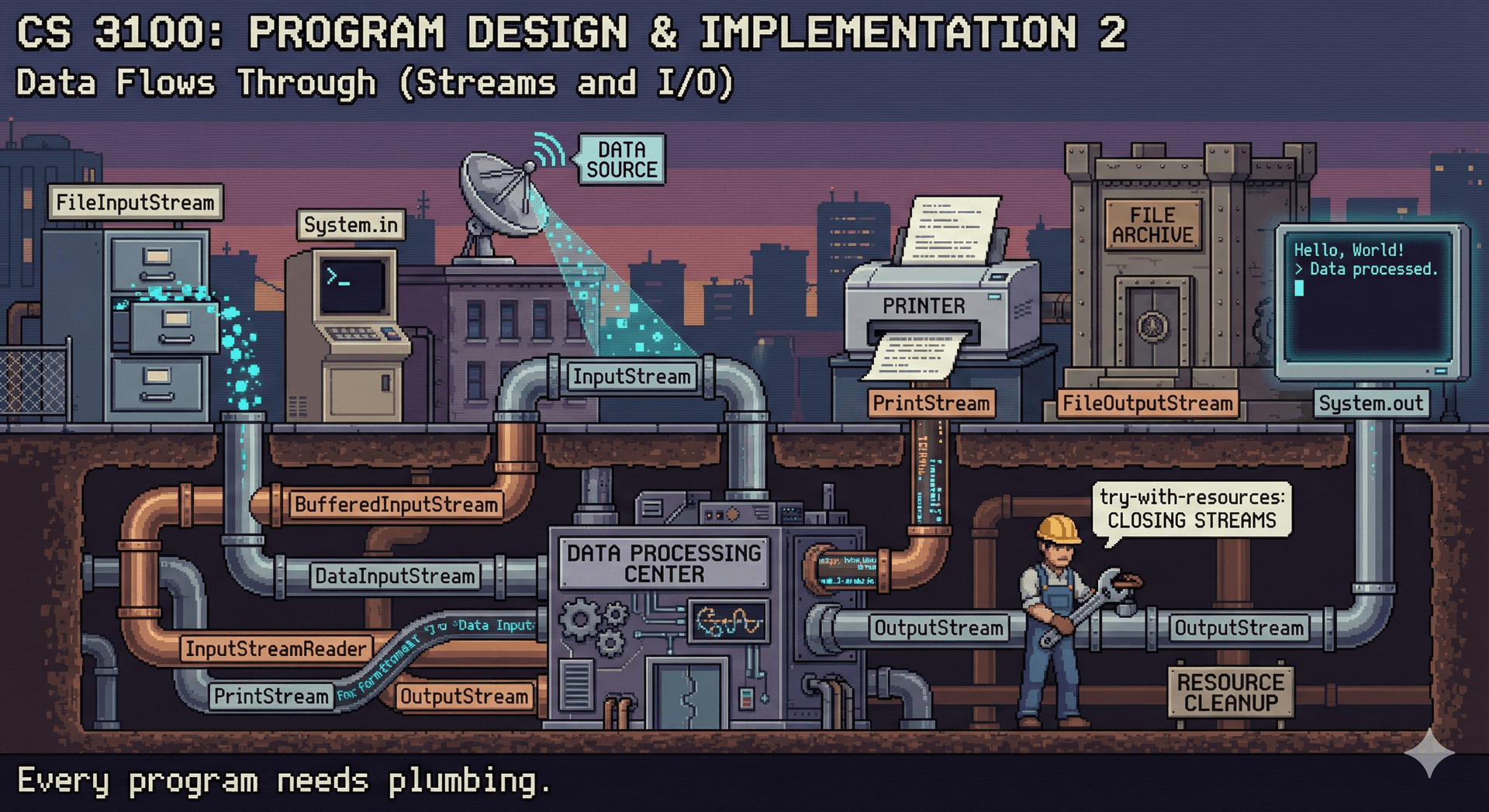
Streams Provide a Uniform Abstraction for All I/O
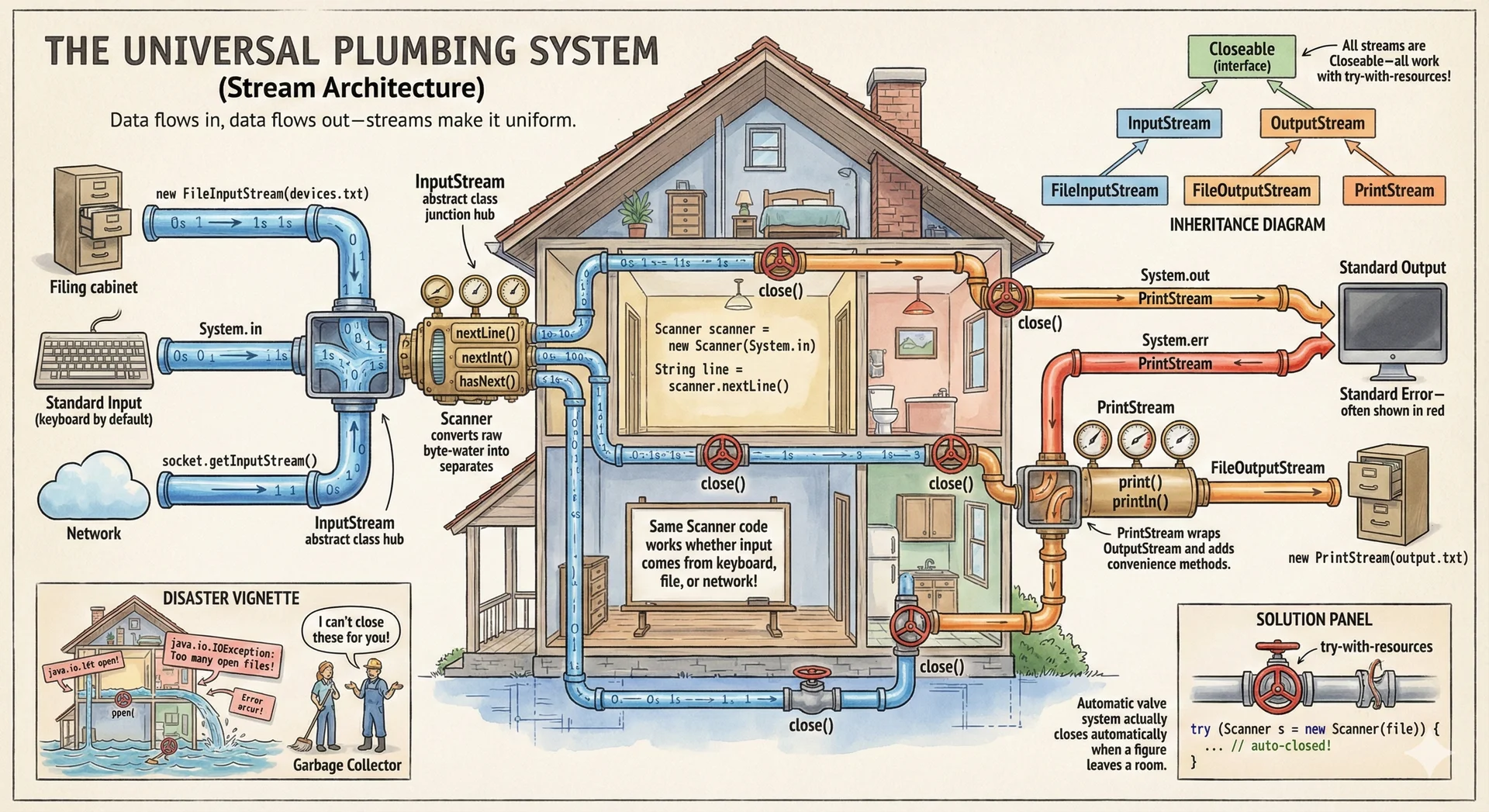
Every Java Program Inherits Three Standard Streams
| Stream | Purpose | Type |
|---|---|---|
System.in | Standard input (keyboard) | InputStream |
System.out | Standard output (console) | PrintStream |
System.err | Standard error (console) | PrintStream |
Unix heritage from 1969 that every Java program inherits
System.out.println("Normal output");
System.err.println("Error message");  // Often shown in red
Stream Classes Use Inheritance for Flexibility
PrintStream Makes Writing Formatted Output Easy
// We've been doing this all along!
System.out.println("Hello, world!");

// println accepts any type — calls toString()
System.out.println(42);
System.out.println(new DimmableLight("test", 100));

// Write to a file instead of console
PrintStream fileOut = new PrintStream("output.txt");
fileOut.println("Written to file!");
fileOut.println("Line 2");
fileOut.close();  // Don't forget to close!
PrintStream wraps the complexity of byte-level I/O
Scanner Parses Formatted Input from Any Source
Scanner scanner = new Scanner(System.in);  // Wrap standard input

System.out.print("Enter device name: ");
String name = scanner.nextLine();  // Read entire line

System.out.print("Enter brightness (0-100): ");
int brightness = scanner.nextInt();  // Parse as integer

DimmableLight light = new DimmableLight(name, brightness);
System.out.println("Created: " + light);

scanner.close();
Scanner parses formatted input from any source
The Same Scanner API Works for Files or Console
Scanner fileScanner = new Scanner(new File("devices.txt"));

List<String> deviceNames = new ArrayList<>();
while (fileScanner.hasNextLine()) {
    String line = fileScanner.nextLine();
    deviceNames.add(line);
}

fileScanner.close();  // Always close when done!
System.out.println("Loaded " + deviceNames.size() + " devices");
Same methods, different source — polymorphism in action
Try-With-Resources Guarantees Streams Are Closed
The verbose way (pre-Java 7):
Scanner scanner = null;
try {
    scanner = new Scanner(
        new File("input.txt"));
    while (scanner.hasNext()) {
        System.out.println(
            scanner.nextLine());
    }
} catch (FileNotFoundException e) {
    System.err.println("Error!");
} finally {
    if (scanner != null) {
        scanner.close();
    }
}
The modern way (Java 7+):
try (Scanner scanner =
        new Scanner(
            new File("input.txt"))) {
    while (scanner.hasNext()) {
        System.out.println(
            scanner.nextLine());
    }
} catch (FileNotFoundException e) {
    System.err.println("Error!");
}
// Automatically closed!
Combine Collections, I/O, and Parsing for Real Programs
public List<IoTDevice> loadDevices(String filename) {
    List<IoTDevice> devices = new ArrayList<>();

    try (Scanner scanner = new Scanner(new File(filename))) {
        while (scanner.hasNextLine()) {
            String line = scanner.nextLine();
            String[] parts = line.split(",");
            String type = parts[0];
            String id = parts[1];

            if (type.equals("light")) {
                int brightness = Integer.parseInt(parts[2]);
                devices.add(new DimmableLight(id, brightness));
            } else if (type.equals("fan")) {
                devices.add(new Fan(id));
            }
        }
    } catch (FileNotFoundException e) {
        System.err.println("Could not load devices: " + e.getMessage());
    }

    return devices;
}
Commonly Confused Term: Overloading
Overloading is having multiple methods with the same name and different parameter types.
public class Vet {
    public void treat(Animal a) { System.out.println("Treating animal"); }
    public void treat(Dog d) { System.out.println("Treating dog"); }
}

Vet vet = new Vet();
Animal a = new Animal();
Animal d = new Dog();    // declared: Animal, runtime: Dog
vet.treat(a);   // prints "Treating animal"
vet.treat(d);   // prints "Treating animal" - uses declared type!
Methods are resolved at compile-time based on declared parameter types.
Commonly Confused Term: Overriding
Overriding is providing a new implementation of an inherited method in a subclass.
public class Animal {
    public String speak() { return "..."; }
}
public class Dog extends Animal {
    @Override
    public String speak() { return "Woof!"; }
}

Animal a = new Animal();
Animal d = new Dog();    // declared: Animal, runtime: Dog
a.speak();   // returns "..."
d.speak();   // returns "Woof!" - uses runtime type
Methods are resolved at run-time based on the actual object type.
Summary
| Generics | Compile-time type safety for collections |
| Collections | List (ordered), Set (unique), Map (key-value) |
| Wrapper types | Bridge primitives to the object world; beware == |
| Streams | Uniform abstraction for I/O; InputStream, OutputStream |
| Scanner | Parse formatted input from any source |
| try-with-resources | Automatic cleanup for Closeable resources |
Next Steps
- Complete flashcard set 3 (Collections & I/O)
- Read: Core Java Volume I, Chapter 3 (Fundamental Programming Structures)
- Assignment 1 due Thursday, January 15 at 11:59 PM