
CS 3100: Program Design and Implementation II
Lecture 4: Specifications and Common Contracts
©2025 Jonathan Bell & Ellen Spertus, CC-BY-SA
Announcements
- In-person office hours (listed on Oakland Canvas) are held in CPM 200:
- Monday 3-4 (Ellen)
- Tuesday 5-6 (Lucia)
- Wednesday 2-4 (Ran)
- Thursday 3-4 (Ellen)
- Thursday 5-6 (Lucia)
- Ellen and Lucia offer one-on-one appointments.
- Complete the student survey by Friday.
- If you are having trouble, ask for help!
How are you feeling about CS 3100?


Text espertus to 22333 if the
URL isn't working for you.
What's your progress on Assignment 1? (anonymous)

Text espertus to 22333 if the
URL isn't working for you.
Learning Objectives
After this lecture, you will be able to:
- Describe the role of method specifications in achieving program modularity and improving readability
- Evaluate the efficacy of a given specification using the terminology of restrictiveness, generality, and clarity
- Utilize type annotations to express invariants such as non-nullness
- Define the role of methods common to all Objects in Java (toString, equals, hashCode, compareTo)
Humans Can Only Hold 7±2 Items in Working Memory
Which is easier to remember?
- Random order: 50, 30, 60, 20, 80, 10, 40, 70
- Pattern: 10, 20, 30, 40, 50, 60, 70, 80
Chunking Lets Us Manage More Than 7 Items
Chunking = organizing information into meaningful units
- "FBI" is 1 chunk, not 3 letters
- "555-1234" is 2 chunks, not 7 digits
- A chess master sees "castled king position" not 5 pieces
Expert programmers chunk code the same way:
- "Binary search" → one chunk (not 15 lines)
- "HashMap lookup" → one chunk (not the internal algorithm)
Specifications Enable Mental Chunking for Code
When reading a program, we want to understand method behavior without reading the implementation.
Without spec: 🤯
public boolean mystery(Object[] arr, Object o) {
    for (int i = 0; i < arr.length; i++) {
        if (arr[i].equals(o)) return true;
    }
    return false;
}
Must read every line to understand
With spec: 😌
/**
 * Returns true if this collection contains
 * the specified element.
 *
 * @return true if this collection contains o
 */
boolean contains(Object o);
Spec tells you what it does
You Spend 10x More Time Reading Code Than Writing It
Consider understanding this call from L3:
Map<String, List<IoTDevice>> devicesByRoom = new HashMap<>();
devicesByRoom.get("living-room").add(new DimmableLight("lr1", 100));
Without spec:
- Open HashMap source (2000+ lines)
- Trace through hash buckets
- Understand resize logic
- Time: 30+ minutes
With spec:
- Read Map.get() Javadoc
- "Returns the value for this key, or null"
- Time: 30 seconds
You used HashMap without reading its 2000-line implementation!
A Good Specification Lets You Predict Behavior
The goal: a developer can understand what a method does without reading its code.
- Any implementation that satisfies the spec is correct
- Any implementation that violates the spec is incorrect
- The spec should be easier to understand than the implementation
But how do we evaluate whether a specification is good?
Good Specifications Balance Three Criteria
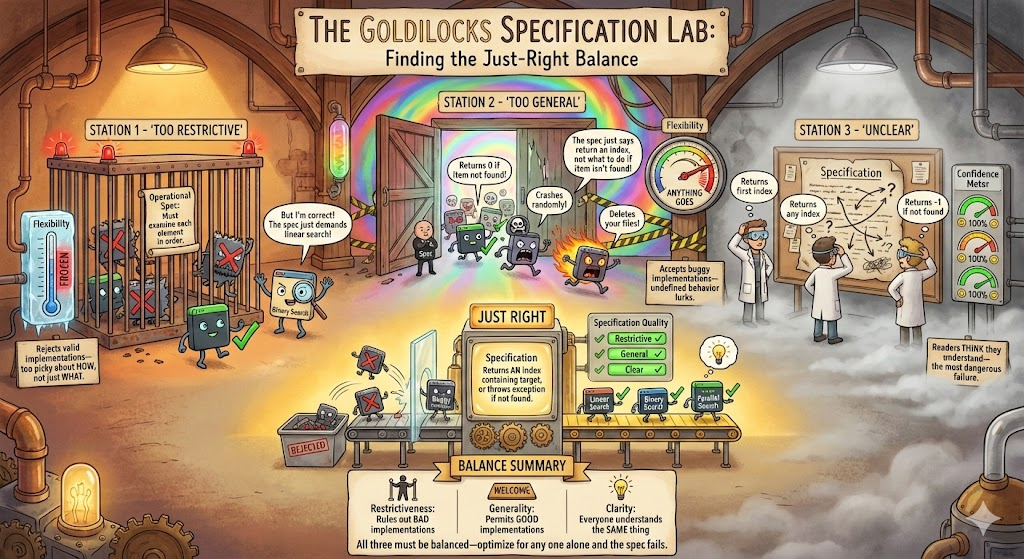
Restrictive Specs Rule Out Bad Implementations
A spec is restrictive if it rules out implementations that clients would find unacceptable.
Think of it as: "What BAD behaviors does this spec prohibit?"
- Does it specify what happens for ALL inputs?
- Does it prohibit surprising or dangerous behavior?
- Could a malicious implementer satisfy it while being useless?
Under-Specified Behavior Allows Bugs to Hide
Consider this spec for Map.get():
/**
 * Returns the value associated with the specified key.
 *
 * @param key the key whose value is to be returned
 * @return the value associated with key
 */
V get(Object key);
What happens if the key isn't in the map?
- Return null?
- Throw KeyNotFoundException?
- Return a default value?
Every Input Needs Defined Behavior
✓ The actual Map.get() specification:
/**
 * Returns the value to which the specified key is mapped,
 * or null if this map contains no mapping for the key.
 *
 * @param key the key whose associated value is to be returned
 * @return the value to which the specified key is mapped,
 *         or null if this map contains no mapping for the key
 * @throws ClassCastException if the key is of an inappropriate type
 * @throws NullPointerException if the key is null and this map
 *         does not permit null keys
 */
V get(Object key);
Now every input has defined behavior.
Silence in a Spec Means Undefined Behavior
❌ Underspecified:
/**
 * Returns an iterator over
 * the elements in this set.
 * @return an Iterator over the
 *         elements in this set
 */
public Iterator<E> iterator()
Client might assume insertion order...
✓ Properly specified:
/**
 * Returns an iterator over
 * the elements in this set.
 * The elements are returned in
 * no particular order.
 * @return an Iterator over the
 *         elements in this set
 */
public Iterator<E> iterator()
Assuming Unspecified Behavior Creates Flaky Tests

"Works on my machine" isn't a specification!
General Specs Don't Over-Constrain Implementations
A spec is general if it doesn't rule out implementations that would be correct.
Think of it as: "What GOOD implementations does this spec allow?"
- Does it describe WHAT the method does, or HOW?
- Could a faster algorithm satisfy it?
- Does it over-specify implementation details?
Operational Specs Reject Valid Implementations
❌ Too operational (not general):
/**
 * Returns true if this set contains the specified element.
 * Iterates through all elements using a for-each loop,
 * comparing each element using equals().
 *
 * @param o the element to search for
 * @return true if found, false otherwise
 */
boolean contains(Object o);
This spec requires O(n) linear search!
Describe Results, Not Algorithms
✓ The actual Set.contains() specification:
/**
 * Returns true if this set contains the specified element.
 * More formally, returns true if and only if this set contains
 * an element e such that Objects.equals(o, e).
 *
 * @param o element whose presence in this set is to be tested
 * @return true if this set contains the specified element
 * @throws ClassCastException if the type of o is incompatible
 * @throws NullPointerException if o is null and this set
 *         does not permit null elements
 */
boolean contains(Object o);
This permits: HashSet (O(1)), TreeSet (O(log n)), LinkedHashSet...
The Right Balance Depends on What Callers Need
Compare these two List methods:
General (contains):
/**
 * Returns true if this list
 * contains the specified element.
 */
boolean contains(Object o);
Any implementation OK
Specific (indexOf):
/**
 * Returns the index of the first
 * occurrence of the specified
 * element, or -1 if not found.
 */
int indexOf(Object o);
Must return FIRST index
indexOf is more restrictive because callers need to know which occurrence.
The Most Dangerous Specs Are Misunderstood Specs
A spec is clear if readers understand it correctly.
The most dangerous specs are those where readers think they understand but don't.
- Too brief: Readers fill in gaps with assumptions
- Too long: Readers skim and miss important details
- Jargon-heavy: Readers guess at meaning
- Redundant: Readers wonder what's different about each statement
Redundancy Creates Confusion, Not Clarity
❌ Redundant (hurts clarity):
/**
 * Closes this stream and releases any resources.
 * This method closes the stream. After closing,
 * the stream is closed and cannot be used.
 * Closing releases resources held by the stream.
 */
void close() throws IOException;
"Close closes the closed stream" — we got it the first time!
Domain-Specific Terms Need Definitions
❌ Unclear (assumes domain knowledge):
/**
 * Iterates over elements in natural order.
 * @return an iterator in natural order
 */
Iterator<E> iterator();
✓ Clear (defines the term):
/**
 * Iterates over elements in natural order.
 * Natural order is defined by the elements' compareTo() method,
 * with smaller elements appearing before larger ones.
 * @return an iterator in ascending natural order
 */
Iterator<E> iterator();
The Same Spec Principles Apply at Every Scale
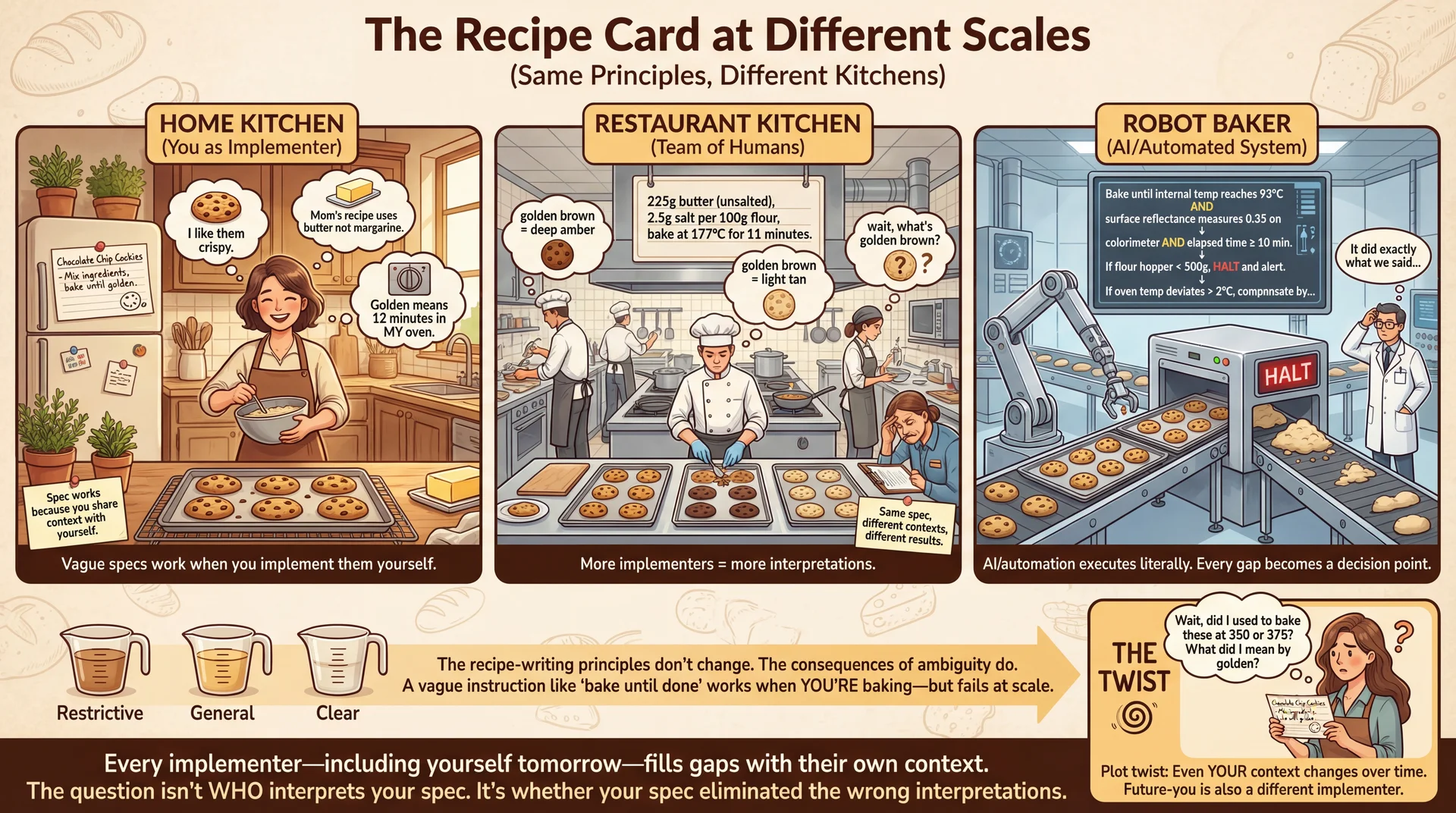
"Process" and "Handle" Are Not Specifications
Consider this IoT device manager API:
/**
 * Handles the given device event.
 *
 * @param event the device event to handle
 */
public void handleEvent(DeviceEvent event)
What does "handle" actually mean? Every implementer fills the gap differently.
- Log it? Update device state? Notify other devices?
- What if the device is offline? Retry? Queue for later?
- Thread-safe? Can it be called concurrently?
Ambiguity Creates Specification Debt

Type Annotations Let Compilers Enforce Specs
![Concept: 'The Factory Quality Control Line' (Comments vs Type Annotations)
A detailed factory floor illustration in a clean industrial design style, showing two parallel assembly lines for 'Method Calls' being quality-checked before shipping to production.
LEFT LINE - 'HONOR SYSTEM QUALITY CONTROL' (Comment-Only Specs):
A conveyor belt carrying method calls (visualized as packages labeled with their arguments). A laminated sign hangs above: '📋 PLEASE CHECK: arr should not be null - Javadoc says so!' A tired human inspector sits on a stool, barely glancing at packages as they roll by. One package clearly labeled 'null' rolls past—the inspector is looking at their phone. Behind the inspection point: CHAOS. Packages explode on contact with the 'Production' area (labeled 'Runtime'), sparks fly, a NullPointerException alarm blares, developers in hard hats scramble with fire extinguishers. A whiteboard shows: 'Days since last null crash: 0̶ ̶3̶ ̶7̶ 0'. Annotation: 'Comments are suggestions. Humans skip reading them. Bugs ship to production.'
RIGHT LINE - 'AUTOMATED QUALITY GATE' (Type Annotations):
The same conveyor belt, but now it passes through an imposing automated scanner (glowing, precise, robotic). The scanner display shows: '@NonNull int[] arr — SCANNING...' Valid packages (with proper non-null arrays) get a green checkmark stamp and proceed smoothly to 'Production'. But the 'null' package hits an invisible force field—red lights flash, the scanner announces 'REJECTED: null violates @NonNull constraint', and the package is automatically diverted to a 'Fix Before Shipping' chute that loops back to the developer's desk. Beyond the gate: calm, orderly production floor. A whiteboard shows: 'Days since last null crash: 847'. Annotation: 'Type annotations are machine-enforced. Bugs caught before shipping.'
CENTER COMPARISON PANEL:
Split view showing the same code:
- Top: '// @param arr must not be null' + 'sum(null);' → Package makes it to production → 💥 RUNTIME CRASH
- Bottom: '@NonNull int[] arr' + 'sum(null);' → Package rejected at compile time → 🔧 Developer fixes it
DETAIL CALLOUTS:
- On the scanner: 'Powered by NullAway + JSpecify' with small logos
- Developer reaction left: 😰 'Why did this crash in production at 3am?!'
- Developer reaction right: 😊 'Caught it before I even ran the tests'
BOTTOM:
A timeline showing: 'Java 8 (2014): Type annotations added' with small portraits of the UW researchers. Caption: 'Moving specs from comments (that humans ignore) to types (that compilers enforce).'
Style: Industrial factory aesthetic with warm yellows/oranges on the chaotic left side, cool blues/greens on the orderly right side. Clean lines, clear labels, immediate visual contrast. Should feel like a safety training poster that makes a compelling case for type annotations. The factory metaphor works because it emphasizes: quality control BEFORE shipping is cheaper than recalls AFTER.](/cs3100-public-resources/img/lectures/web/l4-type-annotations.webp)
Type annotations let the compiler enforce specification invariants.
@NonNull Turns Documentation Into Enforcement
import org.jspecify.annotations.NonNull;
import org.jspecify.annotations.Nullable;

public int sum(@NonNull int[] arr) {
    int sum = 0;
    for (int i = 0; i < arr.length; i++) {
        sum += arr[i];
    }
    return sum;
}
With @NonNull, the compiler enforces that arr is never null.
Note: Java has many competing @NonNull definitions. We use JSpecify.
@NullMarked Makes Non-Null the Default
Mark the whole package as "non-null by default":
// In package-info.java
@NullMarked
package edu.neu.cs3100.myproject;

import org.jspecify.annotations.NullMarked;
Now only mark exceptions with @Nullable:
// In a @NullMarked package:
public int sum(int[] arr) { ... }  // arr assumed non-null

public String format(@Nullable String prefix, String value) { ... }
// prefix can be null, value cannot
Annotations Make Nullability Explicit at a Glance
// In a @NullMarked package

/**
 * Formats a user's display name.
 *
 * @param firstName the user's first name
 * @param middleName the user's middle name, or null if none
 * @param lastName the user's last name
 * @return formatted name (such as "John Q. Public")
 */
public String formatName(
    String firstName,            // non-null (default)
    @Nullable String middleName, // explicitly nullable
    String lastName              // non-null (default)
) {
    if (middleName == null) {
        return firstName + " " + lastName;
    }
    return firstName + " " + middleName.charAt(0) + ". " + lastName;
}
Legacy Code Requires Gradual Annotation Adoption
Two approaches for existing codebases:
Approach A: @NullMarked (new code)
- Mark new packages @NullMarked
- Existing code left unannotated
- Gradually migrate package by package
Approach B: @NonNull everywhere (legacy)
- Don't use @NullMarked
- Add @NonNull as you verify each type
- Safer but more verbose
For this course: new projects use @NullMarked. You'll see this in starter code.
Unannotated Libraries Need Runtime Assertions
Even java.util isn't fully annotated! The checker can't know if library methods return null.
String name = "Alice";
List<String> names = List.of(name); // Checker: "might be null!"
System.out.println(names.size()); // Warning!
Use Objects.requireNonNull to assert your domain knowledge:
List<String> names = Objects.requireNonNull(List.of(name));
// Checker now knows names is non-null
Every Java Object Inherits Four Key Contracts
Every class extends java.lang.Object, which defines methods you should consider overriding:
toString()— human-readable representationequals(Object)— logical equalityhashCode()— hash value for collections
Plus the Comparable interface:
compareTo(T)— natural ordering
toString Should Be Concise But Informative
From the Java documentation:
"Returns a string that textually represents this object. The result should be a concise but informative representation that is easy for a person to read."
Default (useless):
DimmableLight@1a2b3c4d
Overridden (helpful):
DimmableLight(color=2700K,
  brightness=100, on=true)
Good toString Saves Hours of Debugging
// From the IoT device hierarchy in L3
@Override
public String toString() {
    return "DimmableLight(id=" + id + ", " +
           "brightness=" + brightness + ", " +
           "on=" + isOn() + ")";
}
Best practices:
- Include the class name
- Include fields that matter for understanding the object
- Format for readability (not just dump all fields)
When you System.out.println(deviceList), good toString() makes debugging easy.
What does this print (==)?
public class DimmableLight {
    private String id;
    private int brightness;

    public DimmableLight(String id, int brightness) {
        this.id = id;
        this.brightness = brightness;
    }

    public static void main(String[] args) {
        DimmableLight light1 = new DimmableLight("living-room", 100);
        DimmableLight light2 = new DimmableLight("living-room", 100);
        System.out.println(light1 == light2);
    }
}
A. true
B. false
C. I have no idea
Text espertus to 22333 if the
URL isn't working for you.
What does this print (equals()) ?
public class DimmableLight {
    private String id;
    private int brightness;

    public DimmableLight(String id, int brightness) {
        this.id = id;
        this.brightness = brightness;
    }

    public static void main(String[] args) {
        DimmableLight light1 = new DimmableLight("living-room", 100);
        DimmableLight light2 = new DimmableLight("living-room", 100);
        System.out.println(light1.equals(light2));
    }
}
A. true
B. false
C. I have no idea
Text espertus to 22333 if the
URL isn't working for you.
Where does equals() come from?
Object's implementation:
public boolean equals(Object obj) {
    return (this == obj);
}
Since DimmableLight doesn't override equals(), it inherits this version—which just checks reference equality.
Overriding equals()
public class DimmableLight {
    private String id;
    private int brightness;

    // ... constructor ...

    @Override
    public boolean equals(Object obj) {
        if (this == obj) return true;
        if (!(obj instanceof DimmableLight other)) return false;
        return brightness == other.brightness
            && Objects.equals(id, other.id);
    }

    @Override
    public int hashCode() {
        return Objects.hash(id, brightness);
    }
}
What's hashCode()? And why do we need it?
hashCode Enables O(1) Lookup in HashSets and HashMaps

Why override hashCode()?
Object's hashCode() returns a value based on the object's memory address.
Can two different objects have the same memory address? No.
// DimmableLight with equals() but NO hashCode() override
DimmableLight light1 = new DimmableLight("living-room", 100);
DimmableLight light2 = new DimmableLight("living-room", 100);

System.out.println(light1.equals(light2));  // true (we overrode equals)

Set<DimmableLight> lights = new HashSet<>();
lights.add(light1);
System.out.println(lights.contains(light2));  // false!
The problem: light1 and light2 are equal, but have different hash codes, so HashSet looks in the wrong bucket.
Equal Objects Must Have Equal hashCode() Values
The contract (simplified):
- Required: If
x.equals(y), thenx.hashCode() == y.hashCode() - Recommended: If
!x.equals(y), hash codes should differ - Required: Consistent within one execution
⚠️ If you override equals, you must override hashCode!
Use the Same Fields in hashCode as in equals
// For DimmableLight with fields: id, brightness
@Override
public int hashCode() {
    int result = Objects.hashCode(id);
    result = 31 * result + Integer.hashCode(brightness);
    return result;
}

// Or simply:
@Override
public int hashCode() {
    return Objects.hash(id, brightness);
}
Use the same fields as equals. See Effective Java Item 11 for details.
Sorting with the Comparable Interface

The Comparable Interface
public interface Comparable<T> {
    /**
     * Compares this object with the
     * specified object for order.
     *
     * @return negative if this < o,
     *         zero if this == o,
     *         positive if this > o
     */
    int compareTo(T o);
}
compareTo Defines How Objects Sort Naturally
For classes with a natural order, implement Comparable<T>:
/**
 * A dimmable light. Lights are ordered by id, then by brightness.
 */
public class DimmableLight implements Comparable<DimmableLight> {
    private String id;
    private int brightness;

    @Override
    public int compareTo(DimmableLight other) {
        int idCompare = this.id.compareTo(other.id);
        if (idCompare != 0) {
            return idCompare;  // different ids
        }
        // same id, sort by brightness
        return Integer.compare(this.brightness, other.brightness);
    }
}
Returns: negative if this < other, zero if equal, positive if this > other
Summary: Specifications as Contracts
- Specifications enable modularity — you used HashMap without reading its 2000 lines
- Good specs balance three criteria:
- Restrictiveness — Map.get() specifies null for missing keys
- Generality — Set.contains() permits O(1) or O(log n) implementations
- Clarity — no redundancy, domain terms defined
- Type annotations make specs machine-checkable (@NullMarked, @Nullable)
- Object contracts (toString, equals, hashCode, compareTo) enable Collections to work
Critical rule: Override equals → MUST override hashCode (or HashSet breaks!)
Next Steps
- Assignment 1 due Thursday, January 15 at 11:59 PM
- Complete flashcard set 4 (Specifications & Contracts)
Optional readings:
- Effective Java, Items 10-14 (equals, hashCode, toString, Comparable)
- Liskov & Guttag, Chapter 9.2 (Specification theory)
- JSpecify Documentation (Nullness annotations standard)
Next time: Functional Programming and Readability