Lecture overview:
Total time: ~65 MINUTESPrerequisites: L16 (testability, hexagonal intro), L17 (creation patterns, DI), L18 (architectural thinking, boundaries, C4, ADRs, Pawtograder/Bottlenose, four heuristics )Connects to: L20–L21 (distributed architecture, networks, client-server, serverless), L22 (Conway's Law, teams), L29–L30 (MVC/GUI) Structure:
Motivating Question: "How do we organize our code?" + Big Ball of Mud (~3 min)
Monolith: Where We Start — characteristics + quality profile (~8 min)Modular Monolith — best of both worlds, the answer to Big Ball of Mud (~5 min)Partitioning: Technical vs Domain — fundamental organizing principle (~5 min)Quality Attributes vocabulary + scenarios (~10 min)
Styles vs. Patterns + Running Examples Intro (~5 min)
Hexagonal Recap + Layered + Pipelined Styles (~15 min)★ THE EMERGENCE ARC (key synthesis) ★ (~12 min):
Styles Emerge from Heuristics — the diagram showing heuristics → styles
"But Wait: Where Do Those Answers Come From?" — Domain Understanding is the prerequisiteHow Pawtograder's Architecture Emerged — concrete worked example
The Complete Picture: L12 → L18 → L19 — the discovery process
Two Big Families: Monolith vs Microservices — the deployment question (~5 min)Network Changes Everything + Quality Attribute Tradeoffs (~8 min)
Quality Attributes Applied: Pawtograder vs Bottlenose (~5 min)
Key Takeaway: Architecture Is Discovered, Not Chosen (~3 min)
Key theme: Architectural styles EMERGE from applying principled heuristics (L18), but only when grounded in domain understanding (L12). This lecture shows how the same four heuristics — Rate of Change, Actor, ISP, Testability — lead to different styles depending on the problem. Architecture is about tradeoffs — but without understanding your domain, you might invest flexibility in axes of change that will never occur.
→ Transition: Let's start with the title...
CS 3100: Program Design and Implementation II Lecture 19: Architectural Styles — From Hexagons to Monoliths
©2026 Jonathan Bell, CC-BY-SA
Context:
L18 ended with C4 diagrams, ADRs, and "just enough architecture" — applied to Pawtograder
Today: we continue with Pawtograder and Bottlenose to explore architectural styles
Running examples: Pawtograder (the grading system from L18) and Bottlenose (its predecessor)
Key message: "Hexagonal architecture is one of several architectural styles. Today we learn to recognize them, compare them, and evaluate how each affects quality attributes — using two real systems that solve the same problem differently."
→ Transition: Here's what you'll be able to do after today...
Announcements Team Formation Survey Released!
Starting Week 10: teams of 4 for CookYourBooks GUI project
Tell us your preferences + availability
Due Friday 2/26 @ 11:59 PM Complete the Survey → HW4 Due Thursday Night
Learning Objectives
After this lecture, you will be able to:
Define quality attributes that architectural styles affect: maintainability, scalability, deployability, fault tolerance, and more Distinguish between architectural styles and architectural patterns Recognize and compare architectural styles like Hexagonal , Layered , Pipelined , and Monolithic Explain the tradeoffs of monoliths , modular monoliths , and microservices Analyze how architectural choices affect quality attributes differently for specific scenarios
Important framing: You are NOT expected to become master architects by the end of this lecture. The goal is to understand systems that use these styles and reason about how architectural decisions impact quality attributes. When you encounter a hexagonal or layered architecture in the wild, you'll be able to read it — not necessarily design it from scratch.
SET EXPECTATIONS VERY CLEARLY — this is critical framing:
"You will NOT be tested on 'design a hexagonal architecture from scratch'"
"You WILL be expected to READ and UNDERSTAND systems that use these styles"
Real systems rarely fit neatly into one style — they're hybrids, compromises, and evolved messes
The ACTUAL skill we're building: reasoning about quality attributes when you SEE different architectures
"Given this system's architecture, which quality attributes does it prioritize? What are the tradeoffs?"
Why teach styles at all if we're not expecting mastery?
They give us VOCABULARY for discussing what we observe
You'll encounter these patterns in codebases you join — knowing the names helps you understand intent
Like learning art history: you can appreciate a painting without being able to paint it yourself
Once you understand the principles, you can reason about systems you encounter
The "reading vs writing" distinction:
Junior engineers READ existing architectures far more than they DESIGN new ones
Understanding why a system is structured a certain way is 90% of the skill
Design skills come later with experience — comprehension comes first
Time allocation:
Objective 1: Quality Attributes vocabulary (~8 min)
Objective 2: Styles vs. Patterns (~3 min)
Objective 3: Hex recap + Layered + Pipelined (~20 min)
Objective 4: Monolith + Modular Monolith + Microservices teaser (~18 min)
Objective 5: Applying quality attributes to scenarios (~10 min)
Connection to L16 and L18:
L16: Hexagonal Architecture introduced for testability (they already know ports, adapters, domain core)
L18: Where do service boundaries go? (Pawtograder case study)
L19: What quality attributes matter? What styles exist? How does each style affect those attributes?
→ Transition: Let's start with a question you'll face every time you write software...
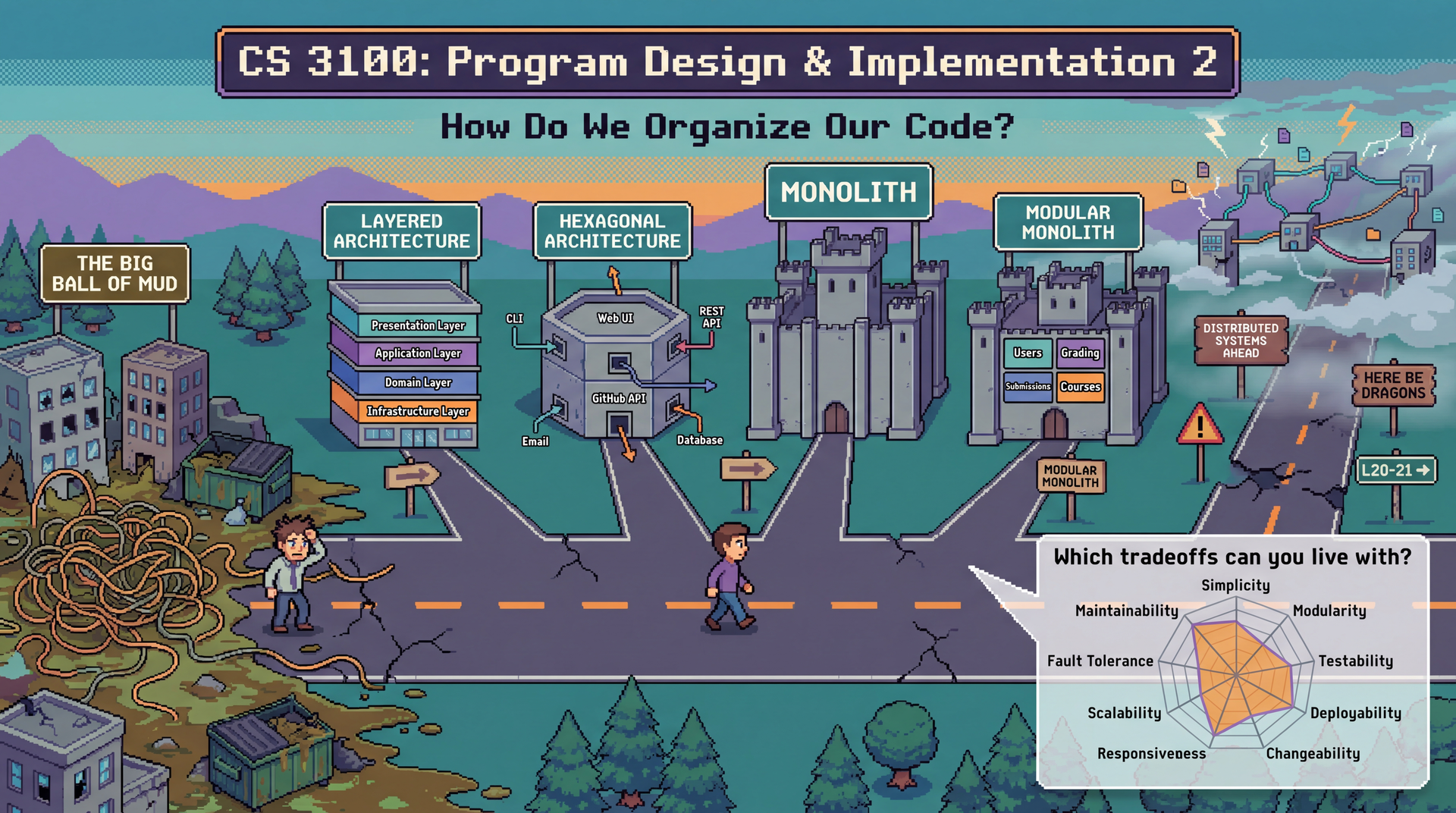
How Do We Organize Our Code?
This is the question at the heart of every architectural decision — from your first class project to production systems serving millions of users. Every pattern and style we study today is an answer to this question.
This is the MOTIVATING QUESTION for the entire lecture.
"How do we organize our code?" is a question you face at EVERY scale
A 500-line homework assignment? You still choose how to split it into classes and packages.
A 50,000-line autograder? The question is the same, but the stakes are higher.
A million-line enterprise system? The question can make or break the project.
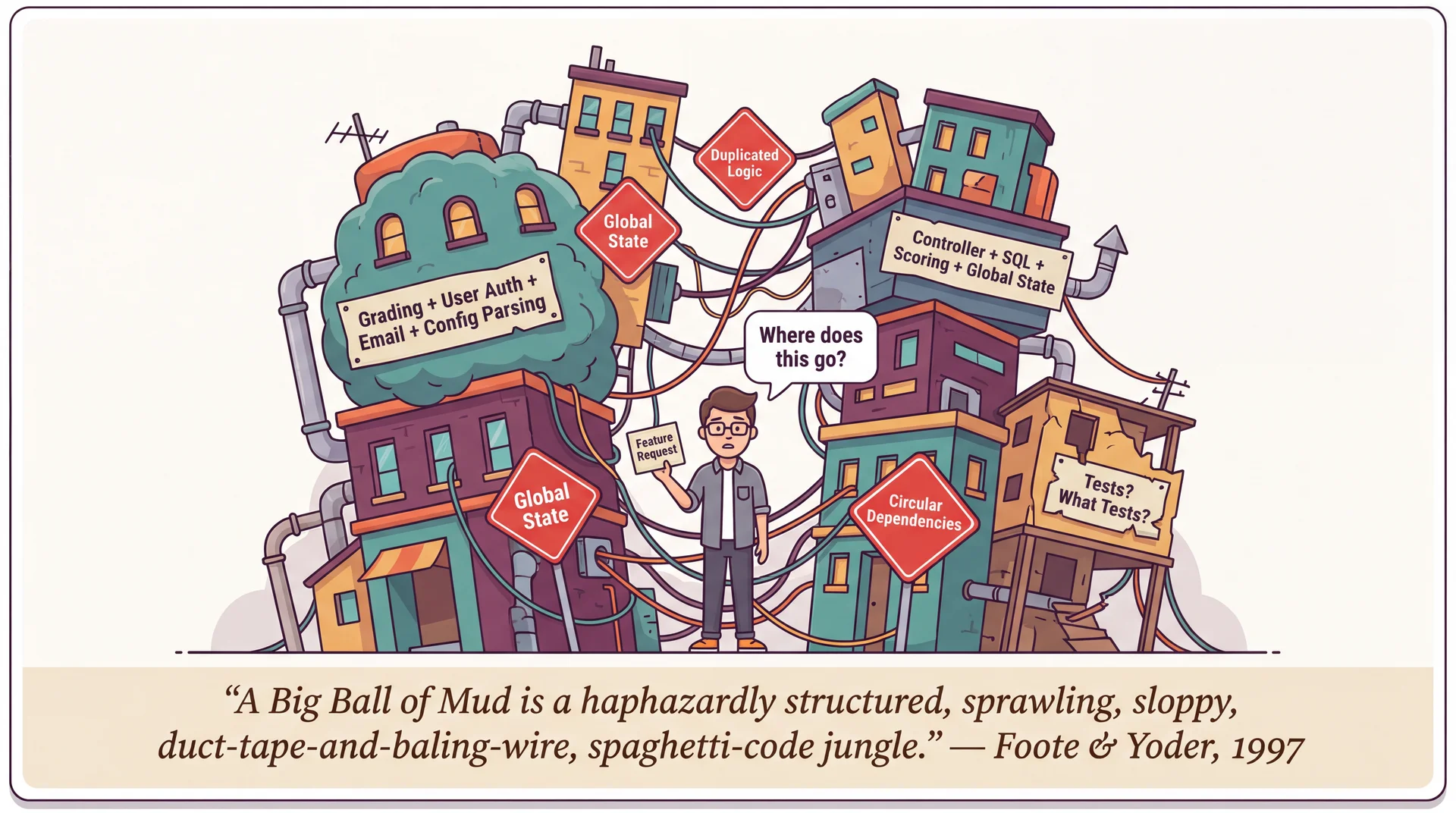
Read the Foote & Yoder quote — it's vivid!
"Haphazardly structured, sprawling, sloppy, duct-tape-and-baling-wire, spaghetti-code jungle"
"Information is shared promiscuously among distant elements"
This isn't a theoretical concern — it's what ACTUALLY HAPPENS when teams don't think about organization
The Big Ball of Mud is the DEFAULT outcome:
Nobody designs a Big Ball of Mud on purpose
It emerges from thousands of small decisions made under pressure: "just put it here for now," "we'll refactor later," "it's faster to copy-paste"
Every pattern we study today — layered, hexagonal, pipelined, monolith, modular monolith — is a strategy to PREVENT this
The real cost isn't aesthetics — it's every quality attribute we'll discuss:
Changeability: "Where does this feature go?" → "Everywhere and nowhere"
Testability: Can't test in isolation when everything depends on everything
Deployability: Can't deploy safely when any change might break anything
Eventually: cheaper to REWRITE than to maintain
Through-line for the lecture:
As we discuss each style, we'll ask: "How does this style help us organize our code?"
Hexagonal: organize around ports and adapters
Layered: organize into horizontal strata
Monolith vs. microservices: organize within one process or across many
Modular monolith: organize with enforced boundaries inside one deployment
Partitioning: organize by technical role or by domain capability
→ Transition: Let's start by understanding what you've been building all along — the monolith...
The Monolith: Where Most Projects Start
Here's a secret: you've been building monoliths your entire programming career . Every Java project, every Python script, you've written in a single codebase — all monoliths. The term only becomes meaningful in contrast to systems that aren't monoliths.
A monolith is a system deployed as a single unit. All functionality — user interface, business logic, data access — lives in one codebase, compiles into one artifact, and runs in one process. This is where we start — and for many successful systems, where we stay.
Single Deployment
One build. One deploy. One running process.
Shared Memory
Components talk via method calls, not networks.
Unified Codebase
One repo, one build system, one language.
Start with what's familiar:
Students have been building monoliths their whole lives without knowing the name
Every Java project they've written? A monolith. Every Python script? A monolith.
The term only becomes meaningful in CONTRAST to systems that AREN'T monoliths
"Monolith" isn't an insult:
It's a description of deployment topology
Many successful systems are monoliths — GitHub was a monolith for years, Shopify still is
The question isn't "is it a monolith?" but "should it be?"
We're going to unpack each of these four characteristics, then see how other styles improve on specific weaknesses...
→ Transition: Let's dig into what each of these means concretely...
What "Single Deployment Unit" Really Means
In a monolith, everything ships together. One git push, one CI pipeline, one artifact, one deploy.
This means:
Fix a typo in the grading UI? Redeploy the whole app.
Update a dependency for course management? Redeploy the whole app.
Every change goes through the same pipeline.
The consequence:
You can't deploy grading fixes without also deploying whatever else changed
A broken test in course management blocks a grading deploy
Deployment frequency is limited by the slowest-moving part
Make this visceral for students:
"You fixed a one-line bug in how grading jobs are queued. To get that fix to students, you have to redeploy the ENTIRE application."
"Your CI pipeline takes 20 minutes. Every change — no matter how small — waits 20 minutes."
"Someone merged a broken migration for courses. Your grading fix can't deploy until that's fixed too."
The positive spin:
One deploy means ONE thing to monitor, ONE rollback strategy, ONE set of health checks
You always know exactly what's running in production — the latest build
→ Transition: What about shared memory?
What "Shared Memory" Really Means
In a monolith, components communicate by calling methods on objects that live in the same process . This is so natural you've never had to think about it:
What a monolith feels like (illustrative)
Course course = courseRepo . findById ( courseId ) ; Assignment assignment = course . createAssignment ( name , dueDate ) ; Grader grader = GraderFactory . buildFor ( assignment , config ) ; transaction ( ( ) -> { assignment . setGrader ( grader ) ; for ( Registration reg : course . getRegistrations ( ) ) notificationService . notifyNewAssignment ( reg , assignment ) ; } ) ; What you get for free:
Speed: Method calls take nanosecondsReliability: If you call a method, it runsTransactions: Wrap multiple operations in one atomic unit — all succeed or all roll backObjects by reference: Pass an Assignment object around; everyone sees the same dataDebugging: Set a breakpoint, step through the entire flow in one debugger session
These guarantees are invisible until you lose them . When components move to different processes or different machines, every one of these guarantees disappears.
This is the most important point to internalize:
Students take shared memory for granted because it's all they've experienced
"When you call GraderFactory.buildFor(assignment, config), have you ever worried that the method might not run? That it might take 30 seconds to start? That it might run TWICE?"
"No? That's because you're in a monolith. Those guarantees come from shared memory."
The transaction point is crucial:
In a monolith: create the assignment, configure the grader, and notify students — all in one transaction
If notifications fail, the assignment creation AND grader config roll back
In a distributed system, there's no way to do this across services — you need sagas, compensating transactions, eventual consistency
→ Transition: And what about working in one codebase?
What "Unified Codebase" Really Means
In a monolith, everyone works in the same repository , with the same language , the same build system , and the same dependency tree .
Benefits of one codebase
Refactoring is easy: rename a method and your IDE finds every callerCode sharing is free: import any class from any packageConsistency: one style guide, one set of linters, one test frameworkOnboarding: new developers learn ONE system, not twelve Costs of one codebase
Merge conflicts: Unless there's a strong enforcement of modularity, it's easy to step on each other's toesSlow builds: the whole app rebuilds even for small changesTechnology lock-in: The whole system uses one language, one frameworkBlast radius: a bad commit affects everything Make the benefits tangible:
"If you want to understand how grading works, you grep one codebase. Every caller, every test, every reference — it's all right there."
"Rename a method? Your IDE handles it. Every caller updates. One commit."
Make the costs tangible:
"If 20 developers are all pushing to the same repo, merge conflicts are a daily occurrence"
"Your CI runs ALL the tests — even if you only changed one file"
"Want to use a different language for a new feature? Too bad — the monolith is locked in"
The big picture:
A monolith gives you simplicity at the cost of flexibility
This is a VALID tradeoff for many, many systems
→ Transition: So how does a monolith score on quality attributes?
Monolith: Quality Attribute Profile Where Monoliths Excel
Simplicity ★★★ — One thing to build, test, deploy, monitorResponsiveness ★★★ — In-process calls are orders of magnitude faster than network callsTestability ★★☆ — One environment to set up, but may need full infrastructureChangeability ★★☆ — IDE refactoring across entire codebase, but changes may ripple Where Monoliths Struggle
Scalability ★☆☆ — Must scale the entire app; heavy work competes with everything elseDeployability ★☆☆ — Every deploy is all-or-nothing; a bug anywhere blocks everythingFault Tolerance ★☆☆ — A crash in any component takes down the entire processModularity ★☆☆ — Boundaries are conventions, not enforcement (without discipline → Big Ball of Mud)
Notice the modularity problem: without enforced boundaries, monoliths tend toward the Big Ball of Mud we saw earlier. Is there a way to get monolith simplicity WITH better modularity?
Walk through the ratings:
Simplicity ★★★: One thing to build, deploy, monitor. The defining strength.
Responsiveness ★★★: Method calls in nanoseconds, database transactions, full stack traces.
Scalability ★☆☆: Vertical only — bigger hardware. Heavy work competes for shared resources.
Deployability ★☆☆: All-or-nothing. A broken test anywhere blocks everything.
Fault Tolerance ★☆☆: Bug in one module crashes everything — one process, one fate.
Modularity ★☆☆: Boundaries exist only as conventions. Without discipline → Big Ball of Mud.
The fragment sets up the modular monolith:
This is the key problem we're going to solve
The monolith is great EXCEPT for modularity
Can we have both?
→ Transition: Yes — that's exactly what a modular monolith gives us...
The Modular Monolith: Best of Both Worlds?
A modular monolith keeps the simplicity of a single deployment but adds enforced internal boundaries . All the operational simplicity of a monolith, with intentional structure to prevent the Big Ball of Mud.
Simplicity ★★★
Still one deploy, one build
Modularity ★★★
Enforced internal boundaries
Changeability ★★☆
Changes isolated to modules
Scalability ★☆☆
Still one process to scale
Key characteristics:
Still one build, one deploy — operationally simple
Modules communicate through explicit public APIs, not by reaching into each other's internals
Each module owns its database tables; cross-module queries go through APIs
Build tools or linters prevent modules from importing private code
Quality attribute wins:
Simplicity ★★★: Keeps the monolith's operational simplicity
Modularity ★★★: This is the big upgrade — enforced boundaries prevent the Big Ball of Mud
Scalability ★☆☆: Still one process — can't scale modules independently
The key insight:
Many teams discover they NEVER need microservices
Module boundaries solve maintainability and team ownership problems
Without the complexity of network communication
→ Transition: But how do we decide what goes in each module? There are two fundamental approaches...
Organizing Modules: Technical or Domain Partitioning?
Whether you're building a modular monolith or just organizing packages, there's a fundamental choice: group code by technical role or by domain capability ?
Technical Partitioning
autograder/
├── controllers/
│   └── SubmissionController.java
├── services/
│   └── GradingService.java
├── repositories/
│   └── SubmissionRepository.java
├── models/
│   ├── Submission.java
│   └── Grade.java
└── views/
    └── submission_result.html
Organized by technical role — controllers together, models together
Domain Partitioning
autograder/
├── grading/
│   ├── GradingService.java
│   ├── Grade.java
│   └── GradeRepository.java
├── submissions/
│   ├── SubmissionController.java
│   ├── Submission.java
│   └── SubmissionRepository.java
└── courses/
    ├── CourseController.java
    ├── Course.java
    └── CourseRepository.java
Organized by business capability — everything for grading together
Two fundamental approaches:
Technical: Group by role (all controllers, all services, all repositories)Domain: Group by capability (all grading code, all submission code, all course code) Most web frameworks encourage technical partitioning:
Rails: controllers/, models/, views/
Spring: convention of packages by layer
This works fine for small apps
But as systems grow, domain partitioning often wins:
"How does grading work?" → everything in grading/ package
"Add Rust support?" → all changes in one vertical slice
→ Transition: Let's see how these tradeoffs play out...
Partitioning Tradeoffs Question Technical Domain "How does Java grading work?" Jump between controllers/, services/, models/ Everything in grading/java/ Adding Rust support? New files in controllers/, services/, models/ All changes in grading/rust/ Team independence? Every feature touches multiple packages "Rust support team" owns their vertical slice
Connection to L18 heuristics:
Actor Ownership → Domain partitioning aligns with who owns whatRate of Change → Technical partitioning separates things that change togetherThe "right" choice depends on your team structure and change patterns
Conway's Law (L22 preview): Organizations design systems that mirror their communication structure. If you have a "frontend team" and "backend team," you'll get technical partitioning. If you have a "grading team" and "courses team," you'll get domain partitioning.
The key insight:
Domain partitioning keeps related changes together
Technical partitioning scatters related changes across packages
The "right" choice depends on how your team is structured
Connection to L18:
These are the SAME heuristics we used to find service boundaries
Actor ownership: who changes what?
Rate of change: what changes together?
Now we're applying them INSIDE the monolith
→ Transition: Now that we understand how to organize modules, let's build vocabulary for evaluating any architecture...
Quality Attributes: The "-ilities"
How do we decide if an architecture is "good"? Not by how it looks — by how it behaves. Quality attributes are the measurable properties of a system that stakeholders care about.
You've already met some of these. Today we'll define a full vocabulary and use it throughout the lecture to evaluate every architectural style we encounter.
Simplicity · Modularity · Testability
Maintainability · Changeability · Deployability
Scalability · Responsiveness · Fault Tolerance
Frame this clearly:
"We've been talking about design principles (SOLID, coupling, cohesion) at the class level"
"Quality attributes are the SYSTEM-level version of that question: what properties does our architecture need to have?"
"Different stakeholders care about different attributes: developers care about maintainability, ops cares about deployability, users care about responsiveness"
Some of these are review:
Testability: L16 (hex arch was motivated by testability)
Modularity and changeability: L7-L8 (coupling, cohesion, SOLID)
Some are NEW: deployability, fault tolerance, scalability at the architectural level
The key insight we're building toward:
Every architectural style makes DIFFERENT tradeoffs among these attributes
There's no style that maximizes all of them — that's why architecture is hard
→ Transition: But how do we make these precise?
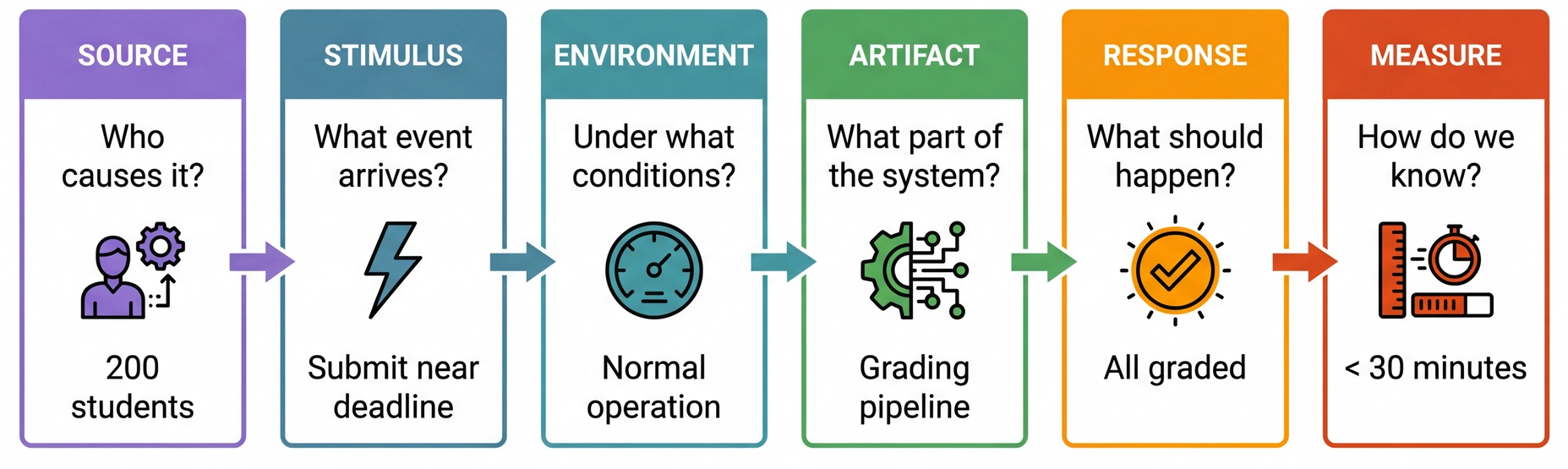
Specifying Quality Attributes: Scenarios
In L9, we learned that vague requirements are dangerous. Quality attributes have the same problem — "the system should be scalable" is as useless as "the system should be fair."
We use a common form — a quality attribute scenario — to make every attribute testable and unambiguous.
Connection to L9 (Requirements Analysis):
In L9, we saw that "the system should be fair" needed to be unpacked into concrete, testable requirements
Quality attributes have the EXACT same problem: "the system should be scalable" means nothing without a scenario
The three risk dimensions from L9 apply directly:
Understanding: What does "scalable" mean for THIS system?
Scope: How much load? How many users? What's the growth curve?
Volatility: Will the load patterns change? Will infrastructure change?
Walk through the six-part framework:
Source: Who or what generates the stimulus? A user, an external system, a developer, an attacker. The source matters — a request from a trusted user may be treated differently than one from an untrusted source.Stimulus: The event that arrives — a spike in submissions, a component crash, a change request, a security probe. For runtime qualities this is a system event; for development-time qualities it's a project event (like "completion of a unit of development" for testability, or "a request for a modification" for changeability).Environment: The conditions — normal operation, peak load, degraded mode, during development, during deployment. The environment sets the context: a change request after code freeze is treated differently than one before. And environment includes your DEPENDENCIES: if GitHub itself is on fire, Pawtograder has a very bad day — grading actions can't run at all. Bottlenose doesn't depend on GitHub, so it keeps grading just fine. This is a fault tolerance scenario where the environment (GitHub outage) changes everything about which architecture wins.Artifact: What part of the system is affected? The whole system, the grading pipeline, the API, a single adapter? Being specific matters: a failure in the data store may be treated differently than a failure in the grading engine.Response: What the system (or the developers) should do in response. For runtime: process requests, isolate failures, maintain service. For development-time: implement the change without side effects, then test and deploy.Measure: The quantifiable threshold — latency, throughput, time to implement a change, number of files touched, data exposed. This is what makes the scenario TESTABLE. The "common form" insight is powerful:
Students struggle with quality attributes because different communities use different vocabulary
Performance people talk about "events" and "latency"; Security people talk about "attacks" and "vulnerabilities"; Modifiability people talk about "change requests" and "effort"
But they're ALL describing the same six-part structure!
This common form cuts through vocabulary confusion
→ Transition: Let's see this in action with our running examples...
Why "Scalable" Isn't Specific Enough
Imagine someone says: "The grading system should be scalable." What does that actually mean? Consider three very different situations Pawtograder might face:
Scenario A: Spike
200 students submit all at once at 11:59pm deadline
What happens?
200 parallel GitHub Actions runners spin up
Each builds, tests, parses, scores independently
All are accepted before the deadline, complete in ~30 minutes
API receives 200 results simultaneously Scenario B: Sustained
1800 students submit over 1 hour during an exam
What happens?
~30 new runners start every minute
~30 complete every minute (steady state)
Load is spread over time
API handles ~30 results/min continuously Scenario C: Trickle
1800 students submit over 24 hours for a homework
What happens?
~1-2 runners at any time
Never more than a handful concurrent
Minimal system stress
API barely notices
All three scenarios involve "grading many submissions" — but they place completely different demands on the system. A system that handles Scenario C perfectly might completely fail at Scenario A. This is why we need a vocabulary for being specific about what we mean.
The pedagogical goal: motivate WHY we need quality attribute vocabulary.
The problem with vague requirements:
"The system should be scalable" — which scenario are we optimizing for?
A system designed for Scenario C might fail catastrophically at Scenario A
A system over-engineered for Scenario A might be wasteful for Scenario C
Walk through each scenario — make them vivid:
Scenario A (Spike):
"200 students all hit submit at 11:59pm. What happens?"
This is a BURST — everything at once
Questions: What if 10 runners fail? Can the API handle 200 simultaneous writes? Race conditions?
Scenario B (Sustained):
"An exam where students have 1 hour, 1800 students in the class"
This is CONTINUOUS PRESSURE — not a spike, but sustained load
Questions: Can we maintain throughput for an hour? Database connection pools? Memory leaks?
Scenario C (Trickle):
"Homework due in a week, students submit throughout"
This is the EASY case — most systems handle this fine
BUT: testing only under Scenario C gives false confidence!
The key insight:
The word "scalable" hides these distinctions
We need SPECIFIC vocabulary to discuss what we actually mean
That's what quality attributes give us — precision instead of hand-waving
Discussion prompt:
"Which scenario do you think CS3100 assignment deadlines look like?" (Usually A or B)
"If you tested only during office hours (Scenario C), would you catch problems?"
→ Transition: Now let's build the vocabulary we'll use to compare any architecture...
Review: Quality Attributes You Already Know
You've already encountered these quality attributes in earlier lectures. They're foundational — and they apply at the architectural level too:
Simplicity
How easy is the system to understand and reason about? Fewer moving parts, fewer deployment units, fewer technologies.
L7: Low coupling and high cohesion make code easier to understand. Readable code is understandable code. These principles scale up to architecture.
Modularity
How well is the system divided into independent, interchangeable components? High cohesion within modules, low coupling between them.
L7: Coupling and cohesion at the class level. Now we scale it up to system components and deployment boundaries.
Testability
How easily can we verify the system behaves correctly? Can components be tested in isolation? Do we need real infrastructure to run tests?
L16: Hexagonal architecture was motivated by this — domain logic testable without real databases or APIs.
We've already seen a tension between simplicity and modularity: adding interfaces and abstractions increases modularity but decreases simplicity. This tension continues at the architectural level.
This is a REVIEW slide — students should recognize these from L7:
Simplicity — connect to L7 concepts:
Low coupling contributes to simplicity: when components don't depend on each other's internals, the system is easier to understand
High cohesion contributes to simplicity: when related things are grouped together, you don't have to hunt across the codebase
Readability contributes to simplicity: clear names, consistent style, self-documenting code
At the architectural level: a monolith is SIMPLE (one thing to deploy/monitor). Microservices add complexity.
"The simplest thing that could possibly work" is a legitimate architectural choice
Modularity — also from L7:
High cohesion within modules, low coupling between them
This is coupling/cohesion scaled UP to system components
Architectural version: Can we change the grading pipeline without touching the course management module?
Hex arch achieves this through ports/adapters; modular monolith through enforced boundaries
Testability — from L16:
Hexagonal architecture separates domain from infrastructure
Architectural version: Can you test the grading engine without a real database? Without GitHub Actions?
The tension callout:
This previews the tradeoffs we'll discuss after defining all attributes
Adding an interface (modularity ↑) means adding code (simplicity ↓)
Low coupling between modules might require MORE code (adapters, interfaces) — a tradeoff!
This isn't a flaw — it's a conscious tradeoff
→ Transition: Now let's introduce the vocabulary for NEW quality attributes...
IMPORTANT FRAMING for the next few slides:
We're building VOCABULARY first, not deep understanding
Students need to know these terms exist and roughly what they mean
The deep exploration of how architectural choices affect these attributes comes LATER in this lecture (when we examine styles) and in L20
Don't get bogged down in details — keep it brisk, definitional
New Attributes: Deployability, Responsiveness, Fault Tolerance
These three attributes become critical when comparing monoliths vs. distributed systems. We'll explore them in depth in L20 — for now, just the vocabulary:
Deployability
How easily can we release changes to production?
High: Independent deploys, small blast radius, quick rollbackLow: All-or-nothing deployment, coordinate across teams Monoliths: one deploy = everything. Distributed: deploy pieces independently.
Responsiveness
How quickly does the system respond to requests?
High: In-process calls (nanoseconds), shared memoryLower: Network calls (milliseconds), serialization overhead Monoliths win here — no network between components.
Fault Tolerance
How does the system behave when something fails?
High: Failed component doesn't crash others, graceful degradationLow: One crash = entire system down Distributed systems isolate failures — but introduce NEW failure modes.
Notice the pattern: Monoliths tend to have better responsiveness but worse deployability and fault tolerance . Distributed systems flip this. These tradeoffs are central to L20.
This is a PREVIEW slide — keep it brisk:
These three attributes are where monoliths and microservices diverge most sharply. We're just planting vocabulary seeds here.
Deployability:
Monolith: fix a typo → redeploy everything
Distributed: fix a typo → redeploy just that service
Responsiveness:
Method call: ~1-10 nanoseconds
Network call: ~1-100 milliseconds (5-7 orders of magnitude slower!)
Monoliths win on raw speed
Fault Tolerance:
Monolith: one bad component poisons the whole process
Distributed: failures are isolated... but network adds new failure modes (timeouts, partial failures)
The fragment reveals the core tradeoff:
This is the heart of the monolith vs. microservices debate
L20 will unpack this in detail with real examples
→ Transition: Now the umbrella term that ties these together...
Umbrella Attribute: Maintainability
Maintainability is the umbrella term for how easily a system can be changed over time. It decomposes into the other attributes:
This is the "big picture" attribute — we'll see how styles affect it throughout this lecture and L20.
When someone says "this system is hard to maintain," ask: Is it hard to understand (simplicity)? Hard to change safely (changeability)? Hard to test (testability)? Hard to modify without affecting other parts (modularity)? Decomposing "maintainability" gives us precision.
Maintainability as the umbrella:
Students often use "maintainability" loosely. Unpack it!
"When someone says 'this system is hard to maintain,' WHICH of these is the problem?"
Is it hard to understand? (simplicity)
Is it hard to change safely? (changeability)
Is it hard to test? (testability)
Is it modular enough that changes don't ripple? (modularity)
Why decomposition matters:
A system can be highly modular but hard to understand (complexity from abstraction)
A system can be simple but hard to change safely (no tests)
A system can be testable but hard to deploy (monolith)
"Maintainability" hides which problem you actually have
This connects to root cause analysis:
Don't say "we have a maintainability problem"
Say "we have a testability problem" or "we have a modularity problem"
Then you know what to fix
→ Transition: Two more attributes to define...
New Attribute: Scalability
How does the system handle growth in load, data, or users?
Scaling strategies vary by architecture — we'll explore this in depth in L20.
Vertical Scaling
"Buy a bigger server" — more CPU, more RAM.
Simple to implement
No code changes required
Has a ceiling (biggest server available)
Heavy work STILL competes for shared resources
Horizontal Scaling
"Add more instances" — offload work to independent workers.
No theoretical ceiling
Heavy work happens elsewhere
Core system stays responsive
Requires architecture that supports it
Key insight: Scalability isn't just "can the system handle more load?" It's "does the rest of the system stay responsive while handling that load?" We'll return to this distinction in L20-21.
Scalability = handling growth:
Vertical scaling:
The intuitive approach: "slow? buy more hardware"
But there's a ceiling — you can only buy so big a server
More importantly: even with a huge server, in a monolith ALL work shares resources
Grading jobs compete with web requests for CPU, memory, DB connections
Adding more grading jobs just makes contention worse
Horizontal scaling:
The distributed approach: "slow? add more workers"
Pawtograder naturally does this — GitHub Actions spins up N runners
The API never touches the heavy work — it just receives normalized feedback
So the API stays fast even during a near-deadline spike
The "rest of the system" insight:
This connects back to our Scenario A (200 at once) from earlier
The question isn't just "can we grade 200 submissions?"
It's "does the web UI stay responsive WHILE we grade 200 submissions?"
Pawtograder: yes. Monolith: no (without architectural changes).
Foreshadow L20-21:
We'll go much deeper into distributed architecture
Horizontal scaling requires infrastructure: queues, workers, coordination
There's no free lunch — distributed systems add complexity
→ Transition: Now that we've defined all attributes, let's talk tradeoffs...
Quality Attributes Trade Off Against Each Other
Here's the uncomfortable truth: you can't maximize every quality attribute . They're in tension with each other.
Simplicity vs. Modularity
Adding interfaces and abstractions → more modular → less simple
We saw this in L7-L8: ISP means more interfaces to understand.
Simplicity vs. Scalability
Horizontal scaling requires workers, queues, coordination → more complexity
A monolith is simple but hits a ceiling. Distributed systems scale but aren't simple.
Deployability vs. Responsiveness
Independent services → independent deploys → network calls → more latency
High deployability often means more service boundaries = more network overhead.
Fault Tolerance vs. Simplicity
Isolation requires boundaries → boundaries add complexity
A monolith is simpler but a single point of failure. Distributed systems isolate failures but add coordination complexity.
Architecture is choosing which attributes matter most for your system. If someone tells you their architecture maximizes everything, they're selling something.
This is the KEY INSIGHT for the lecture:
Every decision has costs:
Adding modularity = adding abstractions = reducing simplicity
Adding scalability = adding workers = adding coordination complexity
Adding deployability = adding service boundaries = adding network latency
Adding fault isolation = adding boundaries = adding complexity
The role of the architect:
NOT to find the "best" architecture (there isn't one)
TO understand the priorities for THIS system
TO make conscious tradeoffs based on those priorities
TO communicate those tradeoffs to the team
Connect to domain understanding (L12):
Domain modeling tells you WHICH quality attributes matter most
A grading system needs scalability at deadline time
A banking system needs fault tolerance and consistency
A startup MVP might just need simplicity
The "selling something" callout:
Vendors often promise architectures that do everything well
In practice, every architectural style makes tradeoffs
Understanding the tradeoffs is the skill — not finding the magic solution
→ Transition: Now we have the vocabulary. Let's clarify what "styles" and "patterns" mean...
Architectural Styles vs. Patterns
Architects use two terms that sound similar but mean different things:
Architectural Style — The Shape
A bundle of characteristics about a system:
How components are organized
How they communicate
How the system is deployed
Where data lives
"Microservices" or "monolith" — a name for a whole worldview
Architectural Pattern — The Solution
A contextualized solution to a recurring problem:
Service Locator for dependency resolution
Repository for data access abstraction
Strategy for extensible behavior
Patterns are used WITHIN a style
Styles describe the overall shape; patterns are reusable solutions you apply within that shape.
Why this distinction matters:
When someone says "we use microservices," they're naming a style — it implies deployment, communication, team structure, etc.
When someone says "we use Circuit Breaker," they're naming a pattern — a specific solution to a specific problem within whatever style they chose
You might use many patterns within a single style
Where do styles come from?
Not from a committee — they emerge from practice
Microservices: the name emerged as a reaction to "big service" architectures
Made possible by better DevOps, containers, API design
This is piecemeal growth (L18) applied to the profession itself!
→ Transition: Let's continue with the systems we introduced in L18...
Continuing from L18: Two Systems, Same Problem
In L18, we identified component boundaries for Pawtograder and compared them to Bottlenose . Both solve the same problem — grade student code — but make different architectural choices.
Pawtograder
"Thick action" architecture
Grading Action normalizes results
Sends through a narrow API
Leverages GitHub Actions infrastructure
Bottlenose
Web application monolith
Platform-driven grading logic
Delegates execution to Orca (Docker)
All-in-one deployment
Both must: accept submissions, run tests, compute scores, report feedback. Today we'll see how architectural styles help us understand WHY they made different choices — and what those choices cost.
Recap from L18 (don't re-teach, just remind):
Pawtograder: Solution Repo, Grading Action, Pawtograder API — three components with narrow interfaces
Bottlenose: Rails app + Orca — tightly coupled, shared database
The boundary heuristics from L18 (rate of change, actors, interface segregation) led to these designs
What's new today:
In L18, we asked "where do the boundaries go?"
Today: "what architectural STYLES describe these systems, and how do those styles affect quality attributes?"
The key insight we're building toward:
Same problem, different styles, different tradeoffs
Neither is "right" — they're better or worse fits for particular constraints
→ Transition: Now let's explore the architectural styles that emerge when we organize code within a monolith...
Recap: Hexagonal Architecture (from L16)
You already know one key style from L16: Hexagonal Architecture (Ports and Adapters). Let's quickly review its core idea before introducing more styles:
Domain Core
Business logic, rules, entities — knows nothing about infrastructure
Ports
Interfaces that define how the domain interacts with the outside world
Adapters
Implementations that connect ports to real technologies
Quick recap from L16:
The domain core contains business logic — it should be testable without databases, APIs, or UIs
Ports are interfaces that define contracts for input (how the world talks to the domain) and output (how the domain talks to the world)
Adapters implement those ports with real technologies (PostgreSQL, REST APIs, React, etc.)
Why this matters for L19:
Hexagonal is one of SEVERAL styles for organizing code within a monolith
We're about to see Layered and Pipelined — different perspectives on the same problem
All three can coexist! They're complementary views, not competing choices.
→ Transition: Now let's see another common style — layered architecture...
Layered Architecture
The layered architecture organizes code into horizontal strata, each with a distinct responsibility. The classic formulation has four layers:
The key rule: dependencies flow downward . Presentation can call Application, Application can call Domain, Domain can call Infrastructure — but never the reverse .
Define each layer clearly:
Presentation: What the user (or external system) sees. Web views, CLI commands, REST endpoints, GraphQL resolvers. Its job is to translate user actions into calls to the Application layer.Application / Service: Orchestrates use cases. "When a student submits, register the submission, trigger grading, and send a notification." No business rules here — just coordination.Domain: The heart of the system. Business rules, entities, value objects. "How do we compute a grade? What are the dependencies between graded parts?" This layer should have ZERO knowledge of databases, HTTP, or file systems.Infrastructure: The technology-specific implementations. PostgreSQL, Redis, Supabase API, file parsers. This layer adapts the outside world to what the Domain and Application layers need. Why this ordering?
The top layers change most frequently (UI redesigns, new API versions)
The bottom layers change less often (business rules are more stable than UIs)
The dependency direction means changes in volatile layers don't cascade downward
→ Transition: This style also emerges from heuristics...
Layered Architecture Emerges from Heuristics
The same L18 heuristics that led to hexagonal architecture can also lead to layered — depending on what they reveal:
Rate of Change → Layers Separate Volatility
Layer Stability Presentation Changes often (UI redesigns) Application Changes moderately (new workflows) Domain Changes rarely (core rules are stable) Infrastructure Changes when tech changes
Dependency direction protects stable layers from volatile ones
Actor Ownership → Layers Map to Roles
Actor Primary Layer UI/UX designer Presentation Product owner Application (use cases) Domain expert Domain DevOps Infrastructure
Different expertise naturally falls into different layers
When do heuristics lead to layers vs. hexagons?
Layered emerges when responsibilities stack vertically (UI → logic → data) and teams map to technical rolesHexagonal emerges when the domain needs multiple entry points (web, CLI, tests) and multiple exit points (DB, API, files)They're not mutually exclusive — many systems exhibit BOTH perspectives
The key insight: same heuristics, different contexts, different emergent structures
When Rate of Change leads to layers:
If your volatility pattern is "top changes most, bottom changes least"
UI redesigns happen every sprint; database schema changes once a year
The dependency direction (down only) protects stable lower layers from rippling changes
When Actor Ownership leads to layers:
If your team structure maps to technical roles: frontend team, backend team, DBA
Each team owns a layer; the interfaces between layers are their contracts
This is Conway's Law in action (preview for L22)
Layers vs. Hexagons — when each emerges:
Layers: When data flows through a clear stack, and volatility decreases as you go downHexagons: When the domain is the stable center and needs to connect to multiple volatile technologies (different UIs, different databases, different external services) The both/and insight:
Pawtograder has BOTH perspectives
Hexagonal: domain core (grading logic) with ports (Builder, FeedbackAPI) and adapters (GradleBuilder, SupabaseAPI)
Layered: Main.ts (presentation) → GradingPipeline (application) → OverlayGrader (domain) → parsers (infrastructure)
These aren't contradictory — they're different lenses on the same structure
→ Transition: What quality attributes does layering serve?
Layered Architecture: Quality Attributes
Why organize into layers? Because it directly serves several quality attributes:
Separation of Concerns
Each layer has one job. The Domain layer doesn't know if it's being called from a web UI, a CLI, or a test harness. You can swap your database without touching business rules.
Testability
Test each layer in isolation. Domain logic can be tested with no database. Application logic can use stub infrastructure. Presentation can be tested against a mock service layer.
Replaceability
Change your UI framework without rewriting business logic. Swap PostgreSQL for MongoDB at the Infrastructure layer. Add a REST API alongside your web UI — both call the same Application layer.
The pitfall: Changes that span layers — adding a new field that flows from the UI through services into the database — require touching every layer . This "layer tax" is the cost of separation. It's worth it for large systems, but can feel heavy for small ones.
Separation of concerns is the fundamental benefit:
"Imagine you're debugging a scoring bug. In a layered system, you know it's in the Domain layer — not tangled up with HTTP handling or database queries."
"Imagine swapping from PostgreSQL to a different database. In a layered system, only the Infrastructure layer changes. Domain and Application are untouched."
Testability follows directly from separation:
Test the Domain layer with plain objects — no database, no network, no file system
Test the Application layer with stub Infrastructure — verify orchestration without real services
This should sound familiar from L16 — hexagonal architecture achieves the same thing through a different lens
The layer tax is real:
"Add a 'late penalty' field: create a database column (Infrastructure), add it to the grade calculation (Domain), expose it in the service (Application), display it in the UI (Presentation) — four layers touched for one concept"
This is the main criticism of strict layering
In practice, many teams relax strict layering — allowing occasional shortcuts where the cost of indirection outweighs the benefit
How does this relate to Hexagonal?
Both achieve separation of domain from infrastructure
Layered emphasizes horizontal strata with strict downward dependencies
Hexagonal emphasizes the domain at the center, with adapters at the edges
In practice, you'll often see BOTH perspectives applied to the same system
→ Transition: Let's see how both Pawtograder and Bottlenose exhibit layers...
Layers in Our Running Examples
Both Pawtograder and Bottlenose exhibit layers — with different technologies at each level:
Pawtograder's Grading Action
Layered vs. Hexagonal: Both separate domain from infrastructure. Layered emphasizes horizontal strata; Hexagonal emphasizes dependency direction (domain at center). You'll often see both lenses applied to the same system.
Side-by-side comparison reveals:
Same four layers, different technologies at each level
Pawtograder: Main.java → GradingPipeline → OverlayGrader → SupabaseAPI/GradleBuilder
Bottlenose: Web views → SubmissionController → Grader subclasses → PostgreSQL + Orca
Many web frameworks loosely follow layered architecture by convention:
Views (Presentation) → Controllers (Application) → Models (Domain) → Database layer (Infrastructure)
But frameworks often make it easy to violate layers — models may contain database queries AND business logic
Discipline is needed to keep the layers clean
The relationship between layered and hexagonal:
Hexagonal Architecture's adapters map roughly to the Infrastructure and Presentation layers
Hexagonal's ports map to the interfaces between layers
Hexagonal's domain core IS the Domain layer
The difference is emphasis: layered says "these are the strata"; hexagonal says "the domain is the center and everything else adapts to it"
→ Transition: What about data flowing in one direction?
Pipelined Architecture (Pipes and Filters)
Data flows through stages. Each stage transforms its input into output for the next. Pawtograder's grading pipeline is a perfect example:
Benefits
Each stage testable independently
Adding mutation testing = insert a stage between "Run Tests" and "Grade Units"
Classic examples: compilers, Unix pipes, ETL
Constraints
Works best when data flows one direction
Awkward for interactive/bidirectional workflows
Cross-cutting concerns may touch every stage
Testability ★★★
Each stage tested in isolation
Changeability ★★★
Insert, remove, or reorder stages
Simplicity ★★☆
Linear flow, easy to follow
Fault Tolerance ★☆☆
Stage failure stops the pipeline
Pawtograder's real pipeline:
Two passes: Pass 1 grades all units, Pass 2 applies dependencies (if Part 1 failed, Part 2 doesn't run)
Adding mutation testing meant inserting a stage — the rest of the pipeline was unchanged
Each stage is independently testable
Classic examples beyond grading:
Compilers: source → tokens → AST → typed AST → optimized IR → machine code
Unix pipes: cat file | grep pattern | sort | uniq
Data processing: ETL (Extract, Transform, Load) jobs
Quality attribute connection:
Testability: Feed known input to one stage, check output — no need to run the entire pipeline
Changeability: Added mutation testing by inserting a stage. Existing stages unchanged.
Simplicity: Data flows in one direction — easy to trace, easy to reason about
Fault tolerance: If the Build stage fails, everything downstream stops. No partial results. This is actually a FEATURE for grading (don't grade what doesn't compile), but a limitation in other contexts.
When to use vs. when to avoid:
Use when data truly flows in one direction through transformations
Avoid when you need interactive back-and-forth or complex state
→ Transition: This style also emerges from heuristics...
Pipelined Architecture Emerges from Heuristics
When does applying heuristics lead to a pipeline? When the problem has a natural transformation flow :
Rate of Change → Stage Independence
Stage When It Changes File overlay Rarely (mechanism stable) Build runner Per language (Gradle → Cargo) Test runner Rarely (JUnit is JUnit) Report parsers When tool versions change Scoring logic When rubric structure changes
Each stage changes for different reasons — natural seams for separation
Testability → Stage-Level Testing
testOverlay()    → known input → expected output
testBuild()      → sample project → BuildResult
testParser()     → sample XML → TestResult[]
testScoring()    → TestResult[] → GradedPart[]
Each stage is a pure function: input → output. Perfect for unit testing.
When does a pipeline emerge?
Apply heuristics and ask: "Does data flow one direction? Is each transformation independently testable? Do stages change for different reasons?"
If yes → pipeline structure emerges naturally.
The pipeline emerged because the problem has transformation structure:
Input: student code + solution repo + config
Output: graded feedback
The transformation is a series of steps, each taking the previous output as input
Rate of Change reveals stage boundaries:
The overlay mechanism changes rarely (just "copy files")
The build runner changes when we add languages (Gradle → Maven → Cargo)
The parsers change when tool versions update (JUnit 4 → JUnit 5 format)
The scoring logic changes when we add features (dependencies, mutation hints)
Each has its own reason to change → each becomes a stage
Testability is PERFECT for pipelines:
Each stage is a pure function (mostly): given this input, produce that output
No shared mutable state between stages
Test each stage with sample inputs/outputs — no need for full integration
This is why compilers are pipelines — each pass is testable in isolation
The emergence pattern:
We didn't say "let's use pipes and filters"
We asked: what changes independently? What can we test independently?
A linear flow of transformations emerged
The name "pipeline" describes what we discovered
→ Transition: Now that we've seen all three styles, let's step back and see the pattern...
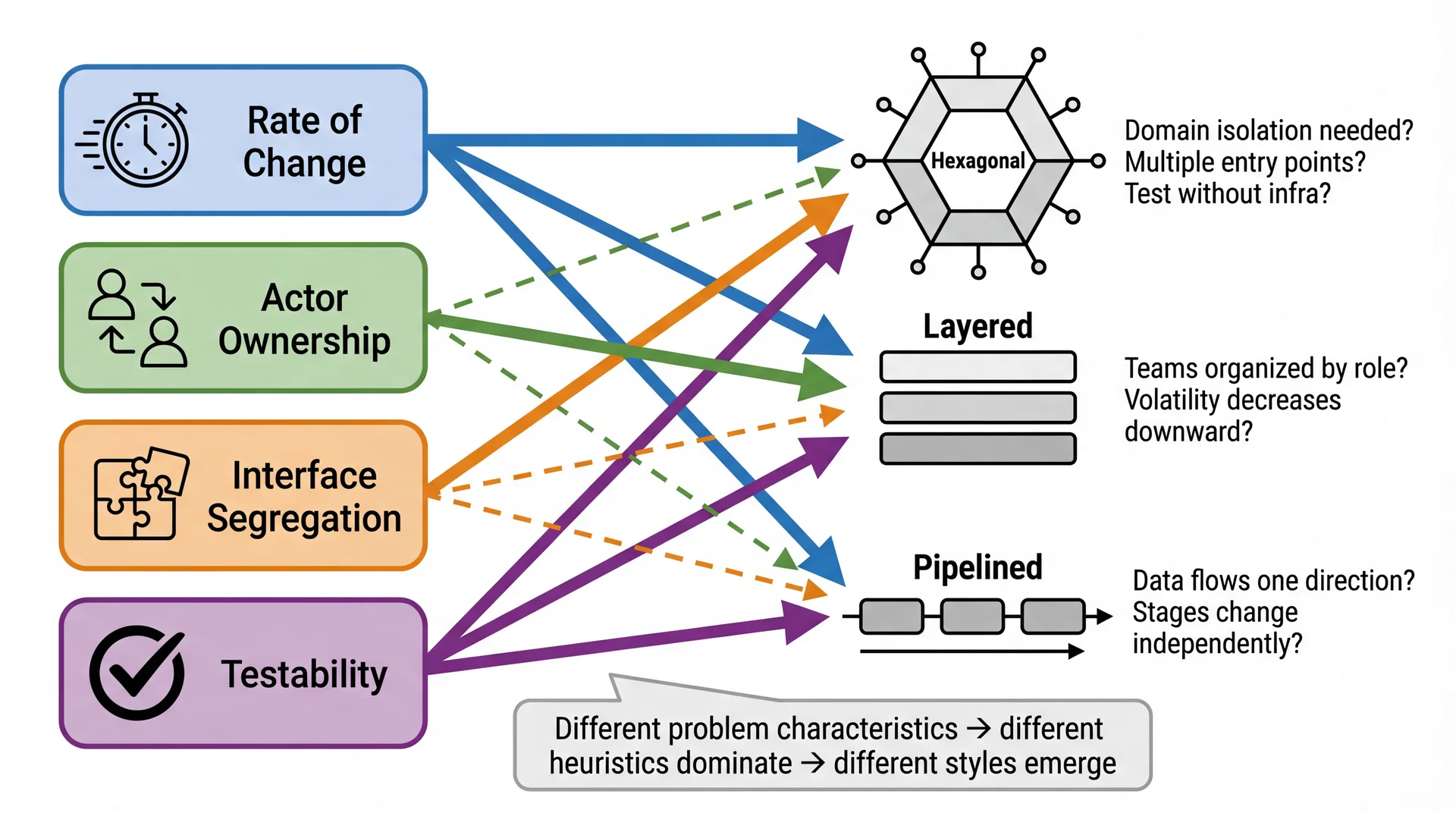
Styles Emerge from Heuristics
We've now seen three styles: Hexagonal, Layered, and Pipelined. Here's the key insight: these styles aren't arbitrary choices — they emerge naturally when you apply the L18 heuristics consistently .
This is the synthesis insight — make it dramatic:
"Notice what we did NOT do: we didn't open a catalog of architectural styles and pick one"
"Instead, we asked questions: What changes? Who owns it? How do we test it?"
"The answers formed a shape — and that shape has a name"
The four heuristics lead to different styles:
Rate of Change applies EVERYWHERE — it's the universal heuristic
Testability + ISP → strongly suggest Hexagonal (domain isolation, narrow ports)
Actor Ownership → strongly suggests Layered (teams map to technical roles)
Rate of Change + Testability → strongly suggest Pipelined (independent stages)
→ Transition: But wait — where do those answers come from? How do we KNOW what actually changes?
But Wait: Where Do Those Answers Come From?
The heuristics ask great questions: What changes at different rates? Who owns what? Where do we need test seams? But you can only answer those questions if you understand your domain .
Without Domain Understanding
"We might need to support multiple databases..."
Adds abstraction layers now
Increases cognitive overhead
Makes simple queries harder to optimize
Pays flexibility tax EVERY DAY
Building for imaginary changes = real complexity for fantasy benefits
With Domain Understanding (L12)
Pawtograder's domain analysis revealed:
Config files change weekly → declarative YAMLGrading logic changes monthly → isolate in adaptersDatabase vendor change unlikely → couple tightly, it's fine Invest flexibility where change actually happens
The L18 heuristics are powerful tools — but they only give good answers when applied to real domain knowledge, not hypothetical scenarios.
This is the crucial "but wait" moment:
We just showed this beautiful diagram: heuristics → styles
Now pull the rug out slightly: "But where do the ANSWERS come from?"
"Rate of Change" requires knowing ACTUAL rates of change
"Actor Ownership" requires knowing who ACTUALLY uses the system
Without L12 domain modeling, you're guessing
The flexibility trap:
Junior architects think "more flexibility = better"
Reality: flexibility has a cost you pay EVERY DAY
If you add a Repository pattern because "we might switch databases" but you never will — you've made every data access harder for no benefit
Connect L12 → L18 → L19:
L12: Understand the domain — what changes, what doesn't
L18: Apply heuristics — but only with REAL domain knowledge
L19: Recognize the pattern that emerged
→ Transition: Let's see this concretely — how did Pawtograder's architecture emerge?
How Pawtograder's Architecture Emerged
We didn't start by saying "let's use hexagonal architecture." We started with domain understanding , applied heuristics , and the structure emerged:
1. Domain Understanding (L12)
Question Answer What changes most? Config files (weekly) What's stable? API contract, core grading logic Who are the actors? Instructors, action maintainers, sysadmins What's unlikely to change? Database vendor, GitHub Actions platform
2. Heuristics Applied (L18)
Heuristic Result Rate of Change Config ↔ Action ↔ API boundaries Actor Ownership Instructor owns config, maintainer owns action ISP Narrow ports: Builder, FeedbackAPI Testability Domain testable without real API
3. The Pattern That Emerged → Hexagonal + Pipelined
Domain core (grading logic) at center — testable without infrastructure
Ports define contracts — Builder, Parser, FeedbackAPI
Adapters implement ports — GradleBuilder, SurefireParser, SupabaseAPI
Data flows through a pipeline — overlay → build → test → parse → grade → submit
We call it "hexagonal" because that's what the community named this shape. We DISCOVERED it; we didn't CHOOSE it.
Walk through the emergence story:
Step 1 — Domain Understanding:
Before writing ANY code, we asked: "What changes? Who cares? What's stable?"
Config changes weekly (instructor iterations)
Grading logic changes monthly (new features)
API contract changes rarely (stability for all actions)
Database vendor? Never going to change — don't abstract it
Step 2 — Heuristics:
Rate of Change → separate config from action from API
Actor Ownership → instructors own config, maintainers own action code
ISP → each client gets a narrow interface (instructors don't see TypeScript)
Testability → need to test grading without deploying to GitHub Actions
Step 3 — Recognition:
The boundaries formed a shape
Domain at center, adapters at edges = hexagonal
Data flowing through transformations = pipelined
We didn't pick these names first — we recognized them after
The meta-lesson:
Architecture is DISCOVERED through domain understanding + heuristics
Style names are vocabulary for COMMUNICATION, not a menu of choices
→ Transition: Now let's see all three styles side by side...
The Complete Picture: L12 → L18 → L19
Architecture isn't about picking from a menu. It's a discovery process :
The style names (hexagonal, layered, pipelined) are vocabulary for communication — not a catalog to shop from. You discover architecture by understanding your domain and asking the right questions.
This is the synthesis of L12 + L18 + L19:
The process:
L12 (Domain): Understand what actually changes, who actually caresL18 (Heuristics): Ask the four questions — but with REAL answers from L12Emergence: Boundaries form naturally from those answersL19 (Recognition): Name the pattern — "oh, this is hexagonal"Communication: Use the vocabulary to explain to your team Why this order matters:
If you skip L12 and go straight to "let's use hexagonal" → you're guessing
If you apply heuristics to hypothetical scenarios → you build flexibility for imaginary changes
Domain understanding GROUNDS the heuristics in reality
The vocabulary insight:
"Hexagonal" is useful because other architects know what it means
But you don't START with "hexagonal" — you END there
You DISCOVER the shape, then COMMUNICATE it using shared vocabulary
→ Transition: Now that we understand how styles emerge, let's look at the two big families of deployment...
The Two Big Families: Monolith vs. Microservices
At the highest level, systems fall into two categories based on how they're deployed:
Monolith — One Deployment Unit
All code lives in a single codebase
Deployed as a single artifact (JAR, binary, container)
Components communicate via method calls
One database, one process, one server (typically)
Everything we've discussed so far — layered, hexagonal, modular monolith, pipelined — are variations within this family.
Microservices — Many Deployment Units
Code split across separate services
Each service deployed independently
Services communicate via network (HTTP, messages)
Separate databases, processes, servers
This is where industry has been moving — and it's the focus of L20-L21.
The Network Changes Everything
In a monolith, method calls are instant , reliable , and traceable . Over a network:
Monolith (Bottlenose)
submission . computeGrade ( ) ; Distributed (Pawtograder)
feedbackApi . submit ( submissionId , feedback ) ; Pawtograder's SupabaseAPI actually implements retry logic with exponential backoff — complexity that simply doesn't exist in a monolith. "Microservices" really means "distributed systems" — and distributed systems are hard .
Monolith vs. Microservices: Quality Attribute Tradeoffs
These are general tradeoffs — not specific to Pawtograder or Bottlenose. Any time you're deciding between these styles, this is the tension:
Quality Attribute Monolith Microservices Simplicity ★★★ One process, one deploy, one mental model ★☆☆ Many services, network complexity, distributed debugging Modularity ★☆☆ Boundaries are conventions — easy to violate ★★★ Boundaries enforced by network — can't cheat Testability ★★☆ One environment, but need full infrastructure ★★★ Each service testable in isolation Deployability ★☆☆ All-or-nothing deploy, slowest part limits frequency ★★★ Independent deploys per service Changeability ★★☆ IDE refactoring is powerful; but changes can ripple ★★☆ Isolated changes easy; cross-service changes expensive Responsiveness ★★★ In-process calls: nanoseconds ★☆☆ Network calls: milliseconds, retries, timeouts Scalability ★☆☆ Vertical only — heavy work competes with everything else ★★★ Horizontal — offload work to independent services Fault Tolerance ★☆☆ One crash takes down everything ★★☆ Failures can be isolated (but new failure modes)
Notice the pattern: almost every row is a direct tradeoff . What monoliths win on simplicity and responsiveness, microservices win on modularity and scalability. This is why "which is better?" is the wrong question.
This is the GENERAL comparison — not yet about our specific systems.
Walk through each row briefly, but let the table speak for itself
The key insight: the ratings are nearly INVERSE of each other
Monoliths trade modularity, deployability, and scalability for simplicity and responsiveness
Microservices trade simplicity and responsiveness for modularity, deployability, and scalability
Row by row:
Simplicity : The defining advantage of monoliths. One thing to build, deploy, debug. Microservices have N things — N deployment pipelines, N log streams, N things that can fail independently.Modularity : This is the defining advantage of microservices. You CAN'T accidentally call another service's internal method — the network enforces boundaries. In a monolith, it's one import statement away.Testability : Microservices can spin up one service with mocks for the rest. Monoliths need the whole environment — database, background jobs, etc.Deployability : Microservices can ship a fix to one service in minutes. Monoliths must deploy everything together.Changeability : Mixed! Monoliths win for cross-cutting changes (IDE refactoring across one codebase). Microservices win for isolated changes (one service, one deploy).Responsiveness : Method calls are nanoseconds. Network calls are milliseconds at best, seconds at worst, infinite on timeout.Scalability : The most dramatic difference. Monolith: buy a bigger server — but even then, grading competes with everything else for CPU and database connections. The whole platform degrades. Microservices: offload heavy work to independent services that scale separately. The core platform stays responsive.Fault Tolerance : Microservices CAN isolate failures — but they also introduce NEW failure modes (network partitions, cascading timeouts, split brain). The ★★☆ rating reflects this complexity. The modular monolith (which we just saw) tries to get modularity ★★★ while keeping simplicity ★★★ — but it can't help with scalability or fault tolerance.
Foreshadow L20-21:
We'll go much deeper into distributed system tradeoffs
Fallacies of Distributed Computing, CAP theorem, eventual consistency
For now: just understand that this is a REAL tradeoff, not a clear winner
→ Transition: Now let's apply this to our specific systems...
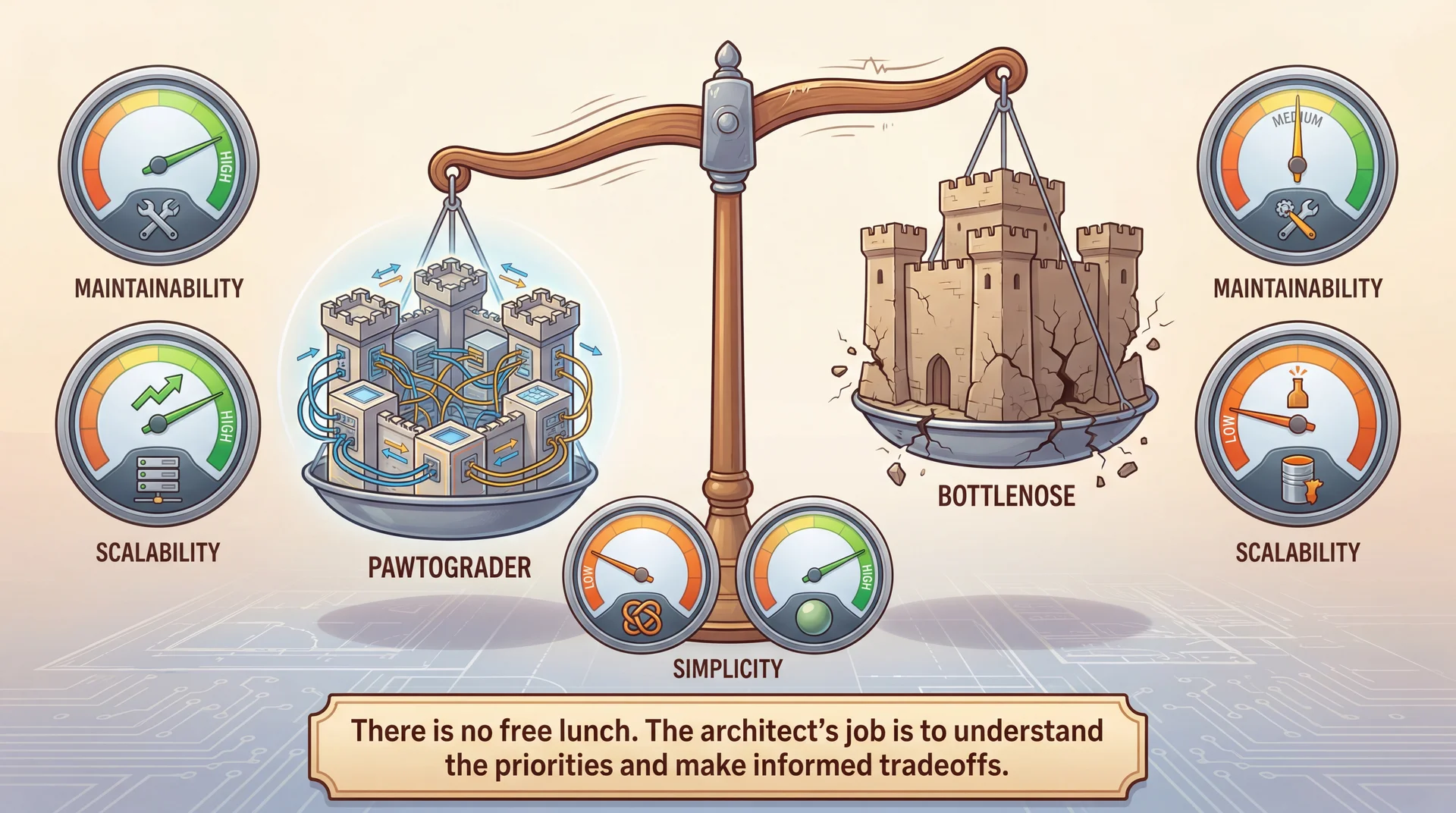
Applying Quality Attributes: Pawtograder vs. Bottlenose
Those were general tradeoffs. Now let's see how they play out concretely in our two running examples:
Quality Attribute Pawtograder Bottlenose Simplicity Multiple services, HTTP boundaries Single deployment (mostly) — easier to reason about Modularity High — hex arch, clean port/adapter boundaries Lower — monolith couples concerns Testability Grading runs locally without infrastructure Needs database, Orca for integration tests Deployability Action and API deploy independently All-or-nothing deploy of core app Changeability Add a language = one adapter class Add a language = changes across layers Scalability Heavy work offloaded to GitHub Actions runners; API stays responsive All work in one process — grading eats CPU/DB connections, whole platform slows Fault Tolerance API down? Action retries. Action fails? API unaffected. Bug in grading can affect course management
Neither system "wins" — they optimize for different priorities. Pawtograder optimizes for modularity, testability, and scalability. Bottlenose optimizes for simplicity and responsiveness.
Walk through the table row by row:
Simplicity : Bottlenose wins — one codebase, one deploy, one mental model. Pawtograder has 3+ services to understand.Modularity : Pawtograder wins — hex arch means clean boundaries. Bottlenose's monolith couples grading to course management.Testability : Pawtograder wins — java -jar grader.jar runs locally. Bottlenose needs a full Rails environment + database + Orca.Deployability : Pawtograder wins — fix grading without touching the API. Bottlenose requires full redeploy.Changeability : Pawtograder wins for language-specific changes (one adapter). Bottlenose wins for cross-cutting changes (one codebase, IDE refactoring).Scalability : Pawtograder wins — all the heavy work (building, testing, parsing, scoring) happens on ephemeral GitHub Actions runners. The API just receives normalized feedback and stays fast. Bottlenose does ALL of that work in the main process — parsing test output, computing grades, running linters — competing with the web app for CPU, memory, and DB connections. Even if you lifted the 15-job limit, you'd just make the contention worse.Fault tolerance : Mixed — Pawtograder isolates failures between components, but introduces network failure modes. Bottlenose's failures are simpler but more catastrophic. Connection to L8 (SOLID at system scale):
Single Responsibility → Solution Repo, Grading Action, API each have one reason to change
Open/Closed → new Builder implementations without modifying existing code
Dependency Inversion → domain depends on abstractions (ports), not concrete adapters
→ Transition: Let's zoom into maintainability with specific change scenarios...
Comparing Maintainability: Change by Change
The same change hits these two architectures very differently :
Change Pawtograder Impact Bottlenose Impact Add Rust language support Add one RustCargoBuilder class; no API changes Add RustGrader subclass + UI views + Docker image + registration Change scoring calculation Modify OverlayGrader; no API or config changes Modify Submission.computeGrade(); affects all graders Add new feedback format Modify AutograderFeedback record; requires API coordination Add fields to InlineComment; database migration
The tradeoffs are real:
Pawtograder's "thick action, narrow API" isolates most changes to a single component
Bottlenose's monolith can optimize across components but changes ripple more widely
Neither is inherently better — the tradeoffs depend on which changes are most frequent and which teams own which components
The Tradeoffs Are Real Quality attributes often conflict:
Pawtograder's narrow API is highly maintainable but requires the action to do more work (less energy-efficient per run)
Bottlenose's monolith is harder to change but can optimize across components
GitHub Actions' horizontal scaling is effortless but potentially wasteful; Bottlenose's controlled queue is efficient but creates bottlenecks
For Pawtograder, the priorities are:
Testability (run grading locally without infrastructure)
Maintainability (instructors iterate on config without touching the action)
Scalability (handle near-deadline spikes)
For Bottlenose, the priorities were different:
Centralized control, institutional integration, comprehensive course management
Simplicity of a single deployment
The architect's job: match the architecture to the constraints. Not every system needs microservices. Not every system needs hexagonal architecture.
→ Transition: Let's wrap up what we've learned...
Key Takeaway: Architecture Is Discovered, Not Chosen
Domain understanding (L12) + heuristics (L18) + style recognition (L19) = a complete approach:
The Heuristics (L18)
Questions that reveal structure
Rate of Change: What changes together? What changes independently?Actor: Who owns what? Whose changes should stay isolated?ISP: What does each client actually need?Testability: Where do we need seams for testing? The Emergent Styles (L19)
Patterns that have names
Hexagonal: Domain isolation with swappable adaptersLayered: Stacked responsibilities, downward dependenciesPipelined: Transformation flow, stage independenceMonolithic: Single deployment, shared memoryModular Monolith: Enforced boundaries in one deployment The Process:
Understand the domain (L12) → Apply heuristics (L18) → Boundaries emerge → Recognize the style (L19) → Communicate it
You don't pick "hexagonal" from a menu. You discover it by understanding what actually matters.
This is the synthesis of L12, L18, and L19:
The unified approach:
L12 (Domain Modeling): Understand your domain — what concepts matter, what changes, what's stable, who cares about what. This prevents building flexibility for imaginary changes.L18 (Heuristics): Apply Rate of Change, Actor, ISP, Testability — but these questions only produce GOOD answers if you understood the domain first.Let boundaries emerge from the answers
Recognize the pattern that emerged (is it hexagonal? layered? pipelined?)
Use the vocabulary to communicate what you discovered
Why domain understanding comes first:
Without L12, you might add flexibility for changes that will NEVER happen
Every abstraction has a cost: indirection, cognitive load, testing overhead
Domain modeling tells you which abstractions will PAY OFF and which are waste
"Rate of Change" heuristic requires knowing ACTUAL rates of change, not hypothetical ones
Why this matters:
Students often think "pick a style and follow it"
Reality: you discover architecture by understanding your domain and asking the right questions
The style names are vocabulary for communication, not a menu of choices
Different problems → same heuristics → different emergent structures
The Pawtograder example:
We started with domain understanding: grading systems, instructors, students, what changes when
We DIDN'T build a "GradingPlatformAdapter" because domain analysis showed platform changes are unlikely
We DID build parsing adapters because domain analysis showed language support changes often
We asked: What changes at different rates? (config weekly, action monthly, API rarely)
We asked: Who owns what? (instructor, maintainer, sysadmin)
We asked: Where do we need test seams? (domain testable without API)
The hexagonal structure EMERGED from those answers
We call it "hexagonal" because that's the vocabulary that lets us communicate it
→ Transition: Let's look at where these ideas go next...
Looking Forward: Where These Ideas Go Next Concept from Today Where It Goes "The Network Changes Everything" L20: Fallacies of Distributed Computing, client-server architecture, security across trust boundariesMonolith vs. Microservices L20-21: Distributed architecture styles, when to break the monolith, serverlessQuality Attribute Tradeoffs L21: How platform constraints (serverless, containers) shape architecture — like GitHub Actions shaped PawtograderHeuristics → Emergent Styles L22: Conway's Law — team structure is another heuristic that shapes architecture
We opened with "how do we organize our code?" — and now you have styles, quality attributes, and tradeoff vocabulary to answer it. Next: what happens when your boundaries cross a network.
The arc ahead:
L20 (Networks & Security): When components communicate over a network, everything gets harder. Fallacies of Distributed Computing. Client-server architecture. Security.L21 (Serverless): Infrastructure building blocks — databases, blob storage, queues. Serverless as an architectural style.L22 (Teams): Conway's Law — team structure is ANOTHER heuristic. "Organizations design systems that mirror their communication structure." The throughline with heuristics:
L16: "How do we design for testability?" → Hexagonal Architecture emerges
L18: "Where do the boundaries go?" → Four heuristics: Rate of Change, Actor, ISP, Testability
L19: "What styles emerge from those heuristics?" → Hexagonal, Layered, Pipelined, Monolith L20-21: "What happens when boundaries cross networks?" → Distributed styles emerge
L22: "What happens when boundaries cross teams?" → Conway's Law as another heuristic
The meta-lesson:
Architecture isn't about memorizing style names
It's about asking the right questions (the heuristics)
The styles are patterns that the community has NAMED
When you apply heuristics consistently, recognizable patterns emerge
The vocabulary lets you communicate with other architects
Final thought: The vocabulary from these lectures — styles, quality attributes, tradeoffs, heuristics, emergence — is how architects think. You're not just learning terms; you're learning a way of analyzing systems.