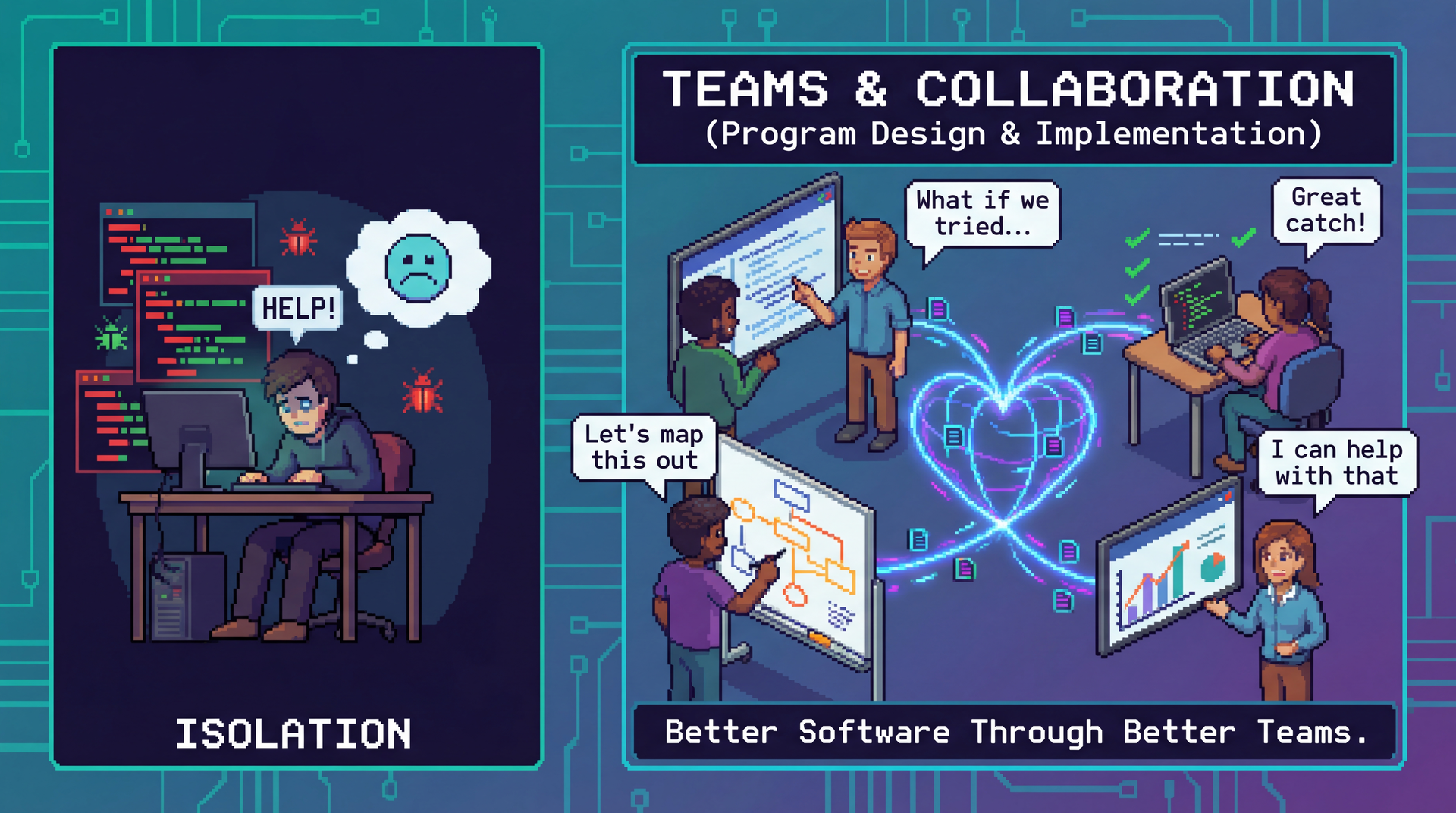
A pixel art illustration contrasting a lone overwhelmed programmer surrounded by bugs (left) with a collaborative team pair-programming, doing code review, whiteboarding, and holding standups connected by a heart-shaped network (right). Speech bubbles show supportive phrases. Tagline: Better Software Through Better Teams.

CS 3100: Program Design and Implementation II

Lecture 22: Teams and Collaboration

©2026 Jonathan Bell, CC-BY-SA

Learning Objectives

After this lecture, you will be able to:

  1. Explain key advantages of working in a team and sharing information with your team
  2. Describe the stages of team formation and strategies for establishing productive working agreements
  3. Describe the HRT pillars of social interaction and strategies for resolving team conflicts
  4. Seek and receive feedback effectively
  5. Write clear and specific GitHub issues, pull requests, and comments, and ask technical questions effectively

Your Team Project: CookYourBooks GUI

You've met your team. Here's what you'll build together:

What you're building:

  • Full JavaFX GUI for CookYourBooks
  • Each team member owns one core feature:
    • Library View (browse cookbooks)
    • Recipe Details/Editor
    • Import Interface (OCR integration)
    • Search & Filter
  • Plus shared infrastructure and "Feature Buffet" extras

The timeline:

  • Now: Team Charter (due Mar 13), final individual assignment (due Mar 19)
  • Mar 26: Design Sprint (wireframes, personas)
  • Apr 9: Checkpoint 1 (core features)
  • Apr 16: Checkpoint 2 (Feature Buffet)
  • Apr 20: Final submission

The structure:

  • One spec, released upfront
  • Incremental delivery required
  • Code review on all PRs

This lecture: The principles, practices, and agreements you need to succeed. We'll return to the team charter at the end with specific guidance.

The Question This Lecture Answers

Team projects rarely fail because of technical skill. They fail because of collaboration.

Today you'll learn:

  • The principles that make collaboration work (HRT, scalable knowledge)
  • The practices that professional teams use (CI, PRs, code review, issues)
  • The agreements that prevent conflicts (team charters, shared expectations)

These separate teams that ship from teams that implode.

You've Been Practicing These Skills

Today's lecture formalizes skills you've already been building in labs:

Lab 4: Respectful disagreement

  • "I think X because Y"
  • "What's driving your preference?"
  • Reaching a joint decision

Lab 5: Building shared understanding

  • Listen to understand, not to argue
  • Create a merged understanding

Lab 6: Giving and receiving explanations

  • Explain bugs without reading notes
  • Partner asks clarifying questions
  • Share what was clear vs. confusing

Lab 8: Communicating technical decisions

  • "I chose X because Y. I considered Z, but..."
  • Partner asks: "Why did you prioritize that?"

Today we put names to these practices and explain why they matter at scale.

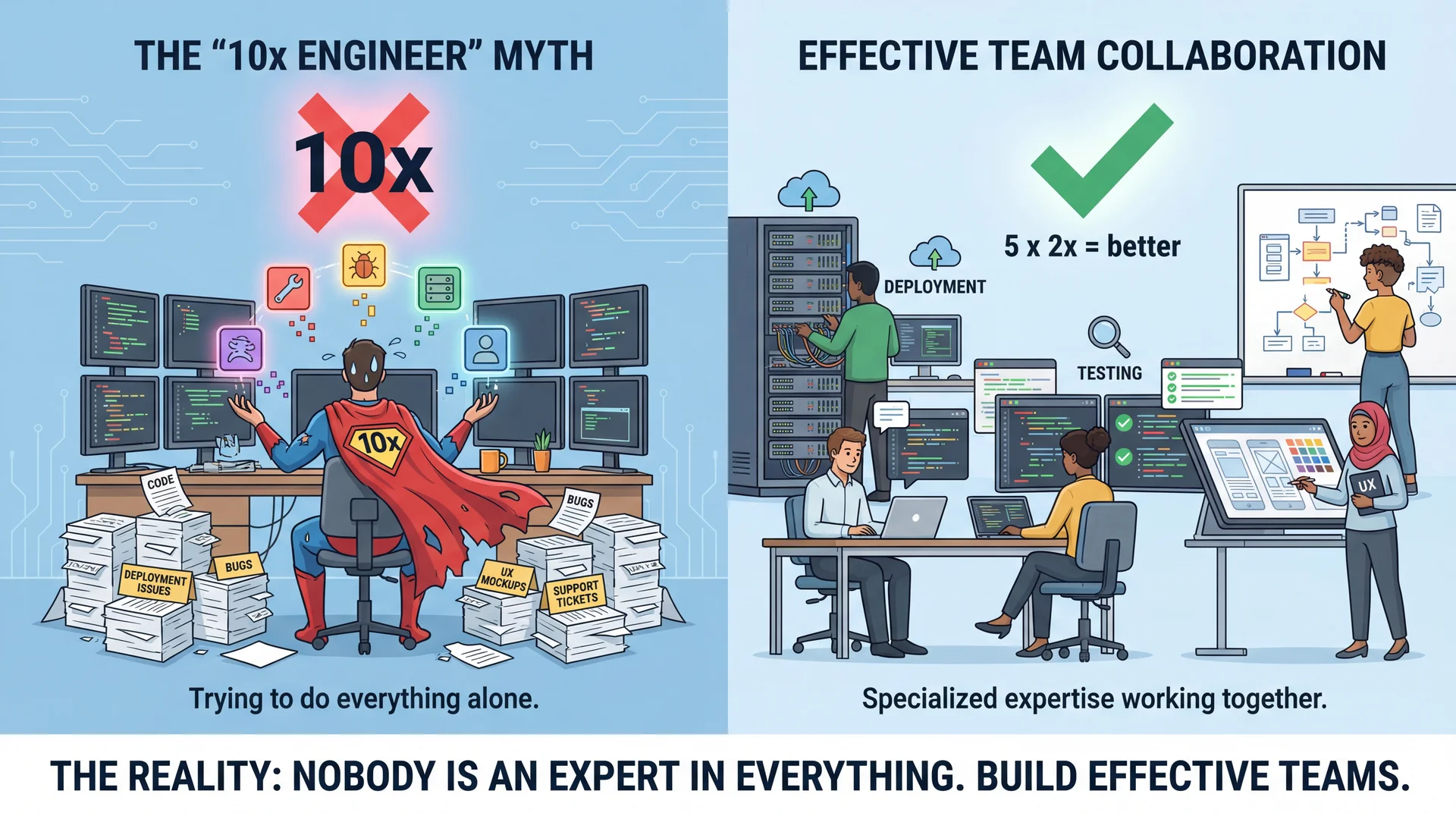
The Myth of the "10x Engineer"

Left: an exhausted lone 'superhero' programmer juggling architecture, UX, testing, deployment, and support tickets simultaneously, dropping most of them. Right: a calm team of 5, each handling one area expertly. A red X crosses out '10x' over the hero; a green checkmark appears over the team.

Cognitive Diversity Produces Better Software

Having members who think differently isn't just nice—it's productive.

  • Different perspectives catch different blind spots. A security-focused engineer notices vulnerabilities a feature-focused one misses.
  • Constructive disagreement improves decisions. When everyone thinks alike, bad ideas go unchallenged.
  • Creativity emerges from intersection. New ideas often come from combining insights across domains.

The discomfort of having your assumptions challenged is the feeling of blind spots being revealed.

📘 Lab 2 in action: When you discussed "Why is Light abstract?" with a neighbor, you probably discovered different approaches. That reflection prompt—"What did you learn from someone who thought differently?"—was cognitive diversity in action.

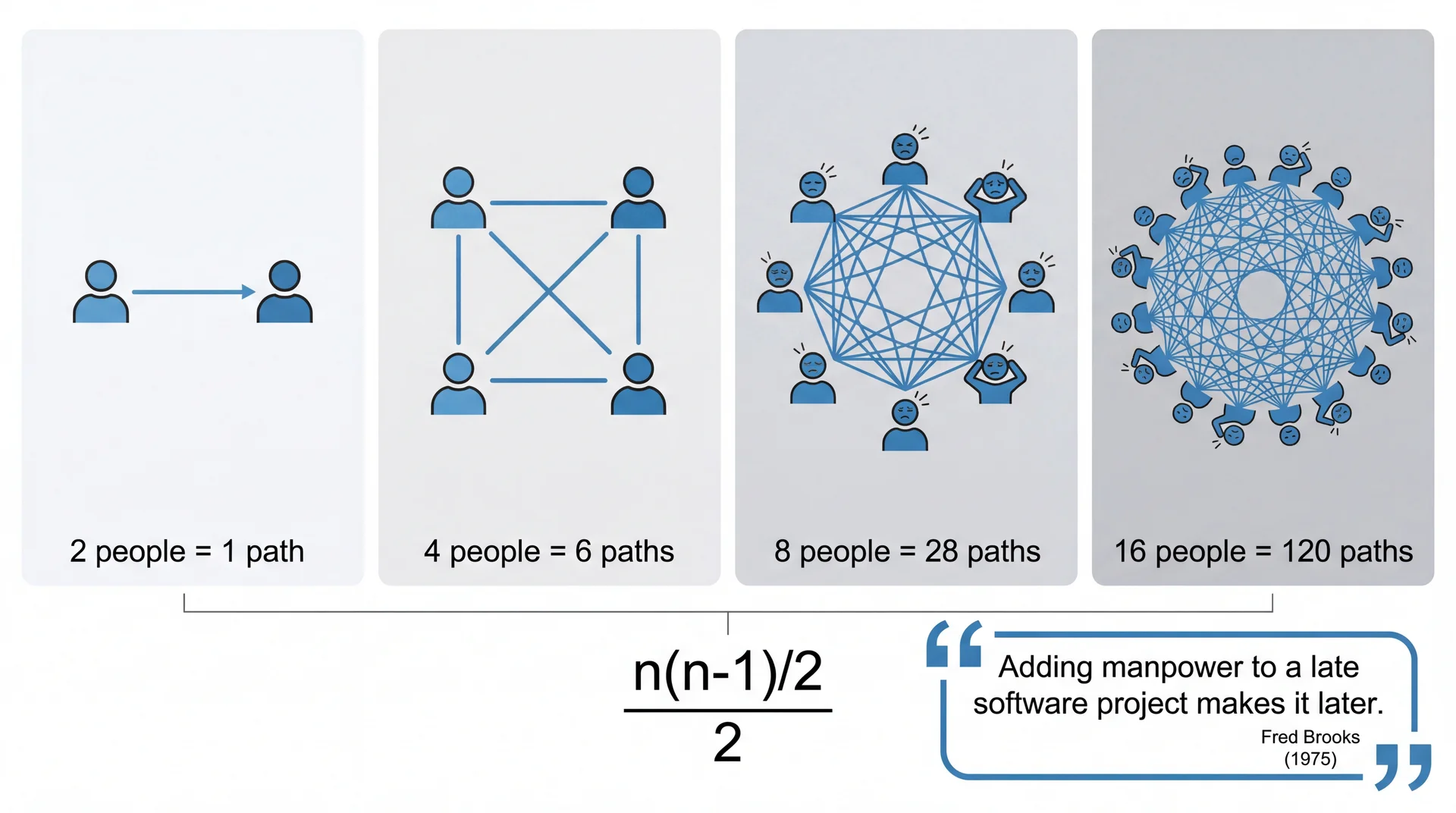
Brooks' Law: Communication Overhead Grows Quadratically

Four panels showing communication paths growing quadratically: 2 people with 1 path (clean), 4 people with 6 paths (busy), 8 people with 28 paths (tangled web), 16 people with 120 paths (total chaos). Formula: n(n-1)/2. Brooks quote: Adding manpower to a late software project makes it later.

Conway's Law: Teams Shape Architecture

Organizations which design systems are constrained to produce designs which are copies of the communication structures of these organizations.

Translation: Your software's architecture will mirror your team's structure—whether you plan for it or not.

Example: Three teams working on one app → three separate services that need integration

Inverse Conway: Design the team structure you want to match the architecture you need

📘 CookYourBooks in action: We structured your team around the architecture—one person owns each GUI component (Library, Recipe, Import, Search). Remember the responsibility heuristics from L18? Each feature is a cohesive responsibility with a defined interface. Team boundaries = module boundaries.

Introducing A5: Designing Services for Your Team (Individual Assignment)

A4's RecipeService bundled everything into one interface—scaling, conversion, import, search. That was intentionally problematic. A5 asks you to fix it by designing services aligned with actors:

ActorA5 Service ResponsibilityGroup Project GUI Component
LibrarianCollections, import, searchLibrary View, Import Interface, Search
CookStep-by-step navigationRecipe Details/Editor
PlannerShopping lists, scaling, export(Feature Buffet options)

Same architecture, CLI → GUI: Your A5 services become the foundation for the group project. Each teammate's GUI component consumes specific services—clean boundaries = parallel work without conflicts.

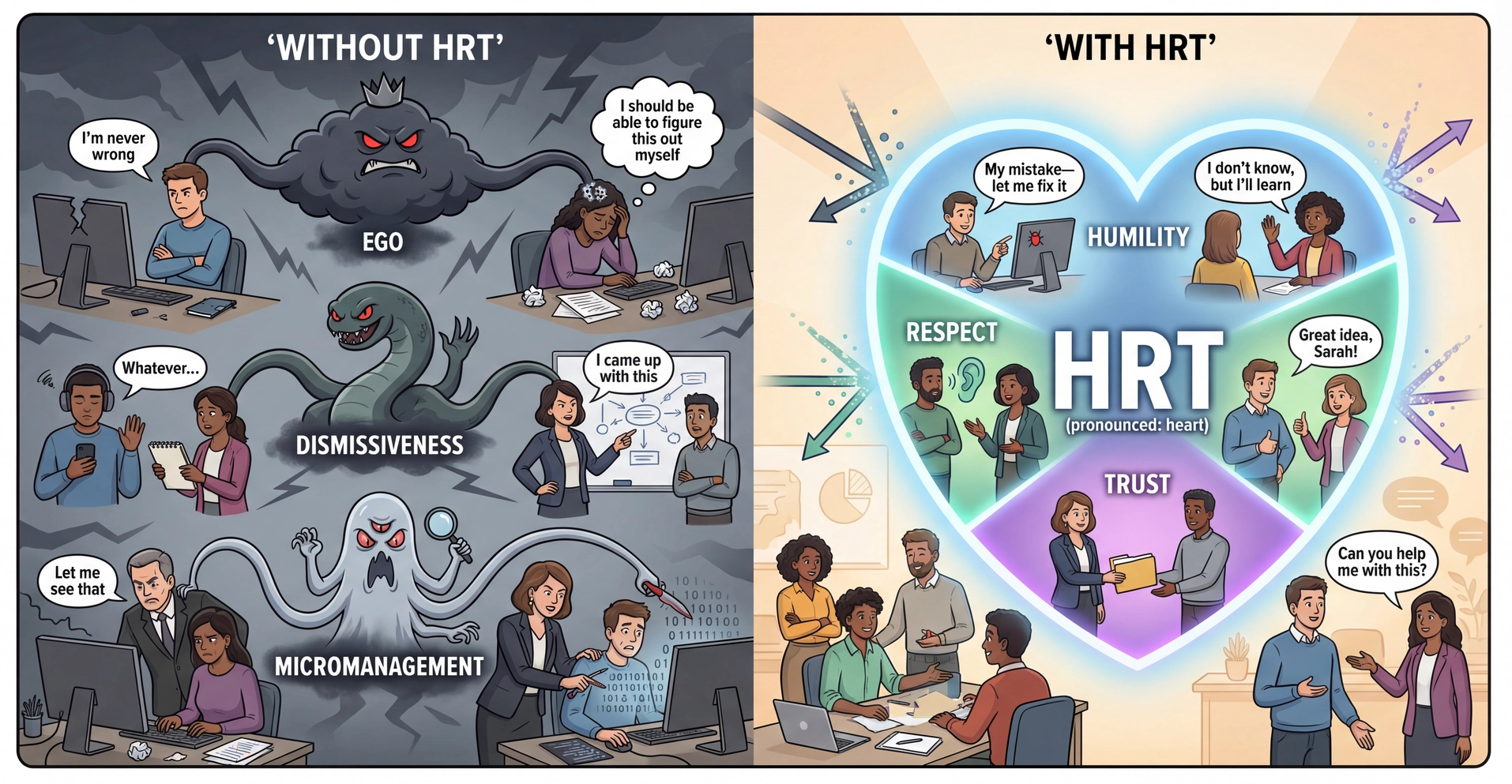
The Three Pillars of Team Interaction: HRT

HRT as a protective shield: Left side shows a team attacked by Ego, Dismissiveness, and Micromanagement monsters. Right side shows the same team protected by a heart-shaped HRT shield with three sections, each with two example behaviors. Humility (blue): admitting mistakes, asking to learn. Respect (green): active listening, giving credit. Trust (purple): delegating calmly, asking for help openly.

From Team Geek / Debugging Teams by Fitzpatrick & Collins-Sussman.

Pillar 1: Humility

You are not the center of the universe (nor is your code!). You're neither omniscient nor infallible. You're open to self-improvement.

Without Humility:

  • "I'm never wrong about code."
  • "I don't need to ask—I'll figure it out myself."
  • Refusing to acknowledge bugs you introduced
  • Taking criticism of code as personal attacks

With Humility:

  • "My mistake—let me fix it."
  • "I don't know, but I'll learn."
  • Accepting that your code can be improved
  • Being willing to change your mind

Humility isn't self-deprecation—it's honest self-assessment and openness to growth.

📘 Labs 4 & 6 in action: In Lab 4, you practiced "I think X because Y"—sharing reasoning, not declaring the One True Answer. In Lab 6, you learned to reject AI suggestions you don't understand: "Rejecting a suggestion is not failure—it's critical thinking." Both require humility to question yourself.

Pillar 2: Respect

You genuinely care about others you work with. You treat them kindly and appreciate their abilities and accomplishments.

Without Respect:

  • Ignoring teammates when they speak
  • Taking credit for others' ideas
  • Dismissing suggestions without consideration
  • "Whatever..." or "That's a dumb idea."

With Respect:

  • Listening to understand, not just to respond
  • "Great idea, Sarah!" — giving credit
  • Assuming competence and good intentions
  • Valuing contributions different from yours

Respect isn't just politeness—it's genuine care for your teammates as people and professionals.

📘 Lab 5 in action: You practiced "listen to understand, not to argue"—treating your partner's interpretation as worth understanding, even when different from yours. That's respect.

Pillar 3: Trust

You believe others are competent and will do the right thing. You're OK with letting them drive when appropriate.

Without Trust:

  • Hovering over teammates, checking every keystroke
  • Rewriting others' code without discussing it
  • Requiring approval for every small decision
  • "Let me just do it myself—it'll be faster."

With Trust:

  • Delegating without micromanaging
  • Giving space to make (and learn from) mistakes
  • Discussing before rewriting someone's work
  • Trusting teammates to ask for help when needed

Trust isn't blind faith—it's giving people the benefit of the doubt and room to grow.

📘 Labs 4 & 8 in action: Lab 4's "be willing to be persuaded" meant trusting your partner's reasoning might reveal something you missed. In Lab 8, you reviewed another pair's interfaces without rewriting them—discussing before suggesting changes. That's trust.

HRT in Practice: All Three Together

Humility

  • Admit when you don't know something
  • Accept that your code can be improved
  • Be willing to change your mind
  • Recognize others' valuable perspectives

Respect

  • Give credit where it's due
  • Listen to understand, not just to respond
  • Assume competence and good intentions
  • Value contributions different from yours

Trust

  • Delegate without micromanaging
  • Give space to make and learn from mistakes
  • Don't rewrite others' code without discussion
  • Trust teammates to ask for help when needed

The pillars reinforce each other: humility enables respect, respect builds trust, and trust requires humility.

How Professional Teams Ship Code

Modern software teams don't just write code—they have processes to keep the codebase healthy.

ConceptWhat It IsWhy It Matters
Continuous Integration (CI)Automated tests that run on every code changeCatches bugs before they reach users
Pull Requests (PRs)A proposal to merge your changes into the shared codebaseCreates a checkpoint for review
Code ReviewTeammates read and comment on your code before it's mergedCatches issues, shares knowledge

You'll use all three in your group projects. Let's understand each one.

Continuous Integration (CI)

You've been using CI all semester—the autograder that runs when you push code.

What CI does:

  • Runs automatically when code is pushed
  • Compiles the code
  • Runs all tests
  • Reports pass/fail status

In professional teams:

  • CI runs on every Pull Request
  • Code can't be merged if CI fails
  • "The build" = CI passing
  • "Breaking the build" = your change caused CI to fail

When the build is broken, nobody on the team can merge their work until it's fixed.

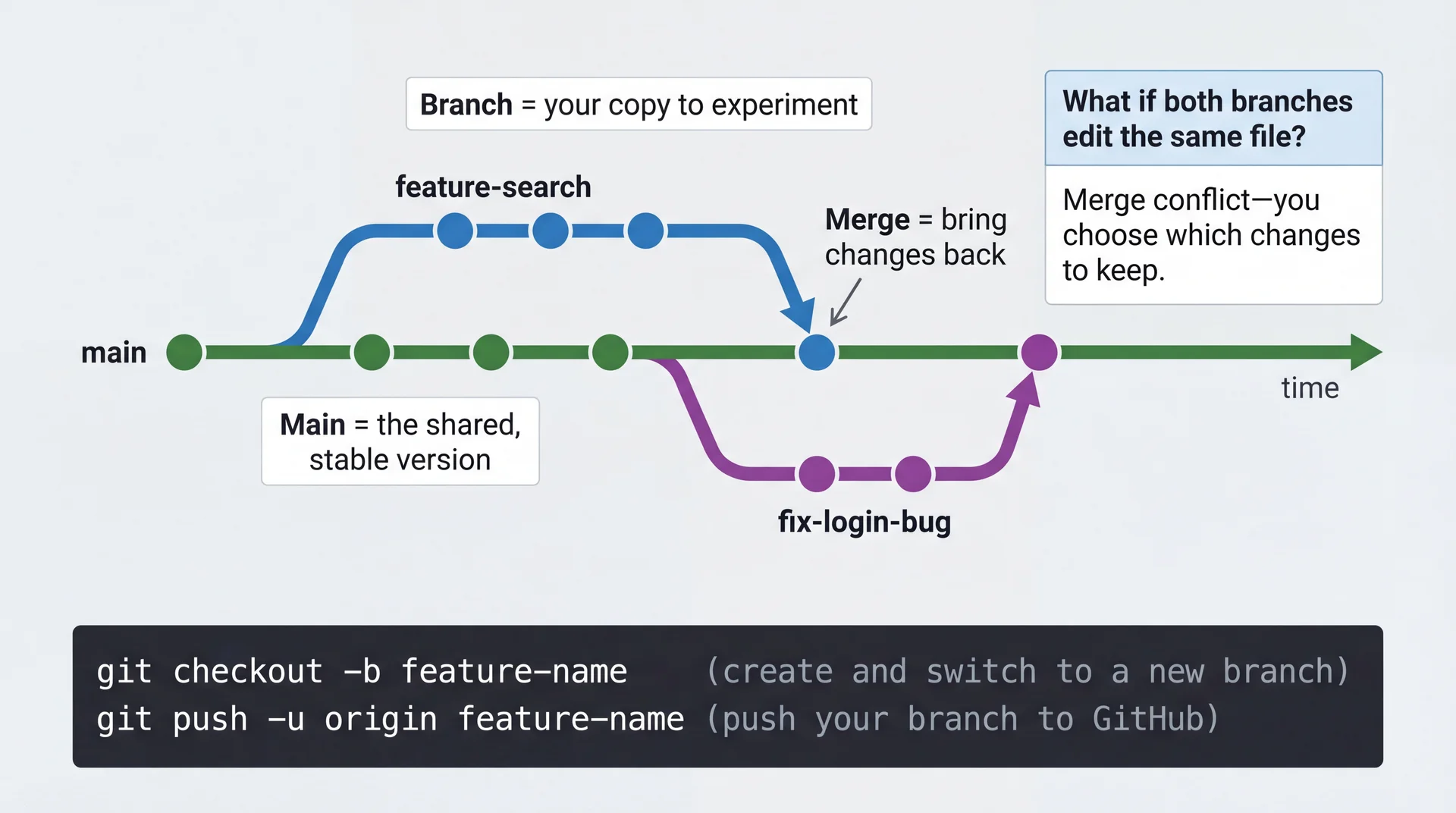
Git Branching: Working in Parallel

Git branching diagram: Green 'main' branch timeline with commits. Blue 'feature-search' splits off early, adds commits, merges back. Purple 'fix-login-bug' splits off later from a more recent point on main, merges after. Side callout explains merge conflicts.

Pull Requests: The Gateway to Shared Code

A Pull Request (PR) is a formal proposal: "I'd like to merge these changes into our shared codebase."

The workflow:

  1. Create a branch for your feature
  2. Write and commit your code
  3. Push and open a Pull Request
  4. CI runs automatically
  5. Teammates review your code
  6. Address feedback, update PR
  7. Once approved + CI passes → merge

Why not just commit to main?

  • Protects the shared codebase
  • Creates a review checkpoint
  • CI catches issues before merge
  • Discussion happens in one place
  • Easy to revert if needed

Code Review: Teammates Read Your Code

Before your PR is merged, teammates read your changes and leave comments.

What reviewers look for:

  • Does the code work correctly?
  • Is it readable and maintainable?
  • Does it follow team conventions?
  • Are there edge cases not handled?
  • Are there tests?

Why teams do this:

  • Catch bugs before they reach users
  • Share knowledge across the team
  • Maintain quality and consistency
  • Mentor junior developers
  • Document design decisions

Code review is where HRT is tested every day. Let's see what that looks like in practice.

Applying HRT to Code Review

Without HRT

"This is wrong. Use a HashMap instead."

"Why would you do it this way?"

"This whole function needs to be rewritten."

With HRT

"Have you considered using a HashMap here? It would give us O(1) lookups instead of O(n)."

"I'm curious about this approach—what led you to this design?"

"I'm having trouble following the logic in this function. Could we pair on simplifying it?"

Same technical goals. The HRT version treats the author as a capable colleague, not a subordinate to be corrected.

📘 Lab 8 in action: When defending your design choices in code review, use the format you practiced: "I chose X because Y. I considered Z, but X is better here because..." When asking questions, use "Why did you prioritize that?"—drawing out reasoning, not challenging.

Anatomy of a Good GitHub Issue

Bad issueTitle: "Unable to login" — Body: "It doesn't work. Please fix."

Bad issueTitle: "Login fails silently when password contains special characters" — Body: "It doesn't work. Please fix."

Good issueTitle: "Login fails silently when password contains special characters"

Body:

  1. Go to login page
  2. Enter username "testuser"
  3. Enter password "p@ss#word!"
  4. Click "Sign In"
  5. Nothing happens, no error displayed

Expected: Error message or successful login — Environment: Chrome 120, macOS 14.2

Pull Request Best Practices

Link to the issue:

Fixes #42

This PR adds input validation for special characters in passwords.

Keep changes small and focused

  • One logical change per PR
  • Reviewable in 15-30 minutes
  • Easier to review, easier to revert

Meaningful commit messages

  • ✗ "fix bug"
  • ✗ "WIP"
  • ✓ "Add regex validation for password special characters"
  • ✓ "Display error toast when login validation fails"

The code shows what changed. The description should explain why.

Making It Easy for Others to Help You

I am trying to [goal] so that I can [context/motivation].

I am running into [specific problem—error message, unexpected behavior].

I have looked at [resources consulted] and tried [approaches attempted].

My tech stack is: [relevant versions and configuration].

I think the problem could be [your hypothesis, if you have one].

Before asking, search first:

  • Stack Overflow, team Slack/Discord history, project docs, closed GitHub issues

After solving, document the solution:

  • Update the original thread, add to wiki, write a blog post

📘 Labs 3 & 6 in action: When you posted on the forum (Lab 3), you included context, expected behavior, and what you tried. In Lab 6, you learned the "3-Question Test" before using AI code: Can I explain this? Can I modify this? Can I debug this? Both are about respecting others' time—including your future self.

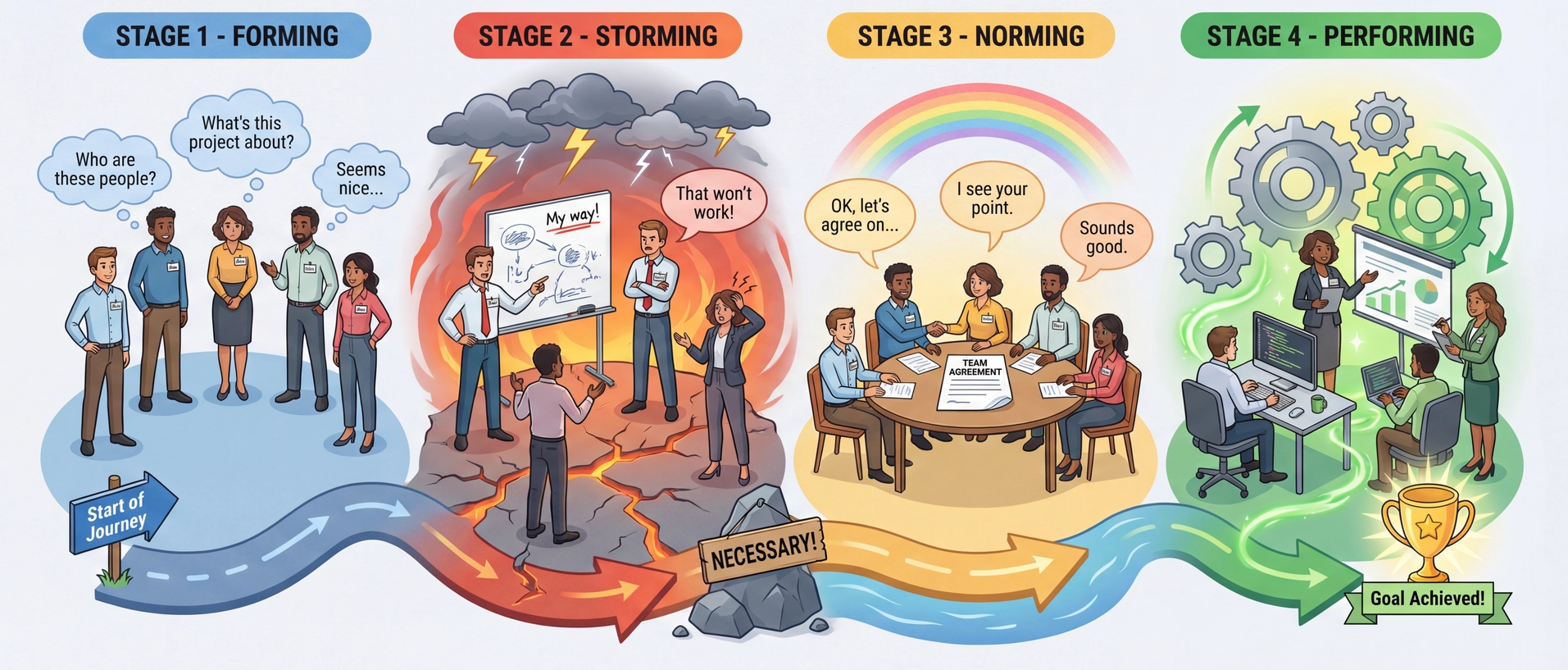
Tuckman's Stages of Team Formation

Four stages of team formation as a journey: Forming (blue, polite strangers with name tags), Storming (red, arguing with lightning bolts, marked NECESSARY), Norming (yellow, team around agreement document with rainbow), Performing (green, team working smoothly as meshing gears with star/trophy).

Team Charters Accelerate Norming

Explicitly discuss and document expectations before conflicts arise:

  • When are we available to work together?
  • How do we prefer to communicate?
  • How do we handle deadlines?
  • What does "done" mean for our work?
  • How will we divide work and make decisions?
  • What do we do when someone is blocked?

Example conflict prevented: A team member who starts work early and one who works best under deadline pressure can negotiate expectations upfront—rather than discovering the mismatch mid-project.

For this class: Your team charter is live now—it's your first team deliverable. We'll cover the details at the end of this lecture.

Conflict Resolution: Six Steps

StepActionExample
1Establish shared facts"The build broke at 11 PM. Here's the commit."
2Express feelings, not accusations"I felt stressed when..." not "You always..."
3Never presume intentAssume good faith until proven otherwise
4Remain calmIf triggered, step away and return later
5Fight forward, not backFocus on solutions, not blame
6Escalate appropriatelyBring in a neutral third party if stuck

Conflict Example: The Broken Build

A teammate committed directly to main, breaking the build right before a deadline.

Counterproductive response:

"You broke the build! Why didn't you use a branch? Now we're all going to miss the deadline because of you."

Using the six steps:

  1. "The build failed at 11 PM after this commit."
  2. "I was stressed because I couldn't test my changes."
  3. (Maybe they didn't know about the branch policy?)
  4. (Take a breath before responding)
  5. "Let's revert and get the build green. Then we can talk about branch protection."
  6. (If it keeps happening, bring it to the team lead)

The goal isn't to win—it's to fix the problem and prevent it from happening again.

📘 Lab 4 in action: When you and your partner disagreed, you didn't just "agree to disagree"—you had to reach a joint decision. Phrases like "What's driving your preference?" and "I hadn't considered that" helped bridge differences. That's conflict resolution.

Accountability: Being Someone Your Team Can Rely On

  • Own your commitments: If you say you'll do something, do it—or communicate early if you can't. Don't wait until the deadline.
  • Take responsibility for outcomes, not just effort: "I worked hard on it" isn't the same as "it's done and working."
  • Support team outcomes: If a teammate is struggling, offer help before being asked. The team succeeds or fails together.

Accountability builds trust. When teammates can count on you, the whole team moves faster.

Seeking Feedback Is a Professional Skill

Vague (unhelpful)

"What did you think of my code?"

Specific (actionable)

"I'm trying to improve my API design. Were the method signatures in this PR clear? What would have made them clearer?"

How to seek feedback effectively:

  • Ask specific questions about areas you want to improve
  • Ask the right people — someone honest, with relevant expertise
  • Make it safe to be honest — "Honest feedback helps more than kind feedback"

Receiving Feedback Without Defensiveness

Your instinct may be to explain, defend, or minimize. Resist.

  1. Say "thank you" before responding — it creates space between reaction and response
  2. Ask clarifying questions — "Can you give me an example?"
  3. Reflect before reacting — you don't have to agree immediately, but don't dismiss
  4. Follow up — tell them what you changed. It encourages future feedback.

The discomfort is the point. If all feedback feels good, you're only hearing from people who tell you what you want to hear.

📘 Lab 6 in action: In the Partner Check, you explained a bug without notes. Your partner's job was to ask one clarifying question, then share what was clear vs. confusing. That's how feedback should work—specific, constructive, and focused on improving understanding.

The Answer to Brooks' Law: Scalable Communication

Brooks' Law says communication overhead grows as n(n-1)/2. The answer isn't fewer teammates—it's communication that scales sub-linearly.

  • Written communication persists: Gets searched, gets reused, doesn't require everyone in the same room
  • HRT applies extra here: Written words lack tone—extra care needed to show respect and assume good intent
  • Conway's Law reminder: How you communicate shapes your software—written artifacts are the connective tissue

Rule of thumb: If you've explained something to more than two people, write it down.

Scalable Knowledge Sharing

One-to-one (doesn't scale)

  • Mentorship sessions
  • Hallway conversations
  • Direct messages
  • Pair programming

One-to-many (scales)

  • Code review
  • Q&A forums
  • Documentation & wikis
  • Recorded tech talks

⚠️ Beware: Discord, Slack, WhatsApp

  • Messages persist but are hard to find
  • Knowledge gets buried in chat history
  • Great for quick coordination, poor for reference

Rule of thumb: If you've explained something to more than two people, write it down.

Research shows developers see ~50% productivity boost when documentation is up-to-date, detailed, and available in multiple formats.

📘 Labs 3 & 6 in action: Forum posts (Lab 3) are one-to-many, persistent knowledge sharing—everyone benefits. Lab 6 emphasized "after solving, document the solution." Both turn one-time help into scalable knowledge.

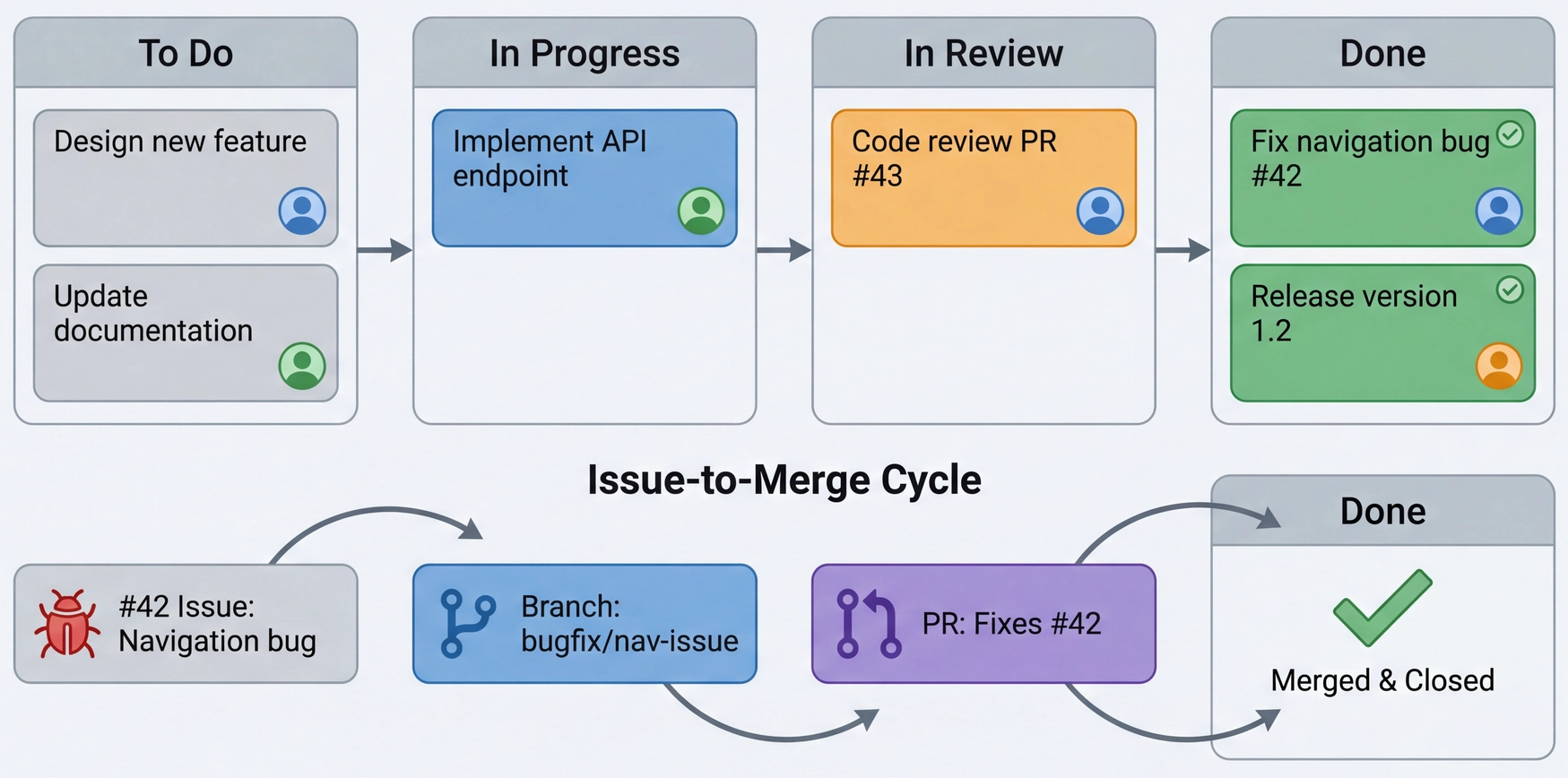
Tracking Progress with GitHub

ToolPurposeKey Features
IssuesTrack bugs, features, tasksAssign to members, label, group into milestones
ProjectsKanban-style boardsTo Do → In Progress → In Review → Done
Pull RequestsConnect code to issuesFixes #123, request reviews, discussion threads
GitHub project workflow: a kanban board with To Do, In Progress, In Review, and Done columns. Below, the cycle shows Issue #42 leading to a branch, then to a Pull Request labeled 'Fixes #42', then merged to Done. Team member avatars assigned to cards.

Regular check-ins (standups, weekly syncs) help surface blockers early.

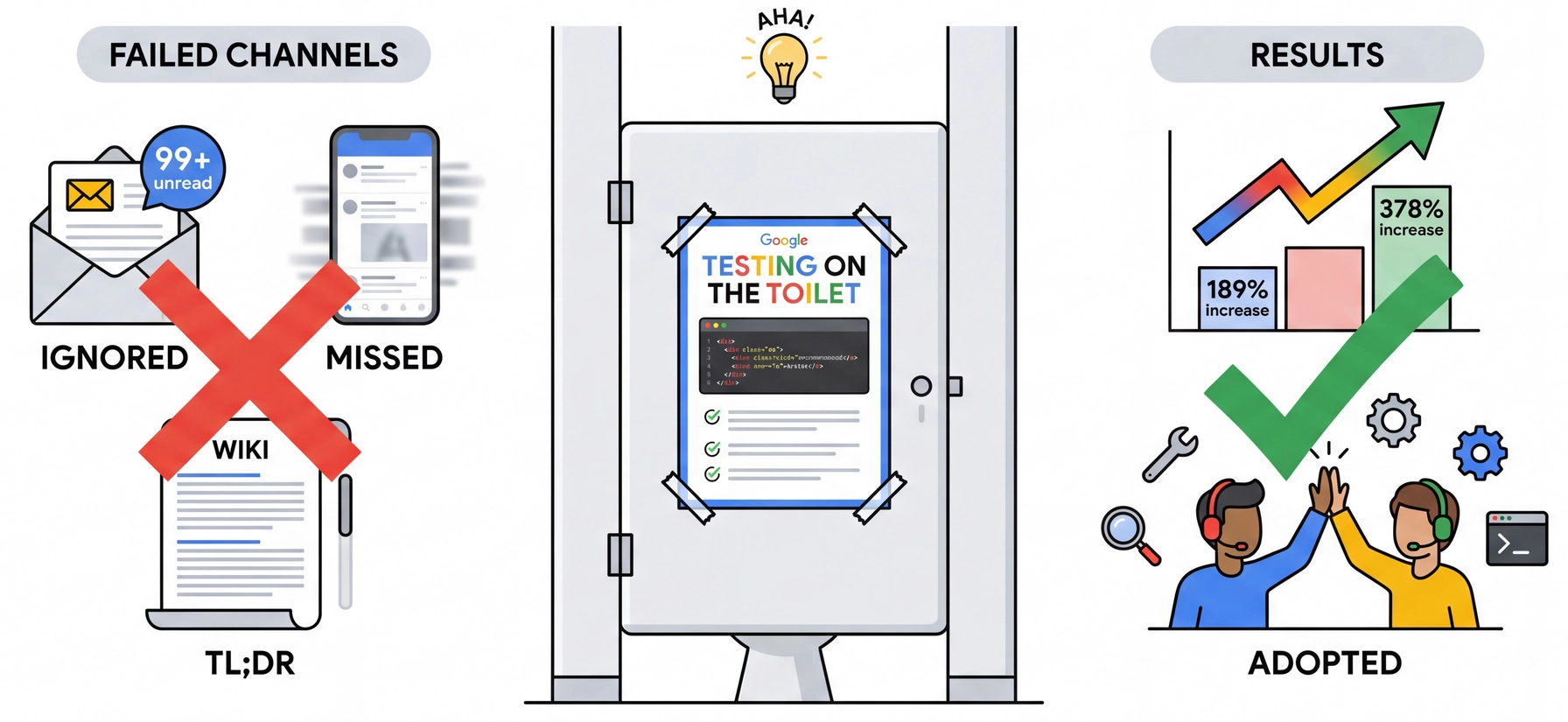
Case Study: Google's "Testing on the Toilet"

Testing on the Toilet illustration: A bathroom stall with a one-page technical flyer posted inside. Left shows failed channels (ignored emails, missed social posts, TL;DR wikis). Right shows results (189% and 378% adoption increases). Tagline: Meet developers where they are. Literally.

The idea: One-page newsletters posted in bathroom stalls, by devs for devs.

Research result: 11 of 12 tools promoted via TotT showed statistically significant adoption increases—outperforming email and social media.

Murphy-Hill et al., "Do Developers Discover New Tools On The Toilet?" ICSE 2019.

Key Takeaways: What Separates Teams That Ship

Team projects rarely fail because of technical skill—they fail because of collaboration. Here's what makes the difference:

Principles

  • HRT: Humility, Respect, Trust
  • The discomfort of feedback is the point
  • We hold you accountable to these

Practices

  • CI catches bugs before they spread
  • PRs create review checkpoints
  • Issues and code review share knowledge
  • Scalable communication beats O(n²)

Agreements

  • Team charters accelerate norming
  • Your first deliverable isn't code—it's alignment
  • Fight forward, not back

Your first deliverable: The team charter is due March 13. Apply these principles this week with your new team.

Your First Team Deliverable: The Team Charter

Your team charter is live now, due March 13. This is not a formality—it's the foundation for everything that follows.

What you'll establish:

  • Communication norms (when, where, how)
  • Working hours and availability
  • How you'll divide work
  • How you'll make decisions
  • What "done" means for your team
  • How you'll handle missed deadlines

Why it matters:

  • Surfaces conflicts before they happen
  • Creates shared expectations to reference
  • Accelerates your team through "storming"
  • Gives you something to point to when things go wrong

Completing Your Team Charter

Step 1: Schedule a team meeting this week

  • Everyone should be present for this conversation
  • Don't just divide up sections and merge—discuss together

Step 2: Have the awkward conversations

  • "What hours do you actually work?" (not what sounds good)
  • "What happens if someone misses a deadline?"
  • "How do we decide when we disagree?"

Step 3: Be specific, not aspirational

  • ❌ "We'll communicate regularly"
  • ✓ "We'll post daily updates in Discord by 9 PM"

HRT in action: Approach this with humility ("my preferences aren't the only valid ones"), respect ("everyone's constraints matter"), and trust ("we'll all follow what we agree to").