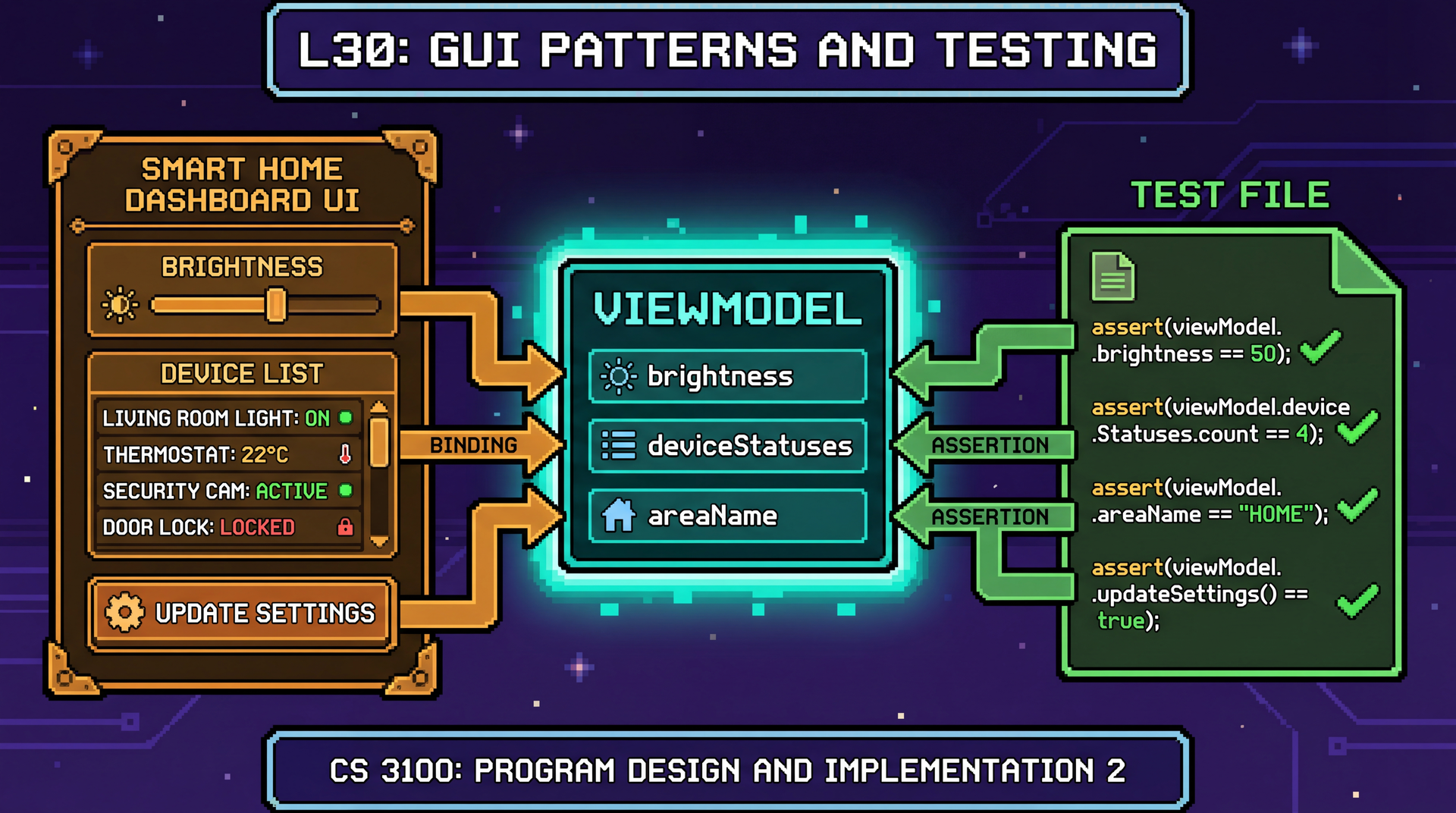
CS 3100: Program Design and Implementation II
Lecture 30: GUI Patterns and Testing
©2026 Jonathan Bell, CC-BY-SA
Learning Objectives
After this lecture, you will be able to:
- Explain the limitations of MVC that motivated MVVM
- Implement the Model-View-ViewModel pattern with JavaFX properties and data binding
- Compare MVC and MVVM in terms of coupling, synchronization, and testability
- Write unit tests for a ViewModel without starting the JavaFX runtime
- Write end-to-end GUI tests using TestFX with accessibility-based locators
Last Lecture We Built an MVC App — Now Let's Break It
Our SceneItAll area dashboard from L29. Spot the bug:
// Controller from L29
@FXML private void initialize() {
    brightnessSlider.valueProperty().addListener((obs, old, val) -> {
        int level = val.intValue();
        brightnessValueLabel.setText(level + "%");
        model.setAllLightsBrightness(level);
        updateDeviceList();  // ✅ remembered to update
    });
}

@FXML private void handleActivateScene() {
    String scene = sceneSelector.getValue();
    if (scene != null) {
        model.activateScene(scene);
        // ❌ BUG: forgot to call updateDeviceList()!
        // User activates "Evening" but the device list still shows old values
    }
}
Every time the Model changes, you must remember to update the View. Forget once → stale UI. This doesn't scale.
MVC's Two Problems: Manual Sync and Untestable Controllers
Problem 1: Manual synchronization
Every Model change requires a manual View update. Forget one → stale UI.
As the app grows, the number of sync points grows linearly. Each one is a potential bug.
Problem 2: Untestable Controller
public class AreaDashboardController {
    @FXML private Slider brightnessSlider;
    @FXML private ListView<String> deviceList;
    // ...
}
To test handleActivateScene(), you need to start the JavaFX runtime, load FXML, create widgets, and simulate clicks.
That's an integration test, not a unit test.
Recall from L16: testable code has high observability (can inspect state) and high controllability (can set state directly). MVC Controllers have neither.
MVVM Adds One Layer to Solve Both Problems
Model
Same as MVC. Business logic, no UI.
ViewModel (new)
UI state as bindable properties. No reference to the View. Fully testable.
View
Declaratively binds to ViewModel properties. Contains no logic.
The key innovation: The ViewModel exposes everything the View needs as observable properties. The View binds to them. When a property changes, the View updates automatically. No manual sync. No forgotten updateDeviceList() calls.
The ViewModel: UI State Without the UI
Note: Code examples in these slides omit import statements and some boilerplate for clarity. See the lecture notes for complete versions.
// ViewModel: AreaDashboardViewModel.java
// Note: ZERO imports from javafx.scene — no widgets, no FXML
public class AreaDashboardViewModel {
    private final StringProperty areaName = new SimpleStringProperty();
    private final IntegerProperty brightness = new SimpleIntegerProperty();
    private final ObservableList<String> deviceStatuses =
        FXCollections.observableArrayList();
    private final ObservableList<String> sceneNames =
        FXCollections.observableArrayList();

    private Area model;

    public void setModel(Area model) {
        this.model = model;
        areaName.set(model.getName());
        brightness.set(model.getAverageBrightness());
        sceneNames.setAll(model.getSceneNames());
        refreshDeviceStatuses();

        // When brightness changes, update the model automatically
        brightness.addListener((obs, oldVal, newVal) -> {
            model.setAllLightsBrightness(newVal.intValue());
            refreshDeviceStatuses();
        });
    }

    public void activateScene(String sceneName) {
        model.activateScene(sceneName);
        brightness.set(model.getAverageBrightness());
        refreshDeviceStatuses();
    }

    private void refreshDeviceStatuses() {
        deviceStatuses.setAll(
            model.getDevices().stream()
                .map(SmartDevice::getStatus).toList());
    }

    // Property accessors for binding
    public StringProperty areaNameProperty() { return areaName; }
    public IntegerProperty brightnessProperty() { return brightness; }
    public ObservableList<String> getDeviceStatuses() { return deviceStatuses; }
    public ObservableList<String> getSceneNames() { return sceneNames; }
}
The View Just Binds — No Logic
The Controller becomes a thin wiring layer — it connects widgets to ViewModel properties and that's it:
// Controller: now just wiring, no logic
public class AreaDashboardController {
    @FXML private Label areaNameLabel;
    @FXML private Slider brightnessSlider;
    @FXML private Label brightnessValueLabel;
    @FXML private ListView<String> deviceList;
    @FXML private ComboBox<String> sceneSelector;

    private AreaDashboardViewModel viewModel;

    public void setViewModel(AreaDashboardViewModel viewModel) {
        this.viewModel = viewModel;

        // Bind widgets to ViewModel properties — done once, never again
        areaNameLabel.textProperty().bind(viewModel.areaNameProperty());
        brightnessSlider.valueProperty().bindBidirectional(
            viewModel.brightnessProperty());
        brightnessValueLabel.textProperty().bind(
            viewModel.brightnessProperty().asString("%d%%"));
        deviceList.setItems(viewModel.getDeviceStatuses());
        sceneSelector.setItems(viewModel.getSceneNames());
    }

    @FXML private void handleActivateScene() {
        String scene = sceneSelector.getValue();
        if (scene != null) {
            viewModel.activateScene(scene);
            // No updateDeviceList() needed — binding handles it!
        }
    }
}
Data Binding in Action: Change the Model, Watch the UI Update
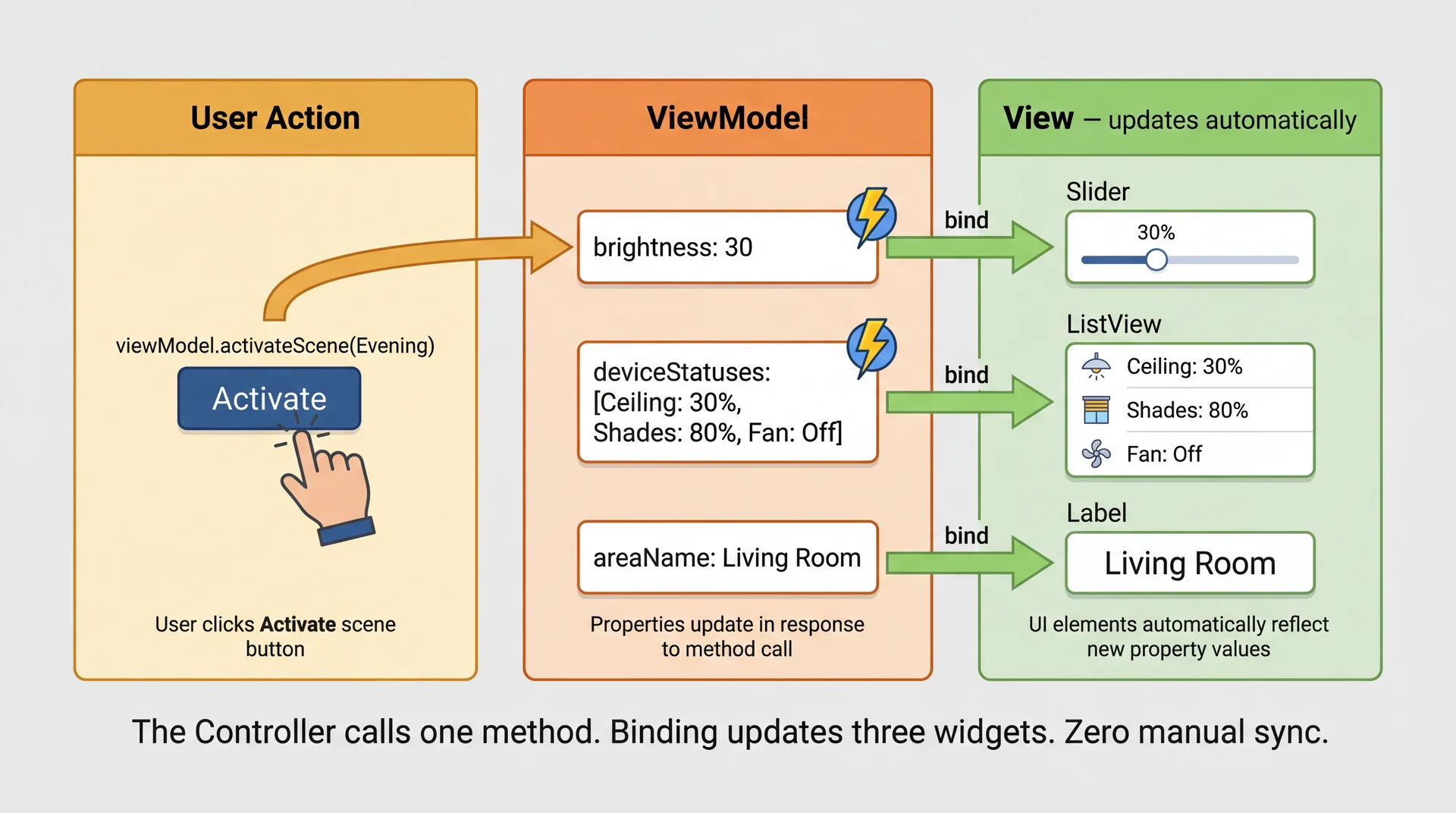
In L29 you wrote updateDeviceList() calls after every Model change. With MVVM, the Controller calls one method. Binding updates every widget automatically.
ObservableList: When Your Data Is a Collection
Individual properties work for single values. But what about the device list?
// In the ViewModel
private final ObservableList<String> deviceStatuses =
    FXCollections.observableArrayList();

// Adding a device → ListView updates automatically
deviceStatuses.add("New Light: 100%");

// Removing a device → ListView updates automatically
deviceStatuses.remove(0);

// Replacing all items → ListView updates automatically
deviceStatuses.setAll("Ceiling Light: 30%", "Shades: 80%", "Fan: Off");
// In the Controller — bind once
deviceList.setItems(viewModel.getDeviceStatuses());
// Never touch deviceList again. Ever.
ObservableList fires change events on add, remove, and replace. The ListView updates automatically.
Gotcha: ObservableList fires when items are added or removed — but NOT when a property inside an existing item changes. If a Light's brightness changes from 70% to 30%, the list doesn't know.
MVC vs. MVVM: Same Feature, Two Architectures
The same "Activate Scene" feature. Look at what each class depends on:
MVC — logic lives in the Controller
public class AreaDashboardController {
    // Depends on View widgets ↓
    @FXML private Slider brightnessSlider;
    @FXML private Label brightnessValueLabel;
    @FXML private ListView<String> deviceList;
    @FXML private ComboBox<String> sceneSelector;

    // AND depends on the Model ↓
    private Area model;

    @FXML private void handleActivateScene() {
        model.activateScene(sceneSelector.getValue());
        // Must know about EVERY widget to update
        brightnessSlider.setValue(model.getAvgBrightness());
        brightnessValueLabel.setText(model.getAvgBrightness() + "%");
        deviceList.getItems().setAll(/* ... */);
    }
}
Depends on: Model + Slider + Label + ListView + ComboBox
To test: need JavaFX runtime, FXML, all widgets instantiated
MVVM — logic lives in the ViewModel
public class AreaDashboardViewModel {
    // Depends on the Model only ↓
    private Area model;

    // Exposes observable properties (no widgets!)
    private final IntegerProperty brightness = ...;
    private final ObservableList<String> statuses = ...;

    public void activateScene(String name) {
        model.activateScene(name);
        brightness.set(model.getAvgBrightness());
        statuses.setAll(/* ... */);
        // View updates automatically via binding
    }
}
Depends on: Model only
To test: new AreaDashboardViewModel() — no UI needed
Same logic. But the MVC Controller depends on the View — it names specific widgets. The ViewModel depends on nothing but the Model. That's why one is testable and the other isn't.
The Whole Point: You Can Unit Test a ViewModel
ViewModel test — pure Java, no UI
@Test
void activateScene_updatesDeviceStatuses() {
    // Arrange
    AreaDashboardViewModel vm =
        new AreaDashboardViewModel();
    Area area = new Area("Living Room");
    area.addDevice(new Light("Ceiling", 100));
    area.addDevice(new Fan("Floor Fan", true));
    area.addScene("Evening",
        Map.of("Ceiling", 30));
    vm.setModel(area);

    // Act
    vm.activateScene("Evening");

    // Assert
    assertEquals(30, vm.brightnessProperty().get());
    assertTrue(vm.getDeviceStatuses()
        .contains("Ceiling: 30%"));
}
Runs in: ~5 ms
MVC Controller test — needs full UI
@Test
void activateScene_updatesDeviceStatuses() {
    // Arrange — need JavaFX runtime!
    Platform.startup(() -> {});
    FXMLLoader loader = new FXMLLoader(
        getClass().getResource(
            "/area-dashboard.fxml"));
    Parent root = loader.load();
    Stage stage = new Stage();
    stage.setScene(new Scene(root));
    stage.show();
    // ... set up model, find widgets ...

    // Act — simulate button click
    clickOn("#sceneButton");

    // Assert — inspect widget state
    ListView list = lookup("#deviceList")
        .query();
    // ... check list items ...
}
Runs in: ~2000 ms (if it doesn't flake)
What ViewModel Tests Should Cover
// 1. State initialization
@Test
void setModel_populatesAreaName() {
    vm.setModel(new Area("Kitchen"));
    assertEquals("Kitchen", vm.areaNameProperty().get());
}

// 2. User action → model update
@Test
void changeBrightness_updatesAllLights() {
    vm.setModel(areaWithLights);
    vm.brightnessProperty().set(50);
    assertEquals(50, areaWithLights.getLight("Ceiling").getBrightness());
}

// 3. Model change → UI property update
@Test
void activateScene_updatesBrightnessProperty() {
    vm.setModel(areaWithEveningScene);
    vm.activateScene("Evening");
    assertEquals(30, vm.brightnessProperty().get());
}

// 4. Edge cases
@Test
void activateScene_withNullName_doesNothing() {
    vm.setModel(areaWithLights);
    vm.activateScene(null);
    // no exception, state unchanged
    assertEquals(100, vm.brightnessProperty().get());
}
What ViewModel Tests Should NOT Cover
Don't test View concerns in ViewModel tests:
- Pixel positions or layout dimensions
- CSS styling or colors
- Animation timing or transitions
- Which specific widget type displays a property
- Focus order or tab behavior
These are View responsibilities. Test them in E2E tests (sparingly) or manual testing.
Do test ViewModel logic:
- Does setting brightness to 150 clamp to 100?
- Does activating a scene update the correct properties?
- Does an empty area show an empty device list?
- Does a null scene name get handled gracefully?
These are decisions the ViewModel makes, independent of how the View displays them.
If your test imports javafx.scene, it's probably testing the wrong layer.
Comprehension Check
Open Poll Everywhere and answer the next 4 questions.
ViewModel Tests Cover Logic — But Who Tests the Wiring?
Your ViewModel is perfect. Your tests all pass. But:
- What if the FXML binds to the wrong property?
- What if the Controller wires one-way instead of bidirectional?
- What if the button's
onActionreferences a method that doesn't exist? - What if two features work individually but break when integrated?
You need some tests that exercise the full stack: View → Controller → ViewModel → Model. That's what end-to-end (E2E) tests are for.
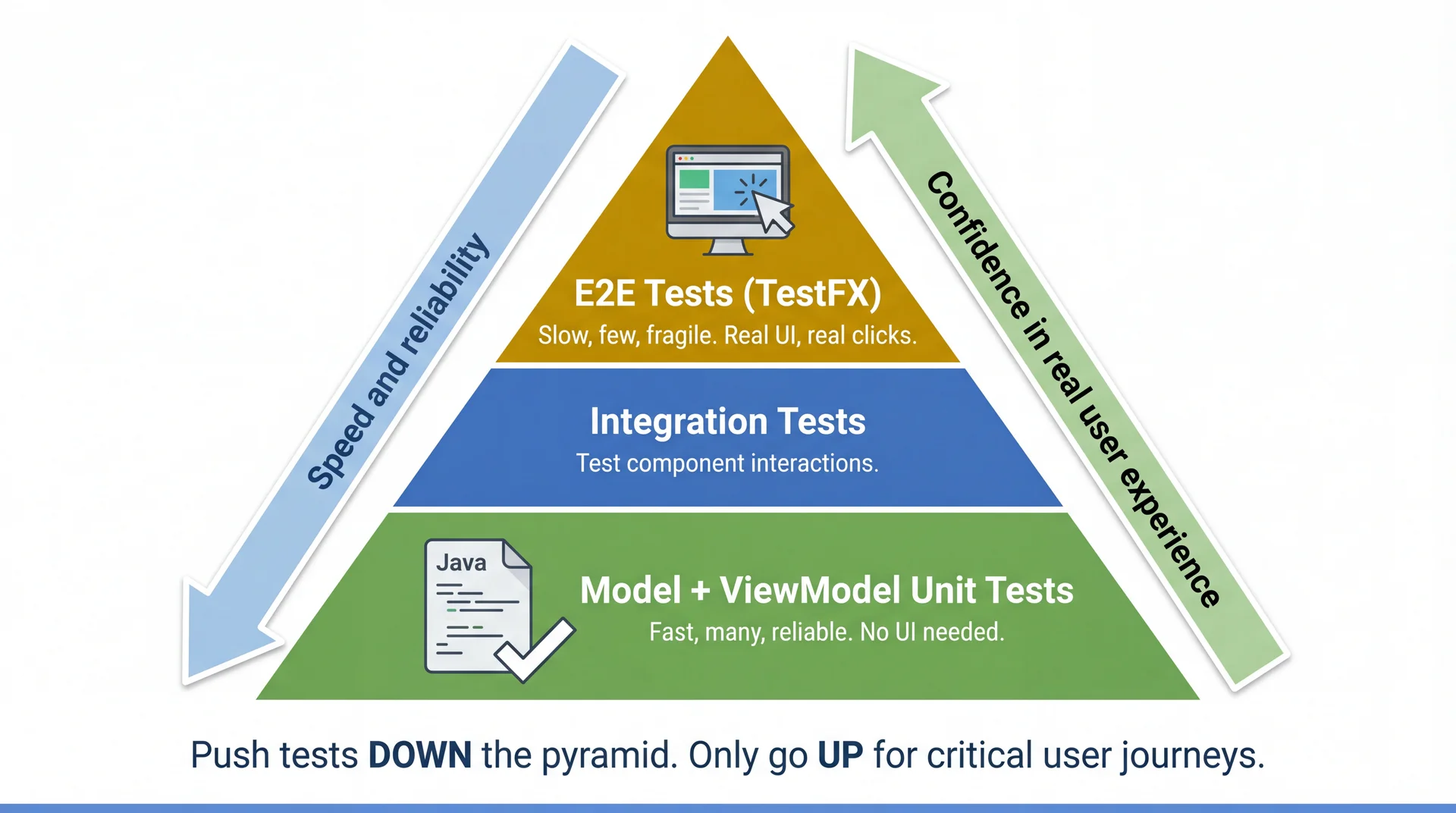
But E2E tests are expensive. Use them sparingly — only for critical user journeys.
The Testing Pyramid, Revisited
TestFX: Simulating a Real User
TestFX launches your real JavaFX application and simulates clicks, typing, and navigation:
import org.testfx.framework.junit5.ApplicationTest;

public class AreaDashboardE2ETest extends ApplicationTest {

    private Area testArea;

    @Override
    public void start(Stage stage) throws Exception {
        // Load the real FXML, create real widgets
        FXMLLoader loader = new FXMLLoader(
            getClass().getResource("/area-dashboard.fxml"));
        stage.setScene(new Scene(loader.load()));

        // Set up test data
        testArea = new Area("Living Room");
        testArea.addDevice(new Light("Ceiling", 100));
        testArea.addScene("Evening", Map.of("Ceiling", 30));

        AreaDashboardViewModel vm = new AreaDashboardViewModel();
        vm.setModel(testArea);
        loader.<AreaDashboardController>getController().setViewModel(vm);

        stage.show();
    }

    // Tests go here — next slides...
}
The Locator Problem: How Do You Find a Button?
| Strategy | Code | Problem |
|---|---|---|
| By fx:id | clickOn("#sceneButton") | Breaks if developer renames the ID |
| By CSS class | clickOn(".button") | Matches ALL buttons — which one? |
| By position | lookup(".button").nth(2) | Breaks if layout changes |
| By text | clickOn("Activate") | Breaks if label text changes; non-unique |
All of these describe how the element is implemented, not what it does. Refactor the UI → tests break.
Is there an identifier that describes what an element does rather than how it's built?
The Solution: Locate by Accessibility Label
The accessibleText you added in L28 and L29 describes what the element does — not how it's implemented:
// Helper: find elements by accessible text
private <T extends Node> T findByAccessibleText(String text) {
    return lookup(node ->
        text.equals(node.getAccessibleText())
    ).query();
}

// Test uses purpose-based locators
@Test
void userCanActivateScene() {
    clickOn(findByAccessibleText("Choose a scene"));
    clickOn("Evening");  // select from dropdown
    clickOn(findByAccessibleText("Activate scene"));

    // Verify the model updated
    assertEquals(30, testArea.getLight("Ceiling").getBrightness());
}
| Refactoring | ID-based test | Accessibility-based test |
|---|---|---|
Rename fx:id from sceneButton to activateBtn | Breaks ❌ | Still passes ✅ |
| Change button text from "Activate" to "Apply Scene" | Breaks ❌ | Still passes ✅ |
| Move button from bottom to top of layout | Breaks (position) ❌ | Still passes ✅ |
Your accessibility work from L28 makes your tests more stable. Accessibility and testability reinforce each other.
Full E2E Test: Activating a Scene in SceneItAll
@Test
void userCanActivateEveningScene() {
    // 1. Select "Evening" from the scene dropdown
    clickOn(findByAccessibleText("Choose a scene"));
    clickOn("Evening");

    // 2. Click Activate
    clickOn(findByAccessibleText("Activate scene"));

    // 3. Verify: brightness slider moved to 30
    Slider slider = findByAccessibleText("Living room brightness");
    assertEquals(30, (int) slider.getValue());

    // 4. Verify: device list shows dimmed lights
    ListView<String> devices = findByAccessibleText("Device status list");
    assertTrue(devices.getItems().contains("Ceiling: 30%"));
}

@Test
void brightnessSliderUpdatesDeviceList() {
    // 1. Drag brightness slider to 50%
    Slider slider = findByAccessibleText("Living room brightness");
    // TestFX can interact with sliders via keyboard
    clickOn(slider);
    press(KeyCode.HOME);            // go to 0
    for (int i = 0; i < 50; i++) {
        press(KeyCode.RIGHT);       // increment to 50
    }

    // 2. Verify device list reflects new brightness
    ListView<String> devices = findByAccessibleText("Device status list");
    assertTrue(devices.getItems().contains("Ceiling: 50%"));
}
Your GA1 Testing Strategy
| Layer | What you test | How many | Speed |
|---|---|---|---|
| Model unit tests | Business logic (scaling, conversion, search) | Many (10-20) | ~5 ms each |
| ViewModel unit tests | UI state, commands, property updates | Many (10-20) | ~5 ms each |
| E2E tests (TestFX) | Critical user journey, end-to-end wiring | Few (1-2) | ~2 sec each |
In GA1 you'll apply these patterns to CookYourBooks. The ViewModel interfaces we provide are your testing contract:
// GA1 provides this interface
public interface LibraryViewModel {
    StringProperty selectedCookbookProperty();
    ObservableList<String> getRecipeNames();
    void selectCookbook(String name);
    void deleteRecipe(String name);
}

// You implement it — and test it
@Test
void selectCookbook_populatesRecipeNames() {
    viewModel.selectCookbook("Italian Favorites");
    assertFalse(viewModel.getRecipeNames().isEmpty());
    assertTrue(viewModel.getRecipeNames().contains("Pasta Carbonara"));
}
Key Takeaways
- MVC's limitation: manual sync is error-prone. Every Model change requires a manual View update. Forget one → stale UI.
- MVVM solves this with data binding. The ViewModel exposes observable properties. The View binds to them. Sync is automatic.
- The ViewModel has no View reference. It's a plain Java class with properties and commands. Fully unit-testable without starting the UI.
- Push tests down the pyramid. ViewModel tests are fast and reliable. E2E tests are slow and flaky. Use E2E only for critical user journeys.
- Accessibility labels make the best test locators. They describe what an element does, not how it's built. Refactor-proof.
- Accessibility and testability reinforce each other. The same practices that help screen reader users also make your tests more stable.
Looking Ahead
Lab 12 (next Monday): Hands-on GUI practice
- Build SceneItAll GUI components using MVC and MVVM patterns from L29 and L30
- Practice ViewModel testing and FXML binding
- Bring your laptop with Scene Builder installed
Next up: Concurrency (L31-32)
- What happens when your event handler needs to talk to a network or database?
- If it blocks, the UI freezes (remember the event loop from L29)
- Background threads,
Platform.runLater(),TaskandServiceclasses - How to keep the UI responsive during long-running operations
Your group project:
- GA1 (due Apr 9): Implement your feature's ViewModel, View, and tests — in GA1 you'll apply these patterns to CookYourBooks
- Write ViewModel unit tests — these are individually graded
- Write 1-2 E2E tests for your feature's critical user journey
- Use accessibility labels on all interactive widgets — it helps your users AND your tests
Today you learned to separate what the UI shows from how it works, and to test both. Next, you learn to keep the UI alive while doing heavy work.