Recognize common infrastructure building blocks (databases, queues, caches, object storage, observability) and their architectural roles
Define "serverless" architecture and Functions as a Service (FaaS) concepts
Compare serverless to traditional and container-based architectures, identifying tradeoffs
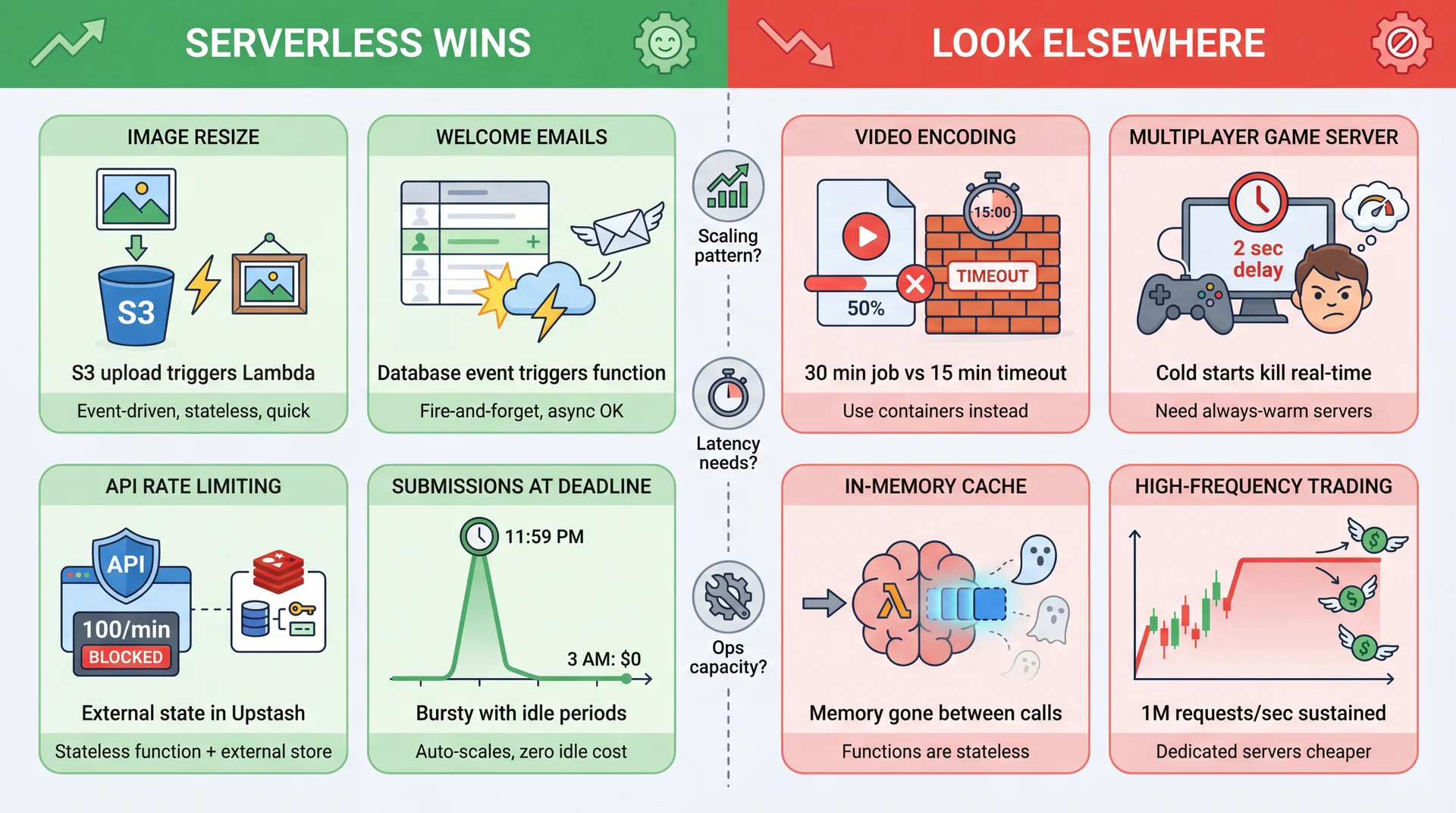
Identify requirements that are well-suited or poorly-suited for serverless
Apply a decision framework for choosing between architectural styles based on team size, scaling needs, and operational capacity
Important framing: You will encounter serverless systems in internships and jobs. The goal is to understand why teams choose serverless and reason about whether it fits a given problem — not to become a serverless architect overnight.
You're building an app that lets users upload photos. You need a feature: resize images to create thumbnails. The core logic is straightforward — we will use an image processing library.
publicclassImageUtils{ publicstaticbyte[]resize(byte[] imageData,int width,int height){ BufferedImage original =ImageIO.read(newByteArrayInputStream(imageData)); BufferedImage thumbnail =newBufferedImage(width, height, original.getType()); Graphics2D g = thumbnail.createGraphics(); g.drawImage(original,0,0, width, height,null); g.dispose(); ByteArrayOutputStream out =newByteArrayOutputStream(); ImageIO.write(thumbnail,"jpg", out); return out.toByteArray(); } }
This is the easy part. ~15 lines of code. You could write this in an hour.
But how do users actually send you an image? This code runs on your laptop. Your users are... not on your laptop.
For users to access your image resizer, you need an HTTP server that listens for requests. Now look how much code you need:
publicclassImageResizeServer{ privatestaticfinalintPORT=8080; privatestaticvolatileboolean running =true; publicstaticvoidmain(String[] args)throwsException{ // YOU set up the server HttpServer server =HttpServer.create(newInetSocketAddress(PORT),0); server.createContext("/resize", exchange ->{ byte[] imageData =parseMultipartUpload(exchange);// Parsing uploads is painful byte[] thumbnail =ImageUtils.resize(imageData,200,200);// ← Your actual logic exchange.sendResponseHeaders(200, thumbnail.length); exchange.getResponseBody().write(thumbnail); exchange.close(); }); server.createContext("/health", ex ->{// Load balancers need this ex.sendResponseHeaders(200,2); ex.getResponseBody().write("OK".getBytes()); ex.close(); }); // YOU handle graceful shutdown Runtime.getRuntime().addShutdownHook(newThread(()->{ running =false; server.stop(5); })); server.start(); System.out.println("Server running on port "+PORT); while(running){Thread.sleep(1000);}// Runs FOREVER until killed } }
Your 15 lines of business logic are now buried in 30+ lines of server boilerplate. And we haven't even talked about where this server runs...
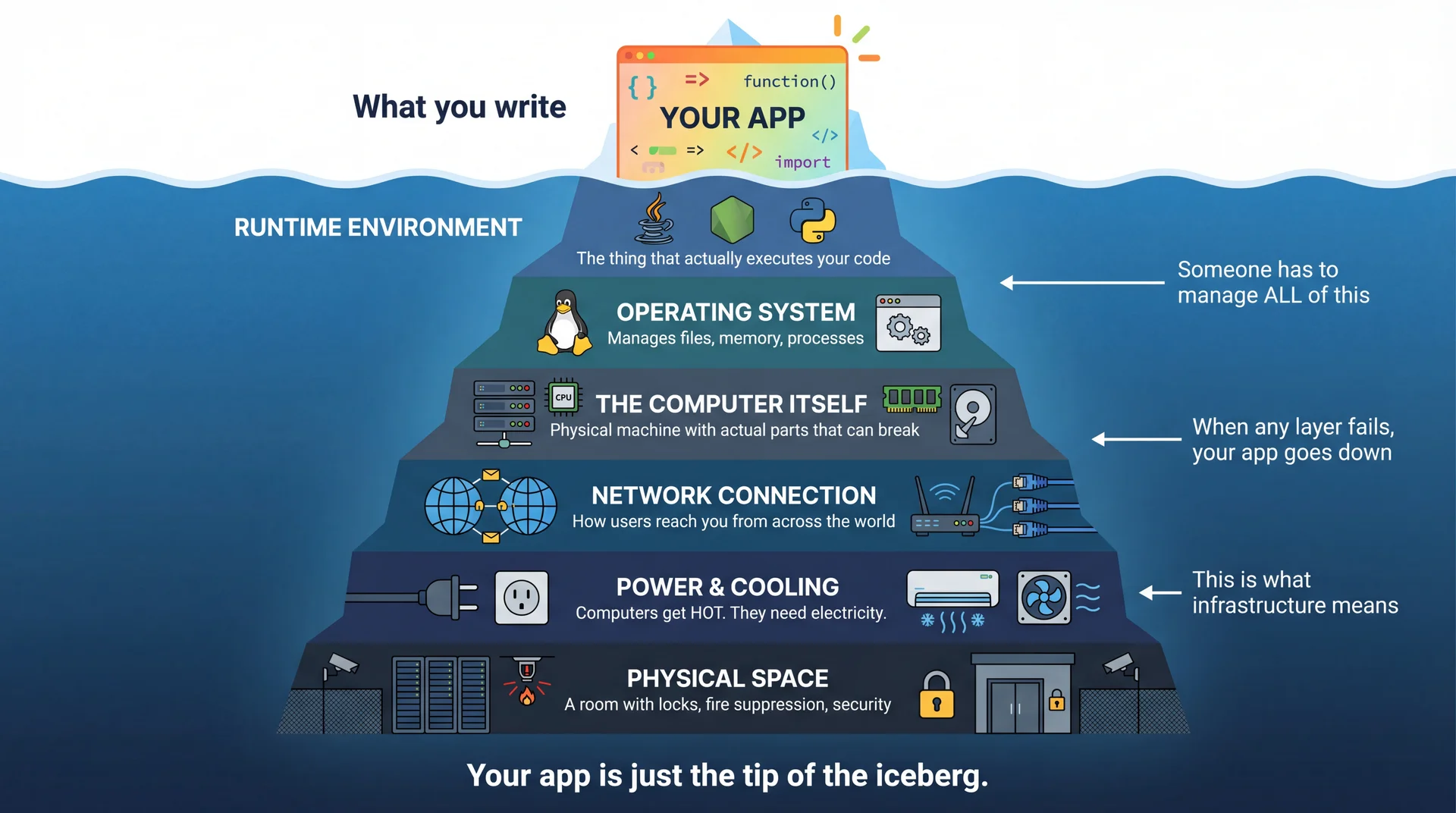
Your ImageResizeServer needs to run somewhere. Running code that serves users around the clock requires far more than just "a computer." This is what we call infrastructure.
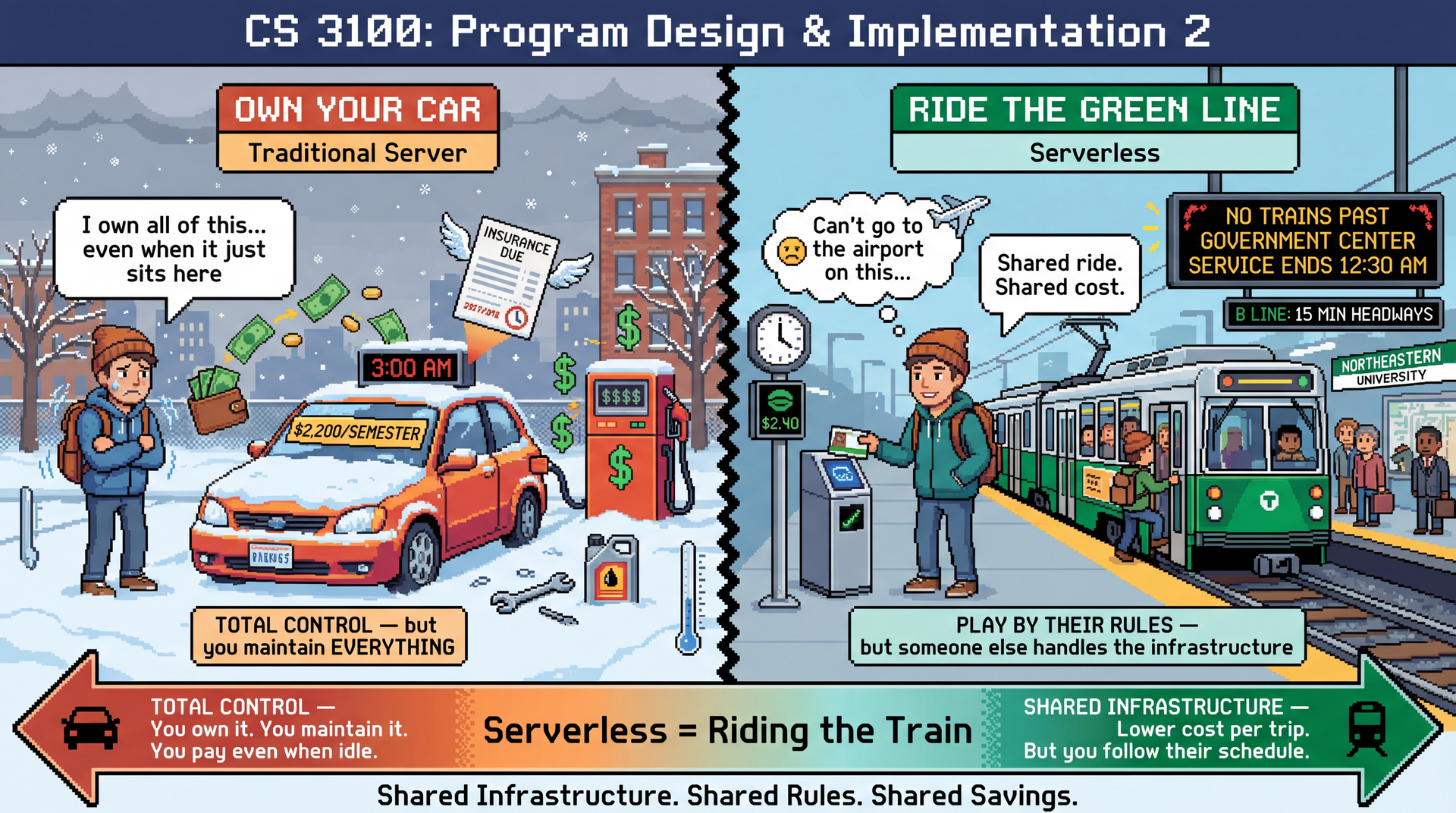
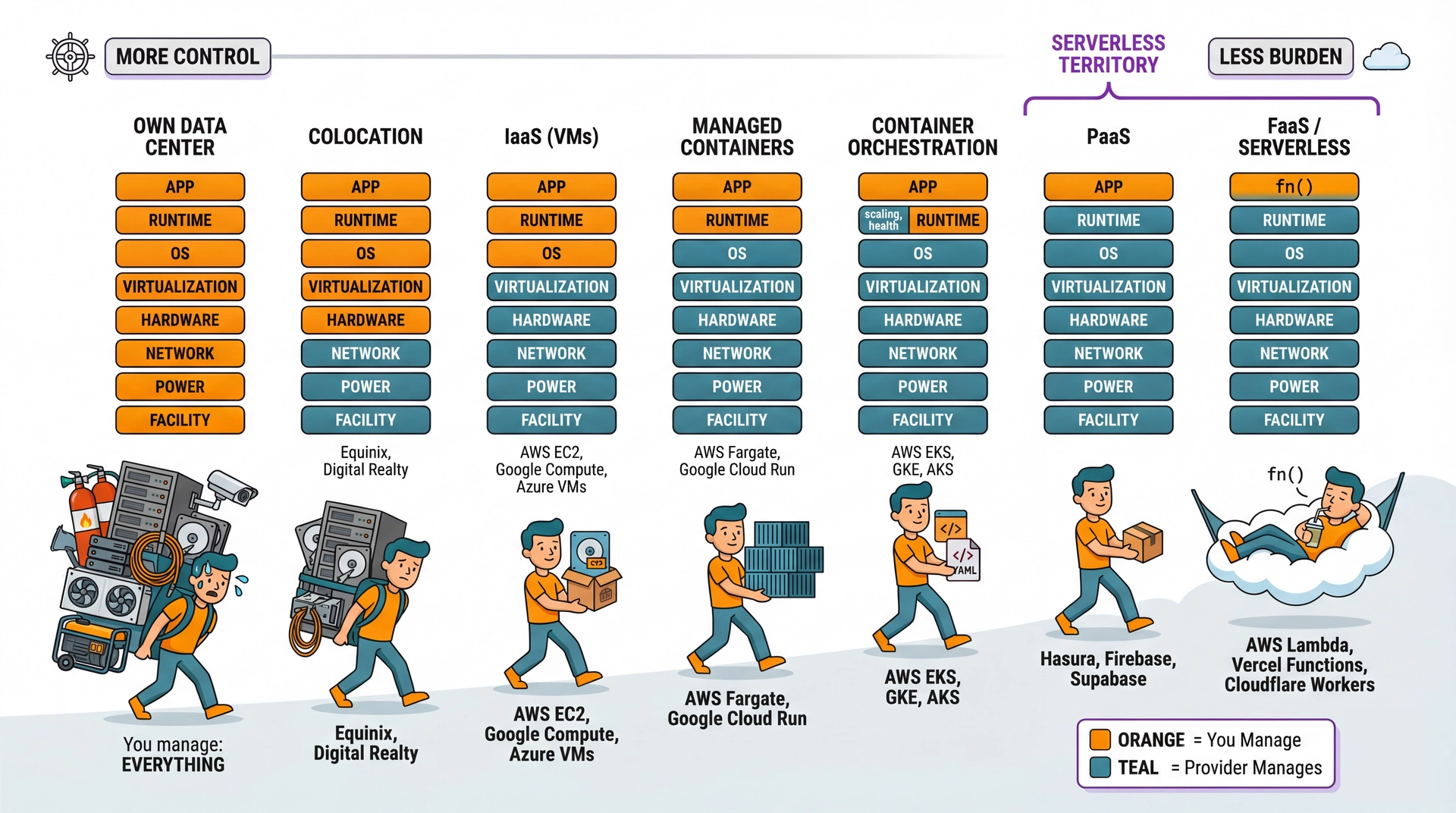
You have a fundamental choice about who manages all that infrastructure. This is the core tradeoff that defines cloud computing — and it's exactly like choosing between owning a car and taking the T.
Own Your Infrastructure
Buy servers. Rent data center space. Hire ops engineers. Configure everything yourself.
Total control — choose any hardware, any software
Predictable costs at high scale
You're responsible for everything: uptime, security, maintenance
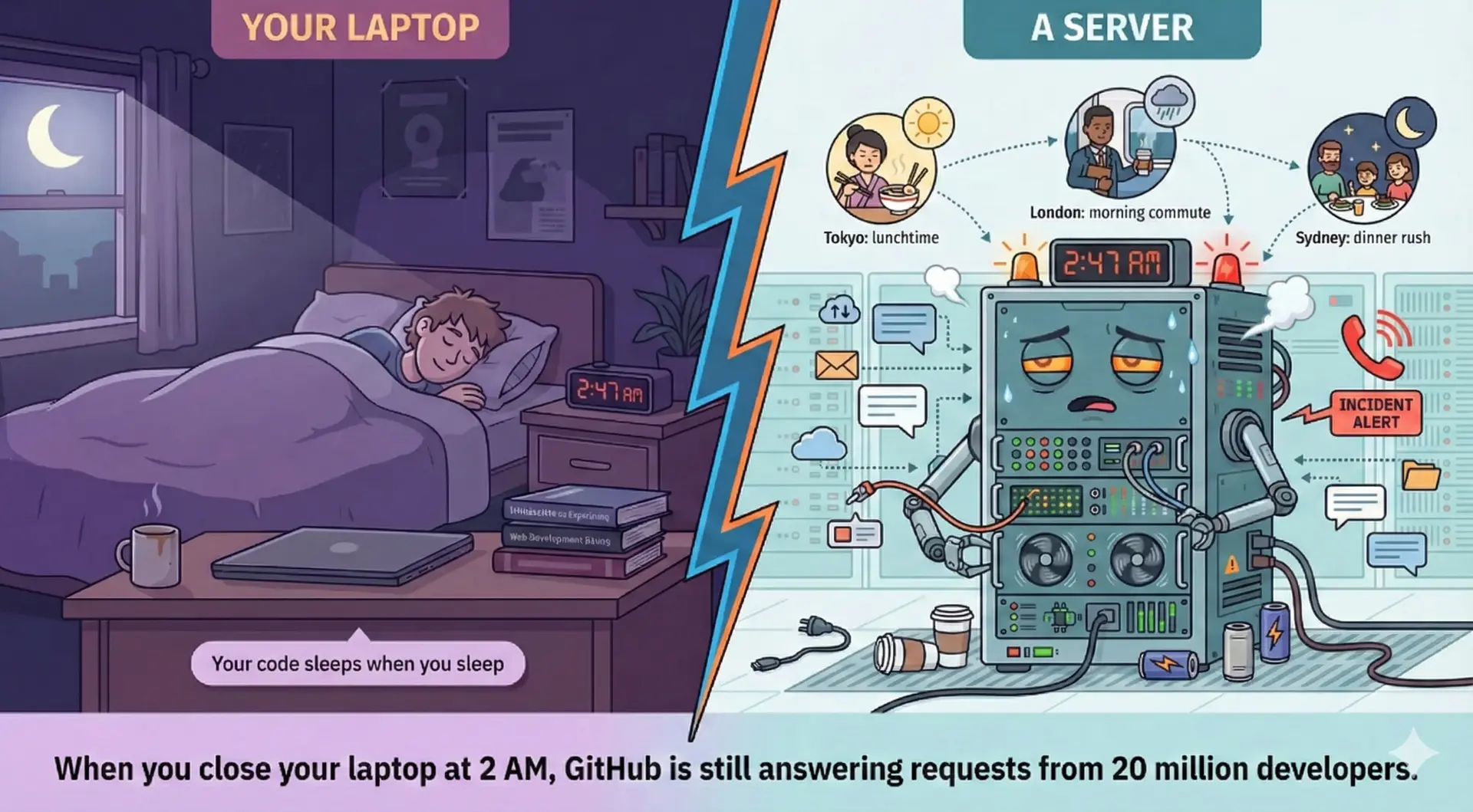
When something breaks at 3 AM, your phone rings
Rent from a Cloud Provider
AWS, Google Cloud, Azure, Supabase — they own the data centers, you use their services.
Less control — work within their constraints
Pay-per-use pricing (can be cheaper... or more expensive)
They handle most operational concerns
When their stuff breaks at 3 AM, their phone rings
This is the same tradeoff you make with transportation in Boston. Own a car? Total freedom, but you pay for parking, insurance, gas, maintenance — even when it sits unused. Take the T? Cheaper per trip, but you follow their schedule and routes.
In L19, we explored architectural styles — monoliths, modular monoliths, and the tradeoffs between them. In L20, we crossed the network boundary and discovered the Eight Fallacies of Distributed Computing.
L19: How do we organize code?
Architectural styles emerge from quality attribute requirements. Monolith-first is usually right.
L20: What changes over networks?
The eight fallacies. Latency, failures, security boundaries. Every call needs timeout + retry.
L21: What if someone else manages it?
Serverless = technical partitioning with a vendor. You write functions; they operate infrastructure.
Today's key insight: Serverless doesn't eliminate distributed systems complexity — it shifts who deals with it. The eight fallacies still apply. You just don't write the retry logic yourself.
Not shown: SaaS (Software as a Service) — even further right. For image resizing, you could outsource entirely to a vendor: call their API, pay per transformation, write zero image code. Maximum convenience, zero customization.
Beyond Compute: What Else Does Your Application Need?
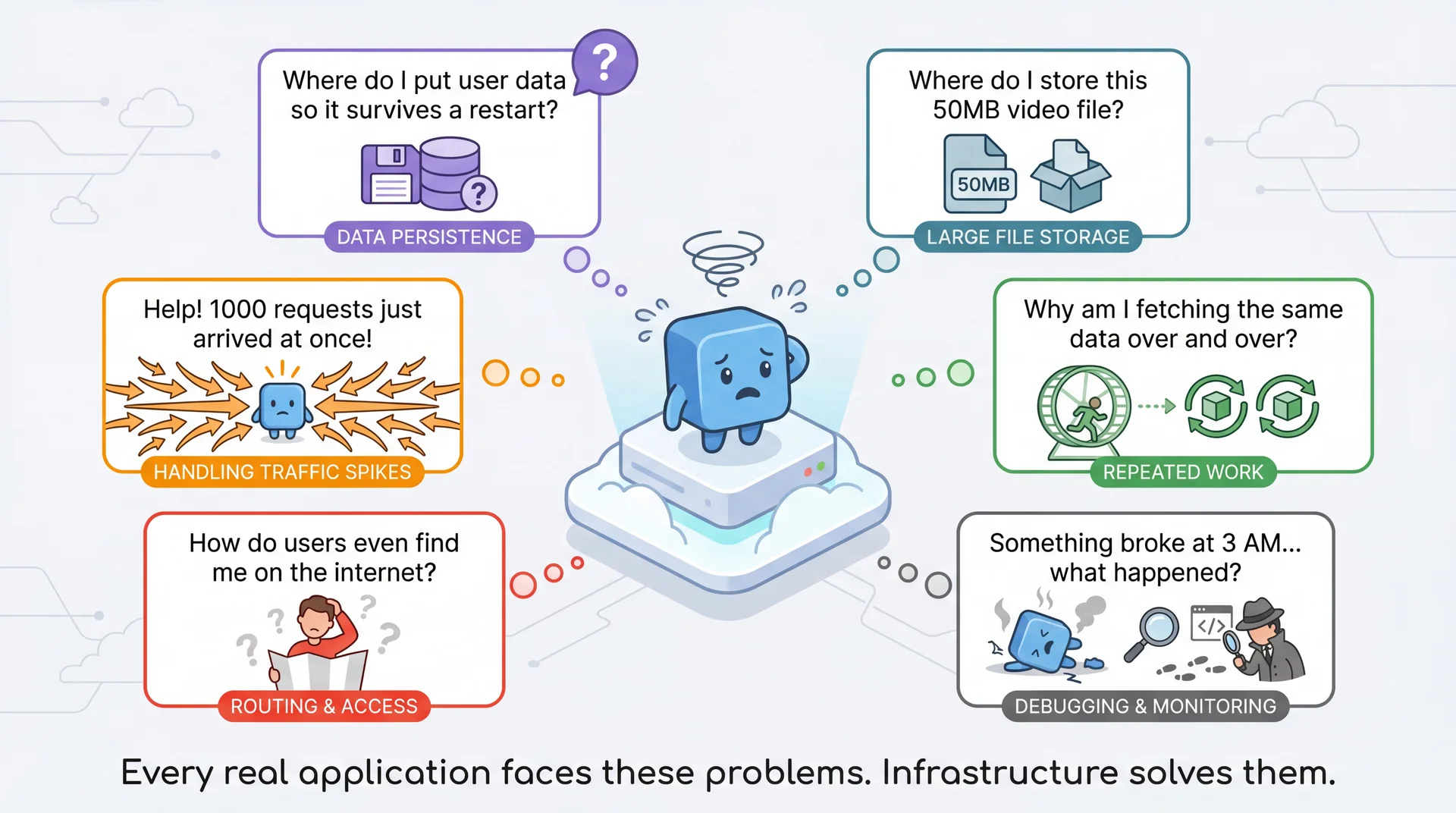
Okay, you've got a server (or a function) running your code. But code alone isn't enough. Real applications have needs that go beyond just executing instructions.
Cloud platforms provide standardized components that solve these recurring problems. Just as we have design patterns in code, these "building blocks" appear across architectural styles.
Databases
Structured data persistence
PostgreSQL, MongoDB, DynamoDB
Object Storage
Files and binary data at scale
S3, Cloud Storage, Supabase Storage
Message Queues
Async communication, buffering
SQS, Pub/Sub, RabbitMQ, pgmq
Caches
Fast access to hot data
Redis, Memcached, Upstash
API Gateways
Unified entry point, auth, routing
AWS API Gateway, Kong
Observability
Logs, metrics, traces
Sentry, Datadog, CloudWatch
Serverless architecture is fundamentally about composing these managed services: you write functions containing business logic; the cloud provider operates the infrastructure.
When your application needs to remember something across restarts — user accounts, submissions, grades — that data lives in a database. The "right" choice depends on query patterns.
Relational (SQL)
Complex queries, relationships, transactions
PostgreSQL, MySQL
SELECT s.*, a.name
FROM submissions s
JOIN assignments a ON s.assignment_id = a.id
WHERE s.student_id = ?
Document (NoSQL)
Flexible schemas, JSON-like storage, no schema enforcement, limited query power
Simple lookups by ID, extremely fast, no schema enforcement, no query power (just fetch by key)
DynamoDB, Redis
GET user:12345
SET session:abc123 {...}
Pawtograder: Uses PostgreSQL — we need queries like "find all submissions by this student across all assignments" and "calculate average scores grouped by section." Relational databases shine here.
Pawtograder: Test files for grading can be several MB. They go to cloud storage; the grading system downloads them when needed. You wouldn't put a 5MB file in a database column.
A message queue lets components communicate without being online at the same time. Producer puts a message; consumer picks it up later. This decouples producers from consumers and buffers work during spikes.
Pawtograder: Grading
Student pushes to GitHub → GitHub enqueues an Actions workflow → grading runs when a runner is available.
Student sees "grading started" immediately. If the runner crashes, GitHub re-queues the job — no submissions lost.
Pawtograder: Repo Creation
Creating repos for 200 students → enqueue "create repo" tasks → background process works through at GitHub's rate limit (60/min).
Instructor sees immediate confirmation; repos appear over minutes.
Key property: Once the queue confirms receipt, it guarantees eventual delivery. The producer moves on; work happens even if consumers crash and restart. This is the retry + graceful degradation pattern from L20, built into infrastructure.
Store copies of frequently-accessed data in memory. Serve directly instead of querying the database every time.
Service
Use Case
Redis
Session data, fast lookups
Memcached
Distributed cache
CDN
Static files at edge
Tradeoff: Speed vs. staleness. When should the cache refresh?
API Gateways: Unified Entry Point
Single entry point for your APIs. Routes requests, handles auth, enforces rate limits.
Pawtograder example: Supabase Gateway routes
/auth/* → authentication
/rest/v1/* → PostgREST (database)
/functions/v1/* → Edge Functions
Connection to L20: Caching addresses Fallacies 2-3 (latency, bandwidth). API gateways centralize the authentication and security concerns we discussed.
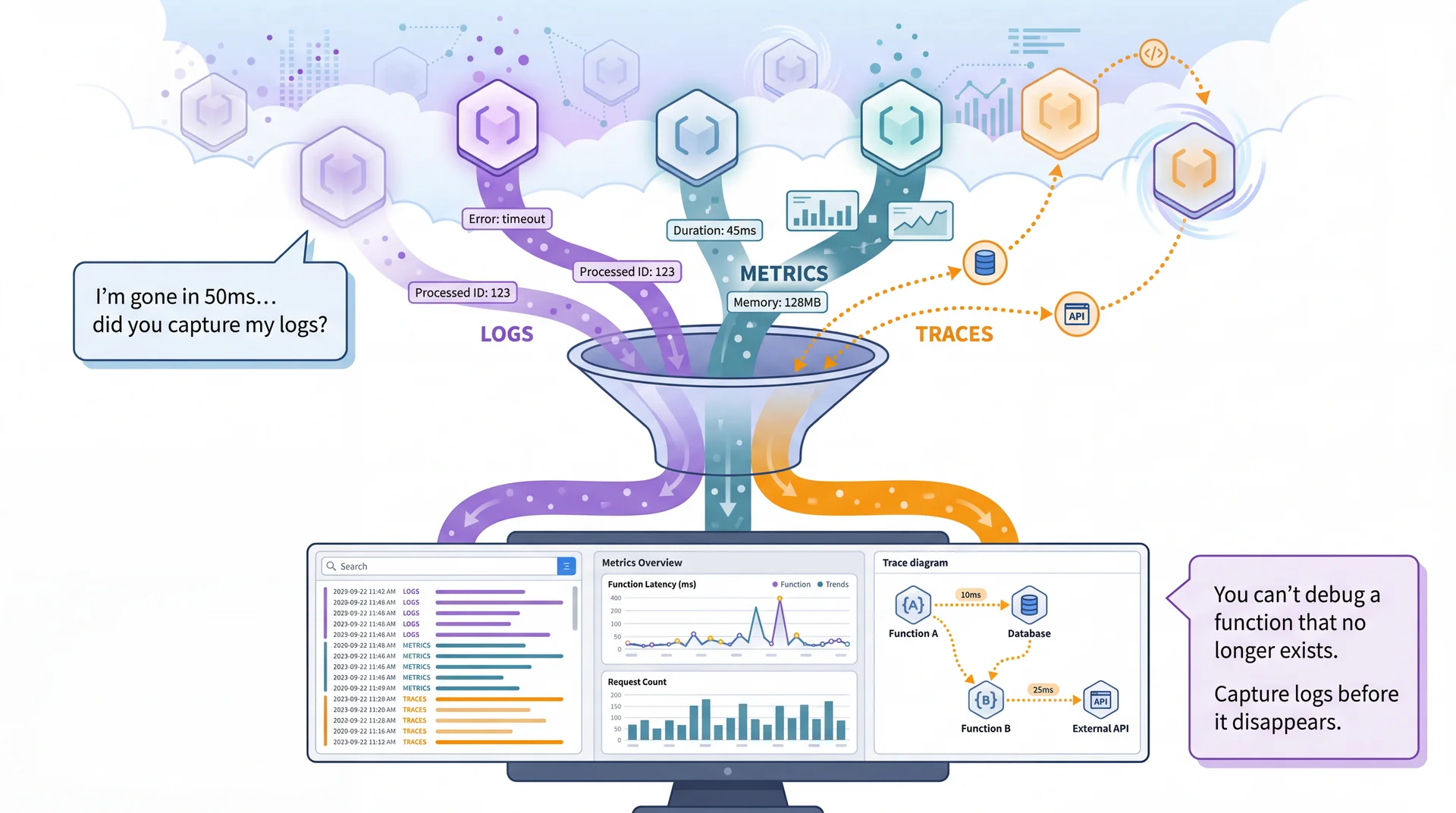
In a monolith, debugging is (relatively) straightforward: one log file, one stack trace. In serverless, a single user action might trigger multiple functions across different machines that may not even exist anymore.
Serverless functions are ephemeral — they spin up, execute, and disappear. You can't SSH in and look around. You must invest in observability, or debugging becomes impossible.
You've used SLF4J — a facade that lets you write logger.info() without knowing where logs go. Serverless platforms tag every log line with a Request ID. This seems minor until you see the alternative.
Without Request IDs: Interleaved chaos
[INFO] Processing submission for alice
[INFO] Processing submission for bob
[INFO] Running tests...
[INFO] Processing submission for carol
[ERROR] Test failed: NullPointerException
[INFO] Running tests...
[INFO] Completed in 847ms
[INFO] Running tests...
[ERROR] Timeout after 30s
[INFO] Completed in 234ms
Which error belongs to which student? Good luck.
With Request IDs: Filter by one request
Filter: RequestId = "3f1e..."

START RequestId: 3f1e...
[INFO] 3f1e Processing submission for bob
[INFO] 3f1e Running tests...
[ERROR] 3f1e Test failed: NullPointerException
END RequestId: 3f1e...
REPORT Duration: 892ms Status: 500
One student's entire request, start to finish.
Key insight: When 100 students submit at once, you get 100 concurrent function instances writing to the same log stream. The Request ID is how you untangle them. The platform adds it automatically — you just filter by it when debugging.
Beyond filtering: Error collection services (Sentry, Datadog) also provide alerting (Slack when errors spike), error grouping (100 identical stack traces → 1 issue), dashboards (error rate over time), and distributed tracing (follow a request across multiple services).
"Serverless" is a bit of a misnomer — there are still servers, you just don't manage them. The key insight is organizational: serverless is technical partitioning with a vendor.
Remember L19: Technical vs. Domain Partitioning?
Technical: Organize by role (controllers, services, repositories)
Domain: Organize by business capability (users, grading, submissions)
Serverless takes technical partitioning to the organizational level: a cloud vendor operates infrastructure as a service.
Specialization Through Outsourcing
The vendor specializes in infrastructure — container orchestration, auto-scaling, security patching.
You specialize in your domain — courses, assignments, grading.
Each side focuses on what they do best.
You gain operational simplicity and elasticity. You lose control: vendor abstractions constrain how you build, pricing determines costs at scale, and switching vendors means rewriting infrastructure code.
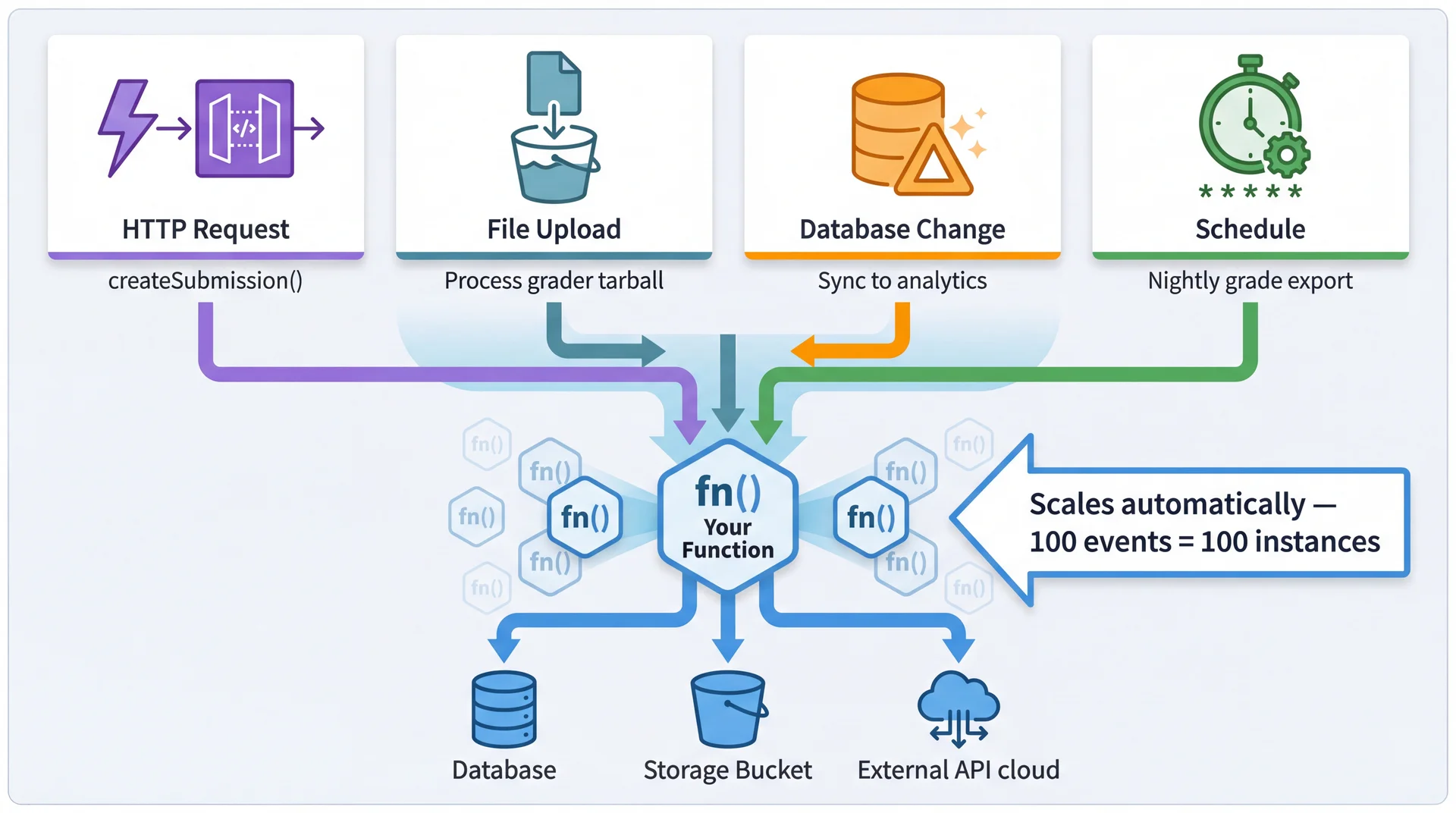
Serverless functions are triggered by events — not just HTTP requests. This enables reactive architectures where functions respond to changes in the system.
AWS Lambda provides a Java library that defines how your code interacts with the platform. The key abstraction is the RequestHandler interface — a generic interface you implement.
// From the AWS Lambda Java SDK (aws-lambda-java-core) publicinterfaceRequestHandler<I,O>{ OhandleRequest(I input,Context context); }
Instead of deploying an application that runs continuously, you deploy functions that execute in response to events. Focus on the principles, not the syntax:
publicclassCreateSubmissionHandler implementsRequestHandler<APIGatewayProxyRequestEvent,APIGatewayProxyResponseEvent>{ publicAPIGatewayProxyResponseEventhandleRequest( APIGatewayProxyRequestEvent request,Context context){ // Create clients for this request (platform provides connection details via environment) var db =newPostgresClient(System.getenv("DATABASE_URL")); var storage =newS3Client(System.getenv("BUCKET_NAME")); SubmissionRequest body =parseJson(request.getBody());// Parse input OIDCClaims claims =verifyGitHubOIDC(request.getHeaders().get("Authorization"));// Verify Submission sub = db.insertSubmission(body.assignmentId(), claims.repo());// Do the work returnnewAPIGatewayProxyResponseEvent() .withStatusCode(200) .withBody(toJson(newSubmissionResponse(sub.id(), storage.getUrl(...)))); } }
① Event-Driven
Platform calls you when event arrives. No main(), no server.
② Stateless
No state persists between calls. Create what you need fresh.
③ Input → Output
Request in, response out. Pure transformation.
Remember our warm-up? With a traditional server, YOU manage the infrastructure. Let's summarize what that ImageResizeServer requires:
Your code responsibilities:
main() method to start the server
Port binding and configuration
Health check endpoints for load balancers
Graceful shutdown handling
Multipart form parsing
Error handling and logging
Infrastructure responsibilities:
Server runs 24/7 (even at 3 AM with zero requests)
YOU restart it when it crashes
YOU scale horizontally (more instances)
YOU configure load balancing
YOU handle SSL certificates
YOU pay for idle time
The 15 lines of image resize logic are buried under all this operational work. What if you could just write the resize function and let someone else handle the rest?
Same image resize, but with Lambda. No main(), no health checks, no shutdown hooks. Just implement the handler — AWS runs it when a file arrives.
// Triggered automatically when a file is uploaded to the "uploads" S3 bucket publicclassImageResizeHandlerimplementsRequestHandler<S3Event,String>{ // Optimization: reuse across "warm" invocations (see note below) privatefinalS3Client s3 =S3Client.create(); @Override publicStringhandleRequest(S3Event event,Context context){ // S3 tells us which file was uploaded var record = event.getRecords().get(0).getS3(); String bucket = record.getBucket().getName(); String key = record.getObject().getKey();// e.g., "uploads/profile-123.jpg" // Download the original image byte[] original = s3.getObjectAsBytes(r -> r.bucket(bucket).key(key)).asByteArray(); // Resize it (using any image library) byte[] thumbnail =ImageUtils.resize(original,200,200); // Save the thumbnail to a different location String thumbKey = key.replace("uploads/","thumbnails/"); s3.putObject(r -> r.bucket(bucket).key(thumbKey),RequestBody.fromBytes(thumbnail)); return"Resized: "+ key +" → "+ thumbKey; } }
What you didn't write: No polling loop checking for new files. No server listening. No scaling config. Upload 1000 images? 1000 functions run in parallel.
Serverless architecture has interesting sustainability implications that cut both ways.
Potential Energy Savings
No idle power: Monolith runs 24/7 even at 3 AM. Serverless consumes energy only when executing.
Shared infrastructure: Cloud providers achieve high utilization across thousands of customers. 80% utilization > 10%.
Right-sized execution: Functions get exactly the resources needed (modulo startup overhead).
Potential Energy Costs
Cold start overhead: Spinning up new containers has energy costs warm monoliths avoid.
Per-request overhead: Each invocation goes through routing, logging, billing infrastructure.
Distributed chattiness: Many small functions calling each other = network energy costs.
The architectural lesson: batch operations when possible. Pawtograder's submitFeedback() sends all test results in one call, not 100 separate calls. This saves latency, cost, AND energy.
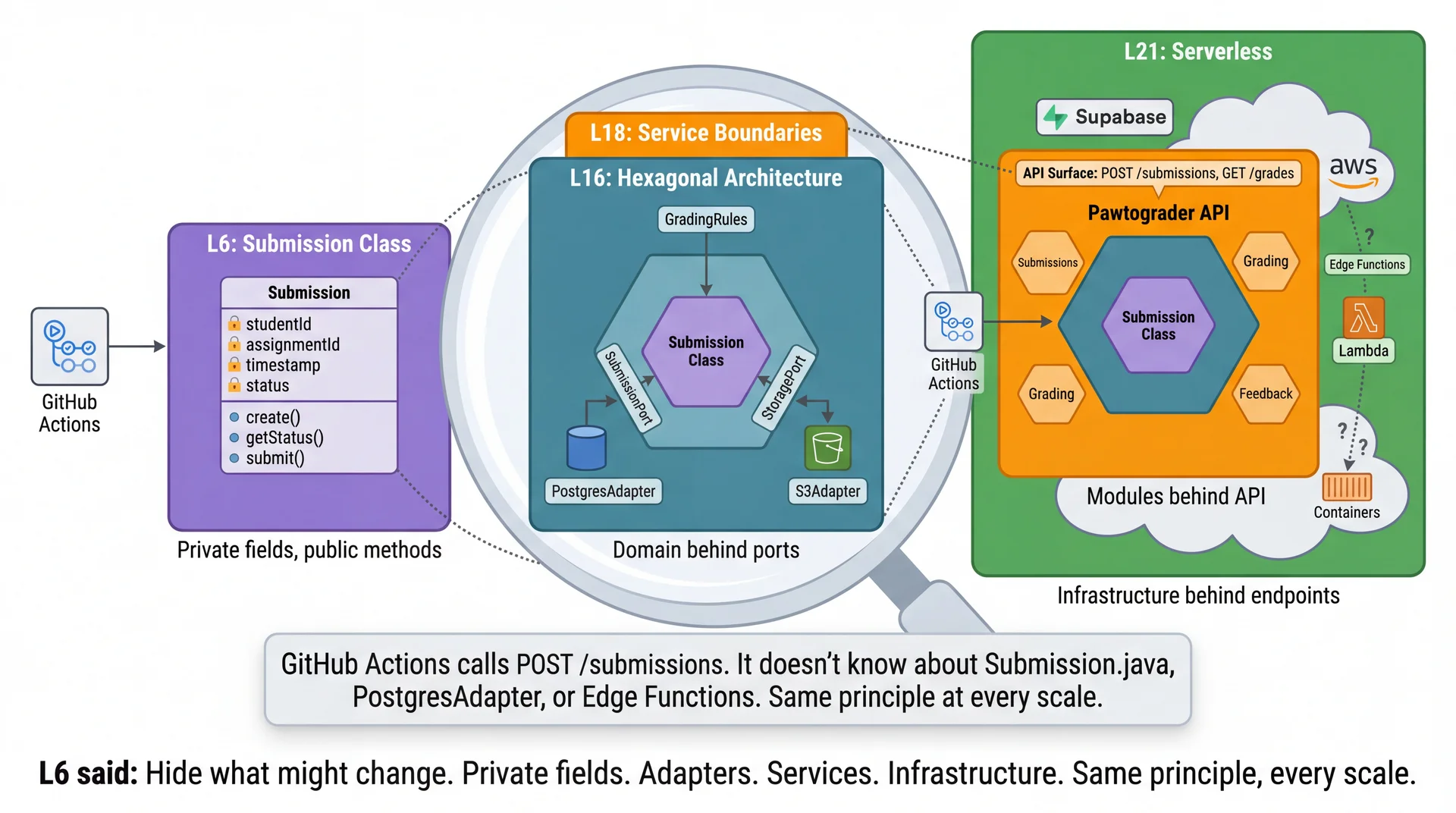
GitHub Actions calls POST /submissions and POST /feedback. It doesn't know — or care — whether these are Edge Functions, Lambda, or a traditional server. That's information hiding at the architectural level.
Architectural styles emerge from quality attribute requirements. Monolith-first is usually right.
L20
What changes over networks?
The eight fallacies. Every network call can fail, be slow, or be intercepted.
L21
What if someone else manages infra?
Serverless = technical partitioning with a vendor. Same principles, different operational model.
The thread connecting all three:
Same design principles at every scale:
Information hiding (L6)
Coupling and cohesion (L7)
Hexagonal architecture (L16)
Quality attribute tradeoffs (L19)
The practical takeaway:
No single architecture is right for everything. Pawtograder's hybrid approach demonstrates this — serverless API, managed compute for grading, PostgreSQL for domain logic.
In L18, we mentioned Christopher Alexander — the architect whose work inspired software design patterns.
Alexander's insight:
The most livable, enduring structures emerge through gradual, adaptive growth — not grand master plans.
You don't design the perfect building. You create the conditions for one to emerge.
The same is true for software:
Start with good boundaries (L18)
Let styles emerge from understanding (L19)
Respect what networks add (L20)
Choose vendors consciously (L21)
Then let the system grow within those constraints.
Alexander called this ineffable quality that makes spaces feel alive the "Quality Without a Name." You can't define it precisely — but you know it when you see it. Well-designed software has it too.
We've been implicitly assuming a single developer making all decisions. Real software is built by teams — and team structure has a big impact on how software gets built.
L22: Teams and Collaboration
How teams organize, communicate, coordinate
Why org structure shapes system structure
Architectural boundaries often become team boundaries
Strategies for effective collaboration
The connection:
Today we saw serverless as outsourcing infrastructure to a specialist vendor — your team focuses on domain logic, they focus on infra.
That's an organizational decision as much as a technical one.